This is the full developer documentation for Pubky Documentation
#
> Key-based, self-regulating web that puts users in control.
# Build for User Sovereignty
Open protocol for key-based, censorship-resistant apps
[ GitHub ](https://github.com/pubky/pubky-core)[ Human Docs ](/overview/)[ AI Kit](https://github.com/pubky/pubky-ai-kit/blob/main/pubky-dev-context.md)
Open with:
[](https://claude.ai/new?q=Pubky%3A%20open%20protocol%20for%20key-based%2C%20censorship-resistant%20web%20apps.%20Public%20key%20identity%2C%20homeserver%20storage%2C%20Mainline%20DHT%20discovery%20over%20HTTP%2FREST.%0A%0AFetch%20the%20docs%20and%20help%20me%20build%20with%20Pubky%3A%0A-%20Full%20\(~110k%20tokens\)%3A%20https%3A%2F%2Fpubky.org%2Fllms-full.txt%0A-%20Compact%20\(~6k%20tokens\)%3A%20https%3A%2F%2Fpubky.org%2Fllms-small.txt)[](https://chat.openai.com/?q=Pubky%3A%20open%20protocol%20for%20key-based%2C%20censorship-resistant%20web%20apps.%20Public%20key%20identity%2C%20homeserver%20storage%2C%20Mainline%20DHT%20discovery%20over%20HTTP%2FREST.%0A%0AFetch%20the%20docs%20and%20help%20me%20build%20with%20Pubky%3A%0A-%20Full%20\(~110k%20tokens\)%3A%20https%3A%2F%2Fpubky.org%2Fllms-full.txt%0A-%20Compact%20\(~6k%20tokens\)%3A%20https%3A%2F%2Fpubky.org%2Fllms-small.txt)[](https://cursor.com/link/prompt?text=Pubky%3A%20open%20protocol%20for%20key-based%2C%20censorship-resistant%20web%20apps.%20Public%20key%20identity%2C%20homeserver%20storage%2C%20Mainline%20DHT%20discovery%20over%20HTTP%2FREST.%0A%0AFetch%20the%20docs%20and%20help%20me%20build%20with%20Pubky%3A%0A-%20Full%20\(~110k%20tokens\)%3A%20https%3A%2F%2Fpubky.org%2Fllms-full.txt%0A-%20Compact%20\(~6k%20tokens\)%3A%20https%3A%2F%2Fpubky.org%2Fllms-small.txt)[](https://gemini.google.com/)[](https://x.com/i/grok?text=Pubky%3A%20open%20protocol%20for%20key-based%2C%20censorship-resistant%20web%20apps.%20Public%20key%20identity%2C%20homeserver%20storage%2C%20Mainline%20DHT%20discovery%20over%20HTTP%2FREST.%0A%0AFetch%20the%20docs%20and%20help%20me%20build%20with%20Pubky%3A%0A-%20Full%20\(~110k%20tokens\)%3A%20https%3A%2F%2Fpubky.org%2Fllms-full.txt%0A-%20Compact%20\(~6k%20tokens\)%3A%20https%3A%2F%2Fpubky.org%2Fllms-small.txt)Prompt 
npm RN Rust
$ npm install @synonymdev/pubky
$ npm install @synonymdev/react-native-pubky
$ cargo add pubky
## [Quick Start](#quick-start)
[](/tldr/)
### [TL;DR](/tldr/)
[30-second overview of the entire ecosystem](/tldr/)
[](/tldr/)
[](/getting-started/)
### [Getting Started](/getting-started/)
[Complete guide for users and developers](/getting-started/)
[](/getting-started/)
[](/glossary/)
### [Glossary](/glossary/)
[Quick reference for key terms](/glossary/)
[](/glossary/)
[](/faq/)
### [FAQ](/faq/)
[63+ questions answered across key topics and features](/faq/)
[](/faq/)
## [For Users](#for-users)
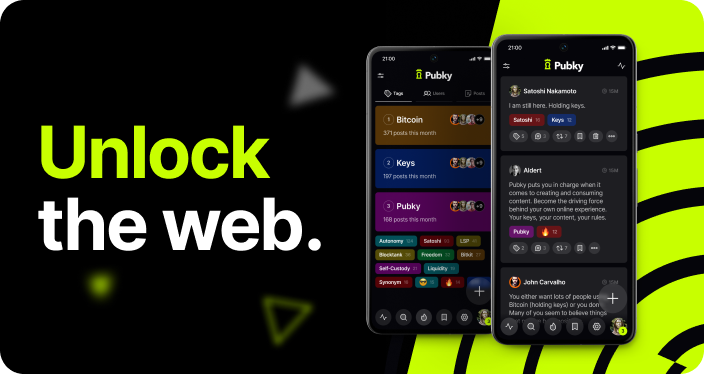
###  Pubky
[Join pubky.app](https://pubky.app)

###  Pubky Ring
[Website ](https://pubkyring.app/)[Learn More](/explore/technologies/pubky-ring/)
### Pubky Explorer
[Explore ](https://explorer.pubky.app)[Learn More](/explore/technologies/pubky-explorer/)
## [For Developers](#for-developers)

###  Pubky Core
[SDK](/explore/pubkycore/sdk/)[API](/explore/pubkycore/api/)[Homeserver](/explore/pubkycore/homeserver/)

### Developer Tools
[Docker Stack](/explore/technologies/pubky-docker/)[CLI](/explore/technologies/pubky-cli/)[Explorer](/explore/technologies/pubky-explorer/)[PKDNS](/explore/technologies/pkdns/)

### Pubky Apps
[Architecture](/explore/pubky-apps/app-architectures/introduction/)[Indexing](/explore/pubky-apps/indexing-and-aggregation/introduction/)[Reference App](/explore/pubky-apps/reference-app/introduction/)
## [Key Concepts](#key-concepts)
[](/explore/technologies/pkdns/)
### [PKDNS](/explore/technologies/pkdns/)
[Decentralized, censorship-resistant DNS for public-key domains.](/explore/technologies/pkdns/)
[](/explore/technologies/pkdns/)
[](/explore/concepts/censorship/)
### [Censorship Resistance](/explore/concepts/censorship/)
[Why centralized platforms fail and how Pubky solves it.](/explore/concepts/censorship/)
[](/explore/concepts/censorship/)
[](/explore/concepts/credible-exit/)
### [Credible Exit](/explore/concepts/credible-exit/)
[Freedom to switch providers without losing data.](/explore/concepts/credible-exit/)
[](/explore/concepts/credible-exit/)
[](/explore/concepts/semantic-social-graph/)
### [Semantic Social Graph](/explore/concepts/semantic-social-graph/)
[Tagged relationships and user-controlled filtering.](/explore/concepts/semantic-social-graph/)
[](/explore/concepts/semantic-social-graph/)
## [Demos](#demos)
Try some proof of concepts built on Pubky Core. What will you create?
### mypubky
A shareable identity card that brings your Pubky identifier, avatar, bio, links, posts, profile tags, and Paykit-powered donation options into one visual page.
[Live Demo ](https://mypubky.com/)[Read More](https://github.com/pubky/mypubky)
### Payky
A linktree like page for payments, based on Paykit, where the user can connect using Pubky Ring and add their payment details (crypto, fiat etc.) and share a link to the page with anyone.
[Live Demo](https://payky.app/)
### ABC
Drop-In Pubky Comment Widget for Blogs Simple embeddable script that lets any website add Pubky-based comments.
[Live Demo ](https://ok300.github.io/abc-prague-hugo/posts/abc-launch/)[Read More](https://github.com/aintnostressin/abc-team-hackathon-prague)
### Mapky
A social layer for OpenStreetMap with place reviews, posts, routes, collections, and geo-captures stored as user-owned data.
[Live Demo ](https://mapky.app/)[Read More](https://github.com/gillohner/mapky-app)
### Passport
Pubky Passport uses Google login to create or access an encrypted Pubky key in Google Drive, where neither Google nor the Pubky Passport server can decrypt it alone.
[Live Demo ](https://passport.buhlerlabs.com)[Read More](https://github.com/SeverinAlexB/pubky-passport-prague26)
### Explorer
A file explorer that allows you to navigate data stored on your Homeserver.
[Live Demo ](https://explorer.pubky.app/)[Read More](https://github.com/pubky/pubky-explorer)
### Eventky
A social calendar and event management app using existing calendar standards, with event data stored on each user’s homeserver.
[Live Demo ](https://eventky.app/)[Read More](https://github.com/gillohner/eventky)
### PKDNS
A DNS server providing self-sovereign and censorship-resistant domain names based on PKARR.
[Live Demo ](https://pkdns.net/)[Read More](https://github.com/pubky/pkdns)
### PubkyLab
An interactive web-based playground for testing and experimenting with the Pubky SDK.
[Live Demo ](https://jvsena42.github.io/pubky-lab/)[Read More](https://github.com/jvsena42/pubky-lab)
### No Registry
Self-host PKDNS in under 10 minutes with a simple Pi-hole or Docker setup.
[Read More](https://www.noregistry.com/)
### Echo
A modern mobile flashcard app where your decks live on your homeserver and sync across devices.
[Read More](https://github.com/jvsena42/echo)
## [Join our Community](#community)
* [Join Pubky.app Try the decentralized social media app. ](https://pubky.app)
* [Telegram Join the community chat. ](https://t.me/pubkycore)
* [GitHub Source code and repositories. ](https://github.com/pubky)
* [Contributing How to contribute to Pubky. ](/contributing/)
[ ](https://synonym.to)[](https://tether.io)
# Pubky Architecture Overview
This page provides a comprehensive overview of the Pubky ecosystem architecture, showing how all components work together to enable decentralized, censorship-resistant applications.
***
## System Architecture
[Section titled “System Architecture”](#system-architecture)
***
## Layer Breakdown
[Section titled “Layer Breakdown”](#layer-breakdown)
### Identity Layer
[Section titled “Identity Layer”](#identity-layer)
The foundation of Pubky is cryptographic identity based on **[key pairs](/explore/technologies/key-pair/)**.
**Components:**
* **[Pubky Ring](/explore/technologies/pubky-ring/)**: Mobile app for secure key management
* **Key Pairs**: Ed25519 public/private key pairs
* **Recovery Files**: Encrypted backups for key recovery
**How It Works:**
1. User generates a key pair (public + private key)
2. Public key becomes permanent identity (z-base-32 encoded)
3. Private key stays secure on device, used for signing
4. Recovery file enables backup and cross-device usage
**Key Properties:**
* ✅ Self-sovereign (no registration with authorities)
* ✅ Portable across devices
* ✅ Permanent (never changes)
* ✅ Cryptographically secure
***
### Discovery Layer
[Section titled “Discovery Layer”](#discovery-layer)
The discovery layer enables finding Homeservers and resolving identities without central servers.
**Components:**
* **[PKARR](/explore/pubkycore/pkarr/introduction/)**: Public Key Addressable Resource Records
* **[Mainline DHT](/explore/technologies/mainline-dht/)**: Distributed Hash Table (10M+ nodes)
* **[PKDNS](/explore/technologies/pkdns/)**: DNS servers for resolving public-key domains
**How It Works:**
**Key Features:**
* Decentralized discovery (no central directory)
* Censorship resistant (15+ years proven infrastructure)
* Self-published (users control their records)
* Updateable (switch Homeservers anytime)
***
### Storage Layer
[Section titled “Storage Layer”](#storage-layer)
**[Homeservers](/explore/pubkycore/homeserver/)** store user data in a filesystem over a simple HTTP API, similar to WebDAV.
**Architecture:**
**Key Properties:**
* **User Choice**: Pick any Homeserver or run your own
* **Data Ownership**: You control your data
* **Portability**: Switch Homeservers without losing data
* **Storage layout**: Files for user data; PostgreSQL for the homeserver’s internal metadata (users, quotas, events — not exposed through the API)
**API Operations:**
* `PUT /pub/app/path` - Store data
* `GET /pub/app/path` - Retrieve data
* `DELETE /pub/app/path` - Delete data
* `LIST /pub/app/` - List directory
***
### Application Layer
[Section titled “Application Layer”](#application-layer)
Applications consume data from Homeservers, either directly or through aggregation services.
**Architecture Patterns:**
#### 1. Simple Client-Homeserver
[Section titled “1. Simple Client-Homeserver”](#1-simple-client-homeserver)
**Use Case**: Personal apps, simple tools, direct data access
#### 2. Global Aggregator
[Section titled “2. Global Aggregator”](#2-global-aggregator)
**Use Case**: Social feeds, search, discovery (e.g., [Pubky Nexus](/explore/pubky-apps/indexing-and-aggregation/pubky-nexus/))
#### 3. Custom Backend
[Section titled “3. Custom Backend”](#3-custom-backend)
**Use Case**: Advanced features, recommendations, specialized processing
***
## Data Flow Example: Publishing a Post
[Section titled “Data Flow Example: Publishing a Post”](#data-flow-example-publishing-a-post)
***
## Component Responsibilities
[Section titled “Component Responsibilities”](#component-responsibilities)
### Pubky Core
[Section titled “Pubky Core”](#pubky-core)
**[Pubky Core](/explore/pubkycore/introduction/)** provides:
* Protocol specification
* Homeserver implementation
* SDK for all platforms
* Authentication system
* API standards
**Repository**: [github.com/pubky/pubky-core](https://github.com/pubky/pubky-core)
### Pubky Ring
[Section titled “Pubky Ring”](#pubky-ring)
**[Pubky Ring](/explore/technologies/pubky-ring/)** handles:
* Key generation and storage
* App authorization
* Session management
* Recovery file creation
**Platforms**: iOS, Android (React Native)
### Pubky Nexus
[Section titled “Pubky Nexus”](#pubky-nexus)
**[Pubky Nexus](/explore/pubky-apps/indexing-and-aggregation/pubky-nexus/)** provides:
* Real-time aggregation
* Social graph indexing
* Search and discovery
* High-performance API
### PKDNS
[Section titled “PKDNS”](#pkdns)
**[PKDNS](/explore/technologies/pkdns/)** enables:
* Public-key domain resolution
* DNS-over-HTTPS support
* Traditional ICANN domain support
* Self-hosted or public instances
**Repository**: [github.com/pubky/pkdns](https://github.com/pubky/pkdns)
### Homegate
[Section titled “Homegate”](#homegate)
**[Homegate](/explore/technologies/homegate/)** provides:
* SMS verification
* Lightning payment verification
* Spam prevention
* Privacy-preserving signup
**Repository**: [github.com/pubky/homegate](https://github.com/pubky/homegate)
***
## Infrastructure Tools
[Section titled “Infrastructure Tools”](#infrastructure-tools)
### Development Tools
[Section titled “Development Tools”](#development-tools)
* **[Pubky Docker](/explore/technologies/pubky-docker/)**: Full stack in one command
* **[Pubky CLI](/explore/technologies/pubky-cli/)**: Command-line Homeserver management
* **[Pubky Explorer](/explore/technologies/pubky-explorer/)**: Web-based data browser
### Work in Progress
[Section titled “Work in Progress”](#work-in-progress)
* **[Paykit](/explore/technologies/paykit/)**: Payment protocol
* **[Pubky Noise](/explore/technologies/pubky-noise/)**: Encrypted communication
***
## Security Model
[Section titled “Security Model”](#security-model)
### Authentication
[Section titled “Authentication”](#authentication)
See [Authentication](/explore/pubkycore/authentication/) for the full authentication flow.
### Data Integrity
[Section titled “Data Integrity”](#data-integrity)
**All data operations are signed:**
1. Client creates data
2. Client signs hash with private key
3. Homeserver verifies signature
4. Data stored with signature
5. Anyone can verify authenticity
### Trust Model
[Section titled “Trust Model”](#trust-model)
**What you trust:**
* ✅ Mathematics (cryptography)
* ✅ Your own keys
* ⚠️ Your Homeserver for availability (not integrity)
**What you DON’T trust:**
* ❌ Central authorities
* ❌ DNS registrars
* ❌ Server operators to verify data (math does it)
***
## Scalability Characteristics
[Section titled “Scalability Characteristics”](#scalability-characteristics)
### Horizontal Scaling
[Section titled “Horizontal Scaling”](#horizontal-scaling)
| Component | Scaling Method |
| ---------------- | -------------------------------------------- |
| **Homeservers** | Add more servers, users distribute naturally |
| **PKDNS** | Run multiple instances, cache aggressively |
| **Nexus** | Shard by user/data type, read replicas |
| **Mainline DHT** | Already 10M+ nodes, proven at scale |
### Performance Metrics
[Section titled “Performance Metrics”](#performance-metrics)
**Typical Latencies:**
* PKARR lookup (cached): < 100ms
* PKARR lookup (DHT): 500-2000ms
* Homeserver GET: 50-200ms
* Nexus API: 10-50ms (sub-millisecond for cached)
***
## Comparison to Other Architectures
[Section titled “Comparison to Other Architectures”](#comparison-to-other-architectures)
### vs Traditional Web (Client-Server)
[Section titled “vs Traditional Web (Client-Server)”](#vs-traditional-web-client-server)
| Aspect | Traditional | Pubky |
| ------------ | ----------------- | ----------------------- |
| Identity | Username\@service | Public key (permanent) |
| Data Storage | Company servers | User-chosen Homeservers |
| Portability | Locked-in | Full portability |
| Censorship | Easy | Very difficult |
### vs Blockchain
[Section titled “vs Blockchain”](#vs-blockchain)
| Aspect | Blockchain | Pubky |
| ----------- | ---------------- | ------------------------ |
| Fees | Transaction fees | None |
| Speed | Slow (blocks) | Instant (HTTP) |
| Storage | Expensive | Cheap (standard hosting) |
| Scalability | Limited | Web-scale |
### vs Pure P2P
[Section titled “vs Pure P2P”](#vs-pure-p2p)
| Aspect | Pure P2P | Pubky |
| --------------- | -------------- | --------------------- |
| Availability | Must be online | Homeservers always on |
| Mobile-Friendly | Difficult | Native support |
| Performance | Variable | Consistent |
| Discovery | Complex | DHT + PKDNS |
***
## Deployment Patterns
[Section titled “Deployment Patterns”](#deployment-patterns)
### Personal Use
[Section titled “Personal Use”](#personal-use)
```plaintext
User Device → Pubky Ring → Personal Homeserver
```
**Best for**: Personal data, backups, full control
### Small Team
[Section titled “Small Team”](#small-team)
```plaintext
Team Members → Shared Homeserver → Team Apps
```
**Best for**: Collaborative projects, startups
### Social Application
[Section titled “Social Application”](#social-application)
```plaintext
Users → Public Homeservers → Nexus Aggregator → Social App
```
**Best for**: Social media, discovery platforms
### Enterprise
[Section titled “Enterprise”](#enterprise)
```plaintext
Users → Enterprise Homeserver + Custom Aggregator + Private Nexus → Internal Apps
```
**Best for**: Organizations with custom requirements
***
## See Also
[Section titled “See Also”](#see-also)
* **[Getting Started](/getting-started/)**: Get started with Pubky
* **[Pubky Core Overview](/explore/pubkycore/introduction/)**: Protocol details
* **[SDK Documentation](/explore/pubkycore/sdk/)**: Build applications
* **[API Reference](/explore/pubkycore/api/)**: HTTP API specification
* **[Comparisons](/comparisons/)**: How Pubky differs from alternatives
* **[FAQ](/faq/)**: Frequently asked questions
# How Pubky Compares to Other Protocols
Understanding how Pubky differs from other decentralized and federated protocols.
***
## Quick Comparison Table
[Section titled “Quick Comparison Table”](#quick-comparison-table)
| Feature | Pubky | Nostr | Bluesky | Farcaster | IPFS |
| ----------------------------- | ----------------------------- | ----------------------------- | --------------------------- | ------------------ | ------------------------ |
| **Identity Model** | Self-sovereign keys (Ed25519) | Self-sovereign keys (Schnorr) | DIDs + handles | Ethereum addresses | Content-addressed |
| **Storage** | Homeservers (HTTP) | Relays (WebSocket) | Personal Data Servers | Hubs (P2P) | IPFS nodes (DHT) |
| **Discovery** | Mainline DHT (10M+ nodes) | Relay lists | DID directory (centralized) | On-chain registry | IPFS DHT |
| **Data Mutability** | ✅ Yes | ✅ Yes | ✅ Yes | ✅ Yes | ❌ No (content-addressed) |
| **Censorship Resistance** | 🟢 High | 🟡 Medium | 🔴 Low | 🟡 Medium | 🟢 High |
| **Blockchain Requirement** | ❌ No | ❌ No | ❌ No | ✅ Yes (Optimism) | ❌ No |
| **Transaction Fees** | ❌ None | ❌ None | ❌ None | ✅ Gas fees | ❌ None |
| **Always-Online Requirement** | 🟡 Partial (Homeservers) | 🟡 Partial (relays) | ❌ No (PDSs) | 🟡 Partial (hubs) | ✅ Yes (for hosting) |
| **Mobile-Friendly** | ✅ Yes | ✅ Yes | ✅ Yes | ✅ Yes | 🟡 Limited |
| **Data Portability** | ✅ Full | ✅ Full | 🟡 Partial | 🟡 Partial | ✅ Full |
| **Maturity** | 🚧 Beta | ✅ Production | ✅ Production | ✅ Production | ✅ Production |
Legend: ✅ Yes | ❌ No | 🟡 Partial | 🟢 High | 🔴 Low | 🚧 Work in Progress
***
## Detailed Comparisons
[Section titled “Detailed Comparisons”](#detailed-comparisons)
### Pubky vs Nostr
[Section titled “Pubky vs Nostr”](#pubky-vs-nostr)
**What They Have in Common:**
* Self-sovereign cryptographic identity
* No blockchain or transaction fees
* Data portability through key ownership
* Open protocol and implementations
**Key Differences:**
| Aspect | Pubky | Nostr |
| ------------------------ | -------------------------------- | ------------------------------- |
| **Storage Model** | Homeservers (HTTP/HTTPS) | Relays (WebSocket) |
| **Discovery** | Mainline DHT (15+ years proven) | Relay lists (client-configured) |
| **Data Structure** | Key-value store (files) | Event stream (signed messages) |
| **Homeserver Discovery** | Automatic via PKARR → DHT | Manual relay configuration |
| **Always-Online** | Not required (Homeservers) | Relays must stay online |
| **Semantic Tagging** | Built-in (Semantic Social Graph) | Application-level |
| **API Protocol** | RESTful HTTP | WebSocket subscriptions |
| **Scalability** | Proven DHT infrastructure | Relay-dependent |
**When to Choose Pubky:**
* Need censorship-resistant discovery (DHT-based)
* Want familiar HTTP/REST APIs
* Building apps requiring mutable file storage
* Need semantic social graph features
**When to Choose Nostr:**
* Want real-time event streaming
* Prefer WebSocket-based architecture
* Ecosystem maturity matters (more clients/relays)
* Simpler relay model appeals to you
***
### Pubky vs Bluesky (AT Protocol)
[Section titled “Pubky vs Bluesky (AT Protocol)”](#pubky-vs-bluesky-at-protocol)
**What They Have in Common:**
* User data portability
* Federation-capable architecture
* Personal data servers
* Social media focus
**Key Differences:**
| Aspect | Pubky | Bluesky |
| -------------------------- | ---------------------------------- | ------------------------------ |
| **Identity** | Public keys (truly self-sovereign) | DIDs + DNS handles (hybrid) |
| **Discovery** | Mainline DHT (decentralized) | DID directory (centralized) |
| **Account Portability** | Automatic (update PKARR) | Requires DID transfer |
| **Handle System** | Optional vanity names | DNS-based handles required |
| **Infrastructure Control** | User chooses Homeserver | Bluesky PBC controls directory |
| **Censorship Resistance** | High (DHT-based) | Low (centralized components) |
| **Data Format** | Flexible key-value | Lexicon-based schemas |
| **Current State** | Beta | Production |
**Key Concern with Bluesky:**
* **Centralization**: DID directory (plc.directory) is controlled by Bluesky PBC
* **Single point of failure**: If the directory is compromised, identity resolution breaks
* **Governance**: Protocol changes controlled by one entity
**When to Choose Pubky:**
* True self-sovereignty is critical
* No dependence on centralized services
* Prefer proven DHT technology
* Building for censorship-resistant use cases
**When to Choose Bluesky:**
* Want production-ready ecosystem now
* Large existing user base matters
* Familiar with ActivityPub/federation
* DNS-based handles are important
***
### Pubky vs Farcaster
[Section titled “Pubky vs Farcaster”](#pubky-vs-farcaster)
**What They Have in Common:**
* Decentralized social protocol
* User-controlled data
* Multiple client support
**Key Differences:**
| Aspect | Pubky | Farcaster |
| ---------------- | --------------------- | ----------------------------- |
| **Identity** | Off-chain (key pairs) | On-chain (Ethereum addresses) |
| **Registration** | Free (generate keys) | Paid (on-chain transaction) |
| **Storage** | Homeservers (HTTP) | Hubs (P2P gossip) |
| **Fees** | None | Gas fees on Optimism |
| **Blockchain** | None | Optimism L2 required |
| **Scalability** | HTTP server scale | Hub network scale |
| **Discovery** | Mainline DHT | On-chain registry |
| **Complexity** | Simpler (no chain) | More complex (chain + hubs) |
**Trade-offs:**
**Pubky Advantages:**
* No blockchain dependency
* No transaction fees
* Simpler architecture
* Faster onboarding (instant key generation)
**Farcaster Advantages:**
* On-chain identity verification
* Ethereum ecosystem integration
* Stronger identity guarantees
* Production maturity
**When to Choose Pubky:**
* Want to avoid blockchain complexity
* No transaction fees requirement
* Prefer HTTP-based architecture
* Need fastest possible onboarding
**When to Choose Farcaster:**
* Ethereum integration is valuable
* On-chain verification important
* Already in crypto ecosystem
* Production maturity required
***
### Pubky vs IPFS
[Section titled “Pubky vs IPFS”](#pubky-vs-ipfs)
**What They Have in Common:**
* Decentralized data storage
* Content distribution
* No central authority
**Key Differences:**
| Aspect | Pubky | IPFS |
| -------------------- | ---------------------------- | ---------------------------------- |
| **Primary Focus** | Mutable identity + data | Immutable content distribution |
| **Addressing** | Identity-first (public keys) | Content-first (CIDs) |
| **Mutability** | Native (update anytime) | Requires IPNS or external pointers |
| **Use Case** | Applications with identity | Content delivery and archival |
| **Data Model** | Key-value (per user) | Merkle DAG (content) |
| **Discovery** | Mainline DHT (identity) | IPFS DHT (content) |
| **Always-Online** | No (Homeservers persist) | Yes (to host your content) |
| **Update Mechanism** | Direct (PUT/DELETE) | Republish with new CID |
**Complementary Technologies:** Pubky and IPFS can work together:
* Store large immutable content on IPFS
* Reference IPFS CIDs in Pubky Homeserver data
* Use Pubky for identity, IPFS for content delivery
**When to Choose Pubky:**
* Building identity-centric applications
* Need mutable user data
* Want simple HTTP APIs
* Social/collaboration apps
**When to Choose IPFS:**
* Content immutability is critical
* Building CDN or archival system
* Deduplication important
* Large file distribution
***
## Architecture Comparison
[Section titled “Architecture Comparison”](#architecture-comparison)
### Data Flow Comparison
[Section titled “Data Flow Comparison”](#data-flow-comparison)
**Pubky:**
```plaintext
User Key → PKARR (DHT) → Homeserver → HTTP API → Apps
```
**Nostr:**
```plaintext
User Key → Relay List → Relays (WebSocket) → Apps
```
**Bluesky:**
```plaintext
DID → Directory → PDS → Lexicon API → Apps
```
**Farcaster:**
```plaintext
Ethereum Address → On-chain Registry → Hubs (P2P) → Apps
```
### Trust Model Comparison
[Section titled “Trust Model Comparison”](#trust-model-comparison)
| Protocol | Trust Requirement |
| ------------- | ------------------------------------------------- |
| **Pubky** | Trust Homeserver for availability (not integrity) |
| **Nostr** | Trust relays for availability (not integrity) |
| **Bluesky** | Trust Bluesky PBC for DID directory |
| **Farcaster** | Trust Optimism L2 and hub operators |
| **IPFS** | Trust no one (content-addressed) |
***
## Migration Paths
[Section titled “Migration Paths”](#migration-paths)
### Moving to Pubky From…
[Section titled “Moving to Pubky From…”](#moving-to-pubky-from)
**From Nostr:**
* Export event history
* Convert to Pubky data format
* Publish to Homeserver
* Update discovery to PKARR
**From Bluesky:**
* Export PDS data
* Generate Pubky keys
* Migrate posts/profile
* Publish PKARR record
**From Centralized Platforms:**
* Export data (if available)
* Create Pubky identity
* Import and republish content
* Announce migration
***
## Ecosystem Maturity
[Section titled “Ecosystem Maturity”](#ecosystem-maturity)
| Protocol | Launch Year | Status | Notable Apps |
| ------------- | ----------- | ---------- | ----------------------- |
| **Pubky** | 2024 | Beta | Pubky App |
| **Nostr** | 2020 | Production | Damus, Amethyst, Primal |
| **Bluesky** | 2023 | Production | Bluesky Social |
| **Farcaster** | 2021 | Production | Warpcast |
| **IPFS** | 2015 | Production | Brave, Opera, many apps |
***
## Common Misconceptions
[Section titled “Common Misconceptions”](#common-misconceptions)
### ”Pubky is just another Nostr”
[Section titled “”Pubky is just another Nostr””](#pubky-is-just-another-nostr)
**False**: While both use keys for identity, Pubky uses HTTP Homeservers and Mainline DHT for discovery, not relays and manual configuration.
### ”Bluesky is decentralized like Pubky”
[Section titled “”Bluesky is decentralized like Pubky””](#bluesky-is-decentralized-like-pubky)
**Partial**: Bluesky has decentralized data servers but centralized identity (DID directory controlled by Bluesky PBC).
### ”Farcaster is more secure because it uses blockchain”
[Section titled “”Farcaster is more secure because it uses blockchain””](#farcaster-is-more-secure-because-it-uses-blockchain)
**Nuanced**: Blockchain provides different guarantees, not inherently more security. Pubky’s cryptographic signatures provide strong integrity without fees.
### ”IPFS can do everything Pubky does”
[Section titled “”IPFS can do everything Pubky does””](#ipfs-can-do-everything-pubky-does)
**False**: IPFS is content-addressed and immutable. Pubky is identity-addressed and mutable. Different use cases.
***
## Bottom Line: Choose Based on Your Needs
[Section titled “Bottom Line: Choose Based on Your Needs”](#bottom-line-choose-based-on-your-needs)
**Choose Pubky if:**
* ✅ Self-sovereignty without compromise is critical
* ✅ Censorship resistance is a top priority
* ✅ You want proven, scalable infrastructure (Mainline DHT)
* ✅ No blockchain dependency is important
* ✅ HTTP/REST APIs are preferred
* ✅ Building social/collaborative applications
* ✅ Fast-growing ecosystem
**Choose Nostr if:**
* ✅ Real-time event streaming is core to your app
* ✅ Existing ecosystem maturity matters now
* ✅ WebSocket-based architecture fits your needs
* ✅ Want maximum client/relay options today
**Choose Bluesky if:**
* ✅ Need production-ready ecosystem immediately
* ✅ Federation model familiar from Mastodon
* ✅ DNS-based handles are important
* ✅ Okay with some centralized components
**Choose Farcaster if:**
* ✅ Ethereum ecosystem integration valuable
* ✅ On-chain verification important
* ✅ Transaction fees acceptable
* ✅ Already in crypto ecosystem
**Choose IPFS if:**
* ✅ Content immutability is required
* ✅ Building CDN or archival system
* ✅ Content-addressed data model fits
* ✅ Deduplication is valuable
***
## See Also
[Section titled “See Also”](#see-also)
* **[Main Documentation](/)**: Complete Pubky knowledge base
* **[Getting Started](/getting-started/)**: Get started with Pubky
* **[FAQ](/faq/)**: Frequently asked questions
* **[Vision](/the-vision-of-pubky/)**: Why we’re building Pubky
* **[Pubky Core](/explore/pubkycore/introduction/)**: Technical overview
# Contributing to Pubky
Thank you for your interest in contributing to Pubky! This guide will help you get started.
AI-Assisted Contributions
We welcome contributions made with the help of AI tools, but you are fully responsible for what you submit. You must understand, review, and be able to explain every change in your PR. Unreviewed AI-generated submissions — bulk changes, hallucinated references, or PRs the author cannot explain — will be closed without review.
***
## Ways to Contribute
[Section titled “Ways to Contribute”](#ways-to-contribute)
### 1. Documentation
[Section titled “1. Documentation”](#1-documentation)
Help improve this knowledge base:
* Fix typos and errors
* Add missing information
* Improve clarity and explanations
* Add examples and tutorials
* Translate to other languages
### 2. Code Contributions
[Section titled “2. Code Contributions”](#2-code-contributions)
Contribute to Pubky projects:
* **[Pubky Core](/explore/pubkycore/introduction/)**: Protocol and Homeserver
* **[Pubky Ring](/explore/technologies/pubky-ring/)**: Mobile key manager
* **[Pubky App](/explore/pubky-apps/introduction/)**: Social application ([pubky.app](https://pubky.app))
* **[Pubky Nexus](/explore/pubky-apps/indexing-and-aggregation/pubky-nexus/)**: Indexing service
* **[Pubky CLI](/explore/technologies/pubky-cli/)**: Command-line tool
* **[PKDNS](/explore/technologies/pkdns/)**, **[Homegate](/explore/technologies/homegate/)**, **[Pubky Docker](/explore/technologies/pubky-docker/)**: Infrastructure tools
### 3. Community Support
[Section titled “3. Community Support”](#3-community-support)
Help others in the community:
* Answer questions on Telegram
* Help troubleshoot issues
* Share your projects and experiences
* Write blog posts and tutorials
### 4. Testing & Bug Reports
[Section titled “4. Testing & Bug Reports”](#4-testing--bug-reports)
Improve quality through:
* Testing beta features
* Reporting bugs with detailed reproduction steps
* Suggesting improvements
* Validating fixes
***
## Contributing to Documentation
[Section titled “Contributing to Documentation”](#contributing-to-documentation)
### Quick Edits
[Section titled “Quick Edits”](#quick-edits)
For small fixes (typos, links, formatting):
1. **Fork the repository**: [github.com/pubky/pubky-knowledge-base](https://github.com/pubky/pubky-knowledge-base)
2. **Make your changes**: Edit markdown files in `src/content/docs/`
3. **Submit a pull request**: Include a clear description
### Larger Contributions
[Section titled “Larger Contributions”](#larger-contributions)
For new pages or significant changes:
1. **Discuss first**: Open an issue to discuss your plans
2. **Follow the structure**: Match existing page organization under `src/content/docs/`
3. **Use standard markdown links**: `[Link text](/path/to/page/)` for internal links, `[text](url)` for external
4. **Register in sidebar**: If adding a new top-level page, add it to the `sidebar` array in `astro.config.mjs`
5. **Test locally**: Build with Starlight to verify
**Build locally:**
```bash
git clone https://github.com/pubky/pubky-knowledge-base
cd pubky-knowledge-base
npm install
npm run dev
# Visit http://localhost:4321
```
### Documentation Style Guide
[Section titled “Documentation Style Guide”](#documentation-style-guide)
**Markdown Conventions:**
* Each page needs a frontmatter block with at least a `title` field
* Use `## Section` for major sections (H2)
* Use `### Subsection` for subsections (H3)
* Use standard markdown links for both internal and external references
**Code Blocks:**
```javascript
// Always specify language
const example = "like this";
```
**Linking:**
```markdown
[Pubky Core](/explore/pubkycore/introduction/)
[Official Docs](https://docs.pubky.org/)
```
**Admonitions:**
```markdown
:::note
Informational callout.
:::
:::tip
Helpful suggestion.
:::
:::caution
Important warning.
:::
```
**Images:**
```markdown
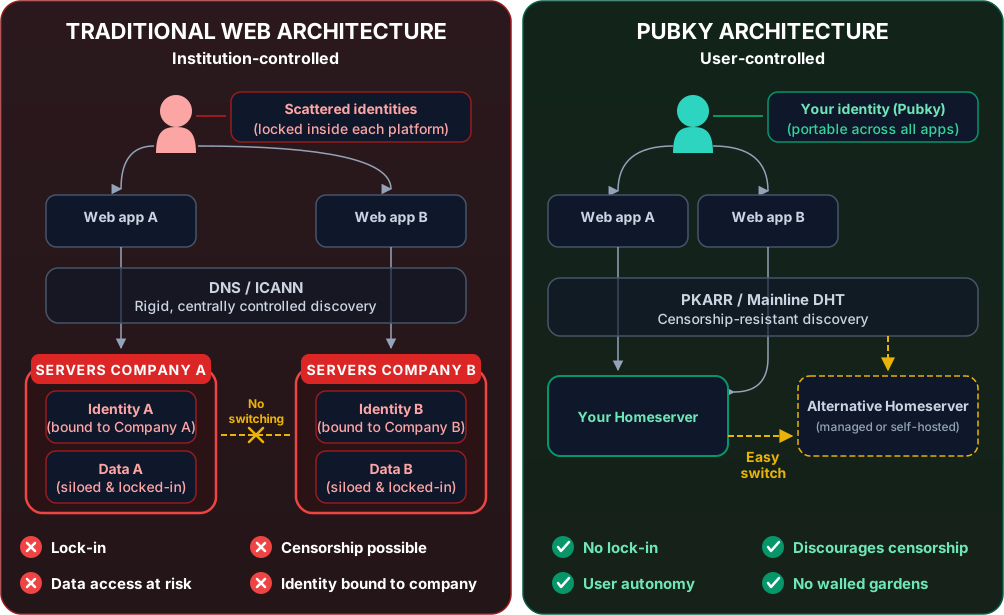
```
***
## Contributing Code
[Section titled “Contributing Code”](#contributing-code)
### General Process
[Section titled “General Process”](#general-process)
1. **Check existing issues**: See if someone is already working on it
2. **Open an issue**: Describe what you want to build/fix
3. **Fork and branch**: Create a feature branch
4. **Write code**: Follow project conventions
5. **Test thoroughly**: Ensure tests pass
6. **Submit PR**: Include description and link to issue
### Code Quality Standards
[Section titled “Code Quality Standards”](#code-quality-standards)
**All code contributions should:**
* ✅ Pass existing tests
* ✅ Add tests for new features
* ✅ Follow language-specific style guides
* ✅ Include documentation/comments where needed
* ✅ Not introduce new linter warnings
* ✅ Be accompanied by a clear commit message
**Commit Message Format:**
```plaintext
type: brief description (max 72 chars)
Longer explanation if needed. Wrap at 72 characters.
Fixes #123
```
**Types:**
* `feat`: New feature
* `fix`: Bug fix
* `docs`: Documentation only
* `style`: Code style (formatting, no logic change)
* `refactor`: Code restructuring
* `test`: Adding or updating tests
* `chore`: Maintenance tasks
**Example:**
```plaintext
feat: add HTTPS record support to PKDNS
Implements HTTPS DNS record type handling in the PKDNS resolver,
enabling service binding records for modern applications.
Fixes #456
```
***
## Development Setup
[Section titled “Development Setup”](#development-setup)
### Pubky Core (Rust)
[Section titled “Pubky Core (Rust)”](#pubky-core-rust)
```bash
# Clone
git clone https://github.com/pubky/pubky-core
cd pubky-core
# Build
cargo build
# Run tests
cargo test
# Run standalone homeserver locally (requires PostgreSQL and database_url in config)
cargo run --bin pubky-homeserver
# Format code
cargo fmt
# Lint
cargo clippy
```
For local `pubky-testnet` setup, including Docker-managed or external PostgreSQL, follow the [Pubky Testnet README](https://github.com/pubky/pubky-core/blob/main/pubky-testnet/README.md).
**Requirements:**
* Rust 1.89+
### Pubky Ring (React Native)
[Section titled “Pubky Ring (React Native)”](#pubky-ring-react-native)
```bash
# Clone
git clone https://github.com/pubky/pubky-ring
cd pubky-ring
# Install dependencies
yarn install
cd ios && pod install && cd ..
# Run on iOS
yarn ios
# Run on Android
yarn android
# Run tests
yarn test
# Lint
yarn lint
```
**Requirements:**
* Node.js >= 22.11.0
* Yarn 1.x
* React Native environment (Xcode for iOS, Android Studio for Android)
### Pubky Nexus (Rust)
[Section titled “Pubky Nexus (Rust)”](#pubky-nexus-rust)
```bash
# Clone
git clone https://github.com/pubky/pubky-nexus
cd pubky-nexus
# Start dependencies (Neo4j, Redis, PostgreSQL)
cd docker && cp .env-sample .env && docker compose up -d && cd ..
# Build
cargo build
# Run all services
cargo run -p nexusd
# Run API only
cargo run -p nexusd -- api
# Run watcher only
cargo run -p nexusd -- watcher
# Run migrations
cargo run -p nexusd -- db migration run
# Load test data and run tests (requires cargo-nextest)
cargo run -p nexusd -- db mock
cargo nextest run -p nexus-common --no-fail-fast
cargo nextest run -p nexus-webapi --no-fail-fast
cargo nextest run -p nexus-watcher --no-fail-fast
```
**Requirements:**
* Rust
* Docker for databases
* cargo-nextest (`cargo install cargo-nextest`)
### Pubky CLI (Rust)
[Section titled “Pubky CLI (Rust)”](#pubky-cli-rust)
```bash
# Clone
git clone https://github.com/pubky/pubky-cli
cd pubky-cli
# Build
cargo build
# Install locally
cargo install --path .
# Run tests
cargo test
# Generate completions
pubky-cli tools completions bash > completions.bash
```
***
## Community Guidelines
[Section titled “Community Guidelines”](#community-guidelines)
### Code of Conduct
[Section titled “Code of Conduct”](#code-of-conduct)
We expect all contributors to:
* **Be respectful**: Treat everyone with respect and kindness
* **Be collaborative**: Work together constructively
* **Be inclusive**: Welcome diverse perspectives
* **Be professional**: Keep discussions focused and productive
* **Give credit**: Acknowledge others’ contributions
### Communication Channels
[Section titled “Communication Channels”](#communication-channels)
* **Telegram**: [t.me/pubkycore](https://t.me/pubkycore) - General discussion and support
* **GitHub Issues**: Bug reports and feature requests
* **GitHub Discussions**: Long-form conversations and proposals
* **Pull Requests**: Code review and technical discussion
### Getting Help
[Section titled “Getting Help”](#getting-help)
**Before asking:**
1. Check the [FAQ](/faq/)
2. Search existing issues
3. Read the [Troubleshooting](/troubleshooting/) guide
4. Review relevant documentation
**When asking:**
1. Be specific about your problem
2. Include relevant code/logs
3. Mention what you’ve tried
4. Specify your environment
***
## Review Process
[Section titled “Review Process”](#review-process)
### Documentation PRs
[Section titled “Documentation PRs”](#documentation-prs)
* Reviewed by documentation maintainers
* Usually merged within 1-3 days
* Focus on clarity, accuracy, and consistency
### Code PRs
[Section titled “Code PRs”](#code-prs)
**Review criteria:**
* Code quality and style
* Test coverage
* Performance implications
* Security considerations
* Breaking changes
* Documentation updates
**Timeline:**
* Initial review: 1-7 days
* Revisions: As needed
* Merge: After approval from maintainer(s)
**Tips for faster review:**
* Keep PRs focused and small
* Include tests
* Update documentation
* Respond to feedback promptly
* Be patient and respectful
***
## Specialized Contributions
[Section titled “Specialized Contributions”](#specialized-contributions)
### Writing Examples
[Section titled “Writing Examples”](#writing-examples)
Share practical examples:
1. **Create a repository**: Your example project
2. **Add to awesome-pubky**: Link to curated list
3. **Write a tutorial**: Blog post or documentation
4. **Record a video**: Screencast or presentation
### Building Clients
[Section titled “Building Clients”](#building-clients)
Building a pubky.app-compatible client?
1. **Use pubky-app-specs**: [npm package](https://www.npmjs.com/package/pubky-app-specs) or [Rust crate](https://crates.io/crates/pubky-app-specs)
2. **Follow the spec**: Ensure interoperability
3. **Test against Nexus**: Use [nexus.pubky.app](https://nexus.pubky.app/swagger-ui/)
4. **Share your work**: Let the community know!
### Running Infrastructure
[Section titled “Running Infrastructure”](#running-infrastructure)
Contributing infrastructure:
1. **Public Homeserver**: Host for community use
2. **PKDNS Instance**: Provide DNS resolution
3. **Nexus Instance**: Run custom indexer
4. **PKARR Relay**: Improve network performance
### Translations
[Section titled “Translations”](#translations)
Help translate documentation:
1. **Choose a language**: Check what needs translation
2. **Create language folder**: e.g., `/es/` for Spanish
3. **Translate markdown files**: Maintain structure
4. **Submit PR**: Include translation credits
***
## Recognition
[Section titled “Recognition”](#recognition)
### Contributors
[Section titled “Contributors”](#contributors)
All contributors are recognized in:
* Repository README files
* Release notes for significant contributions
* Community shout-outs
### Maintainers
[Section titled “Maintainers”](#maintainers)
Consistent, high-quality contributors may be invited to become maintainers with:
* Merge permissions
* Release authority
* Architecture input
***
## License
[Section titled “License”](#license)
By contributing to Pubky projects, you agree that your contributions will be licensed under the MIT License (or the project’s specific license).
**MIT License Basics:**
* ✅ Commercial use allowed
* ✅ Modification allowed
* ✅ Distribution allowed
* ✅ Private use allowed
* ⚠️ No warranty provided
***
## Getting Started Checklist
[Section titled “Getting Started Checklist”](#getting-started-checklist)
Ready to contribute? Here’s your checklist:
**For Documentation:**
* [ ] Fork pubky-knowledge-base repository
* [ ] Make your changes in `src/content/docs/`
* [ ] Test locally with Starlight (`npm run dev`)
* [ ] Submit pull request
**For Code:**
* [ ] Check project’s CONTRIBUTING.md
* [ ] Set up development environment
* [ ] Create feature branch
* [ ] Write code and tests
* [ ] Pass all checks (lint, test, build)
* [ ] Submit pull request
**For Community:**
* [ ] Join Telegram channel
* [ ] Introduce yourself
* [ ] Answer questions where you can
* [ ] Share your projects
***
## Questions?
[Section titled “Questions?”](#questions)
* **Documentation**: Open an issue on [pubky-knowledge-base](https://github.com/pubky/pubky-knowledge-base/issues)
* **Code**: Check project-specific issues
* **General**: Ask on [Telegram](https://t.me/pubkycore)
***
**Thank you for contributing to Pubky! Together we’re building a decentralized, censorship-resistant web. 🚀**
# Censorship
**Censorship** is the suppression or control of speech, communication, or information by a governing body or authority, often resulting in a lack of free expression and limited user autonomy.
Imagine you’ve been using a social platform to share your thoughts and connect with others. One day, you notice that your posts are disappearing or are no longer visible to your friends. Your reach is being reduced, and your voice is being silenced. This is an example of **censorship** at play—when someone else decides what you can and cannot say online, and what others can and cannot see.
## Why Censorship is Inevitable
[Section titled “Why Censorship is Inevitable”](#why-censorship-is-inevitable)
Censorship is inevitable in today’s web because many popular services, like social platforms, require centralized hosting. These platforms need servers to store data, deliver content, and provide other services. As long as centralized servers are involved, someone—be it the server owner, government authority, or a corporate entity—can decide what content is allowed and what is not.
The reality is that many centralized platforms serve millions of users, which makes them natural targets for censorship. Server operators can be pressured to comply with local laws or corporate policies, meaning that user content can be restricted, removed, or filtered at any time.
However, this doesn’t mean we should accept censorship without a solution. Instead, we need systems that **assume censorship is likely** and empower users to navigate around it.
## How Pubky Addresses Censorship
[Section titled “How Pubky Addresses Censorship”](#how-pubky-addresses-censorship)
In **Pubky**, the approach is not to eliminate censorship entirely—because some level of censorship will always exist where there are centralized components—but rather to provide users with a way to **circumvent** it when it happens.
* **Flexible Hosting**: Pubky provides a flexible hosting model using trusted servers known as [Homeservers](/explore/pubkycore/homeserver/). While these servers may be subject to censorship, Pubky ensures that users have the ability to migrate away from a censoring server whenever needed. Users can move their data, identities, and connections seamlessly, meaning they retain control even in the face of censorship.
* **Decentralized Identity**: In Pubky, user identities are not dependent on any single server. By using **self-issued public keys**, users maintain their identity even if they change hosting providers. This prevents identity loss when moving away from a server that engages in censorship.
* **Data Portability and Redundancy**: Pubky ensures that user data can be exported and re-imported across servers without any loss. Users can also use multiple servers for redundancy, minimizing the risk of any single point of failure or censorship cutting them off from their data.
## Important Aspects of Censorship Resistance
[Section titled “Important Aspects of Censorship Resistance”](#important-aspects-of-censorship-resistance)
* **Data Control**: Users should always have access to and control over their data, even if one hosting provider chooses to censor it. Pubky’s approach empowers users by ensuring they are not dependent on any one server.
* **Migration and Interoperability**: The ability to migrate data, identities, and connections between different [Homeservers](/explore/pubkycore/homeserver/) helps users remain resilient against censorship. Interoperable systems mean that even if one provider blocks content, another can provide access.
* **Local Copies and Self-Hosting**: Users can keep local copies of their data, and Pubky encourages self-hosting, giving users more control over what happens to their information and ensuring their content is not subjected to centralized oversight.
## Challenges and Considerations
[Section titled “Challenges and Considerations”](#challenges-and-considerations)
* **Legal Compliance**: Censorship is often tied to legal requirements that hosting providers must comply with. Even decentralized systems will face challenges related to legal jurisdictions, and Pubky is designed to navigate but not entirely eliminate these legal issues.
* **Content Moderation**: Some forms of moderation are necessary—whether it’s to filter out spam or harmful content. Pubky facilitates **user-controlled moderation**, where individuals or groups decide what they want to see, rather than a centralized authority imposing a one-size-fits-all policy.
* **Redundancy Limitations**: While Pubky’s redundancy and migration features provide resilience, they depend on the presence of multiple [Homeservers](/explore/pubkycore/homeserver/) options. During the early phases, users may face limited availability of alternative servers.
Censorship on the web is inevitable, but that doesn’t mean users have to be powerless. With Pubky, you have the ability to choose your hosting, migrate your data, and maintain your identity—all key tools for resisting censorship. Pubky’s design assumes censorship will happen and provides the mechanisms needed to overcome it. This empowers users with true control, ensuring that no single entity can unilaterally suppress their voice. The future of the web lies in resilient, user-first systems that put individuals back in control of their online presence.
# Credible Exit
**Credible Exit** is the ability to leave a platform or service without losing access to your data, identity, or connections, ensuring full user control and portability.
This [substack post](https://subconscious.substack.com/p/credible-exit) by Gordon Brander is a good introduction to the topic.
Imagine you’ve built a social profile on a platform. Over time, you start noticing that some of your posts are being restricted or your content is no longer being promoted. You don’t want to lose everything you’ve built—your posts, connections, or even your online identity. This is where **Credible Exit** comes into play. It ensures that you can leave a platform without losing what’s yours, giving you true control over your online presence.
It is also important for the credible exit to be feasible, as in a measure of cost, meaning the cost of exit should be within the order of magnitude of making an exit economically efficient.
## Why Credible Exit is Important
[Section titled “Why Credible Exit is Important”](#why-credible-exit-is-important)
Today, most platforms hold your data hostage. They make it difficult to leave, and if you do leave, you often lose all your posts, connections, and your ability to stay visible. This is the result of centralized control—a few big platforms deciding what can be shared and who gets to see it. They can censor you or limit your access without warning.
Here are some of the best examples of Credible Exit in practice:
* **Domain Name System (DNS)**: [DNS](/explore/technologies/dns/) is a classic example of a system that allows for a credible exit. If you no longer want your domain hosted with one provider, you can transfer it to another without losing control over your domain name.
* **Email Protocols (IMAP/SMTP)**: Email is another example. Users can change email providers while keeping the same email address, ensuring they don’t lose their communication history or contacts.
* **Bitcoin Wallets**: Bitcoin wallets offer credible exit by allowing users to export private keys and import them into another wallet provider, retaining full control over their funds and transactions.
**Credible Exit** is a fundamental principle that ensures users are never locked in. It means having the freedom to move your data, identity, and content to a new service without losing anything. It gives you leverage, making sure that platforms compete for your trust rather than taking it for granted.
## How Pubky Makes Credible Exit Possible
[Section titled “How Pubky Makes Credible Exit Possible”](#how-pubky-makes-credible-exit-possible)
In **Pubky**, Credible Exit is not just an idea—it’s built into the architecture. Pubky combines decentralized routing and identity with flexible, user-controlled hosting to make sure you’re always in charge.
* **Trusted Servers with a Safety Net**: When you join Pubky, you can use a trusted server to host your data. These servers are there to provide convenience, but you’re never stuck. If the server changes its policies or you simply want to move, Pubky allows you to seamlessly migrate your data to another server without any loss of content or followers.
* **Decentralized Identity**: With Pubky, your identity is not tied to any one server. You use self-issued public keys that are recognized across the network. This means you can change where your data is hosted without losing your identity or connections.
* **Data Portability**: Pubky’s design ensures that all of your data can be easily exported and imported between servers. This keeps your content intact and visible, regardless of where it’s hosted.
> *NOTE*: During Pubky’s initial bootstrapping phase, credible exit may not be practically possible until more Homeserver providers join. [Synonym](https://synonym.to/) is building tools to make it easy for businesses and users to self-host.
## Important Aspects of Credible Exit
[Section titled “Important Aspects of Credible Exit”](#important-aspects-of-credible-exit)
* **Protocols**: The foundation of credible exit, enabling communication and data transfer between systems.
* **Data Importance**: Differentiating between basic data (content created by users) and generated data (interactions, likes, comments), which may require different approaches for exit.
* **Dimensions of Credible Exit**: Including the ability to export data, sync data across platforms, use data in useful formats, and store data in local files.
## Challenges and Considerations
[Section titled “Challenges and Considerations”](#challenges-and-considerations)
* **Static Exports**: While GDPR regulations allow for data exports, the static nature of these exports can limit their utility for ongoing use.
* **Data Formats**: The importance of using common, useful formats for data to ensure it can be utilized elsewhere.
* **Interoperability**: The potential for multiple apps to share data through permissionless APIs, enhancing broad interoperability.
## Summary
[Section titled “Summary”](#summary)
Credible Exit is about freedom and control. It ensures that you’re never at the mercy of a single platform or server. With Pubky, you get the convenience of using trusted servers while always having an exit strategy—one that guarantees you keep everything you’ve built online. This is the foundation of a more open, user-first web, where platforms must earn your trust rather than exploit it.
# Semantic Social Graph

**Semantic Relationships:** Connections between users and content are tagged with meaningful metadata, capturing the context, relevance, and nature of each relationship. **Weighted Connections:** Relationships aren’t just binary; they carry weights that represent their strength, trust level, or relevance, enabling more sophisticated interactions. **User-Centric Personalization:** Users have control over how they interact with the network, allowing them to tailor their experience based on their interests and connections. **Decentralization:** There’s no central authority controlling the network. Users own their identities and data, promoting privacy and sovereignty.
### Why It Matters
[Section titled “Why It Matters”](#why-it-matters)
Enhanced Content Curation: By understanding the semantic meaning and weights of relationships, users receive content that’s more relevant and engaging. Scalability: Automated tagging and weighting mechanisms scale effortlessly, accommodating growing networks without compromising performance. Rich Interactions: Users can engage in more meaningful ways, as the network understands the context and nuances of each relationship.
### Semantic Graphs in Pubky App
[Section titled “Semantic Graphs in Pubky App”](#semantic-graphs-in-pubky-app)
The Pubky App is a user-friendly platform that showcases the capabilities of Pubky Core and PKARR.
**Social Tagging:** Users can tag posts, files, links, and even peers with meaningful labels. This enriches the semantic content of the network. Customizable Feeds: By utilizing tags and weighted relationships, users control what appears in their feeds, ensuring content relevance. **Peer Tagging:** Assign semantic tags to peers, influencing how their content is weighted and displayed. **Web of Relevance:** Move beyond the traditional web-of-trust paradigm to a network where relevance and context drive interactions.
### How Pubky Applies Decentralized Networking and Social Graphing
[Section titled “How Pubky Applies Decentralized Networking and Social Graphing”](#how-pubky-applies-decentralized-networking-and-social-graphing)
Pubky combines decentralized identity, semantic social tagging, and weighted relationships into a cohesive system that offers unparalleled user control and personalization.
**Semantic Social Graphing** Weighted Distances: Relationships aren’t just connections; they have weights that represent their strength or relevance to the user.
**Advanced Content Curation** Personalized Feeds: Users define what content matters to them, and the network delivers it based on semantic relevance and weighted relationships. Dynamic Filtering: Adjust your view of the network in real-time by modifying tags and weights, ensuring your feed evolves with your interests.
### Why It’s Different
[Section titled “Why It’s Different”](#why-its-different)
Pubky bridges the gap between decentralized identity management and personalized content curation, something traditional models haven’t achieved. Enhancing Privacy and Security: By eliminating centralized points of control, Pubky reduces vulnerabilities and enhances user privacy. Promoting Open Innovation: As an open-source project, Pubky invites developers and enthusiasts to contribute, fostering a community-driven evolution of the platform.
# Client - Homeserver
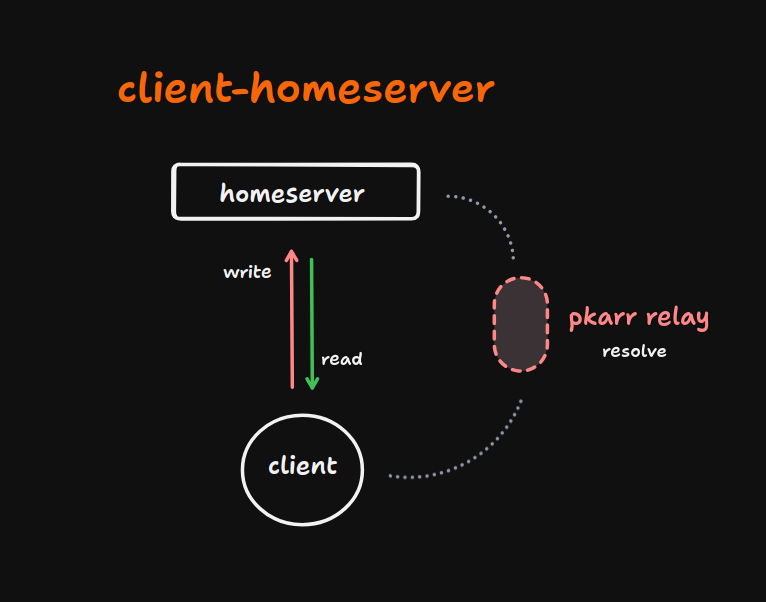
In this architecture, we implement a direct communication model between the client application and the Homeserver. This approach minimizes latency and reduces system complexity by establishing a direct data flow pathway.
This design pattern is particularly well-suited for applications with straightforward functionality, especially those that don’t require real-time interaction or data normalization. This architectural approach demonstrates optimal performance in use cases characterized by intermittent data operations, where asynchronous read/write cycles are adequate for maintaining data consistency and fulfilling application requirements.
To illustrate the practical applications of this architectural paradigm, consider the following implementation scenarios:
1. Bookmark Management System: A client application designed to store and retrieve user bookmarks directly from the Homeserver.
2. File Synchronization Utility: Similar to the open-source [Syncthing](https://syncthing.net/) project, this type of application would facilitate direct file synchronization between the client and the Homeserver.
3. Text Snippet Repository: A lightweight application for creating, storing, and retrieving short text fragments or code snippets as [pastebin](https://pastebin.com/)
These implementations leverage the Pubky Core protocol to establish secure, efficient, and direct data exchange channels between the client and the Homeserver, while the user remains with ownership of their data.
# Custom Backend
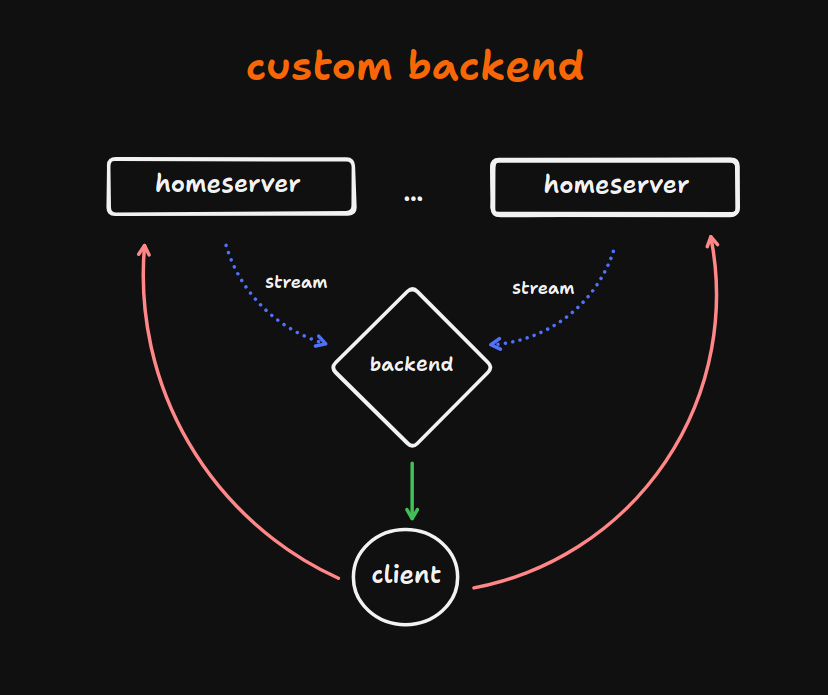
This architectural design introduces a more sophisticated data flow model, incorporating an intermediary backend layer between the client application and the Homeserver. This backend functions as a middleware, enhancing the system’s flexibility and data processing capabilities.
The backend can be potentially comprised with many components. These components will depend on the client app needs, but these are the main ones
1. **Indexer**: Responsible for data normalization, ensuring consistent data structures and optimizing query performance.
2. **Aggregator**: Implements event filtering logic, allowing for selective data propagation based on predefined criteria.
This architecture supports two distinct data consumption patterns:
a) For scenarios requiring both data normalization and event filtering, the client interacts with the backend layer, as an endpoint. The aggregator processes the event stream from the Homeservers, applying filtering rules before passing the data to the indexer for normalization.
b) In cases where only data normalization is necessary, the backend can bypass or not implement the aggregator, consuming events directly from the Homeserver via the indexer.
This modular approach allows for fine-grained control over data processing, enabling efficient resource utilization and optimized client-side performance based on specific application requirements.
## Pubky Nexus: Production Implementation
[Section titled “Pubky Nexus: Production Implementation”](#pubky-nexus-production-implementation)
[Pubky Nexus](/explore/pubky-apps/indexing-and-aggregation/pubky-nexus/) is the production-grade implementation of this custom backend architecture. It combines sophisticated aggregation, normalization, indexation, filtering (compliance), and powerful Social Semantic Graph inference capabilities.
Nexus powers the [Pubky App](/explore/pubky-apps/introduction/) social features with:
* Real-time event aggregation from multiple Homeservers
* High-performance graph database (Neo4j) for relationship queries
* Redis caching layer for sub-millisecond response times
* Comprehensive REST API with full OpenAPI specification
* Advanced moderation and filtering capabilities
**Resources**:
* [Pubky Nexus Documentation](/explore/pubky-apps/indexing-and-aggregation/pubky-nexus/) - Complete feature overview
* [GitHub Repository](https://github.com/pubky/pubky-nexus) - Open source implementation
* [Live API](https://nexus.pubky.app/swagger-ui/) - Production Swagger UI
# Global Aggregators
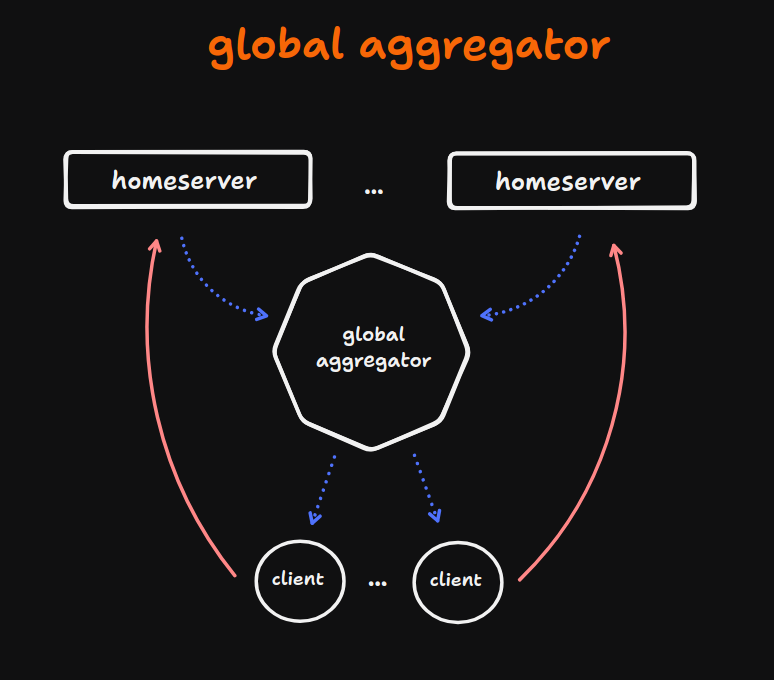
This architectural pattern implements a distributed system model centered around a global aggregation layer, eliminating the need to fetch data from a multitude (maybe thousands!) of Homeservers by the client. The core component of this design is a centralized global aggregator that interfaces with multiple Homeservers, consuming events from each in a unified manner.
Key features of this architecture include:
1. **Centralized Event Processing:** The global aggregator serves as a single point of convergence for event streams originating from disparate Homeservers across the network.
2. **Policy-Driven Filtering:** The aggregators can optionally implement a configurable set of policies and filtering rules, allowing for dynamic event processing based on predefined criteria.
3. **Client Flexibility and Aggregator Choice:** Clients consume data from the global aggregator stream. However, if a client finds the enforced rules of one aggregator unsuitable, it retains the flexibility to switch to an alternative global aggregator that better aligns with its requirements or selectively look for the Homeservers itself.
4. **Scalable Event Distribution:** By centralizing the aggregation process, this architecture facilitates efficient event distribution to multiple clients, potentially reducing redundant processing and network overhead.
# Introduction
Leveraging the [Pubky Core](/explore/pubkycore/introduction/) protocol as the foundational layer, we can envision a diverse array of applications with distinct functionalities. While each app can implement its own unique design patterns and user interfaces, they all share a common underlying architecture: interacting with the distributed data stores, colloquially referred to as [Homeservers](/explore/pubkycore/homeserver/), through standardized read and write operations.
The [Pubky Core protocol](/explore/pubkycore/introduction/) enables a decentralized approach to data management, facilitating seamless communication between clients and their respective data stores. This architecture promotes data sovereignty and enhances system resilience.
Below, we present several high-level designs that showcase the versatility of this architecture, from simple client (browser) apps that interact directly with one or several [Homeservers](/explore/pubkycore/homeserver/) to more complex applications with custom aggregators and backends capable of powerful inference:
* [Client-Homeserver](/explore/pubky-apps/app-architectures/client-homeserver/)
* [Custom backend](/explore/pubky-apps/app-architectures/custom-backend/)
* [Global aggregators](/explore/pubky-apps/app-architectures/global-aggregators/)
# App Specs
Shared data model specifications for the Pubky social app ecosystem, with [pubky.app](/explore/pubky-apps/reference-app/pubky-app/) as the reference implementation.
> **Note:** This component is NOT part of Pubky Core. It is part of the Pubky social app stack.
## Overview
[Section titled “Overview”](#overview)
`pubky-app-specs` defines the canonical data schemas for social application data stored on Pubky [homeservers](/explore/pubkycore/homeserver/). It provides validation rules, serialization logic, and type definitions used by both *Pubky apps* and the [Pubky Nexus](/explore/pubky-apps/indexing-and-aggregation/pubky-nexus/) indexer to ensure interoperability with [pubky.app](/explore/pubky-apps/reference-app/pubky-app/). Note that this is *only* required for “Pubky Social apps”: Pubky apps that read or write pubky.app social data, including profiles, posts and collections, follows, mutes, tags, bookmarks, and feeds. Pubky apps that do not rely on that social data should ignore `pubky-app-specs` and rely solely on their own application-specific schemas.
* **Repository**:
* **License**: MIT
* **Platforms**: Rust (native), WASM, JavaScript (npm: `pubky-app-specs`)
## Data Models
[Section titled “Data Models”](#data-models)
All data is stored under `/pub/pubky.app/` on the user’s homeserver. Key models include:
* **PubkyAppUser** - User profile (name, bio, image, links, status)
* **PubkyAppPost** - Posts with content, kind, parent, embed, attachments, and Collection envelopes
* **PubkyAppBlob** - Raw uploaded bytes addressed by a content hash
* **PubkyAppFile** - File metadata (name, src, content\_type, size)
* **PubkyAppTag** - Tags on URIs (label + target)
* **PubkyAppBookmark** - Bookmarked URIs
* **PubkyAppFollow / PubkyAppMute** - Social relationships
* **PubkyAppFeed** - Saved feed configuration
* **PubkyAppLastRead** - Notification/read-state marker
See the [`pubky-app-specs` README](https://github.com/pubky/pubky-app-specs) for the current schema reference, ID generation rules, validation constraints, and TypeScript/Rust APIs, including the [`PubkyAppPost` section](https://github.com/pubky/pubky-app-specs#pubkyapppost) for current post fields, kinds, attachments, and collection envelopes.
## Role in Ecosystem
[Section titled “Role in Ecosystem”](#role-in-ecosystem)
```plaintext
Compatible apps ──write──> homeserver (/pub/pubky.app/...)
│
▼ events
Pubky Nexus (indexer) ──reads──> indexes to Redis/Neo4j
Both use pubky-app-specs for schema validation
```
# eli5
## ELI5: Pubky App
[Section titled “ELI5: Pubky App”](#eli5-pubky-app)
Imagine you’re at a massive party where everyone is sharing stories, showing pictures, and having interesting conversations. You get to decide who you talk to and what stories you listen to. You have full control over how you interact with people—choosing who to trust and which conversations to join. This is what **Pubky App** is like for the internet—it gives you the power to choose who you connect with and what you share, just like you would at a party, without anyone else deciding for you.
**Pubky App** is like having your own personal party host that you can fully control. Instead of letting big companies decide who sees your posts or what shows up in your feed, **Pubky App** gives you the power. It lets you decide which content you see, who you interact with, and how you organize your online world.
* **Your Rules, Your Control**: Pubky App lets you control your connections with simple rules. If you only want to hear from your closest friends or people who share your hobbies, you can easily decide that. There are no hidden algorithms deciding what you should pay attention to—you are the one in charge.
* **Tags and Trust**: With Pubky, you can tag people, posts, and content based on how much you trust them or how relevant they are to you. This means you can filter out the noise and focus on the people and content that really matter.
* **Move Anytime**: Imagine if you wanted to leave the party and join a different one, but still keep all your friends and stories with you. Pubky App lets you do that too. You can switch to a new service or hosting provider whenever you want, without losing your posts, friends, or identity. You’re never locked in.
So, with **Pubky App**, you’re in charge of your online world—deciding who you talk to, what you see, and how you share. It’s about making the internet feel more like a real conversation with the people you care about, instead of letting algorithms decide for you.
# aggregator
## Pubky Aggregators
[Section titled “Pubky Aggregators”](#pubky-aggregators)
Aggregators are specialized reducers or gatekeepers that continuously scan and collect data from various sources, such as [Homeservers](/explore/pubkycore/homeserver/). They decide what data to allow in and what to keep out.
When the aggregator receive new events, it evaluates it against its predefined criteria. If the data meets the criteria, the aggregator allows it to pass through, making it available for further processing or storage. However, if the data doesn’t meet the criteria, the aggregator blocks it, preventing it from entering the system.
By controlling the flow of information, aggregators play a crucial role in maintaining data quality, preventing information overload, and ensuring that only the most valuable and relevant data is used.
[Pubky Nexus](/explore/pubky-apps/indexing-and-aggregation/pubky-nexus/) implements a production-grade aggregator (the `nexus-watcher` component) that monitors multiple Homeservers in real-time, filtering events and updating the social graph continuously.
### Characteristics
[Section titled “Characteristics”](#characteristics)
* **Fine-grained access controls**: Users and aggregators have granular control over what data is shared, with whom, and under what conditions, ensuring selective and secure data exchange.
* **Efficient data synchronization**: Incremental sync via event streams enables fast and efficient synchronization of changes from Homeservers, reducing the overhead of data aggregation.
* **Normalized data schemas**: Standardized data schemas facilitate interoperability between services, making it easier to integrate and exchange data across the network.
* **Public and niche aggregators**: The network supports both large-scale, public aggregators for discoverability and smaller, niche aggregators that cater to specific communities or use cases.
* **Core user graph expansion**: The aggregation process starts with a core user graph and expands outward through connections, enabling the network to grow organically and efficiently.
* [Censorship resistance](/explore/concepts/censorship/): The system’s censorship resistance is achieved through a decentralized aggregation architecture, where data aggregation is distributed across a network of **independent, autonomous aggregators**. This design ensures that no single entity or node has control over the aggregation process, making it more resilient to censorship attempts.
# indexer
The Indexer is a specialized component that plays a crucial role in the system by normalizing and transforming the aggregated data from multiple [Homeservers](/explore/pubkycore/homeserver/) into a unified view. This enables cross-data store search, queries, and discovery, allowing users to access and analyze data from various sources in a seamless and efficient manner.
[Pubky Nexus](/explore/pubky-apps/indexing-and-aggregation/pubky-nexus/) is the production implementation of this indexer architecture, combining sophisticated event processing with Neo4j graph database and Redis caching for high-performance social graph operations.
### Characteristics
[Section titled “Characteristics”](#characteristics)
1. **Data Normalization**: The Indexer normalizes the data from multiple sources, handling differences in format, structure, and schema. This involves transforming the data into a consistent format, resolving data conflicts, and ensuring that the data is accurate and reliable.
2. **Data Transformation**: The Indexer transforms the normalized data into a unified view, making it possible to query and analyze the data across multiple [Homeservers](/explore/pubkycore/homeserver/). This unified view enables users to access data from different sources as if it were a single, cohesive dataset.
3. **Data Integrity**: The Indexer ensures data integrity through secure synchronization protocols, guaranteeing that the indexed data is consistent and up-to-date. This involves implementing measures to prevent data corruption, ensuring that data updates are propagated across all data stores, and maintaining a high level of data quality and accuracy.
4. **Scalability**: The Indexer is designed to handle large volumes of data from multiple sources, ensuring that it can scale to meet the needs of a growing user base and increasing data demands.
By normalizing, transforming, and ensuring the integrity of the data, the Indexer provides a robust and scalable solution for cross-data store search, queries, and discovery
# introduction
The Backend is responsible for collecting ([aggregators](/explore/pubky-apps/indexing-and-aggregation/aggregator/)) and organizing ([indexer](/explore/pubky-apps/indexing-and-aggregation/indexer/)) data from various sources, known as [Homeservers](/explore/pubkycore/homeserver/).
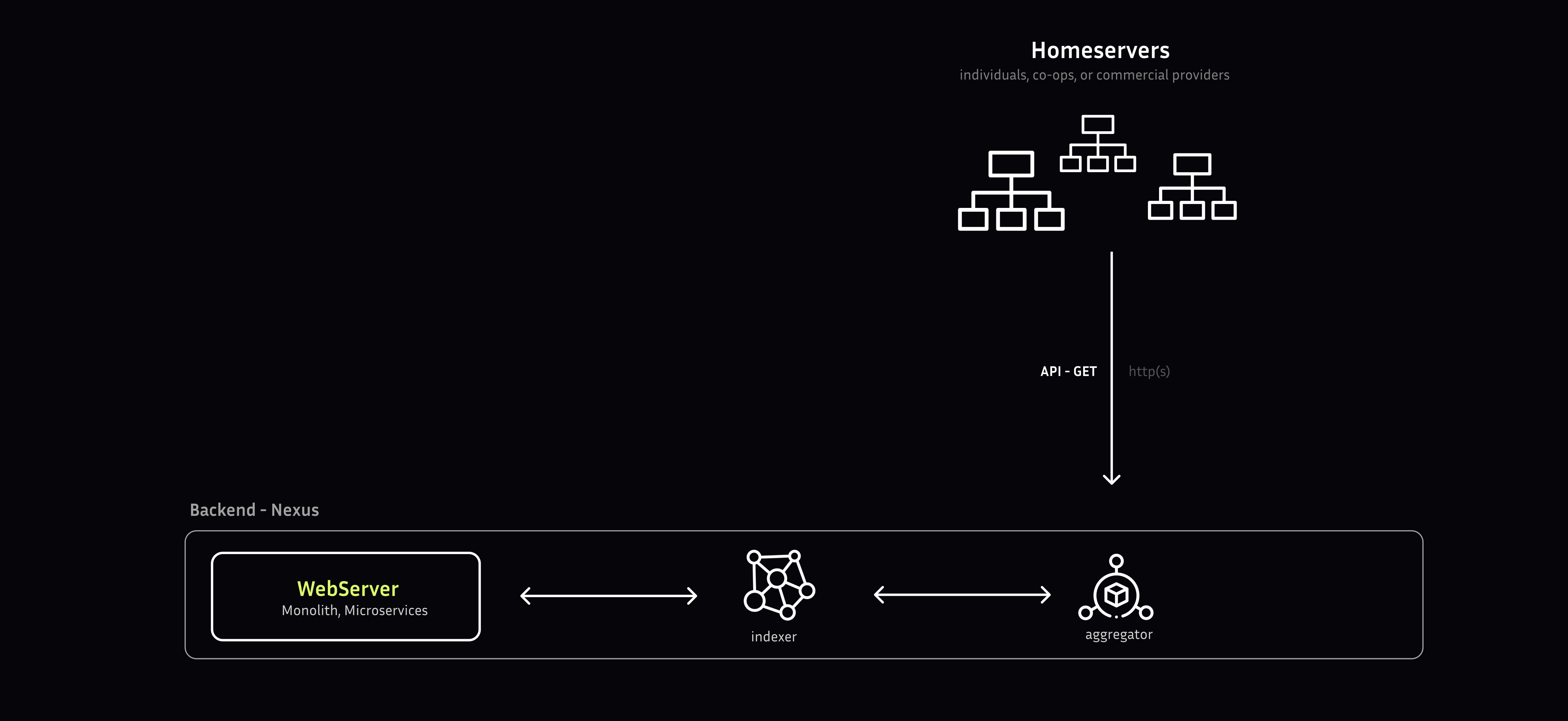
Imagine you’re trying to find a specific document in a large library. The backend is like a librarian who searches through the shelves, finds the right documents, and prepares them for you to use. This ensures that the data is accurate, up-to-date, and in a format that’s easy to work with.
### Main components
[Section titled “Main components”](#main-components)
* [Aggregators](/explore/pubky-apps/indexing-and-aggregation/aggregator/) execute a **data retrieval protocol** to obtain data from **data storage**, initiating a process that retrieves and collects data from various sources.
* [Indexers](/explore/pubky-apps/indexing-and-aggregation/indexer/) receive aggregated data from the **Aggregators** and initiate a rigorous **data normalization** process, transforming and converting the data into a standardized format to ensure consistency and accuracy.
* [Web servers](/explore/pubky-apps/indexing-and-aggregation/web-server/) provide the requested data to [Pubky client](/explore/pubky-apps/reference-app/introduction/)
### Production Implementation
[Section titled “Production Implementation”](#production-implementation)
[Pubky Nexus](/explore/pubky-apps/indexing-and-aggregation/pubky-nexus/) is the production-grade implementation of this backend architecture, powering [Pubky App](/explore/pubky-apps/introduction/)’s social features with real-time aggregation, high-performance indexing, and a comprehensive REST API.
# Pubky Nexus
**Pubky Nexus** is the production-grade indexing and aggregation service that powers Pubky App’s social features. It transforms decentralized data from multiple [Homeservers](/explore/pubkycore/homeserver/) into a high-performance social graph API, enabling real-time social media experiences at scale.
## Overview
[Section titled “Overview”](#overview)
Nexus serves as the central bridge between Pubky Homeservers and social clients, implementing the [aggregator](/explore/pubky-apps/indexing-and-aggregation/aggregator/), [indexer](/explore/pubky-apps/indexing-and-aggregation/indexer/), and [web server](/explore/pubky-apps/indexing-and-aggregation/web-server/) components of the [custom backend architecture](/explore/pubky-apps/app-architectures/custom-backend/). By aggregating events from Homeservers into a rich social graph, Nexus provides the infrastructure needed for features like feeds, search, recommendations, and real-time notifications.
> ⚠️ **Note**: The Nexus API is currently in active development. The service uses the `/v0` route prefix to indicate API instability, and breaking changes may occur as the system evolves toward stability.
## Key Features
[Section titled “Key Features”](#key-features)
### Real-time Social Graph Aggregation
[Section titled “Real-time Social Graph Aggregation”](#real-time-social-graph-aggregation)
Nexus continuously ingests events from multiple Pubky Homeservers, building and maintaining a structured social graph in real-time. This enables features like:
* Following relationships and friend networks
* Post interactions (likes, replies, mentions)
* Tag-based content discovery
* User muting and moderation
### Full-Content Indexing
[Section titled “Full-Content Indexing”](#full-content-indexing)
Rather than requiring clients to locate and query individual Homeservers for content, Nexus indexes and serves content directly. This dramatically improves latency and user experience while still maintaining the decentralized nature of the underlying data. Clients can optionally verify content authenticity directly with Homeservers when needed.
### High Performance & Scalability
[Section titled “High Performance & Scalability”](#high-performance--scalability)
Built in Rust with carefully optimized data structures, Nexus is designed for speed:
* **Sub-millisecond response times**: Most requests are served in less than 1ms
* **Constant time complexity**: Query performance doesn’t degrade as user base grows
* **Efficient caching**: Redis-based caching layer accelerates common queries
* **Horizontal scalability**: Architecture supports distributed deployment
### Social Semantic Graph (SSG)
[Section titled “Social Semantic Graph (SSG)”](#social-semantic-graph-ssg)
Nexus supports Social Semantic Graph-based interactions, enabling:
* web-of-trust relationship mapping
* Content filtering based on social connections
* Personalized feed ranking and recommendations
* Community detection and trust inference
### Graph-Enhanced Search & Recommendations
[Section titled “Graph-Enhanced Search & Recommendations”](#graph-enhanced-search--recommendations)
Leveraging Neo4j for graph database operations, Nexus provides:
* Deep relationship queries across the social graph
* Recommendation algorithms based on network topology
* Tag and content discovery through graph traversal
* Influencer and community identification
### Flexible Caching Architecture
[Section titled “Flexible Caching Architecture”](#flexible-caching-architecture)
A sophisticated Redis caching layer ensures optimal performance:
* Common queries cached for instant retrieval
* Incremental cache updates on new events
* Minimal database load for read-heavy workloads
* Cache invalidation synchronized with graph updates
## Architecture
[Section titled “Architecture”](#architecture)
Nexus is composed of several specialized components working together:
### Components
[Section titled “Components”](#components)
1. **nexus-watcher**: The event aggregator that monitors Pubky Homeservers
* Subscribes to Homeserver event streams
* Filters and validates incoming events
* Translates events into social graph updates
* Handles retry logic for failed operations
2. **nexus-webapi**: The REST API server (formerly nexus-service)
* Serves client requests via HTTP/REST endpoints
* Implements OpenAPI/Swagger specification
* Handles authentication and rate limiting
* Returns formatted responses to Pubky App frontend
3. **nexus-common**: Shared library for common functionality
* Database connectors (Redis, Neo4j)
* Data models and schemas
* Query builders and utilities
* Configuration management
4. **nexusd**: Service orchestration daemon
* Manages component lifecycle
* Performs database migrations
* Handles reindexing operations
* Provides CLI for administration
### Data Flow
[Section titled “Data Flow”](#data-flow)
1. **Event Ingestion**: The watcher monitors multiple Homeservers, receiving events as they occur (new posts, follows, likes, etc.)
2. **Event Processing**: Events are validated, filtered based on configured rules, and transformed into graph operations
3. **Indexing**: Processed events update both the Redis cache (for fast queries) and Neo4j graph database (for complex relationships)
4. **API Responses**: Client requests hit the web API, which serves data from the optimized indexes with sub-millisecond latency
### Technology Stack
[Section titled “Technology Stack”](#technology-stack)
* **Language**: Rust (for performance and safety)
* **Graph Database**: Neo4j (for relationship queries and graph algorithms)
* **Cache Layer**: Redis (for high-speed access to common queries)
* **API Framework**: Axum (Rust web framework)
* **Observability**: OpenTelemetry integration (optional)
## API Endpoints
[Section titled “API Endpoints”](#api-endpoints)
Nexus provides a comprehensive REST API for social features:
### Live API Access
[Section titled “Live API Access”](#live-api-access)
* **Staging** (latest):
* **Production** (stable):
Explore the full API specification, test queries, and view response schemas directly through the Swagger UI.
### Key Endpoint Categories
[Section titled “Key Endpoint Categories”](#key-endpoint-categories)
* **User endpoints**: Profile data, follower/following relationships, user search
* **Post endpoints**: Post creation/retrieval, replies, mentions, bookmarks
* **Feed endpoints**: Timeline generation, filtered streams, personalized feeds
* **Tag endpoints**: Tag-based discovery, trending tags, tag streams
* **Search endpoints**: Full-text search across users and content
* **Graph endpoints**: Relationship queries, web-of-trust calculations
* **Notification endpoints**: Real-time notification delivery
## Observability & Monitoring
[Section titled “Observability & Monitoring”](#observability--monitoring)
Nexus provides rich observability features for operators:
### Database Exploration
[Section titled “Database Exploration”](#database-exploration)
* **Redis Insight**: Inspect cached data structures in real-time at `http://localhost:8001/redis-stack/browser` (local dev)
* **Neo4j Browser**: Visualize and query the social graph at `http://localhost:7474/browser/` (local dev)
### Telemetry Integration
[Section titled “Telemetry Integration”](#telemetry-integration)
Optional OpenTelemetry integration for production monitoring:
* Distributed tracing across components
* Performance metrics and latency tracking
* Error rate monitoring and alerting
* Integration with tools like Signoz, Jaeger, or Prometheus
## Development & Deployment
[Section titled “Development & Deployment”](#development--deployment)
### Prerequisites
[Section titled “Prerequisites”](#prerequisites)
* Rust toolchain (latest stable)
* Docker and Docker Compose (for databases)
* Neo4j (graph database)
* Redis (caching layer)
### Quick Start
[Section titled “Quick Start”](#quick-start)
```bash
# Clone the repository
git clone https://github.com/pubky/pubky-nexus
cd pubky-nexus
# Set up databases via Docker
cd docker
cp .env-sample .env
docker compose up -d
# Run the service (uses default config)
cargo run -p nexusd
# Or run components individually
cargo run -p nexusd -- watcher # Run event watcher
cargo run -p nexusd -- api # Run API server
```
### Configuration
[Section titled “Configuration”](#configuration)
Nexus uses a TOML configuration file (default location: `$HOME/.pubky-nexus/config.toml`). Custom config paths can be specified:
```bash
cargo run -p nexusd -- --config-dir="custom/config/folder"
```
### Testing & Benchmarking
[Section titled “Testing & Benchmarking”](#testing--benchmarking)
```bash
# Load mock data for testing
cargo run -p nexusd -- db mock
# Run unit tests
cargo nextest run -p nexus-common --no-fail-fast
cargo nextest run -p nexus-watcher --no-fail-fast
cargo nextest run -p nexus-webapi --no-fail-fast
# Run benchmarks
cargo bench -p nexus-webapi
cargo bench -p nexus-webapi --bench user # Specific endpoint
```
## Data Migration System
[Section titled “Data Migration System”](#data-migration-system)
Nexus includes a sophisticated migration manager for handling breaking changes to data structures:
### Migration Phases
[Section titled “Migration Phases”](#migration-phases)
1. **Dual Write**: New writes go to both old and new data sources simultaneously
2. **Backfill**: Historical data is migrated from old to new source
3. **Cutover**: Reads switch to the new data source
4. **Cleanup**: Old data sources are safely removed
### Managing Migrations
[Section titled “Managing Migrations”](#managing-migrations)
```bash
# Create a new migration
cargo run -p nexusd -- db migration new MigrationName
# Run pending migrations
cargo run -p nexusd -- db migration run
# Clear database (use with caution)
cargo run -p nexusd -- db clear
```
## Use Cases
[Section titled “Use Cases”](#use-cases)
Nexus enables a variety of social features for applications built on Pubky:
### Social Feeds
[Section titled “Social Feeds”](#social-feeds)
* Chronological and algorithmic timelines
* Filtered feeds by tags, authors, or topics
* Personalized recommendations based on social graph
* Real-time updates without polling
### Discovery & Search
[Section titled “Discovery & Search”](#discovery--search)
* Full-text search across posts and users
* Tag-based content discovery
* Trending topics and hot tags
* User recommendations based on network proximity
### Moderation & Filtering
[Section titled “Moderation & Filtering”](#moderation--filtering)
* User muting and blocking
* Community-based filtering
* Spam detection and prevention
* Custom content policies per instance
### Analytics & Insights
[Section titled “Analytics & Insights”](#analytics--insights)
* User reach and influence metrics
* Content engagement tracking
* Network growth analysis
* Community detection and clustering
## Deployment Options
[Section titled “Deployment Options”](#deployment-options)
### Self-Hosted Instance
[Section titled “Self-Hosted Instance”](#self-hosted-instance)
Organizations can run their own Nexus instance with custom:
* Content filtering and moderation policies
* Event source selection (which Homeservers to index)
* Caching strategies and database configuration
* API rate limits and access controls
### Public Instances
[Section titled “Public Instances”](#public-instances)
The Pubky team operates public instances:
* **Production**: [https://nexus.pubky.app](https://nexus.pubky.app/swagger-ui/)
* **Staging**:
### Hybrid Approaches
[Section titled “Hybrid Approaches”](#hybrid-approaches)
Clients can use a combination of:
* Public Nexus instances for general discovery
* Private instances for specialized communities
* Direct Homeserver queries for verification
## Future Enhancements
[Section titled “Future Enhancements”](#future-enhancements)
The Nexus roadmap includes several planned improvements:
* **Light-weight mode**: Return Homeserver URIs instead of full content
* **Federation protocols**: Inter-Nexus communication for global discovery
* **Advanced ML models**: Improved recommendation algorithms
* **Real-time WebSocket API**: Push-based updates for clients
* **Content delivery optimization**: Edge caching and CDN integration
* **Enhanced privacy controls**: Encrypted graph operations
## Contributing
[Section titled “Contributing”](#contributing)
Nexus is open source and welcomes contributions:
1. Fork the [repository](https://github.com/pubky/pubky-nexus)
2. Create a feature branch
3. Write tests for new functionality
4. Submit a pull request with clear description
All contributions should include tests and benchmarks where applicable.
## Resources
[Section titled “Resources”](#resources)
* **Repository**:
* **Swagger UI** (Staging):
* **Swagger UI** (Production):
* **Issue Tracker**:
## Building Clients for Nexus
[Section titled “Building Clients for Nexus”](#building-clients-for-nexus)
If you’re building a social client application to consume the Nexus API:
* **Data Model Specification**: Use [pubky-app-specs](https://www.npmjs.com/package/pubky-app-specs) as your authoritative reference for data structures and validation rules
* **Web App**: [pubky.app](/explore/pubky-apps/reference-app/pubky-app/) ([github.com/pubky/pubky-app](https://github.com/pubky/pubky-app)) — the production reference implementation
* **API Exploration**: Use the [Swagger UI](https://nexus.pubky.app/swagger-ui/) to explore available endpoints and test queries
## See Also
[Section titled “See Also”](#see-also)
* [Aggregators](/explore/pubky-apps/indexing-and-aggregation/aggregator/) - Event collection and filtering
* [Indexers](/explore/pubky-apps/indexing-and-aggregation/indexer/) - Data normalization and transformation
* [Web Servers](/explore/pubky-apps/indexing-and-aggregation/web-server/) - API serving layer
* [Custom Backend Architecture](/explore/pubky-apps/app-architectures/custom-backend/) - Overall architecture pattern
* [Homeservers](/explore/pubkycore/homeserver/) - Data source and storage layer
# Web Server
The system comprises a suite of **backend services** that orchestrate the integration of **data feeds**, **search functionality**, and **user interface configurations**. The system provides a unified platform for data ingestion, processing, and presentation, enabling seamless interactions between the frontend and backend components.
### Services
[Section titled “Services”](#services)
* **Feeds** - Curated views of aggregated data presented to users. Can include timelines, [tags](/explore/pubky-apps/reference-app/features/tags/), [profiles](/explore/pubky-apps/reference-app/features/profiles/), etc.
* **Search** - Services that index aggregated data and enable full text/attribute searches.
* **Identity** - It provides single sign-on through self-sovereign credentials.
* **[Payments](Paykit.md)** - Payment discovery and coordination service using Paykit protocol (work in progress). Planned capabilities include:
* Public directory API for payment method discovery
* Encrypted storage for payment requests and subscriptions
* Push notification relay for incoming payment notifications
* Receipt storage and verification
* Subscription management coordination
⚠️ **Note**: Paykit is not production-ready and subject to significant changes.
### Architecture
[Section titled “Architecture”](#architecture)
The web server can be designed and implemented using various architectural patterns, depending on the specific requirements of the data request workflow. Two prominent architectural styles that can be employed are:
* **Monolithic Architecture**: A **single-tiered architecture** where the web server is constructed as a self-contained unit, encompassing all necessary components and functionality. This approach is characterized by a **tightly-coupled** design, where all components are integrated into a single executable or deployable unit.
* **Microservices Architecture**: A **multi-tiered architecture** where the web server is decomposed into a collection of **loosely-coupled**, independent services that communicate with each other using **APIs** and **messaging protocols**. Each microservice is responsible for a specific **business capability** or **data domain**, enabling greater flexibility, scalability, and resilience.
The choice of architecture depends on various factors, including **data request patterns**, **traffic volume**, **performance requirements**, **development team expertise**, and **maintenance considerations**.
# Introduction
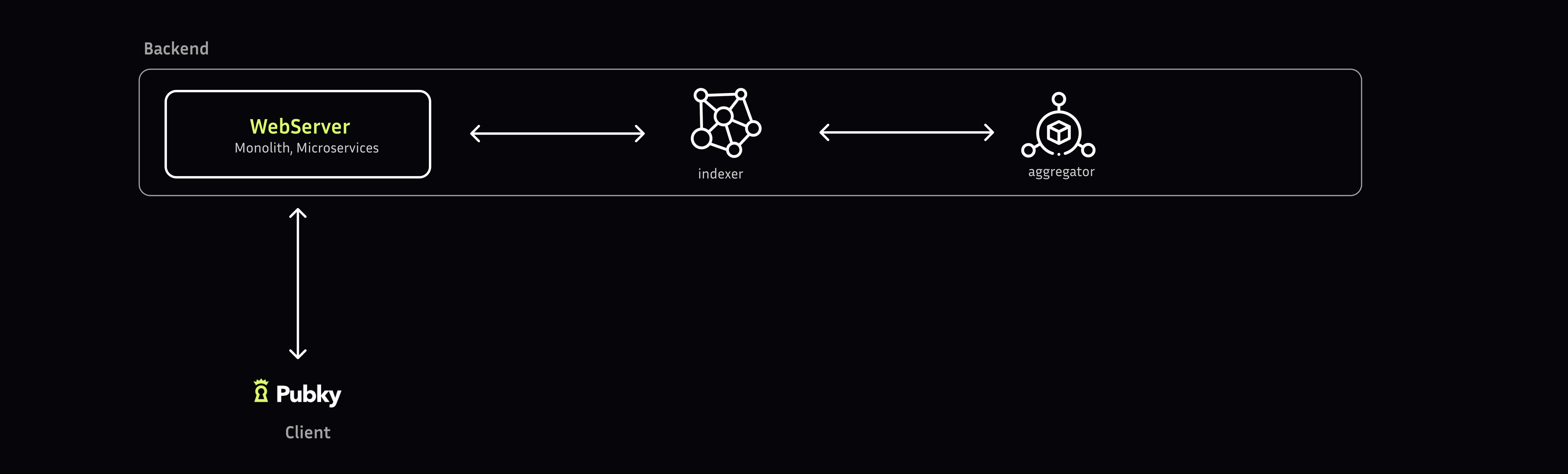
> Synonym will be initially hosting: [Homeserver](/explore/pubkycore/homeserver/) and [Pubky App](/explore/pubky-apps/introduction/)
## Overview
[Section titled “Overview”](#overview)
Pubky App is a decentralized social media application built on [Pubky Core](/explore/pubkycore/introduction/). It serves as a working reference implementation demonstrating how to build social applications on the Pubky protocol.
The data models and validation rules are formally specified in the [pubky-app-specs](https://github.com/pubky/pubky-app-specs) repository, which defines structures for users, posts, tags, bookmarks, follows, mutes, and feeds. This specification ensures interoperability between different Pubky App implementations.
### Live Application & Development Status
[Section titled “Live Application & Development Status”](#live-application--development-status)
* **Live Demo**: - Production instance currently operational
* **Repository**: [github.com/pubky/pubky-app](https://github.com/pubky/pubky-app) - Reference implementation and source code
* **Build Compatible Clients**: Use [pubky-app-specs](https://www.npmjs.com/package/pubky-app-specs) as the authoritative specification.
## Key aspects
[Section titled “Key aspects”](#key-aspects)
* **Data Ownership**: Users have full autonomy over their data, hosting it on **independent [Homeservers](/explore/pubkycore/homeserver/)** that are decentralized and distributed across the network. This approach enables users to maintain **control** and **ownership** of their data, while also ensuring **data sovereignty** and **privacy**.
* **Profiles**: The system employs a **decentralized data storage** approach, where **post**, **comment**, and **like** data are stored in association with **user profiles**.
* [Aggregators](/explore/pubky-apps/indexing-and-aggregation/aggregator/) collecting social graphs
* Feeds of followings’ activities
* [Searching](/explore/pubky-apps/reference-app/features/search/) profiles and posts
* Notification delivery through [application backends](/explore/pubky-apps/indexing-and-aggregation/introduction/)
* Distributed moderation through user blocking
## Components
[Section titled “Components”](#components)
The Pubky App is a complex system that can be broken down into two main components: the [backend](/explore/pubky-apps/indexing-and-aggregation/introduction/) and the [client](/explore/pubky-apps/reference-app/introduction/). These two pieces work together to provide a seamless user experience.
##### Backend: The Data Organizer
[Section titled “Backend: The Data Organizer”](#backend-the-data-organizer)
It collects and organizes data from various sources, processing it into a usable format.
##### Client: The User Interface
[Section titled “Client: The User Interface”](#client-the-user-interface)
It is the part of the Pubky App that you interact with directly. It’s responsible for taking the organized data from the Backend and presenting it to you in a visually appealing and easy-to-understand way.
## MVP Architecture
[Section titled “MVP Architecture”](#mvp-architecture)
The early versions of Pubky app take some shortcuts over the [Pubky Core](/explore/pubkycore/introduction/) design. The MVP app is centralized, therefore we saved time and complexity by aggregating functionality into fewer components. The main two components are the `Homeserver` and the `Indexer`
* The [Homeservers](/explore/pubkycore/homeserver/) fulfils the function of `data stores`, republishing users keys to [PKARR](/explore/pubkycore/pkarr/introduction/) and it acts also as an identity-provider (Oauth-like sign-in). Users maintain a trust relationship with the Homeserver.
* The `Indexer` fulfils the function of the [backend](/explore/pubky-apps/indexing-and-aggregation/introduction/) for the Pubky App. [Pubky Nexus](/explore/pubky-apps/indexing-and-aggregation/pubky-nexus/) is the production implementation of this indexer, providing real-time social graph aggregation, high-performance search, and a comprehensive REST API.
# bookmarks
Bookmarks are a feature that allows you to privately save post for later reference. Here are some ways you can use bookmarks:
1. **Save for later reading**: If you come across a post that you don’t have time to read or engage with immediately, you can bookmark it to read later when you have more time.
2. **Reference material**: Bookmarks can serve as a repository for tweets that contain useful information, such as articles, tutorials, or resources, that you might need to refer to later. In that case, you can organise the posts by topic.
3. **Private note-taking**: Bookmarks can serve as a private note-taking system, allowing you to save tweets that you want to remember without having to publicly like or retweet them.
To bookmark a post, simply click or tap the “Bookmark” icon (it looks like a ribbon) on the post. You can access your bookmarked posts by clicking the button on top of the page.
# layouts
Pubky client offers multiple customizable UI layouts for users that prefer different *column*, *grid*, and *list* layouts for their feeds.
# notifications
Pubky client tracks various event or activities the user may be interested in, and provides relevant notifications for interactions and other relevant activity to the user. Notifications are a way to keep you informed about what’s happening in the app, even when you’re not actively browsing your timeline.
Here are some common types of notifications you might receive:
1. **Mentions**: When someone mentions you in a [post](/explore/pubky-apps/reference-app/features/posts/), you’ll receive a notification. This means they’ve included your public key (**pk:pubky**) in their [post](/explore/pubky-apps/reference-app/features/posts/).
2. **Replies**: If someone replies to one of your [post](/explore/pubky-apps/reference-app/features/posts/), you’ll get a notification.
3. **Re-posts**: If someone re-posts one of your posts, you’ll get a notification.
4. **Follows**: When someone new follows you, you’ll receive a notification.
5. **Quote Posts**: If someone quotes one of your posts, you’ll receive a notification.
# perspectives
Users can save any custom-filtered view or feed as a “perspective” which is basically a custom template of settings of tags, weights, users, reach, and trends. Perspectives can also save custom UI layouts for the user.
# posts
In pubky.app, a **post** is content that a user publishes under `/pub/pubky.app/posts/:post_id` on their homeserver. Posts are defined by [pubky-app-specs](/explore/pubky-apps/app-specs/) and indexed by [Nexus](/explore/pubky-apps/indexing-and-aggregation/pubky-nexus/) for feeds, replies, search, tags, and notifications.
## Post Types
[Section titled “Post Types”](#post-types)
`pubky-app-specs` is the canonical source for post kinds, fields, limits, and validation rules. See the [`PubkyAppPost` section of the `pubky-app-specs` README](https://github.com/pubky/pubky-app-specs#pubkyapppost).
Posts can also participate in social interactions:
1. **Replies**: A post can reference a parent post URI.
2. **Reposts/embeds**: A post can embed another post or resource by kind and URI.
3. **[Tags](/explore/pubky-apps/reference-app/features/tags/)**: Any user can tag a post to make it discoverable by topic or meaning.
4. **Mentions and links**: Clients can render user references and external URLs from post content.
# profiles
In Pubky client, a **profile** refers to a user’s personal page on the app, which displays their information, posts, and other content. A Pubky profile is a unique identity that represents a public key.
Here are some key components of a Pubky profile:
1. **Username**: A unique handle or identifier that represents the user, often preceded by the “pk” keyword(e.g. *pk:uudfeafc1c6dhxxnaiyuzss5ln9i1ikpb8syht46qpnx4ksi6ho*).
2. **Profile picture**: A small image that represents the user, often a photo or logo.
3. **Bio**: A short description of the user, often including information about their interests, profession, or personality.
4. **Website**: A link to the user’s personal website, blog, or other online presence.
5. **Posts**: The user’s posts, which are displayed in reverse chronological order (newest tweets first).
6. **Followers**: The number of users who follow the profile, indicating the size of their audience.
7. **Following**: The number of users that the profile follows, indicating the accounts they’re interested in.
8. **Lists**: The number of lists the user has created or been added to, which are curated groups of accounts.
# search
While Tags & Filters are the primary sorting tools, the app also provides limited traditional search capabilities.
# tags
Tags are free-text labels that any user can publicly assign to **users** or **[posts](/explore/pubky-apps/reference-app/features/posts/)**. They are a core building block of the [Semantic Social Graph](/explore/concepts/semantic-social-graph/), turning everyday social interactions into structured, queryable metadata that powers discovery, filtering, and personalized feeds.
Unlike traditional hashtags where only an author labels their own content, Pubky tags can be applied **by anyone** — you can tag your own profile and posts, and others can tag them too — making them a form of collaborative, crowd-sourced annotation.
## Tag Types
[Section titled “Tag Types”](#tag-types)
There are two kinds of tags:
1. **User Tags** — A user labels any user’s profile, including their own. For example, tagging a peer with “developer”, “bitcoin”, or “photographer”. User tags build up a crowd-sourced description of who someone is.
2. **Post Tags** — A user labels any post, including their own. For example, tagging a post with “insightful”, “privacy”, or “tutorial”. Post tags categorize content from both the author’s and the audience’s perspective.
Both types work the same way: the tagger, the label, and the target (user or post) are recorded as a relationship in the social graph.
## Purpose
[Section titled “Purpose”](#purpose)
1. **Discovery**: Clicking a tag shows all users or posts that carry that label. Tags also support prefix-based [search](/explore/pubky-apps/reference-app/features/search/) (see below).
2. **Categorization**: Tags replace traditional like/dislike mechanics with richer semantic signals. A post can accumulate multiple distinct labels from different people, giving it nuanced context rather than a simple count.
3. **Trending & Hot Tags**: The system tracks which tags are gaining traction over different timeframes (today, this month, all time), powering the [Trends](/explore/pubky-apps/reference-app/features/trends/) feature.
4. **Personalization**: Tags feed into [Perspectives](/explore/pubky-apps/reference-app/features/perspectives/), where users can save custom-filtered views weighted by specific tags, reach, and other criteria.
5. **Notifications**: When someone tags your post or your profile, you receive a [notification](/explore/pubky-apps/reference-app/features/notifications/).
6. **Web of Trust Filtering** (WIP): Tags can be scoped by social distance, so you only see labels from people you actually trust. This is not yet surfaced in the web UI but already supported by the API (see Outlook below).
## How Tags Work
[Section titled “How Tags Work”](#how-tags-work)
1. A user creates a tag by choosing a label and a target (a user profile or a post). The tag is stored on the tagger’s own [Homeserver](/explore/pubkycore/homeserver/) as a `PubkyAppTag` record containing the target URI, the label text, and a timestamp.
2. The [indexer](/explore/pubky-apps/indexing-and-aggregation/indexer/) (Nexus watcher) detects the new tag event from the Homeserver and indexes it into the social graph.
3. The tag is recorded as a **TAGGED** relationship in the graph database, connecting the tagger to the target with the label as metadata.
4. Multiple caches and indexes are updated in parallel: tag counts on the target, tagger lists per label, engagement scores, trending tag rankings, and the tag [search](/explore/pubky-apps/reference-app/features/search/) index.
5. The tag is now queryable through the API — other users and clients can see it, filter by it, and discover content through it.
## Tag Counts and Scores
[Section titled “Tag Counts and Scores”](#tag-counts-and-scores)
The system maintains several counts for each tagged entity:
* **Total tags**: How many individual tag operations a post or user has received.
* **Unique tags**: How many distinct label strings have been applied (e.g., a post tagged “privacy” by three people still has one unique tag but three total tags).
* **Tagger counts**: How many distinct users applied a given label. A label tagged by many different people carries more signal.
These counts contribute to engagement scoring, which influences how content surfaces in feeds and trends.
## Tag Search
[Section titled “Tag Search”](#tag-search)
Tags are indexed for prefix-based search. When a user types a partial label, the system returns all matching tags ordered lexicographically. This enables fast, type-ahead discovery of existing tags across the network.
## Outlook: Reach-Based Tag Queries
[Section titled “Outlook: Reach-Based Tag Queries”](#outlook-reach-based-tag-queries)
The Nexus API already supports scoped tag queries that filter results based on the viewer’s social graph, but this is not yet exposed in pubky.app. Two reach mechanisms exist:
**Hot tags and taggers** ([source](https://github.com/pubky/pubky-nexus/blob/main/nexus-webapi/src/routes/v0/tag/global.rs)) accept a [`StreamReach`](https://github.com/pubky/pubky-nexus/blob/main/nexus-common/src/types/mod.rs) parameter with the following scopes:
* **Followers** (`reach=followers`) — Only tags from people who follow the given user.
* **Following** (`reach=following`) — Only tags from people the given user follows.
* **Friends** (`reach=friends`) — Only tags from mutual connections.
* **Web of Trust** (`reach=wot`, `wot_1`, `wot_2`, `wot_3`) — Tags from the user’s extended trusted network, traversing follow relationships up to the specified depth (defaults to 3).
Example API calls:
* Global (no reach): [`/v0/tags/hot?limit=3`](https://nexus.pubky.app/v0/tags/hot?limit=3)
* Scoped to followers: [`/v0/tags/hot?user_id={pubky}&reach=followers&limit=3`](https://nexus.pubky.app/v0/tags/hot?user_id=ihaqcthsdbk751sxctk849bdr7yz7a934qen5gmpcbwcur49i97y\&reach=followers\&limit=3)
* Taggers for a label: [`/v0/tags/taggers/pubky?user_id={pubky}&reach=followers`](https://nexus.pubky.app/v0/tags/taggers/pubky?user_id=ihaqcthsdbk751sxctk849bdr7yz7a934qen5gmpcbwcur49i97y\&reach=followers\&limit=5)
**User tags** ([source](https://github.com/pubky/pubky-nexus/blob/main/nexus-webapi/src/routes/v0/user/tags.rs)) accept a `viewer_id` and `depth` parameter (1–3) for web-of-trust filtering:
* Example: [`/v0/user/{pubky}/tags?viewer_id={pubky}&depth=2`](https://nexus.pubky.app/v0/user/ihaqcthsdbk751sxctk849bdr7yz7a934qen5gmpcbwcur49i97y/tags?viewer_id=operrr8wsbpr3ue9d4qj41ge1kcc6r7fdiy6o3ugjrrhi4y77rdo\&depth=2)
**Post tags** ([source](https://github.com/pubky/pubky-nexus/blob/main/nexus-webapi/src/routes/v0/post/tags.rs)) do not currently support reach-based filtering. WoT scoping requires an expensive graph traversal per query; for user profiles this cost is justified (you view one profile at a time), but for posts — which appear in bulk in feeds — the overhead would be prohibitive.
Once available on pubky.app, reach filtering will allow two users to look at the same profile or trending tags and see different results depending on their social circles — a key part of how Pubky delivers personalized, trust-aware experiences.
# trends
Pubky client can provide statistical views of the data it has access to and then establish visualizations and leaderboard lists of trending posts, tags, and users.
# Introduction
# Pubky Client
[Section titled “Pubky Client”](#pubky-client)

The Pubky client is the user-facing application for interacting with the Pubky social network. It is available as a progressive web app (PWA) and will eventually support desktop applications.
## Current Implementation
[Section titled “Current Implementation”](#current-implementation)
* **Live Application**: [pubky.app](https://pubky.app) - Production PWA currently operational
* **Backend**: Powered by [Pubky Nexus](/explore/pubky-apps/indexing-and-aggregation/pubky-nexus/) indexing service using Synonym hosted infrastructure
## Development Status
[Section titled “Development Status”](#development-status)
The web client is live at [pubky.app](https://pubky.app).
**For Developers**:
* **Building Compatible Clients**: Use [pubky-app-specs](https://www.npmjs.com/package/pubky-app-specs) as the authoritative data model specification.
* **Contributing**: Contributions welcome at [github.com/pubky/pubky-app](https://github.com/pubky/pubky-app)
Using the library analogy, the Pubky Client is like a personalized research assistant who takes the prepared documents from the librarian ([backend](/explore/pubky-apps/indexing-and-aggregation/introduction/)) and creates a customized report just for you. This report is designed to be easy to read and understand, with all the relevant information presented in a clear and concise manner.
* Users are able to take control of the data and exit the Synonym hosted services and run their own without hampering discoverability ([credible exit](/explore/concepts/credible-exit/)).
* Pubky client uses the open [Pubky Core](/explore/pubkycore/introduction/) for nearly all features, allowing users to avoid censorship by choosing self-hosting or alternate hosts without losing followers or integrity.
* Pubky also includes support for **[Paykit](/explore/technologies/paykit/)**, an open payment protocol (work in progress) for coordinating payments among peers supporting various methods. This allows users to potentially create payment flows for familiar experiences.
⚠️ **Note**: Paykit is currently **work in progress** and not production-ready. Integrations in Bitkit (iOS and Android) serve as testbeds for protocol development, not production features. The protocol specification, security model, and implementation are subject to significant changes.
**Planned Paykit Features** (WIP):
* **Pay to profiles**: Send payments to Pubky identities without requesting addresses/invoices
* **Method discovery**: Discover which payment methods someone accepts (onchain, Lightning)
* **Encrypted negotiation**: Private [Pubky Noise](/explore/technologies/pubky-noise/) channels for secure payment coordination
* **Subscriptions**: Cryptographically signed recurring payment agreements
* **Zero custody**: Users always control their keys and funds
Future Pubky app versions may leverage Paykit once it reaches production readiness to enable peer-to-peer data markets, creator monetization, and value exchange throughout the ecosystem.
* Communities facilitate moderation and discovery around shared interests.
# pubky.app
Web portal for the Pubky ecosystem — a publisher and social feed for the decentralized web.
> **Note:** This component is NOT part of Pubky Core. It is part of the Pubky social app stack (along with [Pubky Nexus](/explore/pubky-apps/indexing-and-aggregation/pubky-nexus/)).
## Overview
[Section titled “Overview”](#overview)
pubky.app is a social media-like web application built on top of [Pubky Core](/explore/pubkycore/introduction/). It serves as the flagship example of how to build applications using the Pubky [SDK](/explore/pubkycore/sdk/) for authentication and data storage, combined with [Nexus](/explore/pubky-apps/indexing-and-aggregation/pubky-nexus/) for data [aggregation](/explore/pubky-apps/indexing-and-aggregation/aggregator/) and [indexing](/explore/pubky-apps/indexing-and-aggregation/indexer/), turning distributed data into fast-loading feeds and a navigable social graph.
* **GitHub**:
* **Platform**: Web (Next.js progressive web app)
* **Status**: Active development
The application follows a local-first architecture where writes commit to local IndexedDB immediately for instant UI feedback, then sync to the [homeserver](/explore/pubkycore/homeserver/) in the background.
## Tech Stack
[Section titled “Tech Stack”](#tech-stack)
* **Next.js 16 / React 19 / TypeScript** — Core framework
* **Tailwind CSS 4 / Shadcn UI / Radix UI** — Styling and components
* **Zustand** — Global state management
* **Dexie** — IndexedDB wrapper for local-first persistence
* **TanStack Query** — Data fetching with caching
* **@synonymdev/pubky** — WASM [SDK](/explore/pubkycore/sdk/) for homeserver communication
* **[pubky-app-specs](/explore/pubky-apps/app-specs/)** — Shared data specifications
## Key Features
[Section titled “Key Features”](#key-features)
* **Social feeds** (home, hot/trending, search) via [Nexus](/explore/pubky-apps/indexing-and-aggregation/pubky-nexus/)
* **Profiles, posts, bookmarks, notifications**
* **QR Code Authentication** via [Pubky Ring](/explore/technologies/pubky-ring/)
* **Offline support** — PWA with service worker caching and local-first writes
## Codebase Structure
[Section titled “Codebase Structure”](#codebase-structure)
The codebase is organized in layers with strict separation of concerns:
| Layer | Responsibility |
| ---------------- | ----------------------------------------------------- |
| **Controllers** | Entry point for UI actions |
| **Coordinators** | System-initiated actions (polling, auth changes, TTL) |
| **Application** | Business logic orchestration |
| **Services** | IO boundaries (local, homeserver, nexus) |
| **Models** | Dexie-based IndexedDB persistence |
| **Stores** | UI state via Zustand |
### Data Flow
[Section titled “Data Flow”](#data-flow)
1. **Writes** go to [homeserver](/explore/pubkycore/homeserver/) via [SDK](/explore/pubkycore/sdk/)
2. [Nexus](/explore/pubky-apps/indexing-and-aggregation/pubky-nexus/) polls [homeserver](/explore/pubkycore/homeserver/) for changes via the `/events/` endpoint
3. Nexus indexes and aggregates data
4. **Reads** come from Nexus for performance
5. Local Dexie cache provides offline access
All user data is stored under `/pub/pubky.app/` on the homeserver following the [pubky-app-specs](/explore/pubky-apps/app-specs/) schema.
See the [repository](https://github.com/pubky/pubky-app) for routes, environment configuration, and development setup.
# Pubky Core API Reference
The [Pubky Core](/explore/pubkycore/introduction/) protocol defines a RESTful HTTP API for storing and retrieving data on [Homeservers](/explore/pubkycore/homeserver/). This document describes the complete API specification.
## Base URL
[Section titled “Base URL”](#base-url)
All API endpoints are relative to the Homeserver base URL:
```plaintext
https://homeserver.example.com
```
Homeserver URLs are discovered via [PKARR](/explore/pubkycore/pkarr/introduction/) records published to the [Mainline DHT](/explore/technologies/mainline-dht/).
When you build with the [SDK](/explore/pubkycore/sdk/), it handles PKARR lookup, transport selection, session cookies, and the `pubky-host` header for HTTPS Homeserver requests. Use the raw HTTP API directly only when you are writing low-level integrations or server components that intentionally bypass the SDK helpers.
## Authentication
[Section titled “Authentication”](#authentication)
See [Authentication](/explore/pubkycore/authentication/) for conceptual overview.
### Public Key Authentication
[Section titled “Public Key Authentication”](#public-key-authentication)
All requests must be authenticated using Ed25519 signatures:
**Headers:**
```plaintext
Authorization: Pubky ::
```
**Signature Generation:**
1. Create message: `METHOD:PATH:TIMESTAMP:BODY_HASH`
2. Sign message with Ed25519 private key
3. Encode signature as base64
**Example (conceptual):**
```plaintext
Method: PUT
Path: /pub/myapp/data
Timestamp: 1704067200
Body: {"hello":"world"}
Body Hash: sha256(body) = abc123...
Message to sign: "PUT:/pub/myapp/data:1704067200:abc123..."
Signature: sign_ed25519(message, private_key)
Authorization: Pubky 8pinxxgqs41n4aididenw5apqp1urfmzdztr8jt4abrkdn435ewo:SGVsbG8gV29ybGQ=:1704067200
```
### Session Tokens
[Section titled “Session Tokens”](#session-tokens)
For long-lived connections, use session tokens:
**Request:**
```http
POST /auth/session
Authorization: Pubky ::
Content-Type: application/json
{
"capabilities": [
"read:/pub/",
"write:/pub/myapp/"
],
"ttl": 3600
}
```
**Response:**
```json
{
"token": "session_abc123...",
"expires_at": 1704070800
}
```
**Usage:**
```http
GET /pub/myapp/data
Authorization: Bearer session_abc123...
```
## Storage Endpoints
[Section titled “Storage Endpoints”](#storage-endpoints)
### PUT - Store Data
[Section titled “PUT - Store Data”](#put---store-data)
Store or update data at a path.
**Request:**
```http
PUT /:path
Authorization: Pubky ::
Content-Type: application/octet-stream
```
**Path Format:**
* Must start with `/pub/` (public) or `/private/` (future)
* Maximum length: 1024 bytes
* Allowed characters: `a-z`, `A-Z`, `0-9`, `-`, `_`, `/`, `.`
**Response:**
```http
HTTP/1.1 200 OK
Content-Type: application/json
{
"path": "/pub/myapp/data",
"size": 1234,
"created_at": 1704067200
}
```
**Error Responses:**
* `400 Bad Request`: Invalid path or data
* `401 Unauthorized`: Invalid authentication
* `403 Forbidden`: Insufficient permissions
* `413 Payload Too Large`: Data exceeds limit (default: 10MB)
* `507 Insufficient Storage`: Quota exceeded
### GET - Retrieve Data
[Section titled “GET - Retrieve Data”](#get---retrieve-data)
Retrieve data from a path.
**Request:**
```http
GET /:path
Authorization: Pubky ::
```
**Response:**
```http
HTTP/1.1 200 OK
Content-Type: application/octet-stream
Content-Length: 1234
```
**Error Responses:**
* `401 Unauthorized`: Invalid authentication
* `403 Forbidden`: Insufficient permissions
* `404 Not Found`: Path does not exist
### DELETE - Remove Data
[Section titled “DELETE - Remove Data”](#delete---remove-data)
Delete data at a path.
**Request:**
```http
DELETE /:path
Authorization: Pubky ::
```
**Response:**
```http
HTTP/1.1 200 OK
Content-Type: application/json
{
"path": "/pub/myapp/data",
"deleted_at": 1704067200
}
```
**Error Responses:**
* `401 Unauthorized`: Invalid authentication
* `403 Forbidden`: Insufficient permissions
* `404 Not Found`: Path does not exist
### LIST - Enumerate Data
[Section titled “LIST - Enumerate Data”](#list---enumerate-data)
List entries under a path prefix (with pagination).
**Request:**
```http
GET /:path?limit=20&cursor=abc123&reverse=false
Authorization: Pubky ::
```
**Query Parameters:**
* `limit` (optional): Maximum entries to return (default: 100, max: 1000)
* `cursor` (optional): Pagination cursor from previous response
* `reverse` (optional): List in reverse order (newest first)
**Response:**
```http
HTTP/1.1 200 OK
Content-Type: application/json
{
"entries": [
{
"path": "/pub/myapp/posts/001",
"size": 512,
"created_at": 1704067200,
"updated_at": 1704067200
},
{
"path": "/pub/myapp/posts/002",
"size": 1024,
"created_at": 1704067300,
"updated_at": 1704067300
}
],
"cursor": "next_page_cursor_xyz",
"has_more": true
}
```
**Error Responses:**
* `401 Unauthorized`: Invalid authentication
* `403 Forbidden`: Insufficient permissions
## Capabilities System
[Section titled “Capabilities System”](#capabilities-system)
Capabilities define what operations a session can perform:
### Capability Syntax
[Section titled “Capability Syntax”](#capability-syntax)
```plaintext
:
```
**Operations:**
* `read`: GET, LIST operations
* `write`: PUT, DELETE operations
* `*`: All operations
**Examples:**
```plaintext
read:/pub/ # Read all public data
write:/pub/myapp/ # Write to /pub/myapp/* only
*:/pub/myapp/posts/ # Full access to posts
read:/pub/social/profile # Read specific path
```
### Capability Checking
[Section titled “Capability Checking”](#capability-checking)
When a request is made:
1. Check session capabilities
2. Match requested path against capability patterns
3. Verify operation is allowed
4. Execute or deny request
## Event Streaming
[Section titled “Event Streaming”](#event-streaming)
Subscribe to real-time updates on data changes via Server-Sent Events (SSE). Two endpoints serve different use cases:
### GET /events-stream — Real-Time SSE Stream
[Section titled “GET /events-stream — Real-Time SSE Stream”](#get-events-stream--real-time-sse-stream)
The primary event API. Clients subscribe to specific users on a homeserver without processing unwanted traffic.
**Request:**
```http
GET /events-stream?user=&user=:&limit=100&live=true&path=/pub/
```
**Query Parameters:**
* `user` (required, repeatable): User public key in z32 format. Append `:` to resume from a position (e.g. `user=abc123:42`). Up to 50 users per request
* `limit` (optional): Maximum events before closing (1–65535). Without limit and `live=false`, all historical events are sent then the stream closes
* `live` (optional): When `true`, delivers all historical events first, then streams new events in real-time. Cannot combine with `reverse`
* `reverse` (optional): When `true`, delivers events newest-first then closes. Cannot combine with `live`
* `path` (optional): Filter events by path prefix (e.g. `/pub/pubky.app/`)
**Response (Server-Sent Events):**
```http
HTTP/1.1 200 OK
Content-Type: text/event-stream
event: PUT
data: pubky://o1gg96ewuojmopcjbz8895478wdtxtzzuxnfjjz8o8e77csa1ngo/pub/posts/003
data: cursor: 42
data: content_hash: AQEBAQEBAQEBAQEBAQEBAQEBAQEBAQEBAQEBAQEBAQE=
event: DEL
data: pubky://o1gg96ewuojmopcjbz8895478wdtxtzzuxnfjjz8o8e77csa1ngo/pub/temp
data: cursor: 43
```
**Event Types:**
* `PUT`: Data was created or updated. Includes a `content_hash` (base64-encoded Blake3 hash)
* `DEL`: Data was deleted
**SSE Data Format** (one `data:` line per field):
1. First line: full `pubky://` resource URL
2. `cursor: ` — event ID for pagination/resumption
3. `content_hash: ` — 32-byte Blake3 hash (PUT events only)
### GET /events/ — Paginated Event Feed
[Section titled “GET /events/ — Paginated Event Feed”](#get-events--paginated-event-feed)
Paginated feed of all events across all users on the homeserver. Intended for indexers and aggregators like [Pubky Nexus](/explore/pubky-apps/indexing-and-aggregation/pubky-nexus/).
**Request:**
```http
GET /events/?cursor=&limit=1000
```
Returns up to 1000 events per batch. Use the returned cursor to paginate through the full history.
## Signup Token Validation
[Section titled “Signup Token Validation”](#signup-token-validation)
Homeservers that require signup tokens (via [Homegate](/explore/technologies/homegate/)) expose an endpoint to check token validity.
### GET /signup\_tokens/{token}
[Section titled “GET /signup\_tokens/{token}”](#get-signup_tokenstoken)
Check whether a signup token is valid, used, or unknown.
**Response (200 OK):**
```json
{
"status": "valid",
"created_at": "2025-03-18T12:00:00Z"
}
```
**Status values:** `valid` (unused), `used` (already redeemed)
**Error Responses:**
* `400 Bad Request`: Missing or invalid token format, or homeserver does not require signup tokens
* `404 Not Found`: Token does not exist
**Rate Limiting:** This endpoint is rate-limited to 10 requests per IP per minute by default.
## Admin API
[Section titled “Admin API”](#admin-api)
Each Homeserver runs a separate admin HTTP server on its own socket (default `127.0.0.1:6288`), isolated from the public Pubky API. It is the only surface for operator tasks — minting signup tokens, suspending abusive users, adjusting per-user quotas, deleting entries, and inspecting health. The admin listener is plain HTTP, so keep it on `localhost` or a trusted network and front it with a reverse proxy if it ever needs to leave the host. See [Homeserver](/explore/pubkycore/homeserver/) for the operator-facing overview.
### Authentication
[Section titled “Authentication”](#authentication-1)
A shared admin password gates every protected route:
* JSON endpoints expect `X-Admin-Password: `
* The WebDAV mount at `/dav/*` uses HTTP Basic auth (`admin:`), so browsers receive a standard `WWW-Authenticate` prompt
The password lives at `[admin].admin_password` in `config.toml`. The sample config ships with `"admin"` for local development — replace it before exposing the port.
Endpoints with a `{public_key}` path parameter return `400 Bad Request` if the value is not a valid z32-encoded public key.
### GET / — Liveness Probe
[Section titled “GET / — Liveness Probe”](#get---liveness-probe)
Returns the literal string `"Homeserver - Admin Endpoint"`. Unauthenticated; useful for basic reachability checks against the admin listener.
### GET /info — Server Overview
[Section titled “GET /info — Server Overview”](#get-info--server-overview)
Returns the user count, the disabled-user count, total disk usage in MB, signup-code stats, the homeserver public key, the advertised PKARR pubky address and ICANN domain, and the running version.
**Response (200 OK):**
```json
{
"num_users": 1842,
"num_disabled_users": 3,
"total_disk_used_mb": 28471,
"num_signup_codes": 250,
"num_unused_signup_codes": 47,
"public_key": "8pinxxgqs41n4aididenw5apqp1urfmzdztr8jt4abrkdn435ewo",
"pkarr_pubky_address": null,
"pkarr_icann_domain": "homeserver.example.com",
"version": "0.9.1"
}
```
`pkarr_pubky_address` and `pkarr_icann_domain` are nullable — they reflect the server’s PKARR and ICANN configuration and may be absent.
### Signup Tokens
[Section titled “Signup Tokens”](#signup-tokens)
Mint signup tokens for gated homeservers — see [Homegate](/explore/technologies/homegate/) for the redemption flow.
**`GET /generate_signup_token`** mints a token using system-default quotas. Returns the token string in the response body.
**`POST /generate_signup_token`** mints a token with explicit per-user quota overrides:
```http
POST /generate_signup_token
X-Admin-Password:
Content-Type: application/json
{
"storage_quota_mb": 1024,
"rate_read": "200mb/m"
}
```
Each field accepts a value, `"unlimited"`, or `null` to use the system default. Absent fields fall back to system defaults. Invalid rate strings return `422 Unprocessable Entity`.
### User Suspension
[Section titled “User Suspension”](#user-suspension)
`POST /users/{public_key}/disable` — flip a per-user `disabled` flag. Subsequent reads and writes against that user’s data fail until re-enabled.
`POST /users/{public_key}/enable` — reverse the disable.
Both return `200 OK` on success, `404 Not Found` for unknown users.
### Per-User Quotas
[Section titled “Per-User Quotas”](#per-user-quotas)
`GET /users/{public_key}/quota` returns both the effective quota (per-user overrides merged with system defaults from `[default_quotas]` and `[storage].default_quota_mb`) and the raw overrides:
```json
{
"effective": {
"storage_quota_mb": 500,
"rate_read": "10mb/s",
"rate_write": "5mb/s"
},
"overrides": {
"storage_quota_mb": 500
}
}
```
`PATCH /users/{public_key}/quota` updates per-user storage and bandwidth fields. Each field follows the same semantics:
* absent → keep existing override
* `null` → reset to Default (use system default)
* `"unlimited"` → no limit
* value (`1024`, `"100mb/m"`) → explicit override
### Entry Deletion
[Section titled “Entry Deletion”](#entry-deletion)
`DELETE /webdav/{public_key}/pub/...` removes a single entry by path and emits a normal `DEL` event so subscribers stay in sync.
The full `/dav/*` mount additionally exposes PROPFIND, GET, PUT, and DELETE across all user data for ops-driven inspection or bulk cleanup. It uses HTTP Basic auth (`admin:`).
### Tooling
[Section titled “Tooling”](#tooling)
The [Pubky CLI](/explore/technologies/pubky-cli/) wraps these endpoints under `pubky-cli admin …` (`info`, `generate-token`, `user disable`, `user enable`, `user delete`) and reads the password from `PUBKY_ADMIN_PASSWORD`.
### Configuration
[Section titled “Configuration”](#configuration)
```toml
[admin]
enabled = true
listen_socket = "127.0.0.1:6288"
admin_password = "change-me"
```
## Metrics Endpoint
[Section titled “Metrics Endpoint”](#metrics-endpoint)
Prometheus-compatible metrics for monitoring.
### GET /metrics
[Section titled “GET /metrics”](#get-metrics)
**Response:**
```plaintext
# HELP pubky_requests_total Total HTTP requests
# TYPE pubky_requests_total counter
pubky_requests_total{method="GET",status="200"} 1000
pubky_requests_total{method="PUT",status="200"} 500
# HELP pubky_storage_bytes Total storage used
# TYPE pubky_storage_bytes gauge
pubky_storage_bytes 1073741824
# HELP pubky_active_sessions Current active sessions
# TYPE pubky_active_sessions gauge
pubky_active_sessions 50
```
## Rate Limiting
[Section titled “Rate Limiting”](#rate-limiting)
Homeservers implement rate limiting to prevent abuse:
**Headers:**
```http
X-RateLimit-Limit: 100
X-RateLimit-Remaining: 95
X-RateLimit-Reset: 1704067260
```
**Rate Limit Exceeded:**
```http
HTTP/1.1 429 Too Many Requests
Retry-After: 60
{
"error": "rate_limit_exceeded",
"message": "Too many requests, try again in 60 seconds"
}
```
**Default Limits:**
* Anonymous: 10 requests/minute
* Authenticated: 100 requests/minute
* Admin: Unlimited
## Error Responses
[Section titled “Error Responses”](#error-responses)
All errors follow a consistent format:
```json
{
"error": "error_code",
"message": "Human-readable error message",
"details": {
"additional": "context"
}
}
```
**Common Error Codes:**
* `invalid_path`: Path format is invalid
* `invalid_signature`: Authentication signature invalid
* `expired_session`: Session token expired
* `insufficient_permissions`: Operation not allowed
* `storage_quota_exceeded`: User quota exceeded
* `rate_limit_exceeded`: Too many requests
* `server_error`: Internal server error
## Best Practices
[Section titled “Best Practices”](#best-practices)
### Optimize Storage
[Section titled “Optimize Storage”](#optimize-storage)
**Store structured data efficiently:**
```plaintext
// Good: Separate entries for each post
PUT /pub/myapp/posts/001 (small JSON)
PUT /pub/myapp/posts/002 (small JSON)
PUT /pub/myapp/posts/003 (small JSON)
// Bad: Single large entry
PUT /pub/myapp/all_posts (large JSON array)
```
### Handle Rate Limits
[Section titled “Handle Rate Limits”](#handle-rate-limits)
```javascript
async function putWithRetry(
session: Session,
path: Path,
data: string,
retries = 3,
): Promise {
for (let i = 0; i < retries; i++) {
try {
return await session.storage.putText(path, data);
} catch (error) {
if (statusCodeOf(error) === 429) {
await new Promise((resolve) => setTimeout(resolve, 1000 * (i + 1)));
continue;
}
throw error;
}
}
throw new Error("PUT failed after retrying rate limits");
}
```
## Resources
[Section titled “Resources”](#resources)
* **[Pubky Core Overview](/explore/pubkycore/introduction/)**: Main documentation
* **[SDK Documentation](/explore/pubkycore/sdk/)**: Client libraries
* **[Homeserver Documentation](/explore/pubkycore/homeserver/)**: Server setup
* **Official Docs**: [pubky.github.io/pubky-core](https://pubky.github.io/pubky-core/)
* **Repository**: [github.com/pubky/pubky-core](https://github.com/pubky/pubky-core)
***
**The Pubky Core API provides a simple, RESTful interface for decentralized data storage.**
# authentication
Pubky uses decentralized authentication where users control their own cryptographic keys. There are no central identity providers.
## Key Concepts
[Section titled “Key Concepts”](#key-concepts)
* **Authenticator**: Any software or hardware capable of [Ed25519](https://en.wikipedia.org/wiki/EdDSA#Ed25519) signing, such as [Pubky Ring](/explore/technologies/pubky-ring/).
* **Capabilities**: Permissions defining what an app can access (e.g., `/pub/pubky.app/:rw` has read and write permissions for path `/pub/pubky.app`).
* **AuthToken**: A signed, time-limited token granting access to the [Homeserver](/explore/pubkycore/homeserver/). Created by the Authenticator, processed by the [SDK](/explore/pubkycore/sdk/), and verified by the Homeserver.
## Participants
[Section titled “Participants”](#participants)
* **Authenticator**: App holding user’s keypair (e.g., [Pubky Ring](/explore/technologies/pubky-ring/))
* **3rd Party App**: Application requesting access
* **[HTTP Relay](/explore/technologies/http-relay/)**: Forwards encrypted tokens between Ring and the app
* **[Homeserver](/explore/pubkycore/homeserver/)**: Verifies tokens and issues sessions
## User Flow with Pubky Ring
[Section titled “User Flow with Pubky Ring”](#user-flow-with-pubky-ring)
Apps display a QR code, the user scans it with [Pubky Ring](/explore/technologies/pubky-ring/), reviews permissions, and approves. The [HTTP Relay](/explore/technologies/http-relay/) securely forwards the encrypted AuthToken back to the app via the `/inbox` endpoint, which then exchanges it with the [Homeserver](/explore/pubkycore/homeserver/) for a session. Auth tokens are valid for a 3-minute window to account for clock drift and slow connections.
If an app reloads while approval is pending, the SDK can resume the flow from the original `authorizationUrl` using `resumeAuthFlow` (JavaScript) or `resume_auth_flow` (Rust). The URL contains the `client_secret`, so store it only in short-lived storage and delete it once the flow completes or is abandoned. Resume only works while the relay channel remains within its retention window, currently about 5 minutes.
The full protocol specification is documented in the [pubky-core GitHub repository](https://github.com/pubky/pubky-core/blob/main/docs/AUTH.md).
## Relay Security
[Section titled “Relay Security”](#relay-security)
The [HTTP Relay](/explore/technologies/http-relay/) encrypts tokens between the authenticator and the requesting app using a shared `client_secret`. The relay itself only sees encrypted blobs and cannot capture valid auth tokens. Messages are persisted for up to 5 minutes and deleted after retrieval. Resume depends on the saved `authorizationUrl`, which lets the SDK rebuild the same relay channel. If the user has not approved yet, the resumed flow keeps polling that channel. If the user approved while the app was refreshed or offline, the encrypted token must still be in `/inbox`, which keeps messages for up to 5 minutes. See [Security Model](/explore/pubkycore/security-model/) for the full trust analysis.
## Current Limitations
[Section titled “Current Limitations”](#current-limitations)
1. **Session Cookie Collision**: Currently, all sessions share a single authentication cookie. Logging into App B overwrites App A’s session. This is unintended behavior, see [issue #122](https://github.com/pubky/pubky-core/issues/122).
2. **No Key Delegation**: AuthToken must be signed by the user’s main key.
## Trust Assumptions
[Section titled “Trust Assumptions”](#trust-assumptions)
**Key management software must be trusted**: [Pubky Ring](/explore/technologies/pubky-ring/) keeps keys out of third-party apps, but apps that handle keys directly must be fully trusted. This is inherent to any self-custody system.
## Session Management Rework (Planned)
[Section titled “Session Management Rework (Planned)”](#session-management-rework-planned)
The authentication system is being reworked to fix the cookie collision bug and improve multi-app support.
# Explaining Pubky Core Like You're 5 Years Old
Imagine you have a special toy castle that you built, and you want your friends to come and play with it. Maybe you set up your castle in your backyard, or in the park, or at your grandma’s house. You tell your friends where it is so they can come play.
Now, suppose you chose the park, but it is closed, or someone says you can’t keep your castle there anymore. No worries!
You Move the Castle: You pick up your castle and set it up somewhere else, like your backyard. You Tell Your Friends: You let your friends know the new spot so they can still come and play. So, what is Pubky Core?
**Pubky Core** is like you being in charge of where your stuff lives on the internet. Even if things change—like someone tries to block your stuff or you decide to move it—you have the power to:
**Choose Where Your Data Lives**: Just like you decide where to place your castle, Pubky Core lets you decide where your information is stored online.
**Move It When Needed**: If you have to change where your data is kept (like moving your castle), you can do that easily.
**Update the Directions**: You can tell everyone where to find your data, so your friends can always access it, no matter where it is.
## Why is Pubky Core Special?
[Section titled “Why is Pubky Core Special?”](#why-is-pubky-core-special)
**You’re in Control**: You decide where your data is stored on the internet, and you can change it whenever you need to.
**Stay Connected Despite Changes**: If something happens—like censorship or a website blocking you—you can move your data to a new place, and people can still find it.
**Freedom to Share**: No one can stop you from sharing your stuff. You always have the ability to let others access your data by updating its location.
## In Simple Terms:
[Section titled “In Simple Terms:”](#in-simple-terms)
**You Control the Location of Your Data**: Just like moving your castle, you choose where your online information lives.
**Adaptable to Change**: If things change or someone tries to stop you, you can move your data and keep sharing without losing anything.
**Always Accessible**: By updating where your data is stored, your friends (or anyone) can always find and see it.
So, Pubky Core empowers you to manage where your data is on the internet. It ensures that even if things change—like being censored or needing to move—you can keep your data accessible and tell others where to find it. It’s all about you being in control, just like deciding where to set up your favorite toy so your friends can always come and play!
# Homeserver
The Pubky network allows multiple, independent data stores, known as “Homeservers.” This improves [censorship-resistance](/explore/concepts/censorship/) and prevents any single entity from controlling the flow of information, or locking people & data in as a walled garden.
Homeservers are meant to represent a primary place to retrieve data from a specific [PKARR](/explore/pubkycore/pkarr/introduction/) public key, but the user can redefine the location of their Homeserver at will by updating their [PKARR](/explore/pubkycore/pkarr/introduction/) record in the [Mainline DHT](/explore/technologies/mainline-dht/).
## Architecture
[Section titled “Architecture”](#architecture)
The Homeserver implementation consists of several components: the main HTTP API server (supporting both ICANN HTTP and [PubkyTLS](/glossary/#pubkytls)), an admin server, a Prometheus metrics server, and republishers that keep user and server keys alive on the DHT.
See the [repository](https://github.com/pubky/pubky-core/tree/main/pubky-homeserver) for API details and configuration.
## Public vs Private Data
[Section titled “Public vs Private Data”](#public-vs-private-data)
Current implementations only support public, unencrypted data. Encrypted data and guarded (access-controlled) data are planned — see [Security Model](/explore/pubkycore/security-model/) for the trust implications.
## Event Stream
[Section titled “Event Stream”](#event-stream)
Homeservers expose event streams for clients to sync data changes:
* `GET /events-stream` — SSE real-time stream with user and path filters. Primary event API, used by clients to subscribe to specific users on third-party homeservers without processing unwanted traffic
* `GET /events/` — Paginated event feed for all users on the homeserver (cursor-based, 1000 events per batch)
## Transport Security
[Section titled “Transport Security”](#transport-security)
Homeservers expose two endpoint types: a [PubkyTLS](/glossary/#pubkytls) direct endpoint (TLS with Raw Public Keys, RFC 7250) and an ICANN endpoint intended to sit behind a reverse proxy with standard X.509 TLS.
SDK clients running outside the browser (for example Rust CLI/server apps or native mobile apps using the SDK bindings) prefer the [PubkyTLS](/glossary/#pubkytls) direct endpoint. When the PKARR record also advertises an ICANN endpoint and the direct endpoint is unreachable, SDK clients automatically use the ICANN endpoint instead. Browsers and legacy clients use the ICANN endpoint from the start. See [Transport Security](/explore/pubkycore/security-model/#transport-security) for details.
This is useful for Homeservers whose direct [PubkyTLS](/glossary/#pubkytls) socket is not reachable from every network, for example behind NAT or a tunnel, while their ICANN domain remains reachable through conventional HTTPS infrastructure.
## User Data Control and Credible Exit
[Section titled “User Data Control and Credible Exit”](#user-data-control-and-credible-exit)
* The current network is being bootstrapped by Synonym’s first Homeserver — over time, more independent Homeserver operators and Pubky applications are needed for the network to fully decentralize
* Anyone can run their own Homeserver and set their own terms
* Homeserver operators can use [Homegate](/explore/technologies/homegate/) for signup verification, implementing SMS or Lightning Network verification to prevent spam while preserving user privacy
* For true [credible exit](/explore/concepts/credible-exit/), users should maintain local backups via [Pubky Backup](/explore/technologies/pubky-backup/). Homeserver mirroring is planned but not yet implemented
* Users can migrate to a new Homeserver at any time by moving their data and updating their [PKARR](/explore/pubkycore/pkarr/introduction/) record
See [Security Model](/explore/pubkycore/security-model/) for the full trust analysis and failure recovery scenarios.
## Running a Homeserver
[Section titled “Running a Homeserver”](#running-a-homeserver)
> **Note:** Production deployment guides are not yet available. Easy deployment packages (Umbrel, apt, docker, start9) are under development.
For local development and testing, start PostgreSQL and configure `database_url`, then run:
```bash
cargo run -p pubky-homeserver
```
For the fixed-port local testnet, Docker-managed PostgreSQL, external PostgreSQL, and in-process testnet usage, follow the [Pubky Testnet README](https://github.com/pubky/pubky-core/blob/main/pubky-testnet/README.md).
# Pubky Core: Open Protocol for Decentralized Web Applications

> **An open protocol for per-public-key backends for censorship resistant web applications.**
## Overview
[Section titled “Overview”](#overview)
Pubky Core combines a [censorship-resistant public-key-based alternative to DNS](https://github.com/pubky/pkarr) ([PKARR](/explore/pubkycore/pkarr/introduction/)) with conventional, tried-and-tested web technologies. This keeps users in control of their identities and data while enabling developers to build software with the availability of web apps, without the costs of managing a central database.
**The Core Philosophy:**
> “The Web, long centralized, must decentralize; Long decentralized, must centralize.”
Pubky Core provides the infrastructure for building truly decentralized applications where:
* Users control their identities (public keys)
* Users choose where their data lives ([Homeserver](/explore/pubkycore/homeserver/))
* Applications remain interoperable
* No single entity can control or censor
## What is Pubky Core?
[Section titled “What is Pubky Core?”](#what-is-pubky-core)
Pubky Core consists of three main components:
### 1. Protocol Specification
[Section titled “1. Protocol Specification”](#1-protocol-specification)
The open protocol that defines:
* Public key-based authentication
* Capability-based authorization
* Key-value storage semantics
* Homeserver discovery via [PKARR](/explore/pubkycore/pkarr/introduction/)
* RESTful API standards
### 2. Homeserver Implementation
[Section titled “2. Homeserver Implementation”](#2-homeserver-implementation)
A production-ready server application that:
* Hosts user data in a filesystem
* Provides RESTful HTTP API
* Handles authentication and sessions
* Publishes to [PKARR](/explore/pubkycore/pkarr/introduction/) for discovery
* Stores user files separately from PostgreSQL-backed homeserver metadata
* Includes admin and metrics endpoints
### 3. SDK (Software Development Kit)
[Section titled “3. SDK (Software Development Kit)”](#3-sdk-software-development-kit)
Client libraries for developers:
* **Rust**: Full-featured native SDK
* **JavaScript/WASM**: Browser and Node.js support
* **iOS/Android**: Native mobile bindings
* Examples and documentation
## Core Concepts
[Section titled “Core Concepts”](#core-concepts)
### [Homeserver](/explore/pubkycore/homeserver/)
[Section titled “Homeserver”](#homeserver)
Decentralized data storage nodes that host user data. Each user can choose their Homeserver or run their own. Data is stored per public key, and users can migrate between Homeservers by updating their [PKARR](/explore/pubkycore/pkarr/introduction/) record.
### [PKARR](/explore/pubkycore/pkarr/introduction/)
[Section titled “PKARR”](#pkarr)
Self-issued public keys that function as sovereign, publicly addressable domains. PKARR records published to the [Mainline DHT](/explore/technologies/mainline-dht/) point to Homeserver locations, enabling decentralized discovery.
### [Authentication](/explore/pubkycore/authentication/)
[Section titled “Authentication”](#authentication)
Users grant apps scoped access to their data on the [Homeserver](/explore/pubkycore/homeserver/). Authentication is decentralized - users control their own cryptographic keys with no central identity providers.
### [Credible Exit](/explore/concepts/credible-exit/)
[Section titled “Credible Exit”](#credible-exit)
Pubky Core’s distributed architecture provides user autonomy through credible exit between interchangeable components. Users can switch Homeservers, applications, or identity managers without losing their data or social graph.
## Key Features
[Section titled “Key Features”](#key-features)
### Authentication & Authorization
[Section titled “Authentication & Authorization”](#authentication--authorization)
* **Public key-based authentication**: No passwords, no accounts
* **3rd party authorization**: OAuth-style flows with capability tokens
* **Session management**: Secure, time-limited sessions
* **Recovery files**: Encrypted backup and recovery
### Storage API
[Section titled “Storage API”](#storage-api)
* **Key-value store**: Simple PUT/GET/DELETE operations
* **HTTP-based**: RESTful API over HTTPS
* **Pagination**: Efficient listing of large datasets
* **Namespace isolation**: Separate data spaces per application
### Developer Experience
[Section titled “Developer Experience”](#developer-experience)
* **Multiple language bindings**: Rust, JavaScript, Swift, Kotlin
* **Comprehensive examples**: Step-by-step tutorials
* **Testing utilities**: Local testnet for development
* **Docker support**: Easy deployment and testing
### Production-Ready
[Section titled “Production-Ready”](#production-ready)
* **Persistent file storage**: Homeservers let apps create, read, update, delete, and list files in a filesystem under `/pub/` through a simple HTTP API.
* **Rate limiting**: Built-in DDoS protection
* **Metrics and monitoring**: Prometheus-compatible metrics
* **Admin API**: Server management and diagnostics
* **Event streams**: Real-time updates via pub/sub
## Architecture
[Section titled “Architecture”](#architecture)
### Application Architectures
[Section titled “Application Architectures”](#application-architectures)
[Pubky App Architectures](/explore/pubky-apps/app-architectures/introduction/) can be very diverse:
1. **[Simple Client-Homeserver](/explore/pubky-apps/app-architectures/client-homeserver/)**
* Web client connects directly to a single Homeserver
* User data storage and retrieval
* Authentication and sessions
2. **[Global Aggregators](/explore/pubky-apps/app-architectures/global-aggregators/)**
* Aggregate data from many Homeservers
* Provide discovery and search
* Enable social features
3. **[Complex Backends](/explore/pubky-apps/app-architectures/custom-backend/)**
* Custom aggregation and inference
* Application-specific logic
* Enhanced features like [Semantic Social Graph](/explore/concepts/semantic-social-graph/)
### Data Flow
[Section titled “Data Flow”](#data-flow)
```plaintext
User Identity (Public Key)
↓
PKARR Record (Mainline DHT)
↓ Points to
Homeserver Location
↓ Stores
User Data (Filesystem)
↓ Accessed by
Applications (via SDK)
```
## Getting Started
[Section titled “Getting Started”](#getting-started)
### For Developers
[Section titled “For Developers”](#for-developers)
**Install SDK:**
```bash
# Rust
cargo add pubky
# JavaScript
npm install @synonymdev/pubky
# See mobile bindings in SDK documentation
```
**Quick Example (JavaScript):**
```javascript
import { Pubky, Keypair } from "@synonymdev/pubky";
// Create client and signer
const pubky = new Pubky();
const signer = pubky.signer(Keypair.random());
// Sign up (pass signup token for gated homeservers, null for open/testnet)
const session = await signer.signup(homeserverPk, null);
// Store data
await session.storage.putJson("/pub/myapp/profile", {
name: "Alice",
bio: "Decentralized and loving it!",
});
// Retrieve data
const profile = await session.storage.getJson("/pub/myapp/profile");
```
See [SDK Documentation](/explore/pubkycore/sdk/) for complete guides.
### Run Local Homeserver
[Section titled “Run Local Homeserver”](#run-local-homeserver)
**Using Cargo:** Start PostgreSQL and configure `database_url` before running a standalone Homeserver:
```bash
git clone https://github.com/pubky/pubky-core
cd pubky-core/pubky-homeserver
cargo run -- --data-dir=~/.pubky
```
**Using Docker:**
```bash
docker build --build-arg TARGETARCH=x86_64 -t pubky:core .
docker run --network=host -it pubky:core
```
See [Homeserver Documentation](/explore/pubkycore/homeserver/) for configuration and deployment.
## Use Cases
[Section titled “Use Cases”](#use-cases)
### Social Applications
[Section titled “Social Applications”](#social-applications)
* Decentralized social networks ([Pubky App](/explore/pubky-apps/introduction/))
* Blogging platforms
* Comment systems
* Forums and communities
### Data Sovereignty
[Section titled “Data Sovereignty”](#data-sovereignty)
* Personal data stores
* Health records
* Document storage
* File sharing
### Identity & Authentication
[Section titled “Identity & Authentication”](#identity--authentication)
* Decentralized identity ([Pubky Ring](/explore/technologies/pubky-ring/))
* Single sign-on for web3
* Credential management
### Payment Infrastructure
[Section titled “Payment Infrastructure”](#payment-infrastructure)
* Payment coordination ([Paykit](/explore/technologies/paykit/))
* Subscription management
* Decentralized commerce
## Target Users
[Section titled “Target Users”](#target-users)
**Pubky Core is made for:**
* Developers and builders of internet software products
* Startups building decentralized applications
* Open-source contributors
* Privacy-focused services
**[Pubky App](/explore/pubky-apps/introduction/) is made for:**
* Users interested in social media and online publishing
* People wanting control over their data
* Users seeking alternatives to Big Tech platforms
## Resources
[Section titled “Resources”](#resources)
### Documentation
[Section titled “Documentation”](#documentation)
* **Official Docs**: [pubky.github.io/pubky-core](https://pubky.github.io/pubky-core/)
* **Rust API Docs**: [docs.rs/pubky](https://docs.rs/pubky)
* **[SDK Guide](/explore/pubkycore/sdk/)**: Complete integration documentation
* **[API Reference](/explore/pubkycore/api/)**: HTTP API specification
* **Examples**: Rust and JavaScript tutorials in repository
### Repositories
[Section titled “Repositories”](#repositories)
* **Main Repository**: [github.com/pubky/pubky-core](https://github.com/pubky/pubky-core)
* **NPM Package**: [@synonymdev/pubky](https://www.npmjs.com/package/@synonymdev/pubky)
### Community
[Section titled “Community”](#community)
* **Telegram**: [t.me/pubkycore](https://t.me/pubkycore)
* **Contributors Guide**: See repository
* **License**: MIT
## Why Pubky Core?
[Section titled “Why Pubky Core?”](#why-pubky-core)
### The Vision
[Section titled “The Vision”](#the-vision)
The reward for everyone is a more open, privacy-focused, usable, modular, and secure web.
For [Synonym](https://synonym.to/) as lead of this project, the goal is to:
* Disrupt Big Tech as an industry
* Gain user recognition through building a decentralized ecosystem
* Position as a major player in online publishing & social media
* Monetize through infrastructure services (similar to Google’s search/aggregation model)
* Introduce users to bitcoin payment infrastructure
### Technical Advantages
[Section titled “Technical Advantages”](#technical-advantages)
**vs. Traditional Web Apps:**
* ✅ User controls data location
* ✅ No vendor lock-in
* ✅ Censorship resistant
* ✅ Privacy by default
**vs. Blockchain:**
* ✅ No transaction fees
* ✅ Instant operations
* ✅ Standard web tech
* ✅ Scalable storage
**vs. P2P Only:**
* ✅ Always available (Homeservers)
* ✅ Fast access
* ✅ Mobile-friendly
* ✅ Familiar HTTP APIs
## Current Status
[Section titled “Current Status”](#current-status)
**Production Ready:**
* ✅ Homeserver implementation stable
* ✅ Rust SDK mature
* ✅ JavaScript/WASM bindings stable
* ✅ Authentication system complete
* ✅ Event streaming SDK (SSE-based, single and multi-user)
**Active Development:**
* 🚧 Mobile native bindings (iOS/Android)
* 🚧 [Paykit](/explore/technologies/paykit/) support
* 🚧 Replication and mirroring tools
* 🚧 Privacy features (encrypted data)
**Needs Community:**
* Mirroring and replication tools
* More Homeserver providers
* Application examples
* Integration libraries
* Documentation improvements
## Related Technologies
[Section titled “Related Technologies”](#related-technologies)
* **[Pubky Ring](/explore/technologies/pubky-ring/)**: Identity manager app
* **[Paykit](/explore/technologies/paykit/)**: Payment protocol (WIP)
* **[Pubky Noise](/explore/technologies/pubky-noise/)**: Encrypted communication (WIP)
* **[Pubky App](/explore/pubky-apps/introduction/)**: Social media application
***
**Pubky Core provides the foundation for building truly decentralized applications. Join us in creating a more open web!**
# architecture
In-depth look at the architecture of [PKARR](/explore/pubkycore/pkarr/introduction/), including its components, data formats, and how they interact.
## Components
[Section titled “Components”](#components)
* **Client**: Applications or users that publish or query [PKARR](/explore/pubkycore/pkarr/introduction/) records. The main Rust crate provides `Keypair`/`PublicKey` types, `SignedPacket` builder, and `Client` for publishing/resolving.
* **Relay**: HTTP relay for environments without UDP access (browsers, firewalled networks). Also serves as intermediary for services on major cloud providers (AWS, GCP, Azure), whose IP ranges are often blocked by DHT nodes.
* **[Mainline DHT](/explore/technologies/mainline-dht/)**: The peer-to-peer network used to announce and resolve [PKARR](/explore/pubkycore/pkarr/introduction/) records.
* **Republisher**: Keeps [PKARR](/explore/pubkycore/pkarr/introduction/) records alive on the [Mainline DHT](/explore/technologies/mainline-dht/) by [periodically republishing](https://github.com/pubky/pkarr-churn/blob/main/results-node_decay.md) them (\~hourly). The `pkarr-republisher` component handles this for Homeserver operators.
## SignedPacket Format
[Section titled “SignedPacket Format”](#signedpacket-format)
```plaintext
SignedPacket = public-key(32) + signature(64) + timestamp(8) + dns-packet(≤1000)
```
Maximum total size: 1104 bytes. Public keys are encoded as 52-character z-base32 strings for DNS compatibility. All packets are Ed25519-signed, ensuring authenticity and integrity. Published to the DHT using BEP44 mutable item operations. The `dns-packet` is a standard compressed DNS packet (see [Supported DNS Record Types](#supported-dns-record-types) below).
See the [PKARR repository](https://github.com/pubky/pkarr) for the full format specification and API reference.
## Interaction Flow
[Section titled “Interaction Flow”](#interaction-flow)
1. **Publishing**: Clients publish [PKARR](/explore/pubkycore/pkarr/introduction/) to the [Mainline DHT](/explore/technologies/mainline-dht/), either directly or through a relay (required for browsers since the DHT uses UDP).
2. **Republishing**: Homeservers and relays republish records for their users to [keep them available](https://github.com/pubky/pkarr-churn/blob/main/results-node_decay.md) on the [Mainline DHT](/explore/technologies/mainline-dht/). Records degrade over hours to days without republishing, so hourly republishing is recommended.
3. **Querying**: Clients query the [Mainline DHT](/explore/technologies/mainline-dht/) for [PKARR](/explore/pubkycore/pkarr/introduction/) using the SHA1 hash of the public key, either directly or through a relay.
## Supported DNS Record Types
[Section titled “Supported DNS Record Types”](#supported-dns-record-types)
A, AAAA, CNAME, TXT, HTTPS/SVCB (RFC 9460).
The `_pubky` SVCB record points to a user’s [Homeserver](/explore/pubkycore/homeserver/), enabling discovery, migration, and failover:
```plaintext
_pubky. SVCB 1 homeserver.example.com port=443
```
A PKARR record can advertise both a direct [PubkyTLS](/glossary/#pubkytls) endpoint and an ICANN endpoint. SDK clients running outside the browser (for example Rust CLI/server apps or native mobile apps using the SDK bindings) prefer the direct endpoint when it is reachable and fall back to the ICANN endpoint automatically; browsers use the ICANN-compatible path.
## Caching
[Section titled “Caching”](#caching)
* **InMemoryCache**: LRU cache for lightweight deployments
* **LmdbCache**: Persistent LMDB-backed cache for relays and servers
## Failure Modes
[Section titled “Failure Modes”](#failure-modes)
See [DHT outages](/explore/pubkycore/security-model/#scenario-dht-unreachable), [record expiry](/explore/technologies/mainline-dht/#data-lifecycle), and [attack resilience](/explore/pubkycore/security-model/#dht-attackers).
## Key Technologies
[Section titled “Key Technologies”](#key-technologies)
* **[Mainline DHT](/explore/technologies/mainline-dht/)**: A global, censorship-resistant p2p network of 10+ million peers. [PKARR](/explore/pubkycore/pkarr/introduction/) records are announced here using BEP44.
See [Security Model](/explore/pubkycore/security-model/) for the DHT threat model and the [pkarr repository](https://github.com/pubky/pkarr) for code examples and multi-platform support details.
# eli5
## ELI5: PKARR with Mainline DHT
[Section titled “ELI5: PKARR with Mainline DHT”](#eli5-pkarr-with-mainline-dht)
Imagine you have a super cool secret club, and everyone in the club needs a way to find each other and communicate without relying on anyone else to organize things. You all have secret codes that tell people who you are, but how do you find where everyone is without a central place telling you?
This is where **PKARR** and **Mainline DHT** come in.
**PKARR** is like a magic address book. Instead of having a central directory, every member of the secret club can create their own identity using special keys, like giving yourself a secret nickname that no one else can copy. With these keys, everyone in the club knows exactly who you are, and they can recognize you by your secret name. But there’s no single person in charge of this address book—everyone has their own copy.
Now, imagine you want to send messages to your friends, but you don’t know where they’re hanging out today. This is where **Mainline DHT** (Distributed Hash Table) comes in. It’s like a giant treasure map that the whole club shares, except instead of finding treasure, it tells you where each of your friends are. Mainline DHT helps everyone find each other without needing a central leader. It’s like everyone working together to keep the map up-to-date so anyone can see where everyone else is, no matter where they are.
* **Your Own Key-Based Identity**: PKARR lets you create your own unique identity without needing permission. You can join the network by making your own keys, and these keys make sure that no one can pretend to be you.
* **Finding Friends with DHT**: Mainline DHT is how you find other people in the network. It’s like a shared phone book where everyone adds their own contact info, so anyone can look up where to find you.
Together, **PKARR** and **Mainline DHT** mean that everyone in the club can find each other and communicate directly, without relying on any big organization to manage things. It’s all about keeping control in the hands of the people, making sure everyone can be found when they want to be, and keeping everything open and secure.
# expectations
Understanding the expectations and limitations of [PKARR](/explore/pubkycore/pkarr/introduction/) is crucial for effective use. This note outlines what [PKARR](/explore/pubkycore/pkarr/introduction/) is not and what users should expect.
## Not a Storage Platform
[Section titled “Not a Storage Platform”](#not-a-storage-platform)
[PKARR](/explore/pubkycore/pkarr/introduction/) is not a storage platform. Records are ephemeral and need to be refreshed regularly to remain on the DHT.
## Not a Real-time Communication Medium
[Section titled “Not a Real-time Communication Medium”](#not-a-real-time-communication-medium)
[PKARR](/explore/pubkycore/pkarr/introduction/) is not designed for real-time communication. It is optimized for infrequent updates and heavy caching to reduce traffic.
## Rate Limiting and Proof of Work
[Section titled “Rate Limiting and Proof of Work”](#rate-limiting-and-proof-of-work)
Expectations include enforcing harsh rate-limiting and possibly demanding proof of work for updates.
## Caching and Propagation Time
[Section titled “Caching and Propagation Time”](#caching-and-propagation-time)
Records are heavily cached, and updates might take some time to propagate. In case of a cache miss, querying the [DHT](/explore/technologies/dht/) might take a few seconds.
## Next Steps
[Section titled “Next Steps”](#next-steps)
For a deeper understanding of why [PKARR](/explore/pubkycore/pkarr/introduction/) was created and its motivation, refer to the [why PKARR?](/explore/pubkycore/pkarr/why-pkarr/) note.
# Getting Started with PKARR
This guide will help you understand how to publish and resolve resource records using [PKARR](/explore/pubkycore/pkarr/introduction/).
## Publishing Resource Records
[Section titled “Publishing Resource Records”](#publishing-resource-records)
To publish resource records for your key, you need to sign a small encoded [DNS](/explore/technologies/dns/) packet (<= 1000 bytes) and publish it on the DHT. This can be done through a relay if necessary.
## Resolving Resource Records
[Section titled “Resolving Resource Records”](#resolving-resource-records)
To resolve some key’s resources, applications can query the [DHT](/explore/technologies/dht/) directly or through a relay. They will then verify the signature themselves.
## DNS Queries Over HTTPS
[Section titled “DNS Queries Over HTTPS”](#dns-queries-over-https)
Existing applications unaware of [PKARR](/explore/pubkycore/pkarr/introduction/) can make normal [DNS](/explore/technologies/dns/) Queries over [HTTPS](/explore/technologies/https/) ([DoH](/explore/technologies/doh/)) to [PKARR](/explore/pubkycore/pkarr/introduction/) servers.
## Caching and Scalability
[Section titled “Caching and Scalability”](#caching-and-scalability)
Clients and [PKARR](/explore/pubkycore/pkarr/introduction/) servers cache records extensively to minimize [DHT](/explore/technologies/dht/) traffic and improve scalability. The [DHT](/explore/technologies/dht/) drops records after a few hours, so it’s important to republish records periodically.
## Next Steps
[Section titled “Next Steps”](#next-steps)
For more technical details on [PKARR](/explore/pubkycore/pkarr/introduction/)’s architecture and how it works, refer to the [architecture](/explore/pubkycore/pkarr/architecture/) note.
# introduction
## Public-Key Addressable Resource Records
[Section titled “Public-Key Addressable Resource Records”](#public-key-addressable-resource-records)
[PKARR](https://github.com/pubky/pkarr) is a revolutionary system that bridges the gap between the Domain Name System ([DNS](/explore/technologies/dns/)) and peer-to-peer overlay networks. It allows self-issued public keys to function as sovereign, publicly addressable domains. This means that anyone with a private key can have a domain that is accessible to everyone.
The core idea is to streamline the process of publishing and resolving resource records for keys, leveraging the Distributed Hash Table ([DHT](/explore/technologies/dht/)) for efficient and scalable data distribution.
## Key Features
[Section titled “Key Features”](#key-features)
* **Simplicity**: PKARR streamlines the integration between [DNS](/explore/technologies/dns/) and peer-to-peer networks.
* **Sovereignty**: Public keys can be used as domains, enabling users to maintain control over their digital identities.
* **Accessibility**: The system is designed to be accessible to anyone capable of maintaining a private key. [Pubky Ring](/explore/technologies/pubky-ring/) provides a user-friendly mobile app for managing these keys securely.
* **Scalability and Resilience**: Designed with scalability and resilience in mind, using the [Mainline DHT](/explore/technologies/mainline-dht/) for storing ephemeral data, and employing caching strategies to minimize [DHT](/explore/technologies/dht/) traffic.
* **Compatibility with Existing Applications**: Supports existing applications through [DNS](/explore/technologies/dns/) over [HTTPS](/explore/technologies/https/) ([DoH](/explore/technologies/doh/)) queries to PKARR servers, ensuring broad compatibility.
## How It Works
[Section titled “How It Works”](#how-it-works)
1. **Publishing Records**: To publish resource records for a key, create a small encoded [DNS](/explore/technologies/dns/) packet (<= 1000 bytes), sign it, and publish it on the DHT. This can be done directly or through a relay if necessary.
2. **Resolving Records**: To find resources associated with a key, applications can query the [DHT](/explore/technologies/dht/) directly or through a relay, verifying the signature themselves.
3. **Fallback for Existing Applications**: Applications unaware of PKARR can make normal [DNS](/explore/technologies/dns/) Queries over [HTTPS](/explore/technologies/https/) (DoH) to PKARR servers, ensuring accessibility.
4. **Caching and Republishing**: Both clients and PKARR servers cache records extensively to improve scalability. The [DHT](/explore/technologies/dht/) drops records after a few hours, necessitating periodic republishing to keep records alive.
For more technical details on PKARR’s architecture and how it works, refer to the [architecture](/explore/pubkycore/pkarr/architecture/) note.
## Getting Started
[Section titled “Getting Started”](#getting-started)
[To start using PKARR](2.Getting%20Started%20with%20Pkarr.md), you can visit the [web app demo](https://pkdns.net) or explore the Rust examples provided in [PKARR repository](https://github.com/pubky/pkarr).
To access public-key domains from your browser, use [PKDNS](/explore/technologies/pkdns/), a DNS server that resolves PKARR records. You can use public [PKDNS](/explore/technologies/pkdns/) instances or run your own server—see the [PKDNS](/explore/technologies/pkdns/) documentation for setup instructions.
# Why PKARR?
This note explores the motivation behind [PKARR](/explore/pubkycore/pkarr/introduction/), addressing the challenges of distributed semantics, databases, and discovery.
In pursuit of a sovereign, distributed, and open web, we identify three challenges:
1. **Distributed Semantics** `Everything expressed as keys and metadata` Developing interoperable semantics for verifiable metadata about a set of public keys that form a digital identity, complete with reputation, social graph, credentials, and more.
2. **Distributed Database(s)** `Anyone can host the data` Verifiable data alone is insufficient; a host-agnostic database is essential for an open web, as opposed to walled gardens.
3. **Distributed Discovery** `Where is the data?` But before that, you need to efficiently and consistently discover the multiple hosts for a given data-set.
Addressing Distributed Discovery first makes the most sense for several reasons:
* The difficulty of these three challenges inversely correlates with their order.
* The marginal utility of solving these challenges positively correlates with their order.
In existing and emerging open social network protocols, users do tolerate limited interoperability between clients, second-class identifiers controlled by hosting or domain servers, inefficient or non-existent conflict-free replication between data stores, and the absence of local-first or offline support. However, their most common complaints involve unavailability, censorship, deplatforming, and difficulty in securely managing keys.
* Distributed Discovery offers the greatest assured leverage by abstracting over current and emerging solutions for (1) and (2) as they compete, complement, and develop independently, all while maintaining the same long lasting identifier, so you don’t have to start from scratch or be locked in.
# Pubky SDK: Client Libraries for Decentralized Applications
The Pubky SDK provides client libraries for building applications on [Pubky Core](/explore/pubkycore/introduction/). Available in multiple languages with consistent APIs across platforms.
## Supported Platforms
[Section titled “Supported Platforms”](#supported-platforms)
| Platform | Language | Status | Package |
| ---------------- | --------------------- | -------- | ---------------------------------------------------------------------------------------------- |
| **Rust** | Rust | ✅ Stable | [crates.io/crates/pubky](https://crates.io/crates/pubky) |
| **Web/Node** | JavaScript/TypeScript | ✅ Stable | [@synonymdev/pubky](https://www.npmjs.com/package/@synonymdev/pubky) |
| **React Native** | JavaScript/TypeScript | ✅ Stable | [@synonymdev/react-native-pubky](https://www.npmjs.com/package/@synonymdev/react-native-pubky) |
| **iOS** | Swift | 🚧 Beta | Native bindings |
| **Android** | Kotlin | 🚧 Beta | Native bindings |
## Installation
[Section titled “Installation”](#installation)
### Rust
[Section titled “Rust”](#rust)
```bash
cargo add pubky
```
### JavaScript/TypeScript
[Section titled “JavaScript/TypeScript”](#javascripttypescript)
```bash
npm install @synonymdev/pubky
# or
yarn add @synonymdev/pubky
```
### React Native
[Section titled “React Native”](#react-native)
```bash
npm install @synonymdev/react-native-pubky
# or
yarn add @synonymdev/react-native-pubky
```
For iOS, also run:
```bash
cd ios && pod install
```
### iOS
[Section titled “iOS”](#ios)
The iOS SDK uses native Swift bindings generated via [UniFFI](https://mozilla.github.io/uniffi-rs/). You can either:
**Option 1: Use CocoaPods** (Recommended)
```ruby
pod 'PubkyCore'
```
**Option 2: Build from source**
```bash
# Clone the FFI repository
git clone https://github.com/pubky/pubky-core-ffi
cd pubky-core-ffi
./build.sh ios
```
The build generates:
* `bindings/ios/PubkyCore.xcframework` - Native framework
* `bindings/ios/pubkycore.swift` - Swift bindings
See [pubky-core-ffi](https://github.com/pubky/pubky-core-ffi) for detailed integration instructions.
### Android
[Section titled “Android”](#android)
The Android SDK uses native Kotlin bindings generated via [UniFFI](https://mozilla.github.io/uniffi-rs/).
**Build from source:**
```bash
# Clone the FFI repository
git clone https://github.com/pubky/pubky-core-ffi
cd pubky-core-ffi
./build.sh android
```
The build generates:
* `bindings/android/jniLibs/` - Native JNI libraries for all architectures
* `bindings/android/pubkycore.kt` - Kotlin bindings
Copy these to your Android project:
```bash
cp -r bindings/android/jniLibs/* app/src/main/jniLibs/
cp bindings/android/pubkycore.kt app/src/main/java/
```
See [pubky-core-ffi](https://github.com/pubky/pubky-core-ffi) for detailed integration instructions.
## Core Concepts
[Section titled “Core Concepts”](#core-concepts)
### Public-Key Identity
[Section titled “Public-Key Identity”](#public-key-identity)
Every user is identified by an Ed25519 public key:
* 32-byte public key (encoded as z-base-32)
* Corresponds to a private key held securely by the user
* Forms the basis of authentication and data ownership
### Homeserver Discovery
[Section titled “Homeserver Discovery”](#homeserver-discovery)
The SDK uses [PKARR](/explore/pubkycore/pkarr/introduction/) to discover where a user’s data is hosted:
1. Query [Mainline DHT](/explore/technologies/mainline-dht/) for public key
2. Retrieve PKARR record with Homeserver URL
3. Connect to the Homeserver via HTTPS or PubkyTLS
### Transport Selection
[Section titled “Transport Selection”](#transport-selection)
Use SDK methods for ordinary storage and event operations instead of constructing Homeserver URLs yourself. For signed-in storage, pass the path, such as `/pub/myapp/profile`; the session supplies the user. For public reads or event subscriptions, pass the user’s public key plus the path or event filter. The SDK turns that into the right HTTP request: it resolves the user’s PKARR record, chooses PubkyTLS or standard HTTPS for the runtime, attaches session cookies when needed, and adds `pubky-host` when an HTTPS Homeserver endpoint needs the target public key. Choose endpoints or set `pubky-host` yourself only when you intentionally use the raw Homeserver HTTP API.
### Storage Paths
[Section titled “Storage Paths”](#storage-paths)
Data is organized in a hierarchical namespace:
```plaintext
/pub/app_name/path/to/data # Public, readable by anyone
/private/app_name/secret # Private (future)
```
## API Reference
[Section titled “API Reference”](#api-reference)
### Client Creation
[Section titled “Client Creation”](#client-creation)
**Rust:**
```rust
use pubky::Pubky;
let pubky = Pubky::new()?;
```
**JavaScript:**
```javascript
import { Pubky } from "@synonymdev/pubky";
const pubky = new Pubky();
```
### Sign Up (Create Account on Homeserver)
[Section titled “Sign Up (Create Account on Homeserver)”](#sign-up-create-account-on-homeserver)
For gated homeservers, obtain a signup token via [Homegate](/explore/technologies/homegate/) first. Pass `None`/`null` only for open homeservers or local testnets.
**Rust:**
```rust
use pubky::{Keypair, Pubky, PublicKey};
let pubky = Pubky::new()?;
let keypair = Keypair::random();
let homeserver =
PublicKey::try_from("8pinxxgqs41n4aididenw5apqp1urfmzdztr8jt4abrkdn435ewo").unwrap();
let signer = pubky.signer(keypair);
let session = signer.signup(&homeserver, signup_token.as_deref()).await?;
```
**JavaScript:**
```javascript
const signer = pubky.signer(keypair);
const session = await signer.signup(homeserverPk, signupToken);
```
### Sign In (Existing User)
[Section titled “Sign In (Existing User)”](#sign-in-existing-user)
**Rust:**
```rust
let signer = pubky.signer(keypair);
let session = signer.signin().await?;
```
**JavaScript:**
```javascript
const signer = pubky.signer(keypair);
const session = await signer.signin();
```
### Sign In: Fast vs Blocking
[Section titled “Sign In: Fast vs Blocking”](#sign-in-fast-vs-blocking)
`signin()` returns quickly by refreshing PKDNS in the background. `signinBlocking()` waits until the user’s homeserver is discoverable via PKDNS (\~3-5s), which is useful when you need immediate resolvability after sign-in:
**Rust:**
```rust
use pubky::{Keypair, Pubky};
let pubky = Pubky::new()?;
let signer = pubky.signer(Keypair::random());
// Fast: PKDNS refresh happens in the background
let session = signer.signin().await?;
// Blocking: waits for PKDNS to be discoverable (~3-5s)
// Use this when you need the user's homeserver to be resolvable immediately
let session = signer.signin_blocking().await?;
```
**JavaScript:**
```javascript
const signer = pubky.signer(keypair);
// Fast: PKDNS refresh happens in the background
const session = await signer.signin();
// Blocking: waits for PKDNS to be discoverable (~3-5s)
// Use this when you need the user's homeserver to be resolvable immediately
const sessionBlocking = await signer.signinBlocking();
```
### Store Data (PUT)
[Section titled “Store Data (PUT)”](#store-data-put)
**Rust:**
```rust
// Requires the "json" feature on the pubky crate
session
.storage()
.put_json("/pub/myapp/profile", &profile)
.await?;
```
**JavaScript:**
```javascript
await session.storage.putJson("/pub/myapp/profile", profile);
```
### Retrieve Data (GET)
[Section titled “Retrieve Data (GET)”](#retrieve-data-get)
**Rust:**
```rust
// Requires the "json" feature on the pubky crate
let profile: serde_json::Value = session.storage().get_json("/pub/myapp/profile").await?;
```
**JavaScript:**
```javascript
const profile = await session.storage.getJson("/pub/myapp/profile");
```
### Delete Data (DELETE)
[Section titled “Delete Data (DELETE)”](#delete-data-delete)
**Rust:**
```rust
session.storage().delete("/pub/myapp/profile").await?;
```
**JavaScript:**
```javascript
await session.storage.delete("/pub/myapp/profile");
```
### List Data (Pagination)
[Section titled “List Data (Pagination)”](#list-data-pagination)
**Rust:**
```rust
let entries = session
.storage()
.list("/pub/myapp/posts/")?
.limit(20)
.reverse(true)
.send()
.await?;
for entry in entries {
println!("{}", entry);
}
```
**JavaScript:**
```javascript
const entries = await session.storage.list(
"/pub/myapp/posts/",
null,
false,
20,
);
for (const url of entries) {
console.log(url);
}
```
### Check Resource (Exists & Metadata)
[Section titled “Check Resource (Exists & Metadata)”](#check-resource-exists--metadata)
Check if data at a given storage path exists, or retrieve its metadata (size, MIME type, ETag for cache validation) without downloading the body:
**Rust:**
```rust
// Check if a resource exists (lightweight HEAD request)
let exists = session.storage().exists("/pub/myapp/profile").await?;
// Get resource metadata without downloading the body
if let Some(stats) = session.storage().stats("/pub/myapp/profile").await? {
println!("Size: {:?}", stats.content_length);
println!("Type: {:?}", stats.content_type);
println!("ETag: {:?}", stats.etag);
}
// Also available on public storage
let user = PublicKey::try_from(user_public_key).unwrap();
let public_exists = pubky
.public_storage()
.exists((&user, "/pub/myapp/profile"))
.await?;
```
**JavaScript:**
```javascript
// Check if a resource exists (lightweight HEAD request)
const exists = await session.storage.exists("/pub/myapp/profile");
// Get resource metadata without downloading the body
const stats = await session.storage.stats("/pub/myapp/profile");
if (stats) {
console.log("Size:", stats.contentLength);
console.log("Type:", stats.contentType);
console.log("ETag:", stats.etag);
}
// Also available on public storage
const publicExists = await pubky.publicStorage.exists(
`pubky://${userPk}/pub/myapp/profile` as Address,
);
```
### Public Read (Unauthenticated)
[Section titled “Public Read (Unauthenticated)”](#public-read-unauthenticated)
Read another user’s public data without a session:
**Rust:**
```rust
let user = PublicKey::try_from(user_public_key).unwrap();
let resp = pubky
.public_storage()
.get((&user, "/pub/myapp/profile"))
.await?;
let text = resp.text().await?;
```
**JavaScript:**
```javascript
const text = await pubky.publicStorage.getText(
`pubky://${userPk}/pub/myapp/profile` as Address,
);
```
## Authentication Flows
[Section titled “Authentication Flows”](#authentication-flows)
### Third-Party Authorization
[Section titled “Third-Party Authorization”](#third-party-authorization)
Pubky Core supports OAuth-style authorization for third-party apps via the `pubkyauth://` protocol:
```rust
use pubky::{AuthFlowKind, Capabilities, Pubky};
let pubky = Pubky::new()?;
let caps = Capabilities::default();
let flow = pubky.start_auth_flow(&caps, AuthFlowKind::signin())?;
// Display flow.authorization_url() as QR code for Pubky Ring to scan
let session = flow.await_approval().await?;
```
See [Authentication](/explore/pubkycore/authentication/) for the full authentication flow.
### Resuming an Auth Flow
[Section titled “Resuming an Auth Flow”](#resuming-an-auth-flow)
Resuming is mainly for in-progress auth requests where the app loses the original flow object before the user approves, such as a page refresh, route reload, tab recovery, or native app restart. Save the original `authorizationUrl` when the flow starts, then pass it back to the SDK to reconnect to the same relay inbox instead of asking the user to scan a new request.
This only works while the relay channel is still within its retention window. Store the URL only in short-lived storage such as `sessionStorage`; it contains the `client_secret`, so delete it after approval or when the flow is abandoned.
**Rust:**
```rust
use pubky::{AuthFlowKind, Capabilities, Pubky};
let pubky = Pubky::new()?;
let caps = Capabilities::default();
let flow = pubky.start_auth_flow(&caps, AuthFlowKind::signin())?;
// Persist only for the short relay TTL; the URL contains a client secret.
let authorization_url = flow.authorization_url().to_string();
// After restart or refresh, reconnect to the same relay channel.
let resumed = pubky.resume_auth_flow(&authorization_url)?;
let session = resumed.await_approval().await?;
```
**JavaScript:**
```javascript
const flow = pubky.startAuthFlow("/pub/myapp/:rw", AuthFlowKind.signin());
// Store only for the short relay TTL; authorizationUrl contains a secret.
sessionStorage.setItem("pubky-auth-url", flow.authorizationUrl);
// After a refresh, reconnect to the same relay channel.
const saved = sessionStorage.getItem("pubky-auth-url");
const resumed = saved ? pubky.resumeAuthFlow(saved) : flow;
const session = await resumed.awaitApproval();
sessionStorage.removeItem("pubky-auth-url");
```
## React Native Usage
[Section titled “React Native Usage”](#react-native-usage)
The React Native SDK (`@synonymdev/react-native-pubky`) provides the same API as the JavaScript SDK with mobile-optimized bindings built using UniFFI.
### Basic Usage
[Section titled “Basic Usage”](#basic-usage)
```typescript
import {
signUp,
signIn,
put,
get,
list,
deleteFile,
generateSecretKey,
getPublicKeyFromSecretKey,
} from "@synonymdev/react-native-pubky";
// All methods return Result type
const result = await signUp(secretKey, homeserverUrl);
if (result.isErr()) {
console.error(result.error.message);
} else {
console.log(result.value); // Success value
}
```
### Sign Up & Authentication
[Section titled “Sign Up & Authentication”](#sign-up--authentication)
```typescript
import {
signUp,
signIn,
signOut,
revalidateSession,
getHomeserver,
} from "@synonymdev/react-native-pubky";
// Standard signup
const signUpRes = await signUp(
secretKey,
"pubky://8pinxxgqs41n4aididenw5apqp1urfmzdztr8jt4abrkdn435ewo",
);
// Signup with token (for gated homeservers)
const signUpWithTokenRes = await signUp(
secretKey,
"pubky://8pinxxgqs41n4aididenw5apqp1urfmzdztr8jt4abrkdn435ewo",
"your_signup_token",
);
// Sign in
const signInRes = await signIn(secretKey);
// Get homeserver
const homeserverRes = await getHomeserver(publicKey);
```
### Data Operations
[Section titled “Data Operations”](#data-operations)
```typescript
import { put, get, list, deleteFile } from "@synonymdev/react-native-pubky";
// Write data
const putRes = await put(
"pubky://z4e8s17cou9qmuwen8p1556jzhf1wktmzo6ijsfnri9c4hnrdfty/pub/profile.json",
{ name: "Alice", bio: "Builder" },
secretKey,
);
// Read data
const getRes = await get(
"pubky://z4e8s17cou9qmuwen8p1556jzhf1wktmzo6ijsfnri9c4hnrdfty/pub/profile.json",
);
// List directory
const listRes = await list(
"pubky://z4e8s17cou9qmuwen8p1556jzhf1wktmzo6ijsfnri9c4hnrdfty/pub/posts/",
);
// Delete file
const deleteRes = await deleteFile(
"pubky://z4e8s17cou9qmuwen8p1556jzhf1wktmzo6ijsfnri9c4hnrdfty/pub/old-post",
secretKey,
);
```
### Key Management
[Section titled “Key Management”](#key-management)
```typescript
import {
generateSecretKey,
getPublicKeyFromSecretKey,
createRecoveryFile,
decryptRecoveryFile,
} from "@synonymdev/react-native-pubky";
// Generate new key pair
const keyRes = await generateSecretKey();
if (keyRes.isErr()) throw keyRes.error;
const secretKey = keyRes.value.secret_key;
// Derive public key
const pubKeyRes = await getPublicKeyFromSecretKey(secretKey);
if (pubKeyRes.isErr()) throw pubKeyRes.error;
const publicKey = pubKeyRes.value.public_key;
// Create encrypted recovery file
const recoveryRes = await createRecoveryFile(secretKey, "passphrase");
if (recoveryRes.isErr()) throw recoveryRes.error;
const recoveryFile = recoveryRes.value; // Base64 encoded
// Decrypt recovery file
const decryptRes = await decryptRecoveryFile(recoveryFile, "passphrase");
if (decryptRes.isErr()) throw decryptRes.error;
const recoveredKey = decryptRes.value;
```
### HTTPS Resolution
[Section titled “HTTPS Resolution”](#https-resolution)
```typescript
import { resolveHttps } from "@synonymdev/react-native-pubky";
// Resolve public key to HTTPS URL
const resolveRes = await resolveHttps(
"z4e8s17cou9qmuwen8p1556jzhf1wktmzo6ijsfnri9c4hnrdfty",
);
if (resolveRes.isOk()) {
console.log(`HTTPS records: ${JSON.stringify(resolveRes.value)}`);
}
```
### Example: Complete Social Profile
[Section titled “Example: Complete Social Profile”](#example-complete-social-profile)
```typescript
import { signUp, put, get } from "@synonymdev/react-native-pubky";
// Sign up
const signUpRes = await signUp(secretKey, homeserverUrl);
if (signUpRes.isErr()) throw new Error(signUpRes.error.message);
// Create profile (following pubky-app-specs)
const profile = {
name: "Alice",
bio: "Building on Pubky",
image: "pubky://alice-pubkey/pub/profile.jpg",
links: [{ title: "Website", url: "https://alice.com" }],
};
// Write profile
const putRes = await put(
"pubky://alice-pubkey/pub/pubky.app/profile.json",
profile,
secretKey,
);
// Read profile
const getRes = await get("pubky://alice-pubkey/pub/pubky.app/profile.json");
if (getRes.isErr()) throw getRes.error;
const savedProfile = JSON.parse(getRes.value);
```
### Repository & Documentation
[Section titled “Repository & Documentation”](#repository--documentation)
* **NPM**: [@synonymdev/react-native-pubky](https://www.npmjs.com/package/@synonymdev/react-native-pubky)
* **GitHub**: [github.com/pubky/react-native-pubky](https://github.com/pubky/react-native-pubky)
* **Examples**: [Example App](https://github.com/pubky/react-native-pubky/tree/main/example)
## Examples
[Section titled “Examples”](#examples)
### Simple Profile Storage
[Section titled “Simple Profile Storage”](#simple-profile-storage)
```javascript
import { Pubky, Keypair } from "@synonymdev/pubky";
async function storeProfile() {
const pubky = new Pubky();
const keypair = Keypair.random();
const signer = pubky.signer(keypair);
// Sign up at a homeserver (null token for open/testnet homeservers)
const session = await signer.signup(homeserverPk, signupToken);
console.log(`Public Key: ${signer.publicKey.z32()}`);
// Store profile (following pubky-app-specs format)
const profile = {
name: "Alice",
bio: "Building on Pubky",
image: "pubky://user_id/pub/pubky.app/files/0000000000000",
links: [{ title: "GitHub", url: "https://github.com/alice" }],
status: "Exploring decentralized tech.",
};
// Store at standard pubky-app location
await session.storage.putJson("/pub/pubky.app/profile.json", profile);
console.log("Profile stored!");
// Retrieve profile
const retrieved = await session.storage.getJson(
"/pub/pubky.app/profile.json",
);
console.log("Retrieved:", retrieved);
}
```
**Note**: This example follows the [pubky-app-specs](https://github.com/pubky/pubky-app-specs) data model specification for interoperability with the pubky.app ecosystem.
### Social Feed Application
[Section titled “Social Feed Application”](#social-feed-application)
```rust
use pubky::{Keypair, Pubky, PubkyResource, PubkySession, PublicKey};
use serde::{Deserialize, Serialize};
#[derive(Serialize, Deserialize)]
struct Post {
content: String,
timestamp: i64,
author: String,
}
async fn publish_post(session: &PubkySession, post: &Post) -> anyhow::Result<()> {
let post_id = post.timestamp.to_string();
let path = format!("/pub/social/posts/{}", post_id);
// Requires the "json" feature on the pubky crate
session.storage().put_json(&path, post).await?;
Ok(())
}
async fn get_feed(pubky: &Pubky, public_key: &PublicKey) -> anyhow::Result> {
let entries: Vec = pubky
.public_storage()
.list((public_key, "/pub/social/posts/"))?
.limit(50)
.reverse(true)
.send()
.await?;
let mut posts = Vec::new();
for entry in entries {
// Requires the "json" feature on the pubky crate
let post: Post = pubky.public_storage().get_json(&entry).await?;
posts.push(post);
}
Ok(posts)
}
```
### Complete Examples
[Section titled “Complete Examples”](#complete-examples)
The repository includes comprehensive examples:
**JavaScript Examples:**
* [0-logging.mjs](https://github.com/pubky/pubky-core/tree/main/examples/javascript/0-logging.mjs) - Setup and logging
* [1-testnet.mjs](https://github.com/pubky/pubky-core/tree/main/examples/javascript/1-testnet.mjs) - Local testnet
* [2-signup.mjs](https://github.com/pubky/pubky-core/tree/main/examples/javascript/2-signup.mjs) - Identity creation
* [3-authenticator.mjs](https://github.com/pubky/pubky-core/tree/main/examples/javascript/3-authenticator.mjs) - Auth flow
* [4-storage.mjs](https://github.com/pubky/pubky-core/tree/main/examples/javascript/4-storage.mjs) - CRUD operations
* [5-request.mjs](https://github.com/pubky/pubky-core/tree/main/examples/javascript/5-request.mjs) - Authorization
**Rust Examples:**
* [0-logging](https://github.com/pubky/pubky-core/tree/main/examples/rust/0-logging) - Setup and logging
* [1-testnet](https://github.com/pubky/pubky-core/tree/main/examples/rust/1-testnet) - Local testnet
* [2-signup](https://github.com/pubky/pubky-core/tree/main/examples/rust/2-signup) - Identity creation
* [3-auth\_flow](https://github.com/pubky/pubky-core/tree/main/examples/rust/3-auth_flow) - Complete auth
* [4-storage](https://github.com/pubky/pubky-core/tree/main/examples/rust/4-storage) - CRUD operations
* [5-request](https://github.com/pubky/pubky-core/tree/main/examples/rust/5-request) - Authorization
* [6-auth\_flow\_signup](https://github.com/pubky/pubky-core/tree/main/examples/rust/6-auth_flow_signup) - Full signup flow
* [7-events\_stream](https://github.com/pubky/pubky-core/tree/main/examples/rust/7-events_stream) - SSE event streaming
## Testing
[Section titled “Testing”](#testing)
### Local Testnet
[Section titled “Local Testnet”](#local-testnet)
For browser or JavaScript development, use the fixed-port local testnet from Pubky Core. The [Pubky Testnet README](https://github.com/pubky/pubky-core/blob/main/pubky-testnet/README.md) keeps the current setup steps for Docker-managed PostgreSQL, external PostgreSQL, and in-process Rust testnets.
After it is running, connect your app to `http://localhost:15411`.
**JavaScript:**
```javascript
import { Pubky } from "@synonymdev/pubky";
const pubky = Pubky.testnet("http://localhost:15411");
```
### Unit Tests
[Section titled “Unit Tests”](#unit-tests)
**JavaScript:**
```bash
cd pubky-sdk/bindings/js
npm run testnet # Start local server
npm test # Run tests
```
**Rust:**
```bash
cd pubky-sdk
cargo test
```
## Advanced Features
[Section titled “Advanced Features”](#advanced-features)
### Event Streaming
[Section titled “Event Streaming”](#event-streaming)
The SDK provides a builder API for subscribing to real-time homeserver events via SSE. See [Event Streaming](/explore/pubkycore/api/#event-streaming) for the underlying HTTP endpoint.
**Rust — Single user:**
```rust
use futures_util::StreamExt;
use pubky::{EventType, Pubky, PublicKey};
let pubky = Pubky::new()?;
let user = PublicKey::try_from("o1gg96ewuojmopcjbz8895478wdtxtzzuxnfjjz8o8e77csa1ngo").unwrap();
let mut stream = pubky
.event_stream_for_user(&user, None)
.live()
.subscribe()
.await?;
while let Some(result) = stream.next().await {
let event = result?;
println!(
"{}: {} (cursor: {})",
event.event_type, event.resource, event.cursor
);
}
```
**Rust — Multiple users on the same homeserver:**
```rust
use futures_util::StreamExt;
use pubky::{EventCursor, Pubky, PublicKey};
let pubky = Pubky::new()?;
let user1 =
PublicKey::try_from("o1gg96ewuojmopcjbz8895478wdtxtzzuxnfjjz8o8e77csa1ngo").unwrap();
let user2 =
PublicKey::try_from("pxnu33x7jtpx9ar1ytsi4yxbp6a5o36gwhffs8zoxmbuptici1jy").unwrap();
let homeserver = pubky.get_homeserver_of(&user1).await.unwrap();
let mut stream = pubky
.event_stream_for(&homeserver)
.add_users([(&user1, None), (&user2, Some(EventCursor::new(100)))])?
.live()
.limit(100)
.path("/pub/")
.subscribe()
.await?;
while let Some(result) = stream.next().await {
let event = result?;
println!("{}: {}", event.event_type, event.resource);
}
```
**JavaScript:**
```javascript
const user = PublicKey.from(
"o1gg96ewuojmopcjbz8895478wdtxtzzuxnfjjz8o8e77csa1ngo",
);
const stream = await pubky.eventStreamForUser(user, null).live().subscribe();
for await (const event of stream) {
console.log(`${event.eventType}: ${event.resource.path}`);
// event.eventType: "PUT" or "DEL"
// event.cursor: string (for pagination/resumption)
// event.contentHash: base64 string (PUT only) or undefined
}
```
**Builder options:**
* `.live()` — After historical events, keep streaming new events in real-time
* `.reverse()` — Deliver events newest-first (cannot combine with `live`)
* `.limit(n)` — Maximum events to receive before closing
* `.path("/pub/...")` — Filter events by path prefix
* `.add_users([(pubkey, cursor), ...])` — Subscribe to multiple users (up to 50)
**Key types:**
* `EventStreamBuilder` — Fluent builder for configuring subscriptions
* `Event` — A single event with `event_type`, `resource`, and `cursor`
* `EventCursor` — A `u64` identifier used for resuming streams from a position
* `EventType` — Either `Put` (with Blake3 `content_hash`) or `Delete`
See the [7-events\_stream example](https://github.com/pubky/pubky-core/tree/main/examples/rust/7-events_stream) for a complete CLI tool.
### Session Management
[Section titled “Session Management”](#session-management)
Sessions are created via the `Signer` and provide scoped storage access:
```rust
use pubky::{Keypair, Pubky};
let pubky = Pubky::new()?;
let signer = pubky.signer(Keypair::random());
// Sign in returns a session
let session = signer.signin().await?;
// Session info
println!("User: {}", session.info().public_key());
// Sign out invalidates the session
session.signout().await.map_err(|(e, _)| e)?;
```
### Session Persistence
[Section titled “Session Persistence”](#session-persistence)
Export a session to a portable string (e.g. save to disk) so it survives process restarts. On restart, call `import_secret` to restore the session without repeating the full auth flow. If available, pass an existing client to reuse its connection pool instead of creating a new one:
**Rust:**
```rust
// Export session as a portable string (e.g. save to disk before shutdown)
let token = session.export_secret();
// On restart, restore without re-authenticating.
// Pass the existing client to reuse its connection pool.
let restored = pubky::PubkySession::import_secret(&token, Some(pubky.client().clone())).await?;
```
**JavaScript:**
```javascript
// Export session as a portable string (e.g. save to storage before shutdown)
const exported = session.export();
// On restart, restore without re-authenticating
const restored = await Session.restore(exported);
```
### Multiple Identities
[Section titled “Multiple Identities”](#multiple-identities)
```rust
let pubky = Pubky::new()?;
let session1 = pubky.signer(keypair_1).signin().await?;
let session2 = pubky.signer(keypair_2).signin().await?;
// Each session maintains a separate identity
```
## Platform-Specific Notes
[Section titled “Platform-Specific Notes”](#platform-specific-notes)
### iOS Integration
[Section titled “iOS Integration”](#ios-integration)
```swift
import PubkySDK
let client = PubkyClient()
let keypair = try await client.signUp()
print("Public Key: \(keypair.publicKey)")
try await client.put(
path: "/pub/myapp/data",
data: jsonData
)
```
### Android Integration
[Section titled “Android Integration”](#android-integration)
```kotlin
import pubky.PubkyClient
val client = PubkyClient()
val keypair = client.signUp()
println("Public Key: ${keypair.publicKey}")
client.put(
path = "/pub/myapp/data",
data = jsonData
)
```
## Error Handling
[Section titled “Error Handling”](#error-handling)
**Rust:**
```rust
use pubky::{Error, errors::RequestError};
match session.storage().get("/pub/myapp/data").await {
Ok(resp) => println!("Retrieved: {}", resp.text().await?),
Err(Error::Request(RequestError::Server { status, message })) => {
eprintln!("Server error {status}: {message}");
}
Err(Error::Request(e)) => eprintln!("Request failed: {e}"),
Err(Error::Pkarr(e)) => eprintln!("PKARR error: {e}"),
Err(Error::Parse(e)) => eprintln!("URL parse error: {e}"),
Err(Error::Authentication(e)) => eprintln!("Auth failed: {e}"),
Err(Error::Build(e)) => eprintln!("Client build failed: {e}"),
}
```
**JavaScript:**
```javascript
try {
const text = await session.storage.getText("/pub/myapp/data");
console.log("Retrieved:", text);
} catch (e) {
const error = e as import("@synonymdev/pubky").PubkyError;
switch (error.name) {
case "RequestError":
console.error("Network or server error:", error.message);
break;
case "InvalidInput":
console.error("Invalid input:", error.message);
break;
case "AuthenticationError":
console.error("Authentication failed:", error.message);
break;
case "PkarrError":
console.error("PKARR resolution failed:", error.message);
break;
case "ClientStateError":
console.error("Client state error:", error.message);
break;
case "InternalError":
console.error("Internal SDK error:", error.message);
break;
}
}
```
## Best Practices
[Section titled “Best Practices”](#best-practices)
1. **Secure Key Storage**: Never store private keys in plaintext
* iOS: Use Keychain Services
* Android: Use EncryptedSharedPreferences
* Web: Use secure storage APIs or [Pubky Ring](/explore/technologies/pubky-ring/)
2. **Session Management**: Use time-limited sessions, refresh regularly
3. **Error Handling**: Always handle network errors and retries
4. **Rate Limiting**: Respect Homeserver rate limits
5. **Data Validation**: Validate data before storing and after retrieving
6. **Namespacing**: Use consistent path structures per application
## Resources
[Section titled “Resources”](#resources)
* **Rust API Docs**: [docs.rs/pubky](https://docs.rs/pubky)
* **Repository**: [github.com/pubky/pubky-core](https://github.com/pubky/pubky-core)
* **NPM Package**: [@synonymdev/pubky](https://www.npmjs.com/package/@synonymdev/pubky)
* **React Native Package**: [@synonymdev/react-native-pubky](https://www.npmjs.com/package/@synonymdev/react-native-pubky)
* **React Native Repository**: [github.com/pubky/react-native-pubky](https://github.com/pubky/react-native-pubky)
* **iOS/Android FFI**: [github.com/pubky/pubky-core-ffi](https://github.com/pubky/pubky-core-ffi) - Native bindings via UniFFI
* **Examples**: [github.com/pubky/pubky-core/tree/main/examples](https://github.com/pubky/pubky-core/tree/main/examples)
* **[Pubky Core Overview](/explore/pubkycore/introduction/)**: Main documentation
* **[API Reference](/explore/pubkycore/api/)**: HTTP API specification
***
**The Pubky SDK makes it easy to build decentralized applications with standard web technologies.**
# Security Model
This document describes the security model, threat landscape, and trust assumptions in the Pubky Core platform. Understanding these is essential for both operators and application developers building on the platform.
## Design Philosophy
[Section titled “Design Philosophy”](#design-philosophy)
Pubky Core aims to minimize trust requirements while remaining practical. The key principle is: **users should have a credible exit from misbehaving actors** without losing their identity or data.
This is achieved through:
* Cryptographic identity (keypairs) that users fully control
* Identity based routing. Knowing identity is enough to locate data
* Data portability via [Pubky Backup](/explore/technologies/pubky-backup/) (homeserver mirroring planned but not yet implemented)
* Optional data signing to detect tampering (planned for apps that need it)
* End-to-end encryption for encrypted data (planned; homeserver cannot read)
## Trust Philosophy: “It is OK to trust when there is a Credible Exit”
[Section titled “Trust Philosophy: “It is OK to trust when there is a Credible Exit””](#trust-philosophy-it-is-ok-to-trust-when-there-is-a-credible-exit)
The Pubky security model accepts that some trust is unavoidable in practical systems. Rather than attempting to eliminate all trust (which often leads to unusable systems), the approach is:
1. **Choose Wisely**: Users select their homeserver operator. This is an explicit trust decision, similar to choosing a bank or email provider. Users CAN run their own homeservers if they don’t trust anyone.
2. **Don’t Trust Fully**: Mirroring and backups allow users to restore data after detecting misbehavior. If your primary homeserver modifies data or acts maliciously, your mirrors will show discrepancies. Data replication / backup is a first step for maintaining data availability.
3. **[Credible Exit](/explore/concepts/credible-exit/)**: The key guarantee is that users can always leave. A misbehaving homeserver cannot hold your identity hostage because:
* Your keypair never leaves your device. [Pubky Ring](/explore/technologies/pubky-ring/) is the reference key manager implementation
* Your data can be backed up and migrated
* [PKARR](/explore/pubkycore/pkarr/introduction/) lets you point your identity to a new homeserver immediately
### The Detection Problem
[Section titled “The Detection Problem”](#the-detection-problem)
[Credible exit](/explore/concepts/credible-exit/) has a prerequisite: **knowing when to exit**. A malicious homeserver that misbehaves silently (withholding data, tampering, surveillance) can cause harm before the user realizes something is wrong.
This is the hardest unsolved problem in the security model. Planned mitigations:
| Detection Method | How It Helps |
| --------------------------- | ------------------------------------------------ |
| Mirroring with cross-checks | Primary and mirror disagree → problem detected |
| Client-side verification | User’s device periodically verifies its own data |
| Reputation signals | Community feedback surfaces bad actors |
The principle: make misbehavior **detectable**, not just **escapable**.
### Cold Key Philosophy
[Section titled “Cold Key Philosophy”](#cold-key-philosophy)
[Pubky Ring](/explore/technologies/pubky-ring/) keeps identity keys isolated from third-party apps:
* **Minimal Exposure**: The private key never leaves Ring — apps never see it
* **Infrequent Use**: Ring is only needed when granting access to a new app
* **Session Delegation**: After authorization, apps operate with session tokens issued by the homeserver
* **No Recovery**: If you lose both your device and your mnemonic, your identity is permanently lost
This model minimizes the attack surface: even a compromised app cannot steal your identity, only its own session.
### PKARR as Source of Truth
[Section titled “PKARR as Source of Truth”](#pkarr-as-source-of-truth)
[PKARR](/explore/pubkycore/pkarr/introduction/) DNS records are the authoritative source for identity resolution:
* When you update your PKARR record to point to a new homeserver, the old one loses authority immediately
* Clients that properly resolve PKARR will always find your current homeserver
* A malicious old homeserver cannot impersonate you after migration
This is why credible exit works: identity follows the keys, not the server.
## Threat Actors
[Section titled “Threat Actors”](#threat-actors)
The security model considers three primary threat actors:
### Homeserver Operators
[Section titled “Homeserver Operators”](#homeserver-operators)
**Current Capabilities:**
* Can read all user data (public and private)
* Can tamper with user data without detection
* Can deny service (refuse to serve data)
* Can log access patterns (who reads what)
**After Planned Improvements:**
* Cannot read encrypted data
* Cannot modify signed data without detection (for apps using signing)
* Can still deny service (availability attacks)
* Can still observe metadata (access patterns)
**Note on signing**: Data signing will be optional. Not every use case needs cryptographic verification, and signing adds overhead. Apps can choose whether to sign data based on their trust requirements.
**Mitigation:** Users maintain local backups via [Pubky Backup](/explore/technologies/pubky-backup/), ensuring data portability even if the homeserver refuses to cooperate. Homeserver mirroring (slave servers) is planned but not yet implemented.
### Network Attackers
[Section titled “Network Attackers”](#network-attackers)
**Threats:**
* Man-in-the-middle attacks on unencrypted connections
* Eavesdropping on network traffic
* Replay attacks using captured auth tokens
**Mitigations:**
* HTTPS for all homeserver communication
* AuthToken timestamps with 3-minute validity window (prevents replay)
* Capability scoping limits damage from compromised tokens
* Auth tokens encrypted between authenticator and requesting app via [relay](/explore/technologies/http-relay/)
### DHT Attackers
[Section titled “DHT Attackers”](#dht-attackers)
The Mainline DHT is subject to known attack vectors (Sybil attacks, eclipse attacks, denial of service). These are mitigated by the [BEP42](https://www.bittorrent.org/beps/bep_0042.html) security extension and the sheer scale of the network (10M+ nodes). For detailed analysis, see:
* [Mainline DHT — Censorship Resistance Explained](https://medium.com/pubky/mainline-dht-censorship-explained-b62763db39cb)
* [BitTorrent’s Mainline DHT Security Assessment (INRIA)](https://inria.hal.science/inria-00577043/document)
* [Real-world Sybil Attacks in BitTorrent Mainline DHT (IEEE)](https://ieeexplore.ieee.org/document/6503215/)
Pubky adds additional resilience through multiple relay fallbacks and periodic republishing of records.
### Design Trade-offs
[Section titled “Design Trade-offs”](#design-trade-offs)
These are intentional design decisions, not oversights:
| Decision | Homeserver Trusted? | Rationale |
| ---------------------- | ------------------- | -------------------------------------------------------------------------------------------------------- |
| Session token issuance | Yes | Practical trade-off; keeping Ring’s keys isolated means homeserver must issue tokens |
| Capability enforcement | Yes | Homeserver trusted to honor the capabilities Ring authorized |
| Session revocation | Yes | Homeserver trusted to delete sessions when Ring requests |
| Key custody | No | Ring is sole key holder; no homeserver recovery path |
| Identity resolution | No | [PKARR](/explore/pubkycore/pkarr/introduction/) is authoritative; homeserver cannot claim false identity |
| Data authenticity | Yes (for now) | Planned: data signing will remove this trust requirement |
**Why trust the homeserver for sessions?**
The alternative would require Ring to be involved in every operation, which conflicts with keeping keys isolated. By trusting the homeserver for session management:
* Ring is only used for initial authorization
* Apps get standard session tokens they can use without Ring
* Users can still revoke via Ring, and exit via migration if homeserver misbehaves
### Known Limitations
[Section titled “Known Limitations”](#known-limitations)
1. **Session Cookie Collision**: Currently, all sessions share a single authentication cookie. Logging into App B overwrites App A’s session. This is a critical bug being addressed via session management rework.
2. **No Data Signing**: Data stored on homeservers is not cryptographically signed. A malicious operator could forge, alter, or delete content without readers detecting it.
3. **Cloud IP Blocking**: BitTorrent DHT nodes commonly block cloud provider IP ranges. Running pkarr/mainline clients directly in Google Cloud or AWS often fails. The solution is using relays hosted in smaller providers.
4. **Mnemonic Fallback Security Risk**: Users without [Pubky Ring](/explore/technologies/pubky-ring/) can authenticate by entering their 12-word mnemonic directly on 3rd party apps. This is a security vulnerability — malicious apps could exfiltrate the mnemonic since users cannot verify that client-side JavaScript actually keeps the mnemonic local. The mnemonic should only ever be entered on trusted infrastructure (e.g. Ring or the user’s own homeserver). This limitation is being addressed alongside the session management rework.
## Planned Trust Improvements
[Section titled “Planned Trust Improvements”](#planned-trust-improvements)
### Data Signing (Optional Feature, Planned 2026)
[Section titled “Data Signing (Optional Feature, Planned 2026)”](#data-signing-optional-feature-planned-2026)
The [SDK](/explore/pubkycore/sdk/) will optionally sign data on behalf of the user before storing it on the homeserver. Readers can verify the signature against the user’s public key.
**After implementation:**
* Homeserver cannot modify signed data without detection
* Readers have proof of authorship for signed content
* Tampering is cryptographically detectable
**Important**: Signing will be optional per-app. Not every use case requires cryptographic verification of data integrity, and signing adds storage and processing overhead.
### Guarded Data (Planned)
[Section titled “Guarded Data (Planned)”](#guarded-data-planned)
Guarded data access control will be enforced by the homeserver, requiring authentication to read. Path conventions are TBD. This is not encryption — the homeserver can still read the data.
**Use case:** Data that should be non-public but where trusting the homeserver is acceptable.
### Encrypted Data (Planned)
[Section titled “Encrypted Data (Planned)”](#encrypted-data-planned)
End-to-end encryption for encrypted data. Homeserver stores ciphertext and cannot read the content.
**After implementation:**
* Homeserver sees only encrypted blobs
* Only authorized parties can decrypt
* Metadata (access patterns, data sizes) still visible to homeserver
**Quantum Computing Rationale**: The layered approach (encrypted data behind guarded paths) provides defense-in-depth. As quantum computing advances, encryption that is secure today may be cracked in the future. By requiring authentication to access encrypted data, if the encryption is eventually cracked, the access control layer remains as a second barrier.
### Homeserver Mirroring (Planned, Not Yet Started)
[Section titled “Homeserver Mirroring (Planned, Not Yet Started)”](#homeserver-mirroring-planned-not-yet-started)
Planned primary-backup architecture where slave homeservers would stay in sync with the master.
**Benefits (when implemented):**
* Users could verify their data is properly mirrored
* Users could switch to backup if primary misbehaves
* [Censorship](/explore/concepts/censorship/) would become detectable and escapable, reducing the incentive to attempt it
**Current Status**: This feature is a concept only — implementation has not started. Currently, users should use [Pubky Backup](/explore/technologies/pubky-backup/) to maintain local copies of their data.
## Transport Security
[Section titled “Transport Security”](#transport-security)
### PubkyTLS (RFC 7250 Raw Public Keys)
[Section titled “PubkyTLS (RFC 7250 Raw Public Keys)”](#pubkytls-rfc-7250-raw-public-keys)
For connections to public-key Homeserver addresses (for example `https://_pubky./...`), the [SDK](/explore/pubkycore/sdk/) uses **[PubkyTLS](/glossary/#pubkytls)**. It is TLS with Raw Public Keys as defined in RFC 7250, which removes the need for Certificate Authority chains when connecting to these addresses.
**How it works:**
* The server’s public key is known in advance (it’s part of the URL/address)
* TLS handshake uses the raw Ed25519 public key instead of an X.509 certificate
* The SDK verifies the connection against the expected public key directly
* No CA trust chain required — the public key IS the identity
**Platform behavior:**
* **Native SDK targets (Rust SDK and native mobile bindings, not browser/WASM)**: Prefer [PubkyTLS](/glossary/#pubkytls) with raw public key verification. If the PKARR record also advertises an ICANN endpoint and the direct endpoint cannot be reached, the SDK automatically falls back to the ICANN endpoint.
* **WASM/Browser**: Uses standard HTTPS through the ICANN-compatible path (browsers don’t support raw public key TLS)
For Pubky resources, pass the Pubky URL or resource to the SDK and let it build the request. The SDK resolves PKARR, chooses PubkyTLS or standard HTTPS for the runtime, and adds `pubky-host` when an HTTPS Homeserver endpoint needs the target public key. During ICANN fallback, the HTTPS request goes to the ICANN domain, so `pubky-host: ` tells the Homeserver which user namespace the request is for. Only set that header or choose endpoints yourself when deliberately using the raw Homeserver HTTP API.
**ICANN hosts** (regular domains) continue to use standard X.509 TLS with CA verification.
## Authentication Security
[Section titled “Authentication Security”](#authentication-security)
### AuthToken Design
[Section titled “AuthToken Design”](#authtoken-design)
The auth protocol uses time-limited, capability-scoped tokens:
```plaintext
AuthToken = signature(64) + namespace(10) + version(1) + timestamp(8) + pubky(32) + capabilities
```
**Security Properties:**
* **Namespace**: “PUBKY:AUTH” prevents cross-protocol replay
* **Timestamp**: Must be within 3-minute window (prevents replay)
* **Signature**: Ed25519 over message bytes (authenticity)
* **Capabilities**: Scoped permissions limit damage from compromise
### Capability Scoping
[Section titled “Capability Scoping”](#capability-scoping)
Capabilities follow the principle of least privilege:
```plaintext
/pub/my-app/:rw # Read+write to specific directory only
/pub/file.txt:r # Read-only single file
/:rw # Root access (avoid when possible)
```
Apps should request minimal capabilities. Users can review requests in [Pubky Ring](/explore/technologies/pubky-ring/) before approval.
### Relay Security
[Section titled “Relay Security”](#relay-security)
The [HTTP Relay](/explore/technologies/http-relay/) encrypts tokens between the authenticator ([Pubky Ring](/explore/technologies/pubky-ring/)) and the requesting app using a shared `client_secret`, preventing relay operators from capturing valid auth tokens. See [HTTP Relay](/explore/technologies/http-relay/) for the full flow.
## Trust Surface After All Improvements
[Section titled “Trust Surface After All Improvements”](#trust-surface-after-all-improvements)
Even with all planned improvements, some trust remains:
| Aspect | Trust Required | Notes |
| -------------------- | ------------------- | ---------------------------------------------- |
| Data integrity | App’s choice | Signed data is verifiable; signing is optional |
| Data confidentiality | None (encrypted) | E2E encryption for encrypted data |
| Data availability | Full trust | Homeserver can still deny service |
| Metadata | Full trust | Homeserver sees access patterns |
| Key management | User responsibility | Lost keys = lost identity (by design) |
### Residual Risks
[Section titled “Residual Risks”](#residual-risks)
1. **Availability**: Homeservers can deny service. Currently mitigated by [Pubky Backup](/explore/technologies/pubky-backup/) for data portability. Homeserver mirroring (planned) would allow seamless switching.
2. **Metadata Leakage**: Homeservers see who accesses what data, timing patterns, data sizes. This is inherent to any server-based system.
3. **Key Loss**: Users are responsible for their 12-word mnemonic phrase. Loss means permanent loss of that identity.
4. **Key Compromise**: If an attacker obtains a user’s private key, they control the identity. Mitigated by secure storage in device keychains.
## Recommendations
[Section titled “Recommendations”](#recommendations)
### For Users
[Section titled “For Users”](#for-users)
* Keep your 12-word recovery phrase secure and backed up (each pubky has its own phrase)
* Loss of mnemonic = permanent loss of that identity (by design, no recovery)
* Review capability requests carefully before approving in [Pubky Ring](/explore/technologies/pubky-ring/)
* Use [Pubky Backup](/explore/technologies/pubky-backup/) to maintain local copies of your data
* Homeserver mirroring is not yet available — backups are currently your credible exit path
### For App Developers
[Section titled “For App Developers”](#for-app-developers)
* Request minimal capabilities needed for your app
* Validate data signatures when reading from homeservers
* Don’t store sensitive data in unencrypted form
* Handle auth failures gracefully (sessions can be revoked)
### For Homeserver Operators
[Section titled “For Homeserver Operators”](#for-homeserver-operators)
* Run TLS/HTTPS for all connections
* Monitor for anomalous access patterns
* Implement rate limiting to prevent abuse
* Keep software updated for security patches
* Consider running relays in non-cloud environments for DHT access
## Failure Scenarios and Recovery
[Section titled “Failure Scenarios and Recovery”](#failure-scenarios-and-recovery)
This section shows how [credible exit](/explore/concepts/credible-exit/) works in practice across common failure modes.
### Scenario: Homeserver Goes Down
[Section titled “Scenario: Homeserver Goes Down”](#scenario-homeserver-goes-down)
| Phase | What Happens | User Action |
| ------------ | ------------------------------------------------------------------------------------ | ---------------------------------------------------- |
| Immediate | Data becomes temporarily inaccessible | Wait for recovery or decide to migrate |
| If prolonged | Use [Pubky Backup](/explore/technologies/pubky-backup/) to restore from local backup | Sign up on a new homeserver |
| Recovery | Re-upload data, update [PKARR](/explore/pubkycore/pkarr/introduction/) record | External links automatically resolve to new location |
Your identity (keypair in Ring) is unaffected. The homeserver going down is an inconvenience, not a catastrophe.
### Scenario: Homeserver Misbehaves
[Section titled “Scenario: Homeserver Misbehaves”](#scenario-homeserver-misbehaves)
| Misbehavior | Detection | Response |
| -------------------------- | -------------------------------------------------------------------------------------------- | -------------------------------- |
| Denies service | May be selective. Unless you’re the affected reader, detection relies on others reporting it | Migrate to new homeserver |
| Modifies your data | Hard to detect without signing (planned) | Migrate + warn others |
| Logs access patterns | Inherent to any server model | Accept or self-host |
| Refuses to delete sessions | Ring can’t verify compliance | Migrate + rotate pubky if needed |
Misbehavior triggers migration. The homeserver cannot hold your identity hostage because your keypair never lived there.
### Scenario: DHT Unreachable
[Section titled “Scenario: DHT Unreachable”](#scenario-dht-unreachable)
| Situation | Impact | Fallback |
| ----------------- | ---------------------------- | --------------------------------------------- |
| Temporary outage | New resolutions fail | Clients use cached homeserver locations |
| Prolonged outage | New users can’t discover you | HTTP relays provide alternative resolution |
| Regional blocking | Varies by location | Multiple relay endpoints in different regions |
The DHT is resilient (10M+ nodes, 15+ years running), but even if parts fail, cached data and relays provide continuity.
### Scenario: Mnemonic Leaked
[Section titled “Scenario: Mnemonic Leaked”](#scenario-mnemonic-leaked)
| Consequence | Mitigation |
| ----------------------------------- | ------------------------------------------------------- |
| Attacker can impersonate you | Create a new pubky immediately |
| Attacker can access your sessions | Revoke all sessions via Ring (if you still have access) |
| Attacker can read your private data | Migrate to new pubky, re-establish relationships |
| Old pubky is compromised forever | No recovery — this is by design (like Bitcoin) |
Mnemonic leakage is catastrophic for that identity. The system doesn’t try to recover compromised keys — you create a new identity and move on. This is the trade-off for self-custody.
### Recovery Pattern
[Section titled “Recovery Pattern”](#recovery-pattern)
Across all failure scenarios, the same pattern applies:
1. **Identity survives** — Your keypair is separate from any infrastructure
2. **Data can be recovered** — Via backups or (planned) mirroring
3. **Exit is always possible** — [PKARR](/explore/pubkycore/pkarr/introduction/) lets you point your identity elsewhere
4. **Damage is contained** — One failure doesn’t cascade to your entire digital life
# Distributed Hash Table
It is a decentralized key-value store that allows for efficient data retrieval in a distributed system. Unlike traditional databases, DHTs do not rely on a central server to manage data. Instead, they use a hash function to map keys to nodes in the network, enabling data to be stored and retrieved across multiple nodes.
A relevant example of DHT for Pubky is the [Mainline DHT](/explore/technologies/mainline-dht/) that is used primarily by the BitTorrent Network.
## Key Features
[Section titled “Key Features”](#key-features)
* **Decentralization**: DHTs operate without a central authority, making them highly resilient to failures and [censorship](/explore/concepts/censorship/).
* **Scalability**: They can easily scale to accommodate more data and users by adding more nodes to the network.
* **Efficiency**: By distributing data across multiple nodes, DHTs can provide fast access to data without the need for a central server.
## Applications
[Section titled “Applications”](#applications)
DHTs are widely used in various applications, including:
* **P2P Networks**: They are the backbone of peer-to-peer (P2P) networks, enabling the sharing of files and resources among users.
* **Content Delivery Networks (CDNs)**: DHTs help in efficiently distributing content across a global network of servers, improving load balancing and reducing latency.
## Challenges
[Section titled “Challenges”](#challenges)
Despite their advantages, DHTs face several challenges, including:
* **Security**: Ensuring data privacy and integrity in a decentralized environment.
* **Consistency**: Achieving consistency across the distributed network, especially in the presence of node failures or network partitions.
* **Performance**: Balancing the trade-off between data distribution and access latency.
DHTs represent a significant advancement in distributed systems, offering a scalable and efficient solution for data storage and retrieval in decentralized environments.
# Domain Name System (DNS)
The Domain Name System (DNS) is a hierarchical and distributed naming system that translates human-readable domain names (e.g., `www.example.com`) into IP addresses (e.g., `192.0.2.1`) that computers use to identify each other on the network. This process simplifies internet navigation by allowing users to access websites using memorable names instead of numerical addresses.
## How DNS Works
[Section titled “How DNS Works”](#how-dns-works)
When you enter a domain name in your browser, a multi-step lookup process occurs:
1. **Query Initiation**: Your device checks its local DNS cache for the IP address
2. **Recursive Resolver**: If not cached, the query goes to a recursive DNS resolver (usually provided by your ISP)
3. **Root Nameserver**: The resolver queries a root nameserver to find the TLD (Top Level Domain) nameserver
4. **TLD Nameserver**: The TLD nameserver (e.g., for `.com`) directs to the authoritative nameserver
5. **Authoritative Nameserver**: This server returns the IP address for the requested domain
6. **Response**: The IP address is returned to your device and cached for future use
This hierarchical system enables billions of domain names to be resolved efficiently across the internet.
## DNS Record Types
[Section titled “DNS Record Types”](#dns-record-types)
DNS supports multiple record types, each serving different purposes:
| Record Type | Purpose | Example |
| ----------- | ----------------------------- | --------------------------------- |
| **A** | Maps domain to IPv4 address | `example.com → 192.0.2.1` |
| **AAAA** | Maps domain to IPv6 address | `example.com → 2001:db8::1` |
| **CNAME** | Canonical name (alias) | `www.example.com → example.com` |
| **TXT** | Text records for verification | SPF, DKIM, domain verification |
| **MX** | Mail exchange servers | Email routing |
| **NS** | Nameserver records | Delegates subdomain to nameserver |
| **HTTPS** | HTTPS service binding | Modern service configuration |
| **SVCB** | Service binding | Generic service endpoints |
## Centralization and Control Issues
[Section titled “Centralization and Control Issues”](#centralization-and-control-issues)
Traditional DNS has fundamental limitations:
### 1. Centralized Control
[Section titled “1. Centralized Control”](#1-centralized-control)
* **ICANN governance**: A single organization controls the root zone
* **Registrar dependency**: You rent domain names, never truly own them
* **Payment required**: Annual fees to maintain domains
* **Revocable**: Domains can be seized or suspended
### 2. Censorship Vulnerability
[Section titled “2. Censorship Vulnerability”](#2-censorship-vulnerability)
* **DNS filtering**: Governments and ISPs can block domain resolution
* **Selective blocking**: Easy to censor specific sites
* **Surveillance**: DNS queries reveal browsing activity
* **Single point of failure**: Attacking DNS infrastructure impacts accessibility
### 3. Privacy Concerns
[Section titled “3. Privacy Concerns”](#3-privacy-concerns)
* **Unencrypted queries**: Traditional DNS (port 53) sends queries in plaintext
* **Activity tracking**: ISPs and intermediaries can monitor all DNS requests
* **Data harvesting**: DNS providers can collect and monetize query data
## Why PKDNS is Needed
[Section titled “Why PKDNS is Needed”](#why-pkdns-is-needed)
[PKDNS](/explore/technologies/pkdns/) addresses these limitations by creating a decentralized, censorship-resistant alternative:
* **Self-sovereign domains**: Your public key IS your domain - no registration, no rent
* **No central authority**: Uses [Mainline DHT](/explore/technologies/mainline-dht/) instead of ICANN hierarchy
* **Censorship resistant**: Distributed across millions of nodes, impossible to block
* **True ownership**: You control your identity and domain through cryptographic keys
* **Privacy**: No centralized entity tracks your DNS queries
PKDNS bridges the gap between traditional DNS and the decentralized web, enabling [PKARR](/explore/pubkycore/pkarr/introduction/) records to function as domains while maintaining compatibility with existing infrastructure.
## Security Considerations
[Section titled “Security Considerations”](#security-considerations)
### Traditional DNS Security Issues
[Section titled “Traditional DNS Security Issues”](#traditional-dns-security-issues)
1. **DNS Spoofing**: Attackers can provide false DNS responses
2. **Cache Poisoning**: Malicious data injected into DNS caches
3. **Man-in-the-Middle**: Unencrypted queries can be intercepted
4. **DDoS Attacks**: DNS servers are frequent targets
### Modern DNS Security Solutions
[Section titled “Modern DNS Security Solutions”](#modern-dns-security-solutions)
* **DNSSEC**: Cryptographic signatures verify DNS responses (but doesn’t encrypt queries)
* **[DNS over HTTPS](/explore/technologies/doh/)**: Encrypts DNS queries to prevent surveillance
* **DNS over TLS (DoT)**: Similar encryption using TLS protocol
* **Encrypted SNI**: Hides the domain name during TLS handshake
### PKDNS Security Model
[Section titled “PKDNS Security Model”](#pkdns-security-model)
PKDNS provides superior security through:
* **Cryptographic authentication**: All records are signed with private keys
* **Distributed verification**: Anyone can verify signatures independently
* **No trust required**: Eliminates need to trust centralized authorities
* **Resilient infrastructure**: Distributed across DHT nodes, no single point of failure
## DNS in the Pubky Ecosystem
[Section titled “DNS in the Pubky Ecosystem”](#dns-in-the-pubky-ecosystem)
Pubky uses DNS technology in innovative ways:
1. **[PKDNS](/explore/technologies/pkdns/)**: DNS server that resolves public-key domains from [PKARR](/explore/pubkycore/pkarr/introduction/) records
2. **Hybrid approach**: Supports both traditional ICANN domains and public-key domains
3. **[DoH](/explore/technologies/doh/) integration**: Provides encrypted DNS resolution
4. **Homeserver discovery**: PKARR records contain DNS-like entries pointing to [Homeservers](/explore/pubkycore/homeserver/)
## See Also
[Section titled “See Also”](#see-also)
* **[PKDNS](/explore/technologies/pkdns/)**: Public-key DNS implementation
* **[PKARR](/explore/pubkycore/pkarr/introduction/)**: Public key addressable resource records
* **[Mainline DHT](/explore/technologies/mainline-dht/)**: Distributed hash table powering PKDNS
* **[DoH](/explore/technologies/doh/)**: DNS over HTTPS for encrypted queries
* **[HTTPS](/explore/technologies/https/)**: Secure HTTP protocol
# DNS over HTTPS
It is a security protocol that encrypts [DNS](/explore/technologies/dns/) queries and responses, enhancing privacy and security by preventing eavesdropping and tampering. In the context of [PKARR](/explore/pubkycore/pkarr/introduction/), DoH plays a crucial role in ensuring that [DNS](/explore/technologies/dns/) queries made to resolve public-key addresses are secure and cannot be intercepted or manipulated by third parties.
### Key Points about DoH
[Section titled “Key Points about DoH”](#key-points-about-doh)
* **Encryption**: DoH encrypts [DNS](/explore/technologies/dns/) traffic, making it unreadable to anyone who might intercept the data. This is achieved by sending [DNS](/explore/technologies/dns/) queries and responses over [HTTPS](/explore/technologies/https/) connections, utilizing port 443, the standard port for [HTTPS](/explore/technologies/https/) traffic.
* **Privacy and Security**: By encrypting [DNS](/explore/technologies/dns/) queries, DoH significantly increases privacy and security. It prevents Internet Service Providers (ISPs), governments, and hackers from monitoring or altering [DNS](/explore/technologies/dns/) requests.
* **Standardization and Adoption**: DoH has been adopted by major internet brands, including Apple, Microsoft, and Google, to enhance online security. It was first implemented by Mozilla in 2018, and since then, it has become a standard for secure [DNS](/explore/technologies/dns/) communication.
* **Compatibility and Implementation**: DoH can be enabled in browsers and operating systems, allowing users to benefit from its privacy and security features. However, it’s important to ensure compatibility with existing cybersecurity solutions, as enabling DoH might impact [DNS](/explore/technologies/dns/) traffic filtering tools.
# Homegate: Homeserver Signup Gatekeeping Service
**Homegate** is a backend service that manages and controls signups for [Pubky Homeservers](/explore/pubkycore/homeserver/). It provides verification mechanisms to prevent spam and abuse while preserving user privacy, implementing both SMS verification and Lightning Network payment verification for Homeserver access.
## Overview
[Section titled “Overview”](#overview)
When operating a public Homeserver, spam prevention is critical. Homegate acts as a gatekeeper, requiring users to prove their authenticity before gaining access to create accounts on a Homeserver. Unlike traditional centralized signup systems, Homegate is designed to:
* **Prevent spam**: Rate-limit signups per phone number or require economic commitment via Lightning payments
* **Preserve privacy**: Use cryptographic hashing (Argon2id with Blake3 pepper) to protect phone number privacy
* **Remain optional**: Homeserver operators can choose to use Homegate, implement their own solution, or allow open signups
* **Support multiple verification methods**: SMS codes or Lightning Network payments
### Use Case
[Section titled “Use Case”](#use-case)
Homegate solves the problem expressed in [FAQ#Q50](/faq/#q50): “How do users join Pubky App? Via invite codes from Homeservers. Prevents spam while preserving privacy.”
While the FAQ mentions “invite codes,” Homegate implements a more sophisticated system using:
1. **SMS verification**: Send a code to a phone number, verify ownership
2. **Lightning payment verification**: Generate a BOLT11 invoice, verify payment
## Architecture
[Section titled “Architecture”](#architecture)
### Components
[Section titled “Components”](#components)
**HTTP API Server** (`axum`):
* RESTful endpoints for verification flows
* OpenAPI specification for API documentation
* CORS support for browser-based clients
* Request origin tracking for abuse prevention
**SMS Verification Service**:
* Integration with [Prelude](https://docs.prelude.so/) SMS provider
* Rate limiting per phone number (weekly/annual limits)
* Cryptographic phone number hashing for privacy
* Session reuse for pending verifications
**Lightning Network Verification Service**:
* Integration with [PhoenixD](https://github.com/ACINQ/phoenixd) Lightning node
* BOLT11 invoice generation
* Real-time payment tracking via WebSocket
* Background payment synchronization
**Database Layer** (PostgreSQL + SQLx):
* Verification request tracking
* Rate limit enforcement
* Payment status management
* Migration system for schema evolution
**Security Layer**:
* Argon2id password hashing for phone numbers
* Blake3-based pepper stored securely on disk
* Per-IP rate limiting
* User-agent tracking
### Technology Stack
[Section titled “Technology Stack”](#technology-stack)
* **Language**: Rust
* **Web Framework**: Axum 0.8
* **Database**: PostgreSQL via SQLx
* **SMS Provider**: Prelude API
* **Lightning**: PhoenixD via HTTP + WebSocket APIs
* **Cryptography**: Argon2id (hashing), Blake3 (pepper)
## Verification Methods
[Section titled “Verification Methods”](#verification-methods)
### SMS Verification
[Section titled “SMS Verification”](#sms-verification)
Users verify phone number ownership by receiving and entering a verification code.
#### Flow
[Section titled “Flow”](#flow)
1. **Request Code**: `POST /sms_verification/send_code`
* Submit phone number in E.164 format (e.g., `+30123456789`)
* Service checks rate limits (default: 2/week, 4/year per number)
* Creates Prelude verification session
* Sends SMS code to phone number
2. **Verify Code**: `POST /sms_verification/verify_code`
* Submit phone number and 6-digit code
* Service validates code with Prelude
* Returns success/failure
3. **Get Status**: `GET /sms_verification/status/{phone_number}`
* Check if phone number is verified
* Returns verification state
#### Rate Limits
[Section titled “Rate Limits”](#rate-limits)
Configurable per Homeserver deployment:
* **Weekly limit**: `HG_MAX_SMS_VERIFICATIONS_PER_WEEK` (default: 2)
* **Annual limit**: `HG_MAX_SMS_VERIFICATIONS_PER_YEAR` (default: 4)
These limits prevent:
* Phone number farming
* Bulk account creation
* Verification code abuse
#### Privacy Protection
[Section titled “Privacy Protection”](#privacy-protection)
Phone numbers are **never stored in plaintext**:
1. **Blake3 Pepper**: Secret value generated on first run, stored at `/.homegate/pepper.txt`
2. **Argon2id Hashing**: Phone number + pepper → cryptographic hash
3. **Database Storage**: Only hash is stored, not original phone number
**⚠️ Critical**: If `pepper.txt` is lost, existing verifications cannot be matched to new requests, breaking rate limit enforcement.
#### Session Reuse
[Section titled “Session Reuse”](#session-reuse)
Multiple `send_code` requests for the same phone number reuse the existing Prelude session:
* Prevents SMS flooding
* Reduces costs for Homeserver operators
* User can request code resend without creating new session
### Lightning Network Verification
[Section titled “Lightning Network Verification”](#lightning-network-verification)
Users verify economic commitment by paying a Lightning Network invoice.
#### Flow
[Section titled “Flow”](#flow-1)
1. **Create Verification**: `POST /ln_verification`
* Optional amount and description
* Service generates BOLT11 invoice via PhoenixD
* Returns verification ID and invoice string
2. **Check Status**: `GET /ln_verification/{verification_id}`
* Check current payment status
* Returns: `pending`, `paid`, `expired`, or `failed`
3. **Await Payment**: `GET /ln_verification/{verification_id}/await`
* Long-polling endpoint (30s timeout)
* Waits for payment confirmation
* Returns immediately if already paid
4. **Background Sync**: Continuous WebSocket connection to PhoenixD
* Monitors all incoming payments in real-time
* Updates verification status automatically
* Handles reconnections and error recovery
#### Payment Amounts
[Section titled “Payment Amounts”](#payment-amounts)
Configurable by Homeserver operator:
* **Minimum amount**: Prevent dust attacks
* **Default amount**: Balance between accessibility and spam prevention
* **Custom amounts**: Allow users to pay more for priority, donations, etc.
#### Economic Anti-Spam
[Section titled “Economic Anti-Spam”](#economic-anti-spam)
Lightning payments provide natural spam resistance:
* **Cost per signup**: Makes bulk account creation expensive
* **Instant verification**: No waiting for confirmations
* **Privacy-preserving**: No personal information required
* **Censorship-resistant**: Lightning Network is permissionless
## API Reference
[Section titled “API Reference”](#api-reference)
### SMS Verification Endpoints
[Section titled “SMS Verification Endpoints”](#sms-verification-endpoints)
#### Send Verification Code
[Section titled “Send Verification Code”](#send-verification-code)
```http
POST /sms_verification/send_code
Content-Type: application/json
{
"phoneNumber": "+30123456789"
}
```
**Responses**:
* `200 OK`: Code sent successfully
* `400 Bad Request`: Invalid phone number format
* `429 Too Many Requests`: Rate limit exceeded
* `500 Internal Server Error`: SMS service failure
#### Verify Code
[Section titled “Verify Code”](#verify-code)
```http
POST /sms_verification/verify_code
Content-Type: application/json
{
"phoneNumber": "+30123456789",
"code": "123456"
}
```
**Responses**:
* `200 OK`: Code verified successfully
* `400 Bad Request`: Invalid code
* `404 Not Found`: No pending verification
* `410 Gone`: Verification expired
#### Get Status
[Section titled “Get Status”](#get-status)
```http
GET /sms_verification/status/{phoneNumber}
```
**Responses**:
* `200 OK`: Returns JSON with verification status
* `404 Not Found`: Phone number not verified
### Lightning Network Endpoints
[Section titled “Lightning Network Endpoints”](#lightning-network-endpoints)
#### Create Verification
[Section titled “Create Verification”](#create-verification)
```http
POST /ln_verification
Content-Type: application/json
{
"amountSat": 1000,
"description": "Homeserver signup verification"
}
```
**Response** (200 OK):
```json
{
"verificationId": "550e8400-e29b-41d4-a716-446655440000",
"invoice": "lnbc10n1...",
"amountSat": 1000,
"expiresAt": "2025-01-05T12:00:00Z"
}
```
#### Get Verification Status
[Section titled “Get Verification Status”](#get-verification-status)
```http
GET /ln_verification/{verificationId}
```
**Response** (200 OK):
```json
{
"verificationId": "550e8400-e29b-41d4-a716-446655440000",
"status": "paid",
"amountSat": 1000,
"paidAt": "2025-01-05T11:30:00Z"
}
```
**Status values**: `pending`, `paid`, `expired`, `failed`
#### Await Payment
[Section titled “Await Payment”](#await-payment)
```http
GET /ln_verification/{verificationId}/await
```
Long-polling endpoint that waits up to 30 seconds for payment:
* Returns immediately if already paid
* Times out after 30s if still pending
* Client should retry if timeout occurs
## Deployment
[Section titled “Deployment”](#deployment)
### Prerequisites
[Section titled “Prerequisites”](#prerequisites)
* PostgreSQL database
* Prelude API account (for SMS)
* PhoenixD Lightning node (for Lightning payments)
* Rust toolchain (for building from source)
### Configuration
[Section titled “Configuration”](#configuration)
Set environment variables (see `.env.example` in repository):
```bash
# Database
DATABASE_URL=postgres://user:pass@localhost:5432/homegate
# Prelude SMS
PRELUDE_API_KEY=your_prelude_api_key
PRELUDE_PROJECT_ID=your_project_id
# PhoenixD Lightning
PHOENIXD_URL=http://localhost:9740
PHOENIXD_PASSWORD=your_phoenixd_password
# Rate Limits (optional)
HG_MAX_SMS_VERIFICATIONS_PER_WEEK=2
HG_MAX_SMS_VERIFICATIONS_PER_YEAR=4
# Server
HG_PORT=8080
HG_HOST=0.0.0.0
```
### Running
[Section titled “Running”](#running)
#### Development
[Section titled “Development”](#development)
```bash
# Clone repository
git clone https://github.com/pubky/homegate
cd homegate
# Set up environment
cp .env.example .env
# Edit .env with your credentials
# Run database migrations
cargo run -- migrate
# Start server
cargo run
```
#### Production
[Section titled “Production”](#production)
```bash
# Build release binary
cargo build --release
# Run migrations
./target/release/homegate migrate
# Start service
./target/release/homegate serve
```
#### Docker
[Section titled “Docker”](#docker)
```bash
# Build image
docker build -t homegate .
# Run with environment
docker run -d \
--name homegate \
-p 8080:8080 \
--env-file .env \
homegate
```
### Database Migrations
[Section titled “Database Migrations”](#database-migrations)
Homegate uses SQLx for database migrations:
```bash
# Run all pending migrations
cargo run -- migrate
# Create new migration
sqlx migrate add create_new_table
# Rollback last migration (if supported)
cargo run -- migrate revert
```
Migrations are located in `src/infrastructure/sql/migrations/`.
### Critical: Pepper Security
[Section titled “Critical: Pepper Security”](#critical-pepper-security)
On first run, Homegate generates a **pepper** file at `/.homegate/pepper.txt`:
**⚠️ BACKUP THIS FILE**
If lost:
* Cannot match existing phone number hashes to new verification requests
* Rate limits will not be enforced correctly
* Existing verified users may be unable to re-verify
**Security recommendations**:
* Store pepper in encrypted backup
* Restrict file permissions (`chmod 600`)
* Include in disaster recovery plan
* Never commit to version control
## Integration with Homeservers
[Section titled “Integration with Homeservers”](#integration-with-homeservers)
Homegate is designed to integrate with [Pubky Homeserver](/explore/pubkycore/homeserver/) signup flows:
### Typical Integration
[Section titled “Typical Integration”](#typical-integration)
1. **User initiates signup** on Homeserver web interface
2. **Homeserver redirects** to Homegate verification flow
3. **User completes verification** (SMS or Lightning)
4. **Homegate returns success** to Homeserver
5. **Homeserver creates account** using [Pubky Core SDK](/explore/pubkycore/sdk/)
### Verification Token Flow
[Section titled “Verification Token Flow”](#verification-token-flow)
After successful verification, Homegate can issue a signed token:
* Homeserver verifies token signature
* Token contains verification method, timestamp, rate limit info
* Prevents verification bypass attacks
### Self-Hosted vs. Shared
[Section titled “Self-Hosted vs. Shared”](#self-hosted-vs-shared)
**Self-Hosted Homegate**:
* Full control over verification policies
* Custom rate limits
* Private SMS/Lightning credentials
* Isolated user base
**Shared Homegate**:
* Multiple Homeservers share one Homegate instance
* Centralized rate limiting across Homeservers
* Reduced operational overhead
* Shared anti-spam database
## Testing
[Section titled “Testing”](#testing)
### Unit Tests
[Section titled “Unit Tests”](#unit-tests)
```bash
# Test individual components
cargo test --lib
```
### Integration Tests
[Section titled “Integration Tests”](#integration-tests)
```bash
# Requires PostgreSQL
DATABASE_URL=postgres://postgres:postgres@localhost:5432/homegate_test \
cargo test
```
### E2E HTTP Tests
[Section titled “E2E HTTP Tests”](#e2e-http-tests)
```bash
# Full HTTP integration tests with mocked SMS/Lightning
DATABASE_URL=postgres://postgres:postgres@localhost:5432/homegate_test \
cargo test --lib e2e::
```
Test structure:
* **Unit tests**: IP extraction, hashing logic
* **Service tests**: Business logic, database operations
* **E2E tests**: Full HTTP flows with WireMock for external APIs
## Use Cases
[Section titled “Use Cases”](#use-cases)
### Public Homeserver Operation
[Section titled “Public Homeserver Operation”](#public-homeserver-operation)
Run a public Homeserver with spam protection:
* Require SMS verification for all signups
* Rate limit accounts per phone number
* Preserve user privacy with hashed identifiers
### Lightning-Gated Community
[Section titled “Lightning-Gated Community”](#lightning-gated-community)
Create a Homeserver requiring payment for access:
* Set minimum Lightning payment amount
* Immediate verification upon payment
* No personal information required
* Donations support Homeserver operation
### Hybrid Verification
[Section titled “Hybrid Verification”](#hybrid-verification)
Offer users a choice:
* SMS verification (free, but rate-limited)
* Lightning payment (instant, any amount)
* Different verification levels for different features
### Regional Homeserver
[Section titled “Regional Homeserver”](#regional-homeserver)
Operate a Homeserver for specific region:
* SMS verification validates phone number locality
* Rate limits prevent cross-border spam
* Lightning fallback for international users
### Development/Testing
[Section titled “Development/Testing”](#developmenttesting)
Run a Homeserver for development:
* Low Lightning payment amounts (1 sat)
* Relaxed SMS rate limits
* Easy cleanup between test runs
## Operational Considerations
[Section titled “Operational Considerations”](#operational-considerations)
### Costs
[Section titled “Costs”](#costs)
**SMS Verification**:
* Prelude charges per SMS sent
* Typical cost: $0.01-0.10 per SMS (varies by country)
* Rate limits reduce cost exposure
**Lightning Verification**:
* PhoenixD requires Lightning node operation
* Incoming payments incur routing fees (\~1%)
* Channel liquidity management
* On-chain fees for channel opens/closes
### Reliability
[Section titled “Reliability”](#reliability)
**SMS Dependencies**:
* Prelude API uptime
* International SMS delivery reliability
* Phone number portability issues
**Lightning Dependencies**:
* PhoenixD node uptime
* Lightning Network routing reliability
* Channel liquidity availability
* WebSocket connection stability
### Scalability
[Section titled “Scalability”](#scalability)
**Database**:
* PostgreSQL handles millions of verifications
* Index on phone number hashes for performance
* Regular cleanup of expired verifications
**SMS Service**:
* Prelude scales automatically
* Consider multiple SMS providers for redundancy
**Lightning Service**:
* PhoenixD requires channel capacity monitoring
* Automated channel rebalancing recommended
* Consider Lightning Service Provider (LSP) for larger scale
### Privacy
[Section titled “Privacy”](#privacy)
**SMS Verification**:
* Phone numbers hashed before storage
* Pepper protects against rainbow tables
* Argon2id makes brute-force infeasible
* No plaintext phone numbers in logs
**Lightning Verification**:
* No personal information collected
* Payment amounts are visible on Lightning Network
* Invoice descriptions should not contain PII
* Payment hashes cannot be linked to users without invoices
## Security Considerations
[Section titled “Security Considerations”](#security-considerations)
### Threat Model
[Section titled “Threat Model”](#threat-model)
**Attacks Homegate Prevents**:
* Bulk account creation via SMS farming
* Phone number enumeration attacks
* Verification code brute-forcing
* Rate limit bypass attempts
**Attacks Homegate Does NOT Prevent**:
* Stolen phone numbers (SIM swapping)
* Stolen Lightning payments (compromised wallets)
* Sophisticated adversaries with large phone number pools
* State-level phone number access
### Best Practices
[Section titled “Best Practices”](#best-practices)
1. **Rotate pepper periodically** (with migration strategy)
2. **Monitor rate limit patterns** for abuse
3. **Set up alerts** for SMS/Lightning service failures
4. **Regular database backups** including pepper file
5. **Rate limit per IP** in addition to per phone number
6. **Log verification attempts** for abuse analysis
7. **Use HTTPS** for all API endpoints
8. **Validate all input** (phone numbers, codes, amounts)
## Limitations
[Section titled “Limitations”](#limitations)
### Phone Number Verification
[Section titled “Phone Number Verification”](#phone-number-verification)
* **SMS delivery**: Not guaranteed in all countries
* **Phone number recycling**: Old numbers may be reassigned
* **VoIP numbers**: May not receive SMS
* **Rate limit bypass**: Users with multiple phone numbers
* **Cost**: SMS fees add up for high-volume Homeservers
### Lightning Network Verification
[Section titled “Lightning Network Verification”](#lightning-network-verification-1)
* **Technical barrier**: Users need Lightning wallet
* **Liquidity**: Homeserver needs sufficient inbound liquidity
* **Network fees**: May exceed verification amount for small payments
* **UX complexity**: More steps than SMS for non-technical users
* **Volatility**: Sat amounts may need adjustment based on BTC price
### General
[Section titled “General”](#general)
* **Not a complete KYC solution**: Verifies possession, not identity
* **Privacy vs. abuse trade-off**: Better privacy = easier to abuse
* **Centralization risk**: SMS provider is single point of failure
* **Pepper loss**: Unrecoverable without backups
## Future Enhancements
[Section titled “Future Enhancements”](#future-enhancements)
Potential improvements for Homegate:
* **Multiple SMS providers**: Failover and redundancy
* **CAPTCHA verification**: Browser-based spam prevention
* **Email verification**: Additional verification method
* **OAuth/OIDC**: Social login as verification
* **Reputation systems**: Trust scores for verified users
* **Geographic restrictions**: Limit by country/region
* **Time-based rate limits**: Daily/hourly limits
* **Payment-based rate limit increases**: Pay more = higher limits
* **Multi-factor verification**: Require SMS + Lightning
* **Verification marketplace**: Allow third-party verifiers
## Resources
[Section titled “Resources”](#resources)
* **Repository**:
* **OpenAPI Spec**: [openapi.yaml](https://github.com/pubky/homegate/blob/main/openapi.yaml)
* **Prelude Documentation**:
* **PhoenixD Documentation**:
## See Also
[Section titled “See Also”](#see-also)
* [Homeserver](/explore/pubkycore/homeserver/) - Pubky Homeserver documentation
* [Pubky Core](/explore/pubkycore/introduction/) - Core protocol and SDK
* [FAQ#Q50](/faq/#q50) - How users join Pubky App
* [Censorship](/explore/concepts/censorship/) - Censorship resistance principles
# HTTP Relay
HTTP relay service for forwarding encrypted AuthTokens during Pubky [authentication](/explore/pubkycore/authentication/) flows.
* **GitHub**: [`pubky/pubky-http-relay`](https://github.com/pubky/pubky-http-relay)
* **Default endpoint**: `https://httprelay.pubky.app/inbox`
* **License**: MIT
* **Language**: Rust
## Why a Relay?
[Section titled “Why a Relay?”](#why-a-relay)
In the Pubky Auth flow, a third-party app needs to receive an AuthToken from the user’s authenticator ([Pubky Ring](/explore/technologies/pubky-ring/)). The challenge:
* The app may be a web page with no backend
* The authenticator is a mobile app
* They need to exchange data without direct connectivity
The relay solves this by providing a temporary rendezvous point where encrypted tokens can be deposited and retrieved.
## How It Works
[Section titled “How It Works”](#how-it-works)
Since v0.7.0, the relay uses the `/inbox` endpoint (replacing the previous `/link` channel):
1. **App generates a client secret** and starts long-polling the relay inbox channel
2. **App shows QR code** containing `pubkyauth:///?relay=...&secret=...&caps=...`
3. **Ring scans QR**, signs AuthToken, encrypts it with `client_secret`
4. **Ring POSTs** encrypted blob to the relay inbox
5. **App retrieves** the message via long-poll GET, decrypts using `client_secret`, and acknowledges via DELETE
The `/inbox` endpoint persists messages server-side for up to 5 minutes. The producer can verify delivery via `/ack` and `/await` sub-endpoints.
The relay only ever sees encrypted blobs — it cannot capture valid auth tokens.
SDK clients can resume an in-progress auth flow after a page refresh or app restart by saving the original `authorizationUrl` and passing it to `resumeAuthFlow` / `resume_auth_flow`. The URL contains the relay URL and `client_secret`, so the SDK can rebuild the same inbox channel and continue polling. If Ring already posted the encrypted token while the app was away, `/inbox` can still return it as long as the channel is within its retention window. Delete the URL once the flow completes because it contains the `client_secret`.
See the [pubky-core GitHub docs](https://github.com/pubky/pubky-core/blob/main/docs/AUTH.md) for the full protocol spec and [Authentication](/explore/pubkycore/authentication/) for an overview.
### Migration from /link to /inbox
[Section titled “Migration from /link to /inbox”](#migration-from-link-to-inbox)
The previous `/link` channel used synchronous producer/consumer pairing. The new `/inbox` channel is more reliable and fixes connectivity issues reported by users. The SDK auto-dispatches: if a relay URL ends with `/link`, the old approach is used; otherwise the `/inbox` approach is used.
## Self-Hosting
[Section titled “Self-Hosting”](#self-hosting)
The relay is designed to be self-hostable for reduced latency, privacy, and reliability. Use the [`pubky-http-relay`](https://github.com/pubky/pubky-http-relay) crate as a dependency in your Rust project.
Apps can specify a custom relay URL via the [SDK](/explore/pubkycore/sdk/).
## Related Components
[Section titled “Related Components”](#related-components)
* **[Pubky Ring](/explore/technologies/pubky-ring/)**: The authenticator that sends tokens through the relay
* **[Pubky SDK](/explore/pubkycore/sdk/)**: Client library that subscribes to relay channels
* **[Pubky Homeserver](/explore/pubkycore/homeserver/)**: Verifies tokens and issues sessions
# Hypertext Transfer Protocol Secure
It is an extension of HTTP that encrypts communication over a computer network, enhancing security and privacy. It uses TLS (Transport Layer Security) or SSL (Secure Sockets Layer) for encryption, protecting against eavesdropping and tampering. HTTPS is essential for securely transmitting sensitive data, such as login credentials and financial transactions, ensuring the authenticity of websites and the privacy of user communications.
## Key Features
[Section titled “Key Features”](#key-features)
* **Encryption**: Secures data in transit using TLS/SSL, making it unreadable to interceptors.
* **Authentication**: Verifies the identity of websites and services using digital certificates, ensuring users are communicating with the intended party.
* **Protection**: Guards against man-in-the-middle attacks and [DNS](/explore/technologies/dns/) spoofing, safeguarding user data and privacy.
# Jeb: Pubky AI Bot
**Jeb** is an AI-powered bot for the [Pubky](/explore/pubky-apps/introduction/) decentralized social network. Affectionately named “Jeb,” this bot automatically responds to mentions with intelligent summaries, fact-checking, and other AI-powered capabilities, demonstrating how AI can enhance decentralized social experiences without compromising user sovereignty.
## Overview
[Section titled “Overview”](#overview)
Jeb operates as an autonomous agent on the Pubky network, monitoring mentions and providing helpful AI-generated responses. Unlike centralized social media bots that collect user data, Jeb operates transparently on the decentralized Pubky infrastructure, with all interactions stored on [Homeservers](/explore/pubkycore/homeserver/) under user control.
### Key Characteristics
[Section titled “Key Characteristics”](#key-characteristics)
* **AI-Powered**: Supports multiple AI providers (Groq, OpenAI, Anthropic, OpenRouter)
* **Event-Driven**: Built on Redis Streams for scalable, asynchronous processing
* **Production-Ready**: Full observability with health checks, metrics, and structured logging
* **Privacy-Preserving**: No data collection; all interactions occur via public Pubky protocol
* **Open Source**: MIT licensed, fully transparent implementation
* **Horizontally Scalable**: Worker-based architecture for handling high volumes
## Capabilities
[Section titled “Capabilities”](#capabilities)
### Summary Generation
[Section titled “Summary Generation”](#summary-generation)
Jeb can summarize long threads or conversations to help users quickly understand complex discussions.
**Trigger Keywords**: “summary”, “tl;dr”, “recap”, “summarize”
**How It Works**:
1. User mentions Jeb in a post with a summary request
2. Jeb fetches the full thread context from the Homeserver
3. AI generates a concise summary with key points
4. Response includes up to 3 bullet points highlighting main topics
5. Safety check ensures appropriate content before posting
**Example Interaction**:
```plaintext
User: "@jeb can you summarize this thread? tl;dr"
Jeb: "This thread discusses X, Y, and Z. Key points:
• Point 1 about topic A
• Point 2 about topic B
• Point 3 about topic C"
```
**Token Management**: Jeb respects configurable token budgets to avoid overwhelming AI APIs with massive threads.
### Fact-Checking
[Section titled “Fact-Checking”](#fact-checking)
Jeb can verify factual claims by searching for supporting evidence using web search APIs.
**Trigger Keywords**: “verify”, “fact check”, “source?”, “is this true?”
**How It Works**:
1. User mentions Jeb with a fact-check request
2. Jeb extracts factual claims from the content
3. Uses MCP (Model Context Protocol) tools to search Brave API
4. AI analyzes search results and assigns verdicts per claim
5. Returns overall assessment with confidence level and sources
**Verdict Types**:
* **Accurate**: Claim supported by reliable sources
* **Mixed**: Some accurate elements, some not
* **Inaccurate**: Contradicted by reliable sources
* **Unverifiable**: Insufficient evidence to determine truth
**Example Interaction**:
```plaintext
User: "The moon landing happened in 1969. @jeb fact check"
Jeb: "Verdict: ACCURATE (High Confidence)
Claim verified by multiple reliable sources:
• NASA official records
• Independent analysis from [source]
• Historical documentation from [source]"
```
### Intelligent Routing
[Section titled “Intelligent Routing”](#intelligent-routing)
Jeb uses a hybrid classification system to understand user intent:
**Heuristic Classification**: Fast keyword matching for obvious cases
* “summary” → Summary action
* “fact check” → Factcheck action
* “verify” → Factcheck action
**LLM Classification**: Fallback to AI when keywords are ambiguous
* Analyzes full context and conversational intent
* Handles natural language requests without exact keywords
* More flexible but slightly higher latency
## Architecture
[Section titled “Architecture”](#architecture)
### System Design
[Section titled “System Design”](#system-design)
```plaintext
┌─────────────────────────────────────────────────────────┐
│ Pubky Network │
│ (Homeservers + Nexus API) │
└───────────────────┬─────────────────────────────────────┘
│
▼
┌──────────────────────┐
│ Mention Poller │ ← Polls for @jeb mentions
└──────────┬───────────┘
│
▼
┌──────────────────────┐
│ Event Bus (Redis) │ ← mention.received.v1
└──────────┬───────────┘
│
▼
┌──────────────────────┐
│ Router │ ← Classifies intent
│ (Heuristics + LLM) │
└──────────┬───────────┘
│
┌──────────┴──────────┐
▼ ▼
┌─────────────────┐ ┌─────────────────┐
│ Summary Workers │ │ Factcheck Workers│
│ (Horizontal │ │ (Horizontal │
│ Scaling) │ │ Scaling) │
└────────┬────────┘ └────────┬─────────┘
│ │
└──────────┬──────────┘
▼
┌──────────────────────┐
│ Reply Publisher │ → Posts to Pubky
└──────────────────────┘
```
### Components
[Section titled “Components”](#components)
**Mention Poller**:
* Queries [Pubky Nexus](/explore/pubky-apps/indexing-and-aggregation/pubky-nexus/) API for mentions
* Tracks last processed mention to avoid duplicates
* Emits `mention.received.v1` events to Redis Streams
* Configurable polling interval (default: 30s)
**Router**:
* Consumes mention events from Redis Streams
* Applies heuristic keyword matching first
* Falls back to LLM classification if needed
* Emits action-specific events (e.g., `action.summary.requested.v1`)
* Stores routing decisions for audit trail
**Action Workers**:
* **Summary Workers**: Generate thread summaries using AI
* **Factcheck Workers**: Verify claims using web search + AI
* Horizontally scalable for load distribution
* Each worker type runs in its own consumer group
**Reply Publisher**:
* Receives completed responses from workers
* Performs final safety checks (wordlist filtering)
* Publishes replies to Pubky via [Pubky SDK](/explore/pubkycore/sdk/)
* Stores published replies for auditability
### Data Flow
[Section titled “Data Flow”](#data-flow)
1. **Mention Detection**: Poller finds new @jeb mentions
2. **Event Emission**: Mention stored in DB, event sent to Redis
3. **Intent Classification**: Router determines user intent
4. **Action Processing**: Workers execute appropriate logic
5. **Response Generation**: AI creates human-readable response
6. **Safety Validation**: Content checked against wordlist
7. **Publication**: Reply posted to Pubky network
### Technology Stack
[Section titled “Technology Stack”](#technology-stack)
* **Language**: TypeScript/Node.js 20+
* **Database**: PostgreSQL (mention tracking, audit logs)
* **Event Bus**: Redis Streams (event-driven architecture)
* **AI Providers**: Groq (default), OpenAI, Anthropic, OpenRouter
* **Web Search**: Brave Search API (via MCP protocol)
* **Pubky Integration**: `@synonymdev/pubky` SDK
* **Data Validation**: `pubky-app-specs` for schema compliance
* **Observability**: Winston logging, Prometheus metrics, health endpoints
## Deployment
[Section titled “Deployment”](#deployment)
### Quick Start with Docker Compose
[Section titled “Quick Start with Docker Compose”](#quick-start-with-docker-compose)
The fastest way to run Jeb:
```bash
# Clone repository
git clone https://github.com/pubky/pubky-ai-bot
cd pubky-ai-bot
# Configure environment
cp .env.example .env
# Edit .env with your configuration (see below)
# Start all services (bot, PostgreSQL, Redis)
docker compose up -d
# Check logs
docker compose logs -f pubky-ai-bot
# Stop services
docker compose down
```
### Configuration
[Section titled “Configuration”](#configuration)
#### Required Environment Variables
[Section titled “Required Environment Variables”](#required-environment-variables)
```bash
# Bot Identity (generate at https://iancoleman.io/bip39/)
PUBKY_BOT_MNEMONIC="word1 word2 ... word12"
# AI Provider (Groq is free for development)
AI_PRIMARY_PROVIDER=groq
GROQ_API_KEY=gsk_your_groq_api_key
# Pubky Network
PUBKY_NETWORK=testnet # or: mainnet (when ready)
```
#### Optional Configuration
[Section titled “Optional Configuration”](#optional-configuration)
```bash
# AI Models (per action)
AI_MODEL_SUMMARY=llama-3.1-8b-instant
AI_MODEL_FACTCHECK=llama-3.1-8b-instant
AI_MODEL_CLASSIFIER=llama-3.1-8b-instant
# Brave Search for fact-checking
BRAVE_API_KEY=your_brave_api_key
# Database (auto-configured by Docker Compose)
DATABASE_URL=postgres://user:pass@localhost:5432/pubkybot
REDIS_URL=redis://localhost:6379/0
# Polling
MENTION_POLL_INTERVAL_MS=30000 # 30 seconds
# Performance
WORKER_CONCURRENCY_SUMMARY=2
WORKER_CONCURRENCY_FACTCHECK=2
```
### AI Provider Setup
[Section titled “AI Provider Setup”](#ai-provider-setup)
#### Groq (Free for Development)
[Section titled “Groq (Free for Development)”](#groq-free-for-development)
1. Sign up at [console.groq.com](https://console.groq.com)
2. Create an API key
3. Set `GROQ_API_KEY=gsk_...` in `.env`
4. Uses fast Llama 3.1 models
#### OpenAI
[Section titled “OpenAI”](#openai)
1. Get API key from [platform.openai.com](https://platform.openai.com)
2. Set `AI_PRIMARY_PROVIDER=openai`
3. Set `OPENAI_API_KEY=sk-...`
4. Configure `AI_MODEL_SUMMARY=gpt-4o-mini` (or other model)
#### Anthropic
[Section titled “Anthropic”](#anthropic)
1. Get API key from [console.anthropic.com](https://console.anthropic.com)
2. Set `AI_PRIMARY_PROVIDER=anthropic`
3. Set `ANTHROPIC_API_KEY=sk-ant-...`
4. Configure `AI_MODEL_SUMMARY=claude-3-5-sonnet-latest`
#### OpenRouter
[Section titled “OpenRouter”](#openrouter)
1. Get API key from [openrouter.ai](https://openrouter.ai)
2. Set `AI_PRIMARY_PROVIDER=openrouter`
3. Set `OPENROUTER_API_KEY=sk-or-...`
4. Configure models using OpenRouter model names
### Production Deployment
[Section titled “Production Deployment”](#production-deployment)
#### Horizontal Scaling
[Section titled “Horizontal Scaling”](#horizontal-scaling)
Run multiple worker instances for high load:
```bash
# Single instance for poller + router (stateful polling)
npm start
# Scale summary workers horizontally
NODE_ENV=production WORKER_TYPE=summary npm start &
NODE_ENV=production WORKER_TYPE=summary npm start &
NODE_ENV=production WORKER_TYPE=summary npm start &
# Scale factcheck workers horizontally
NODE_ENV=production WORKER_TYPE=factcheck npm start &
NODE_ENV=production WORKER_TYPE=factcheck npm start &
```
#### Kubernetes Deployment
[Section titled “Kubernetes Deployment”](#kubernetes-deployment)
```yaml
# Poller + Router (single replica)
apiVersion: apps/v1
kind: Deployment
metadata:
name: jeb-poller
spec:
replicas: 1 # Must be 1 (stateful polling)
template:
spec:
containers:
- name: jeb-poller
image: pubky/jeb-bot:latest
env:
- name: NODE_ENV
value: production
---
# Summary Workers (scale as needed)
apiVersion: apps/v1
kind: Deployment
metadata:
name: jeb-summary-workers
spec:
replicas: 3 # Scale based on load
template:
spec:
containers:
- name: jeb-summary
image: pubky/jeb-bot:latest
env:
- name: WORKER_TYPE
value: summary
---
# Factcheck Workers (scale as needed)
apiVersion: apps/v1
kind: Deployment
metadata:
name: jeb-factcheck-workers
spec:
replicas: 3 # Scale based on load
template:
spec:
containers:
- name: jeb-factcheck
image: pubky/jeb-bot:latest
env:
- name: WORKER_TYPE
value: factcheck
```
### Database Migrations
[Section titled “Database Migrations”](#database-migrations)
On first deployment or after updates:
```bash
# Run migrations
npm run db:migrate
# Or via Docker
docker compose exec pubky-ai-bot npm run db:migrate
```
## Observability
[Section titled “Observability”](#observability)
### Health Endpoints
[Section titled “Health Endpoints”](#health-endpoints)
**Comprehensive Health Check**:
```http
GET /api/health
```
Returns detailed status of all services:
* Database connectivity
* Redis connectivity
* AI provider availability
* Last mention poll time
* Worker status
**Kubernetes Readiness Probe**:
```http
GET /api/health/ready
```
Returns 200 when service is ready to accept traffic.
**Kubernetes Liveness Probe**:
```http
GET /api/health/live
```
Returns 200 when service is alive (restarts if fails).
### Prometheus Metrics
[Section titled “Prometheus Metrics”](#prometheus-metrics)
```http
GET /metrics
```
Exported metrics include:
* `jeb_mentions_received_total` - Total mentions processed
* `jeb_actions_executed_total` - Actions by type and status
* `jeb_action_duration_seconds` - Action execution time
* `jeb_replies_published_total` - Successful replies
* `jeb_ai_api_calls_total` - AI API usage by provider
* `jeb_ai_tokens_used_total` - Token consumption tracking
* `jeb_redis_operations_total` - Redis stream operations
* `jeb_db_query_duration_seconds` - Database performance
### Structured Logging
[Section titled “Structured Logging”](#structured-logging)
Winston-based logging with JSON output for production:
```json
{
"timestamp": "2025-01-05T10:30:00.000Z",
"level": "info",
"message": "Action completed",
"mentionId": "abc123",
"actionType": "summary",
"durationMs": 1234,
"aiProvider": "groq",
"tokensUsed": 450
}
```
Log levels: `error`, `warn`, `info`, `debug`
## Safety & Moderation
[Section titled “Safety & Moderation”](#safety--moderation)
### Wordlist Filtering
[Section titled “Wordlist Filtering”](#wordlist-filtering)
Jeb includes configurable banned term lists to prevent inappropriate responses:
**Configuration** (`config/default.json`):
```json
{
"safety": {
"wordlist": {
"enabled": true,
"blockOnMatch": true,
"lists": ["offensive", "spam", "political"]
}
}
}
```
**Behavior**:
* Checks generated responses before publishing
* Blocks replies containing banned terms
* Logs blocked content for audit
* Customizable per deployment
### Injection Prevention
[Section titled “Injection Prevention”](#injection-prevention)
Protection against prompt injection attacks:
* Input validation on all user content
* Structured prompts with clear boundaries
* Regex-based injection pattern detection
* AI content safety checks
### Rate Limiting
[Section titled “Rate Limiting”](#rate-limiting)
Per-user rate limiting prevents abuse:
* Configurable limits per time window
* Tracked in Redis for distributed rate limiting
* Graceful degradation when limits exceeded
## Database Schema
[Section titled “Database Schema”](#database-schema)
### Core Tables
[Section titled “Core Tables”](#core-tables)
**mentions**: Tracks incoming mentions
* `id` - Unique mention identifier
* `author_pubky` - User who mentioned Jeb
* `content` - Mention text
* `post_id` - Pubky post ID
* `processed_at` - Processing timestamp
* `status` - `pending`, `processing`, `completed`, `failed`, `skipped_old`
**action\_executions**: Audit trail for actions
* `id` - Execution identifier
* `mention_id` - Reference to mention
* `action_type` - `summary`, `factcheck`, etc.
* `status` - `pending`, `success`, `failed`
* `duration_ms` - Execution time
* `tokens_used` - AI token consumption
* `error_details` - Failure context (if failed)
**artifacts**: Stores generated content
* `id` - Artifact identifier
* `action_execution_id` - Reference to execution
* `artifact_type` - `summary`, `evidence`, `sources`
* `content` - Generated content (JSONB)
**replies**: Published responses
* `id` - Reply identifier
* `mention_id` - Original mention
* `post_id` - Published Pubky post ID
* `content` - Reply text
* `published_at` - Publication timestamp
**routing\_decisions**: Classification audit
* `id` - Decision identifier
* `mention_id` - Mention being classified
* `method` - `heuristic` or `llm`
* `action_type` - Determined action
* `confidence` - Classification confidence (LLM only)
* `reasoning` - Why this action was chosen
### Event Sourcing
[Section titled “Event Sourcing”](#event-sourcing)
All state changes are event-driven:
* Events stored in Redis Streams
* Database reflects event-derived state
* Enables replay and debugging
* Supports horizontal scaling
## Advanced Features
[Section titled “Advanced Features”](#advanced-features)
### MCP Integration
[Section titled “MCP Integration”](#mcp-integration)
Jeb uses Model Context Protocol for tool integration:
**Brave Search Tool**:
* Queries Brave Search API for factual verification
* Configurable result limits and timeouts
* Source credibility scoring
* Automatic retry with exponential backoff
**Docker MCP Server**:
* Separate container for MCP tools (`Dockerfile.brave-mcp`)
* Communicates with main bot via stdio protocol
* Isolated tool execution environment
### Idempotency
[Section titled “Idempotency”](#idempotency)
All operations are idempotent:
**Idempotency Keys**:
* Mention ingestion: `mention:{mentionId}`
* Routing decisions: `route:{mentionId}`
* Action executions: `action:{actionType}:{mentionId}`
**TTL**: 24 hours (prevents duplicate processing)
**Benefits**:
* Safe to retry failed operations
* Prevents duplicate replies
* Handles network failures gracefully
### Dead Letter Queue
[Section titled “Dead Letter Queue”](#dead-letter-queue)
Failed messages moved to DLQ for investigation:
```bash
# Check DLQ length
redis-cli xlen pubky:dlq
# Read failed messages
redis-cli xread STREAMS pubky:dlq 0
# Reprocess from DLQ
npm run reprocess -- --from-dlq
```
### Reprocessing
[Section titled “Reprocessing”](#reprocessing)
Manually reprocess mentions:
```bash
# Reprocess specific mention
npm run reprocess -- --mention-id abc123
# Reprocess recent failures
npm run reprocess:recent
# Reprocess with limits
npm run reprocess:limited -- --limit 10
```
## Development
[Section titled “Development”](#development)
### Local Development Setup
[Section titled “Local Development Setup”](#local-development-setup)
```bash
# Install dependencies
npm ci
# Start PostgreSQL and Redis (via Docker Compose)
docker compose up -d postgres redis
# Run migrations
npm run db:migrate
# Start development server with hot reload
npm run dev
```
### Testing
[Section titled “Testing”](#testing)
```bash
# Run all tests
npm test
# Run tests with coverage
npm test:coverage
# Run tests in watch mode
npm test:watch
# Run tests in Docker (includes DB and Redis)
npm run test:docker
```
Test categories:
* Unit tests: Individual service logic
* Integration tests: Database operations
* E2E tests: Full workflow simulations
### Code Quality
[Section titled “Code Quality”](#code-quality)
```bash
# Lint TypeScript
npm run lint
npm run lint:fix
# Format code
npm run format
# Type check
npm run typecheck
```
## Use Cases
[Section titled “Use Cases”](#use-cases)
### Community Moderation
[Section titled “Community Moderation”](#community-moderation)
Use Jeb to help moderators:
* Summarize long complaint threads
* Fact-check claims in disputes
* Provide context for moderation decisions
### News Verification
[Section titled “News Verification”](#news-verification)
Combat misinformation:
* Fact-check breaking news claims
* Provide source citations
* Assess claim credibility
### Thread Digests
[Section titled “Thread Digests”](#thread-digests)
Help users catch up:
* Summarize active discussions
* Extract key points from long threads
* Highlight consensus or disagreements
### Educational Support
[Section titled “Educational Support”](#educational-support)
Assist learning:
* Verify historical or scientific claims
* Provide sources for further reading
* Summarize complex explanations
### Research Assistance
[Section titled “Research Assistance”](#research-assistance)
Aid researchers:
* Quick literature verification
* Source finding
* Claim cross-referencing
## Limitations & Considerations
[Section titled “Limitations & Considerations”](#limitations--considerations)
### AI Model Limitations
[Section titled “AI Model Limitations”](#ai-model-limitations)
* **Hallucinations**: AI may generate plausible but incorrect information
* **Bias**: Models reflect training data biases
* **Context Window**: Limited thread history can be processed
* **Cost**: AI API calls incur costs at scale
### Network Dependencies
[Section titled “Network Dependencies”](#network-dependencies)
* **Homeserver Availability**: Relies on Homeserver uptime
* **Nexus API**: Depends on [Pubky Nexus](/explore/pubky-apps/indexing-and-aggregation/pubky-nexus/) for mention polling
* **Web Search**: Fact-checking requires Brave API access
* **Redis/PostgreSQL**: Infrastructure dependencies
### Factchecking Constraints
[Section titled “Factchecking Constraints”](#factchecking-constraints)
* **Source Quality**: Limited by search engine results
* **Real-time Events**: May not have recent information
* **Subjective Topics**: Works best for objective facts
* **Language**: Primarily English (model-dependent)
### Privacy Considerations
[Section titled “Privacy Considerations”](#privacy-considerations)
* **Public Interactions**: All mentions and replies are public
* **AI Provider**: Content sent to third-party AI APIs
* **Search Queries**: Fact-check queries sent to Brave
* **Audit Logs**: All interactions logged for debugging
### Operational Considerations
[Section titled “Operational Considerations”](#operational-considerations)
* **Polling Latency**: 30s default delay before responding
* **AI Rate Limits**: Provider-specific throughput limits
* **Token Budgets**: Large threads may be truncated
* **Safety Trade-offs**: Wordlist may block legitimate content
## Future Enhancements
[Section titled “Future Enhancements”](#future-enhancements)
Potential improvements for Jeb:
* **Multi-language Support**: Automatic translation and localization
* **Image Analysis**: OCR and image fact-checking
* **Sentiment Analysis**: Detect and respond to emotional tone
* **Thread Visualization**: Generate visual summaries (graphs, timelines)
* **Collaborative Filtering**: User feedback on response quality
* **Custom Actions**: Plugin system for extensible capabilities
* **Real-time Streaming**: WebSocket-based instant responses
* **Fine-tuned Models**: Domain-specific model training
* **Federated Learning**: Privacy-preserving model improvement
* **Voice Responses**: Audio summary generation
## Resources
[Section titled “Resources”](#resources)
* **Repository**:
* **Docker Images**: [Docker Hub](https://hub.docker.com/r/pubky/jeb-bot) (if published)
* **Configuration Examples**: [config/](https://github.com/pubky/pubky-ai-bot/tree/main/config)
* **Migration Files**: [src/infrastructure/database/migrations/](https://github.com/pubky/pubky-ai-bot/tree/main/src/infrastructure/database/migrations)
### AI Providers
[Section titled “AI Providers”](#ai-providers)
* **Groq**:
* **OpenAI**:
* **Anthropic**:
* **OpenRouter**:
### Related Tools
[Section titled “Related Tools”](#related-tools)
* **BIP39 Mnemonic Generator**:
* **Brave Search API**:
* **Model Context Protocol**:
## See Also
[Section titled “See Also”](#see-also)
* [Pubky App](/explore/pubky-apps/introduction/) - Social network where Jeb operates
* [Pubky Nexus](/explore/pubky-apps/indexing-and-aggregation/pubky-nexus/) - Backend API for mention polling
* [Pubky SDK](/explore/pubkycore/sdk/) - SDK used for posting replies
* [Homeserver](/explore/pubkycore/homeserver/) - Where Jeb’s posts are stored
* [Pubky Ring](/explore/technologies/pubky-ring/) - Identity management (for bot account)
# Key Pair
A cryptography key pair consists of two related but distinct cryptographic keys:
1. **Private Key**: A secret key that is used to decrypt, sign, or authenticate data. It’s called “private” because it should be kept confidential and secure to prevent unauthorized access.
2. **Public Key**: A publicly accessible key that is used to encrypt, verify, or authenticate data. It’s called “public” because it can be shared freely without compromising the security of the system.
## How do key pairs work?
[Section titled “How do key pairs work?”](#how-do-key-pairs-work)
Here’s a simplified overview of how key pairs are used in various cryptographic scenarios:
### Encryption
[Section titled “Encryption”](#encryption)
* Alice wants to send a secure message to Bob.
* Bob generates a key pair and shares his public key with Alice.
* Alice uses Bob’s public key to encrypt the message.
* Bob uses his private key to decrypt the message.
### Digital Signatures
[Section titled “Digital Signatures”](#digital-signatures)
* Alice wants to send a document to Bob and prove its authenticity.
* Alice generates a key pair and uses her private key to sign the document.
* Bob uses Alice’s public key to verify the signature and ensure the document hasn’t been tampered with.
### Authentication
[Section titled “Authentication”](#authentication)
* Alice wants to access a secure system or service.
* The system generates a key pair and shares its public key with Alice.
* Alice uses the system’s public key to encrypt a challenge or password.
* The system uses its private key to decrypt the challenge or password and authenticate Alice.
### Key Pair Properties
[Section titled “Key Pair Properties”](#key-pair-properties)
* **Asymmetric**: Key pairs are asymmetric, meaning that the private key is not easily derived from the public key.
* **Mathematical relationship**: The private and public keys are mathematically related, allowing for encryption, decryption, signing, and verification.
* **Unique**: Each key pair is unique, ensuring that data encrypted with a public key can only be decrypted with the corresponding private key.
### Types of Key Pairs
[Section titled “Types of Key Pairs”](#types-of-key-pairs)
* **RSA (Rivest-Shamir-Adleman)**: A popular algorithm used for encryption, decryption, and digital signatures.
* **Elliptic Curve Cryptography (ECC)**: A more modern algorithm used for encryption, decryption, and digital signatures, offering better security with smaller key sizes.
* **Diffie-Hellman (DH)**: A key exchange algorithm used to establish a shared secret key between two parties.
In summary, cryptography key pairs are a fundamental component of secure online communications, enabling encryption, digital signatures, and authentication. By using a pair of related but distinct keys, key pairs provide a secure way to protect data and ensure its authenticity.
# Mainline DHT
Mainline [DHT](/explore/technologies/dht/) is a standard Distributed Hash Table (DHT) implementation widely used in the BitTorrent network, based on the [Kademlia](https://en.wikipedia.org/wiki/Kademlia) protocol. This decentralized system allows for efficient data storage and retrieval across a vast network of nodes, making it highly resilient and scalable.
Pubky uses Mainline DHT as the foundation for [PKARR](/explore/pubkycore/pkarr/introduction/) (Public Key Addressable Resource Records), enabling decentralized identity and discovery without central authorities.
## Key Features
[Section titled “Key Features”](#key-features)
* **Decentralization**: It operates without a central authority, enhancing its resilience against failures and [censorship](/explore/concepts/censorship/).
* **Scalability**: It can easily scale to accommodate more data and users by adding more nodes to the network.
* **Efficiency**: By distributing data across multiple nodes, Mainline DHT provides fast access to data without the need for a central server.
* **Proven Track Record**: 15+ years of production use in the BitTorrent network with an estimated 10 million nodes worldwide
* **Ephemeral Storage**: Records stored via [BEP44](https://www.bittorrent.org/beps/bep_0044.html) are temporary and require periodic republishing
* **Security Extensions**: Implements [BEP42](https://www.bittorrent.org/beps/bep_0042.html) security measures and Sybil attack resistance
## How Pubky Uses Mainline DHT
[Section titled “How Pubky Uses Mainline DHT”](#how-pubky-uses-mainline-dht)
### Identity Resolution
[Section titled “Identity Resolution”](#identity-resolution)
When you access a public-key domain (e.g., `pubky://o4dksfbqk85ogzdb5osziw6befigbuxmuxkuxq8434q89uj56uyy`):
1. [PKDNS](/explore/technologies/pkdns/) queries Mainline DHT for that public key
2. DHT returns signed [PKARR](/explore/pubkycore/pkarr/introduction/) records
3. Records contain Homeserver URLs and other DNS-style resource records
4. Your client can now connect to the user’s Homeserver
### Data Lifecycle
[Section titled “Data Lifecycle”](#data-lifecycle)
* **Publishing**: Users sign DNS packets and publish to DHT (directly or via relay)
* **Caching**: Clients and relays cache records extensively to minimize DHT traffic
* **Republishing**: Records [expire after a few hours](https://github.com/pubky/pkarr-churn/blob/main/results-node_decay.md) and must be republished by users, friends, or service providers
* **Discovery**: Popular records may be kept alive by DNS servers as they receive queries
## Technical Implementation
[Section titled “Technical Implementation”](#technical-implementation)
Pubky’s Mainline DHT client is implemented in Rust with:
* **Client Mode**: Query and store values without accepting incoming requests
* **Server Mode**: Act as a routing/storing node, contributing to network capacity
* **Adaptive Mode**: Start as client, upgrade to server after 15 minutes if publicly accessible
### Supported BEPs (BitTorrent Enhancement Proposals)
[Section titled “Supported BEPs (BitTorrent Enhancement Proposals)”](#supported-beps-bittorrent-enhancement-proposals)
* **[BEP 5](https://www.bittorrent.org/beps/bep_0005.html)**: Core DHT Protocol
* **[BEP 42](https://www.bittorrent.org/beps/bep_0042.html)**: DHT Security Extension
* **[BEP 43](https://www.bittorrent.org/beps/bep_0043.html)**: Read-only DHT Nodes
* **[BEP 44](https://www.bittorrent.org/beps/bep_0044.html)**: Storing Arbitrary Data in the DHT
## Applications
[Section titled “Applications”](#applications)
* **BitTorrent Network**: Mainline DHT adds tracker capabilities to each peer in the BitTorrent network, enhancing its resilience and reducing dependency on centralized trackers.
* **Pubky Identity System**: Enables self-sovereign public-key domains without DNS registrars
* **[PKDNS](/explore/technologies/pkdns/)**: DNS resolution for public-key domains via DHT lookups
* **Peer-to-Peer File Sharing**: Beyond BitTorrent, DHTs like Mainline are used for instant messaging, name resolution, and other peer-to-peer applications.
## Why Mainline DHT?
[Section titled “Why Mainline DHT?”](#why-mainline-dht)
From the PKARR project’s perspective, Mainline DHT was chosen because:
1. **Proven at Scale**: Largest DHT in existence with \~10 million nodes
2. **Battle-Tested**: 15 years facilitating trackerless torrents worldwide
3. **Generous Retention**: Mutable data retention reduces republishing frequency
4. **Wide Support**: Implementations in most languages, well-understood by experts
5. **No Bootstrap Required**: Leverage existing infrastructure instead of building new networks
## Security Considerations
[Section titled “Security Considerations”](#security-considerations)
* **Not a Storage Platform**: Records are ephemeral and will be dropped without regular republishing
* **Not real-time**: Records are heavily cached; updates may take time to propagate
* **Sybil Resistance**: Implementation includes measures against Vertical Sybil Attacks
* **Rate Limiting**: Server operators should implement custom rate limiting for DoS protection
## Links
[Section titled “Links”](#links)
* **Implementation**: [github.com/pubky/mainline](https://github.com/pubky/mainline) - Rust DHT client/server
* **API Documentation**: [docs.rs/mainline](https://docs.rs/mainline/latest/mainline/)
* **Examples**: [github.com/pubky/mainline/tree/main/examples](https://github.com/pubky/mainline/tree/main/examples)
* **Wikipedia**: [Mainline DHT](https://en.wikipedia.org/wiki/Mainline_DHT)
* **Kademlia Protocol**: [Wikipedia](https://en.wikipedia.org/wiki/Kademlia)
## Related Documentation
[Section titled “Related Documentation”](#related-documentation)
* [PKARR](/explore/pubkycore/pkarr/introduction/) - Public Key Addressable Resource Records built on Mainline DHT
* [PKDNS](/explore/technologies/pkdns/) - DNS server that resolves public-key domains via DHT queries
* [DHT](/explore/technologies/dht/) - General Distributed Hash Table concepts
# Paykit: Decentralized Payment Protocol (Work in Progress)
> ⚠️ **NOTE**: Paykit is currently under active development and is **NOT production-ready**. The protocol and implementation are subject to significant changes. Integration work in Bitkit serves as a testbed for protocol development.
## Overview
[Section titled “Overview”](#overview)
Paykit is a payment protocol (work in progress) built on Pubky that aims to enable payment discovery, negotiation, and coordination across multiple payment methods (Bitcoin onchain, Lightning Network, and potentially others).
## Core Concept
[Section titled “Core Concept”](#core-concept)
Paykit abstracts payment complexity behind a single, static **Pubky public key**. Your public key becomes a universal payment identifier - recipients would discover your available payment methods by querying your [Homeserver](/explore/pubkycore/homeserver/)’s public directory at `/pub/paykit.app/v0/`.
This enables applications where users pay directly to profiles, offering an intuitive experience when multiple payment methods are possible.
## Proposed Architecture (Under Development)
[Section titled “Proposed Architecture (Under Development)”](#proposed-architecture-under-development)
### Three-Layer System
[Section titled “Three-Layer System”](#three-layer-system)
1. **Public Directory Layer** (`paykit-lib`)
* Publish payment methods to Pubky Homeservers
* Discover methods from other users’ public keys
* Public read access for discovery
2. **Interactive Payment Layer** (`paykit-interactive`)
* Encrypted channels using **[Pubky Noise](/explore/technologies/pubky-noise/)** for private negotiation
* Receipt exchange and payment coordination
* End-to-end encrypted communication
3. **Subscription & Automation Layer** (`paykit-subscriptions`)
* Recurring payment agreements with cryptographic signatures
* Auto-pay rules with spending limits
* Payment request system with expiration
## Key Features (In Development)
[Section titled “Key Features (In Development)”](#key-features-in-development)
### Payment Method Discovery
[Section titled “Payment Method Discovery”](#payment-method-discovery)
Query any Pubky identity to discover their available payment methods (onchain, Lightning, or custom).
### Encrypted Payment Negotiation
[Section titled “Encrypted Payment Negotiation”](#encrypted-payment-negotiation)
Private channels for payment coordination using **[Pubky Noise](/explore/technologies/pubky-noise/)**, a Noise Protocol (IK pattern) implementation built for the Pubky ecosystem. This avoids revealing payment details publicly.
**Pubky Noise** provides:
* End-to-end encrypted communication channels
* Three-step IK handshake for secure connections
* WebSocket and TCP transport support
* Integration with Pubky identity system
### Subscriptions & Recurring Payments
[Section titled “Subscriptions & Recurring Payments”](#subscriptions--recurring-payments)
* Cryptographically signed subscription agreements
* Flexible billing frequencies (daily, weekly, monthly, yearly)
* Auto-pay with configurable spending limits
* Replay protection via nonce tracking
### Security Model (Evolving)
[Section titled “Security Model (Evolving)”](#security-model-evolving)
**Sealed Blob v1 Encryption**: Sensitive data on public Pubky paths is encrypted:
* Payment requests encrypted to recipient’s Noise public key
* Subscription proposals/agreements encrypted per-party
* X25519 ECDH + HKDF-SHA256 + ChaCha20-Poly1305
* Prerequisite: Noise endpoint published at `/pub/paykit.app/v0/noise`
See **[Pubky Noise](/explore/technologies/pubky-noise/)** for details on the encrypted channel implementation.
## Current Implementation Status
[Section titled “Current Implementation Status”](#current-implementation-status)
**Current Version**: 1.0.1 (Work in Progress)
* 🚧 Core library under development
* 🚧 Interactive protocol (WIP)
* 🚧 Subscription system (WIP)
* 🚧 Security model evolving
* 🚧 Protocol specification in flux
* 🚧 Integration testing in Bitkit (iOS/Android)
### Demo Applications
[Section titled “Demo Applications”](#demo-applications)
* **CLI**: Command-line reference implementation (WIP)
* **Web**: WebAssembly browser demo
* **iOS Demo**: SwiftUI prototype with Keychain storage
* **Android Demo**: Jetpack Compose prototype
### Testing Integrations
[Section titled “Testing Integrations”](#testing-integrations)
* **Bitkit iOS**: Protocol testing integration (\~80 files)
* **Bitkit Android**: Protocol testing integration (\~97 files)
* **[Pubky Ring](/explore/technologies/pubky-ring/)**: Identity and key management integration
## Potential Use Cases (Future)
[Section titled “Potential Use Cases (Future)”](#potential-use-cases-future)
### Direct Peer Payments
[Section titled “Direct Peer Payments”](#direct-peer-payments)
Pay directly to profiles using Pubky identity without requesting addresses or invoices.
### Content Monetization
[Section titled “Content Monetization”](#content-monetization)
* Paywalls for content
* Tip jars for creators
* Micropayments for API access
### Subscription Services
[Section titled “Subscription Services”](#subscription-services)
* Magazine subscriptions
* SaaS billing
* Recurring donations
### E-Commerce
[Section titled “E-Commerce”](#e-commerce)
* Online store checkouts
* Marketplace payments
* Service bookings
## Technical Details (Subject to Change)
[Section titled “Technical Details (Subject to Change)”](#technical-details-subject-to-change)
### Storage Paths
[Section titled “Storage Paths”](#storage-paths)
* Payment methods: `/pub/paykit.app/v0/{methodId}` (public)
* Noise endpoint: `/pub/paykit.app/v0/noise` (public)
* Payment requests: `/pub/paykit.app/v0/requests/{id}` (encrypted)
* Subscriptions: `/pub/paykit.app/v0/subscriptions/*` (encrypted)
### Supported Payment Methods (Planned)
[Section titled “Supported Payment Methods (Planned)”](#supported-payment-methods-planned)
* **onchain**: Bitcoin on-chain addresses
* **lightning**: BOLT11 invoices, LNURL-pay, Lightning addresses
* **Custom**: Extensible to other methods (under consideration)
### Key Management
[Section titled “Key Management”](#key-management)
* **Ed25519**: Identity signing and verification
* **X25519**: Noise Protocol key exchange
* Derived from same seed via HKDF ([Pubky Ring](/explore/technologies/pubky-ring/) integration)
## Relationship to Pubky Core
[Section titled “Relationship to Pubky Core”](#relationship-to-pubky-core)
Paykit is designed as a **layer 2 protocol** on top of Pubky Core:
* Uses Pubky Homeservers for storage
* Leverages Pubky’s public-key identity system
* Integrates with Pubky’s DHT-based discovery
* Extends Pubky with payment-specific functionality
## Development Status & Roadmap
[Section titled “Development Status & Roadmap”](#development-status--roadmap)
* ⏳ Protocol specification stabilization
* ⏳ Security audit and hardening
* ⏳ Cross-platform testing and validation
* ⏳ Production deployment planning
* ⏳ Interoperability testing
* ⏳ Performance optimization
## Related Research
[Section titled “Related Research”](#related-research)
**Atomicity Protocol** - Peer-to-peer mutual credit system research exploring trust-based payment routing using Pubky’s [Semantic Social Graph](/explore/concepts/semantic-social-graph/). Designed as settlement infrastructure for credit issuance and transfer across economic scales from peer-to-peer to institutional banking. Currently in research phase.
## Resources
[Section titled “Resources”](#resources)
* **Repository**: [github.com/pubky/paykit-rs](https://github.com/pubky/paykit-rs) (WIP)
* **Additional Documentation**: [paykit-rs/docs/](https://github.com/BitcoinErrorLog/paykit-rs/tree/main/docs) — informal drafts in a downstream working fork; not authoritative
* **Protocol Spec**: [PAYKIT\_PROTOCOL\_V0.md](https://github.com/BitcoinErrorLog/paykit-rs/blob/main/docs/PAYKIT_PROTOCOL_V0.md) (Draft)
* **Bitkit iOS (WIP Testing)**: [github.com/BitcoinErrorLog/bitkit-ios](https://github.com/BitcoinErrorLog/bitkit-ios)
* **Bitkit Android (WIP Testing)**: [github.com/BitcoinErrorLog/bitkit-android](https://github.com/BitcoinErrorLog/bitkit-android)
* **[Pubky Ring](/explore/technologies/pubky-ring/) (Identity Manager)**: See dedicated page for identity and key management
***
**⚠️ Important**: Do not use Paykit for production applications. The protocol is a work in progress and subject to breaking changes.
# PKDNS: Public-Key DNS Server
**PKDNS** is a DNS server that enables self-sovereign and censorship-resistant domain names by resolving [PKARR](/explore/pubkycore/pkarr/introduction/) (Public Key Addressable Resource Records) hosted on the [Mainline DHT](/explore/technologies/mainline-dht/). It bridges the gap between traditional DNS infrastructure and public key-based domains, allowing anyone to access the decentralized web using standard DNS protocols.
## Overview
[Section titled “Overview”](#overview)
PKDNS makes public-key domains accessible to everyone by acting as a DNS resolver that understands both traditional ICANN domains and PKARR-based public-key domains. When you query a public-key domain (52-character base32 encoded public key), PKDNS fetches the signed DNS records from the Mainline DHT, verifies the signature, and returns them to your browser or application—just like traditional DNS.
### Key Innovation
[Section titled “Key Innovation”](#key-innovation)
Instead of relying on ICANN registrars and centralized name servers, PKDNS enables:
* **Self-sovereign domains**: Your Ed25519 public key IS your domain
* **Censorship resistance**: Records are distributed across \~10 million DHT nodes
* **No registration fees**: Publish records directly to the DHT
* **Cryptographic verification**: All records are signed and verifiable
* **ICANN fallback**: Still resolves traditional domains seamlessly
## How It Works
[Section titled “How It Works”](#how-it-works)
### Resolution Flow
[Section titled “Resolution Flow”](#resolution-flow)
1. **User queries domain**: Browser or app requests `7fmjpcuuzf54hw18bsgi3zihzyh4awseeuq5tmojefaezjbd64cy`
2. **PKDNS recognizes format**: Identifies 52-character base32 as a public-key domain
3. **DHT lookup**: Queries the Mainline DHT for PKARR records associated with that public key
4. **Signature verification**: Validates that records were signed by the private key holder
5. **Cache and return**: Caches the verified records and returns DNS response to client
6. **ICANN fallback**: For traditional domains like `example.com`, forwards to upstream DNS (default: 8.8.8.8)
### Public-Key Domain Format
[Section titled “Public-Key Domain Format”](#public-key-domain-format)
Public-key domains use base32-encoded Ed25519 public keys:
* **Length**: 52 characters (z-base-32 encoding)
* **Example**: `7fmjpcuuzf54hw18bsgi3zihzyh4awseeuq5tmojefaezjbd64cy`
* **Subdomains**: Support standard subdomain syntax (e.g., `blog.7fmjpcuuzf54hw18bsgi3zihzyh4awseeuq5tmojefaezjbd64cy`)
### Supported Record Types
[Section titled “Supported Record Types”](#supported-record-types)
PKDNS currently supports the most common DNS record types:
* **A**: IPv4 addresses
* **AAAA**: IPv6 addresses
* **TXT**: Text records
* **CNAME**: Canonical name records
* **MX**: Mail exchange records
For other record types, use bind9 or similar full-featured DNS servers.
## Features
[Section titled “Features”](#features)
### DNS-over-HTTPS (DoH)
[Section titled “DNS-over-HTTPS (DoH)”](#dns-over-https-doh)
PKDNS supports DNS-over-HTTPS, enabling encrypted DNS queries from browsers:
* Configure browser to use a PKDNS DoH endpoint
* All DNS queries encrypted over HTTPS
* Prevents ISP snooping on DNS traffic
* Public DoH endpoints available in [servers.txt](https://github.com/pubky/pkdns/blob/master/servers.txt)
### Caching
[Section titled “Caching”](#caching)
Multi-layer caching for optimal performance:
* **Response cache**: Caches DNS responses to reduce DHT queries
* **PKARR cache**: Stores verified PKARR records from DHT
* **Configurable TTL**: Respects DNS TTL values from records
### Rate Limiting
[Section titled “Rate Limiting”](#rate-limiting)
Built-in protection against abuse:
* Per-IP rate limiting to prevent DoS attacks
* Configurable thresholds and timeouts
* Protects both the server and the DHT network
### Dynamic DNS (DynDNS)
[Section titled “Dynamic DNS (DynDNS)”](#dynamic-dns-dyndns)
Support for dynamic IP updates:
* CLI tool for publishing updated A/AAAA records
* Automated IP detection from multiple providers
* Periodic republishing to keep records alive on DHT
* Perfect for Homeservers and dynamic IP addresses
### Hybrid Resolution
[Section titled “Hybrid Resolution”](#hybrid-resolution)
Seamlessly resolves both public-key domains and traditional domains:
* Public-key domains (52 chars) → DHT lookup
* ICANN domains → Upstream DNS fallback
* Configurable upstream DNS server
* No special client configuration needed
## Getting Started
[Section titled “Getting Started”](#getting-started)
### Using Public Hosted Servers
[Section titled “Using Public Hosted Servers”](#using-public-hosted-servers)
The easiest way to try PKDNS:
1. **Choose a public server**: Check [servers.txt](https://github.com/pubky/pkdns/blob/master/servers.txt) for available DNS-over-HTTPS endpoints
2. **Configure your browser**:
* Firefox: Settings → Network Settings → Enable DNS over HTTPS → Custom → Enter DoH URL
* Chrome: Settings → Privacy and security → Security → Use secure DNS → Custom → Enter DoH URL
* Edge: Settings → Privacy, search, and services → Security → Use secure DNS → Choose provider
3. **Test it works**: Visit
### Self-Hosting PKDNS
[Section titled “Self-Hosting PKDNS”](#self-hosting-pkdns)
#### Pre-Built Binaries
[Section titled “Pre-Built Binaries”](#pre-built-binaries)
```bash
# Download latest release for your platform
wget https://github.com/pubky/pkdns/releases/latest/download/pkdns-linux-x64.tar.gz
# Extract
tar -xzf pkdns-linux-x64.tar.gz
# Run (requires port 53 access)
sudo ./pkdns --verbose
```
#### Build from Source
[Section titled “Build from Source”](#build-from-source)
```bash
# Install Rust toolchain
curl --proto '=https' --tlsv1.2 -sSf https://sh.rustup.rs | sh
# Clone and build
git clone https://github.com/pubky/pkdns.git
cd pkdns
cargo build --release
# Run
sudo ./target/release/pkdns --verbose
```
#### Docker Deployment
[Section titled “Docker Deployment”](#docker-deployment)
```bash
# Using Docker Compose
git clone https://github.com/pubky/pkdns.git
cd pkdns
docker compose up -d
# Or pull directly
docker pull synonymsoft/pkdns
docker run -p 53:53/udp -p 53:53/tcp synonymsoft/pkdns
```
### Configuration
[Section titled “Configuration”](#configuration)
#### Command-Line Options
[Section titled “Command-Line Options”](#command-line-options)
```bash
pkdns [OPTIONS]
Options:
-f, --forward # ICANN fallback DNS server [default: 8.8.8.8:53]
-v, --verbose # Show verbose output [default: false]
-c, --config # Path to config file
-p, --pkdns-dir # Base directory for data [default: ~/.pkdns]
-h, --help # Print help
-V, --version # Print version
```
#### Configuration File
[Section titled “Configuration File”](#configuration-file)
Location: `~/.pkdns/pkdns.toml`
Example configuration:
```toml
# Upstream DNS for ICANN domains
fallback_dns = "8.8.8.8:53"
# Enable DNS-over-HTTPS
[doh]
enabled = true
port = 443
cert_path = "/path/to/cert.pem"
key_path = "/path/to/key.pem"
# Rate limiting
[rate_limit]
requests_per_minute = 100
burst_size = 20
# Caching
[cache]
max_entries = 10000
ttl_seconds = 300
```
See [sample-config.toml](https://github.com/pubky/pkdns/blob/master/server/sample-config.toml) for full options.
### Verification
[Section titled “Verification”](#verification)
Test that PKDNS is working correctly:
#### Verify Public-Key Domain Resolution
[Section titled “Verify Public-Key Domain Resolution”](#verify-public-key-domain-resolution)
```bash
# Replace SERVER_IP with your PKDNS server IP (127.0.0.1 for local)
nslookup 7fmjpcuuzf54hw18bsgi3zihzyh4awseeuq5tmojefaezjbd64cy SERVER_IP
```
**Expected output**: IP address(es) for the public-key domain
#### Verify ICANN Domain Fallback
[Section titled “Verify ICANN Domain Fallback”](#verify-icann-domain-fallback)
```bash
nslookup example.com SERVER_IP
```
**Expected output**: Standard DNS response for example.com
#### Browser Test
[Section titled “Browser Test”](#browser-test)
Navigate to:
**Expected**: Website loads successfully
> **Tip**: Always add `./` at the end of public-key domain URLs, otherwise browsers may search instead of resolve.
## Publishing Your Own Public-Key Domain
[Section titled “Publishing Your Own Public-Key Domain”](#publishing-your-own-public-key-domain)
To publish a website on a public-key domain:
### Generate Key Pair
[Section titled “Generate Key Pair”](#generate-key-pair)
```bash
# Using pkdns CLI
pkdns-cli generate
# Outputs:
# Public key: 7fmjpcuuzf54hw18bsgi3zihzyh4awseeuq5tmojefaezjbd64cy
# Private key (seed): <52-character secret>
```
**⚠️ Security**: Store your private key securely. Anyone with the private key can publish records for your domain.
### Create DNS Zone File
[Section titled “Create DNS Zone File”](#create-dns-zone-file)
Create a standard DNS zone file with your records:
```dns
@ 3600 IN A 203.0.113.42
@ 3600 IN AAAA 2001:db8::1
www 3600 IN CNAME @
```
### Publish to DHT
[Section titled “Publish to DHT”](#publish-to-dht)
```bash
# Using pkdns CLI
pkdns-cli publish --seed --zone-file records.zone
# Or with dynamic IP detection
pkdns-cli publish --seed --zone-file records.zone --detect-ip
```
### Keep Records Alive
[Section titled “Keep Records Alive”](#keep-records-alive)
DHT records expire after a few hours. For persistent domains:
```bash
# Manual republishing
while true; do
pkdns-cli publish --seed --zone-file records.zone
sleep 3600 # Republish every hour
done
# Or use DynDNS features for automation
```
See the [publishing guide](https://medium.com/pubky/how-to-host-a-public-key-domain-website-v0-6-0-ubuntu-24-04-57e6f2cb6f77) for detailed instructions.
## Use Cases
[Section titled “Use Cases”](#use-cases)
### Self-Sovereign Web Publishing
[Section titled “Self-Sovereign Web Publishing”](#self-sovereign-web-publishing)
Publish websites without:
* Domain registrars (no annual fees)
* DNS hosting services (no third-party control)
* Renewal requirements (keys don’t expire)
* Censorship risk (distributed across DHT)
### Decentralized Applications
[Section titled “Decentralized Applications”](#decentralized-applications)
Enable dApps to use human-readable addresses:
* No smart contract required for DNS
* Cryptographic verification built-in
* Works with existing web infrastructure
* Low latency (\~100ms typical resolution)
### Development & Testing
[Section titled “Development & Testing”](#development--testing)
Instant domain names for development:
* Generate test domains in seconds
* No registration or setup fees
* Update records instantly
* Perfect for CI/CD pipelines
### Privacy-Focused Browsing
[Section titled “Privacy-Focused Browsing”](#privacy-focused-browsing)
Access censorship-resistant content:
* Records can’t be seized or altered
* No central authority to pressure
* Works through standard DNS protocols
* Compatible with existing privacy tools
### Personal Identity
[Section titled “Personal Identity”](#personal-identity)
Use your public key as your digital identity:
* Single domain across all services
* Provable ownership via signatures
* No platform lock-in
* Portable across applications
## Architecture
[Section titled “Architecture”](#architecture)
### Components
[Section titled “Components”](#components)
**Server (`pkdns`)**: Main DNS server process
* Listens on port 53 (UDP/TCP) for DNS queries
* Optional DNS-over-HTTPS endpoint (port 443)
* Multi-threaded request handling
* Integration with Mainline DHT client
**CLI Tool (`pkdns-cli`)**: Command-line utilities
* Key generation and management
* Record publishing and updates
* Zone file parsing
* Dynamic IP detection
**PKARR Resolver**: Core resolution logic
* DHT query coordination
* Signature verification
* Record caching and TTL management
* Bootstrap node management
**Response Cache**: Query optimization
* In-memory cache of DNS responses
* Configurable size and TTL
* LRU eviction policy
### Performance Characteristics
[Section titled “Performance Characteristics”](#performance-characteristics)
* **Resolution time**: \~100-300ms for cold cache (DHT lookup)
* **Cached resolution**: <1ms (memory lookup)
* **Throughput**: Thousands of queries per second (cached)
* **Memory footprint**: \~50MB base + cache size
* **DHT network**: \~10 million nodes, high availability
### Security Model
[Section titled “Security Model”](#security-model)
* **Cryptographic verification**: All PKARR records are Ed25519-signed
* **No trust required**: Clients verify signatures independently
* **Censorship resistance**: Distributed storage across massive DHT
* **DoS protection**: Rate limiting and query validation
* **Privacy**: DoH encryption for DNS queries
## Limitations & Considerations
[Section titled “Limitations & Considerations”](#limitations--considerations)
### Port 53 Requirement
[Section titled “Port 53 Requirement”](#port-53-requirement)
DNS servers traditionally require port 53, which needs root/admin privileges:
* **Linux**: Use `sudo` or configure capabilities
* **macOS**: System services may occupy port 53 (Docker Desktop)
* **Windows**: May conflict with other DNS services
* **Workaround**: Use DNS-over-HTTPS only (doesn’t require port 53)
### DHT Ephemeral Storage
[Section titled “DHT Ephemeral Storage”](#dht-ephemeral-storage)
Records expire after a few hours and must be republished:
* **Active domains**: Need periodic republishing (\~hourly)
* **Automated solutions**: DynDNS features handle this
* **Trade-off**: Prevents DHT pollution but requires maintenance
### Record Size Limit
[Section titled “Record Size Limit”](#record-size-limit)
PKARR packets must be ≤1000 bytes:
* Limits number of records per domain
* Use CNAME indirection for complex setups
* Consider multiple public keys if needed
### Limited Record Type Support
[Section titled “Limited Record Type Support”](#limited-record-type-support)
Currently supports only: A, AAAA, TXT, CNAME, MX
* Use bind9 for advanced record types (SRV, CAA, etc.)
* May expand in future versions
### Browser Trailing Slash
[Section titled “Browser Trailing Slash”](#browser-trailing-slash)
Browsers may search instead of resolve domains:
* Always append `./` to public-key domains in URL bar
* Example: `http://7fmjpcuuzf54hw18bsgi3zihzyh4awseeuq5tmojefaezjbd64cy./`
* Not needed for bookmarks or links
## Troubleshooting
[Section titled “Troubleshooting”](#troubleshooting)
### ”Address already in use” Error
[Section titled “”Address already in use” Error”](#address-already-in-use-error)
**Problem**: Port 53 is occupied by another service
**Solutions**:
* **Docker Desktop** (macOS): Disable DNS proxy in Docker settings
* **systemd-resolved** (Ubuntu): [Disable or reconfigure](https://www.linuxuprising.com/2020/07/ubuntu-how-to-free-up-port-53-used-by.html)
* **Alternative**: Run only DoH server (doesn’t need port 53)
### PKDNS Domains Don’t Resolve
[Section titled “PKDNS Domains Don’t Resolve”](#pkdns-domains-dont-resolve)
**Check**:
1. Server running: `ps aux | grep pkdns`
2. Port accessible: `nc -zvu 127.0.0.1 53`
3. DHT connectivity: Check verbose logs for bootstrap
4. Firewall rules: Allow UDP/TCP port 53
### ICANN Domains Don’t Resolve
[Section titled “ICANN Domains Don’t Resolve”](#icann-domains-dont-resolve)
**Problem**: Upstream DNS not configured correctly
**Solution**:
```bash
# Use reliable upstream DNS
pkdns -f 8.8.8.8:53 # Google DNS
pkdns -f 1.1.1.1:53 # Cloudflare DNS
```
### Slow Resolution Times
[Section titled “Slow Resolution Times”](#slow-resolution-times)
**Causes**:
* Cold cache (first query to DHT is slower)
* DHT connectivity issues
* Network latency
**Solutions**:
* Pre-warm cache for frequently accessed domains
* Increase cache size in config
* Check network connectivity to DHT bootstrap nodes
## Resources
[Section titled “Resources”](#resources)
* **Repository**:
* **Releases**:
* **Docker Image**:
* **Public Servers**: [servers.txt](https://github.com/pubky/pkdns/blob/master/servers.txt)
* **Zone Explorer**:
* **Telegram Chat**:
### Documentation
[Section titled “Documentation”](#documentation)
* [DNS-over-HTTPS Setup](https://github.com/pubky/pkdns/blob/master/docs/dns-over-https.md)
* [Dynamic DNS Configuration](https://github.com/pubky/pkdns/blob/master/docs/dyn-dns.md)
* [Logging Configuration](https://github.com/pubky/pkdns/blob/master/docs/logging.md)
* [Publishing Guide](https://medium.com/pubky/how-to-host-a-public-key-domain-website-v0-6-0-ubuntu-24-04-57e6f2cb6f77)
### Blog Posts
[Section titled “Blog Posts”](#blog-posts)
* [Mainline DHT Censorship Explained](https://medium.com/pubky/mainline-dht-censorship-explained-b62763db39cb)
* [Public Key Domains Censorship Resistance Explained](https://medium.com/pubky/public-key-domains-censorship-resistance-explained-33d0333e6123)
### Related Tools
[Section titled “Related Tools”](#related-tools)
* **[pkarr](https://github.com/pubky/pkarr)**: Core PKARR library and specification
* **[pkdns-digger](https://github.com/pubky/pkdns-digger)**: Web-based DNS record lookup tool for PKARR/PKDNS
* **[pkdns-vanity](https://github.com/jphastings/pkdns-vanity)**: Generate vanity public-key domains
* **[awesome-pubky](https://github.com/aljazceru/awesome-pubky)**: Curated list of Pubky resources
## See Also
[Section titled “See Also”](#see-also)
* [PKARR](/explore/pubkycore/pkarr/introduction/) - Public Key Addressable Resource Records
* [Mainline DHT](/explore/technologies/mainline-dht/) - Distributed hash table powering PKDNS
* [DNS](/explore/technologies/dns/) - Traditional Domain Name System
* [DoH](/explore/technologies/doh/) - DNS over HTTPS protocol
* [Pubky Core](/explore/pubkycore/introduction/) - Core protocol and infrastructure
# Pubky Backup
Desktop backup application for Pubky users to maintain local copies of all their published data from their [homeserver](/explore/pubkycore/homeserver/).
> **Note:** This tool is under active development. Behaviour and features may change.
* **GitHub**:
* **Platforms**: Linux, macOS, Windows
A lightweight background process that continually keeps a Pubky user’s local backup in-sync with their published data. Runs in the system tray and automatically polls for changes.
## Role in Credible Exit
[Section titled “Role in Credible Exit”](#role-in-credible-exit)
Pubky Backup enables [credible exit](/explore/concepts/credible-exit/) by giving users a local copy of their data. With a backup, users can:
1. **Migrate**: Sign up with a new homeserver and restore their data
2. **Verify**: Compare local backup against homeserver to detect tampering
3. **Recover**: Restore data if homeserver becomes unavailable
See [Security Model](/explore/pubkycore/security-model/) for the full trust model and recovery scenarios.
## Core Features
[Section titled “Core Features”](#core-features)
* **Continuous Sync**: Polls the homeserver every 30 seconds for new events
* **Local Backup**: Stores all published data (`/pub/` resources) to a local directory
* **Snapshot Creation**: Timestamped ZIP archives for point-in-time recovery
* **Multi-Pubky Support**: Backup multiple pubky keys, each in its own directory
* **System Tray**: Background operation with sync status indicator
* **Force Sync**: Manual trigger for immediate sync
## How It Works
[Section titled “How It Works”](#how-it-works)
1. User enters their pubky (app validates format)
2. Uses [PKDNS](/explore/technologies/pkdns/) to discover the homeserver
3. Fetches events from the homeserver’s `/events/` endpoint with cursor-based pagination
4. Processes PUT events (download data) and DELETE events (remove local files)
5. Polls every 30 seconds, persisting cursor for restart continuity
## Tech Stack
[Section titled “Tech Stack”](#tech-stack)
Built with Rust (Tauri backend) and TypeScript (Vite frontend). Uses the `pubky` crate for homeserver communication and OpenDAL for filesystem abstraction.
See the [repository](https://github.com/pubky/pubky-backup) for build instructions, storage layout, and API reference.
# Pubky CLI
**Pubky CLI** is a command-line tool for interacting with Pubky Homeservers. Built in Rust, it provides both user-facing and administrative capabilities for managing Homeservers, testing deployments, and automating workflows.
## Overview
[Section titled “Overview”](#overview)
Pubky CLI wraps the official [Pubky SDK](/explore/pubkycore/sdk/) and provides:
* **User Operations**: Signup, signin, data management, session handling
* **Admin Operations**: User management, server stats, invite token generation
* **Testing Tools**: Integration with `pubky-testnet` for local development
* **Automation**: Script-friendly interface for CI/CD and deployment automation
## Installation
[Section titled “Installation”](#installation)
### From Crates.io
[Section titled “From Crates.io”](#from-cratesio)
```bash
cargo install pubky-cli
```
### From Source
[Section titled “From Source”](#from-source)
```bash
git clone https://github.com/pubky/pubky-cli
cd pubky-cli
cargo install --path .
```
### Verify Installation
[Section titled “Verify Installation”](#verify-installation)
```bash
pubky-cli --version
```
## Quick Start
[Section titled “Quick Start”](#quick-start)
### Create Recovery File
[Section titled “Create Recovery File”](#create-recovery-file)
Recovery files store encrypted identity keys:
```bash
# Generate recovery file with passphrase
pubky-cli tools generate-recovery ./alice.recovery --passphrase mypass
# Prints the public key
# Example: z4e8s17cou9qmuwen8p1556jzhf1wktmzo6ijsfnri9c4hnrdfty
```
### User Signup
[Section titled “User Signup”](#user-signup)
```bash
# Sign up with homeserver (testnet)
PUBKY_CLI_RECOVERY_PASSPHRASE=mypass \
pubky-cli user signup ./alice.recovery --testnet
# With signup code (for gated servers)
PUBKY_CLI_RECOVERY_PASSPHRASE=mypass \
pubky-cli user signup --signup-code ./alice.recovery --testnet
```
### Admin Operations
[Section titled “Admin Operations”](#admin-operations)
```bash
# Get server info
PUBKY_ADMIN_PASSWORD=admin \
pubky-cli admin info
# Generate signup token
PUBKY_ADMIN_PASSWORD=admin \
pubky-cli admin generate-token
```
## User Commands
[Section titled “User Commands”](#user-commands)
### Authentication
[Section titled “Authentication”](#authentication)
```bash
# Sign in
PUBKY_CLI_RECOVERY_PASSPHRASE=mypass \
pubky-cli user signin ./alice.recovery --testnet
# Check session
PUBKY_CLI_RECOVERY_PASSPHRASE=mypass \
pubky-cli user session ./alice.recovery --testnet
# Sign out
PUBKY_CLI_RECOVERY_PASSPHRASE=mypass \
pubky-cli user signout ./alice.recovery --testnet
```
### Data Management
[Section titled “Data Management”](#data-management)
```bash
# Publish data from file
PUBKY_CLI_RECOVERY_PASSPHRASE=mypass \
pubky-cli user publish "/pub/myapp/data.json" ./local-file.json ./alice.recovery --testnet
# Get data by path
PUBKY_CLI_RECOVERY_PASSPHRASE=mypass \
pubky-cli user get "/pub/myapp/data.json" ./alice.recovery --testnet
# List directory
PUBKY_CLI_RECOVERY_PASSPHRASE=mypass \
pubky-cli user list "/pub/myapp/" ./alice.recovery --testnet
# Delete data
PUBKY_CLI_RECOVERY_PASSPHRASE=mypass \
pubky-cli user delete "/pub/myapp/data.json" ./alice.recovery --testnet
```
## Admin Commands
[Section titled “Admin Commands”](#admin-commands)
### User Management
[Section titled “User Management”](#user-management)
```bash
# Disable user
PUBKY_ADMIN_PASSWORD=admin \
pubky-cli admin user disable
# Enable user
PUBKY_ADMIN_PASSWORD=admin \
pubky-cli admin user enable
# Delete user data
PUBKY_ADMIN_PASSWORD=admin \
pubky-cli admin user delete /path/to/file
```
### Server Operations
[Section titled “Server Operations”](#server-operations)
```bash
# Get server statistics
PUBKY_ADMIN_PASSWORD=admin \
pubky-cli admin info
# Generate invite/signup token
PUBKY_ADMIN_PASSWORD=admin \
pubky-cli admin generate-token
```
## Environment Variables
[Section titled “Environment Variables”](#environment-variables)
| Variable | Purpose | Example |
| ------------------------------- | ------------------------------ | ------------------------------------------------------- |
| `PUBKY_ADMIN_PASSWORD` | Admin API password | `admin` |
| `PUBKY_CLI_RECOVERY_PASSPHRASE` | Auto-decrypt recovery files | `mypassphrase` |
| `PUBKY_PKARR_BOOTSTRAP` | Override PKARR bootstrap nodes | `node1.example.com:6881,node2.example.com:6881` |
| `PUBKY_PKARR_RELAYS` | Custom PKARR relay URLs | `https://relay1.example.com,https://relay2.example.com` |
| `PUBKY_PKARR_TIMEOUT_MS` | PKARR request timeout | `5000` |
## Shell Completions
[Section titled “Shell Completions”](#shell-completions)
Generate tab completion scripts for your shell:
```bash
# Bash
pubky-cli tools completions bash --outfile "$(brew --prefix)/etc/bash_completion.d/pubky-cli"
# Zsh
mkdir -p ~/.zfunc
pubky-cli tools completions zsh --outfile ~/.zfunc/_pubky-cli
echo 'fpath+=("$HOME/.zfunc")' >> ~/.zshrc
# Fish
pubky-cli tools completions fish --outfile ~/.config/fish/completions/pubky-cli.fish
# PowerShell
pubky-cli tools completions powershell --outfile $PROFILE/../Completions/pubky-cli.ps1
```
Supported shells: `bash`, `zsh`, `fish`, `powershell`, `elvish`
## Testing & CI
[Section titled “Testing & CI”](#testing--ci)
```bash
# Run all tests (includes integration tests)
cargo test
```
If integration tests require `pubky-testnet`, follow the [Pubky Testnet README](https://github.com/pubky/pubky-core/blob/main/pubky-testnet/README.md) for local database setup.
### Example Workflow
[Section titled “Example Workflow”](#example-workflow)
```bash
#!/bin/bash
# Automated user onboarding script
# 1. Generate recovery file
pubky-cli tools generate-recovery ./user.recovery --passphrase $PASSWORD
# 2. Sign up
PUBKY_CLI_RECOVERY_PASSPHRASE=$PASSWORD \
pubky-cli user signup $HOMESERVER_PK ./user.recovery --testnet
# 3. Sign in
PUBKY_CLI_RECOVERY_PASSPHRASE=$PASSWORD \
pubky-cli user signin ./user.recovery --testnet
# 4. Publish initial profile
PUBKY_CLI_RECOVERY_PASSPHRASE=$PASSWORD \
pubky-cli user publish "/pub/pubky.app/profile.json" ./profile.json ./user.recovery --testnet
echo "User onboarded successfully!"
```
## Use Cases
[Section titled “Use Cases”](#use-cases)
### Local Development
[Section titled “Local Development”](#local-development)
Test Homeserver functionality without building custom clients:
```bash
# Start local homeserver (requires PostgreSQL and database_url in config)
cargo run -p pubky-homeserver -- --data-dir ~/.pubky
# Test with CLI
pubky-cli admin info
```
### Deployment Automation
[Section titled “Deployment Automation”](#deployment-automation)
Script Homeserver configuration and user provisioning:
```bash
# Generate batch signup tokens
for i in {1..100}; do
PUBKY_ADMIN_PASSWORD=$ADMIN_PASS pubky-cli admin generate-token >> tokens.txt
done
```
### Integration Testing
[Section titled “Integration Testing”](#integration-testing)
Validate end-to-end flows in CI:
```bash
# CI test script
cargo test --all
```
### Homeserver Administration
[Section titled “Homeserver Administration”](#homeserver-administration)
Manage users and monitor server health:
```bash
# Disable abusive user
PUBKY_ADMIN_PASSWORD=admin pubky-cli admin user disable $ABUSER_KEY
# Check server stats
PUBKY_ADMIN_PASSWORD=admin pubky-cli admin info
```
## Architecture
[Section titled “Architecture”](#architecture)
### Project Structure
[Section titled “Project Structure”](#project-structure)
```plaintext
pubky-cli/
├── src/
│ ├── admin.rs # Admin API wrapper
│ ├── user.rs # User operations (via Pubky SDK)
│ ├── tools.rs # Utilities (recovery, completions)
│ ├── util.rs # Shared helpers
│ └── main.rs # CLI entry point
├── tests/
│ └── integration.rs # E2E tests with pubky-testnet
└── Cargo.toml
```
### Dependencies
[Section titled “Dependencies”](#dependencies)
* **pubky SDK** (`0.6.0-rc.6`): User-facing operations
* **pubky-testnet**: Local testing harness
* **clap**: Command-line argument parsing
* **tokio**: Async runtime
## Troubleshooting
[Section titled “Troubleshooting”](#troubleshooting)
### Connection Issues
[Section titled “Connection Issues”](#connection-issues)
```bash
# Verify homeserver is running
curl http://127.0.0.1:6287/
# Check admin API
curl http://127.0.0.1:6288/
```
### Recovery File Errors
[Section titled “Recovery File Errors”](#recovery-file-errors)
```bash
# Ensure passphrase is correct
PUBKY_CLI_RECOVERY_PASSPHRASE=wrong-pass pubky-cli user signin ./alice.recovery
# Error: Failed to decrypt recovery file
# Use correct passphrase
PUBKY_CLI_RECOVERY_PASSPHRASE=correct-pass pubky-cli user signin ./alice.recovery
# Success
```
### Testnet vs Production
[Section titled “Testnet vs Production”](#testnet-vs-production)
```bash
# Testnet (local development)
pubky-cli user signup $HOMESERVER_PK ./recovery --testnet
# Production (requires full homeserver URL)
pubky-cli user signup $HOMESERVER_PK ./recovery
```
## Links
[Section titled “Links”](#links)
* **Crates.io**: [crates.io/crates/pubky-cli](https://crates.io/crates/pubky-cli)
* **Repository**: [github.com/pubky/pubky-cli](https://github.com/pubky/pubky-cli)
* **CI Status**: [GitHub Actions](https://github.com/pubky/pubky-cli/actions)
* **Pubky SDK**: [docs.rs/pubky](https://docs.rs/pubky)
## Related Documentation
[Section titled “Related Documentation”](#related-documentation)
* [Pubky SDK](/explore/pubkycore/sdk/) - Client libraries for all platforms
* [Pubky Homeservers](/explore/pubkycore/homeserver/) - Homeserver deployment and configuration
* [Pubky Docker](/explore/technologies/pubky-docker/) - Full stack Docker environment
* [Pubky Core API](/explore/pubkycore/api/) - HTTP API specification
# Pubky Docker
**Pubky Docker** is a Docker Compose orchestration that provides a one-click local development environment for running the complete Pubky Social (App) stack. It’s designed for developers who want to experiment with the full Pubky ecosystem or test components in an isolated environment.
## Overview
[Section titled “Overview”](#overview)
Pubky Docker orchestrates the following components:
1. **PKARR Relay** - DHT relay for public key-addressable records
2. **Pubky Homeserver** - Decentralized data storage instance
3. **Pubky Nexus** - Social media indexer and aggregator
4. **Pubky App** - Social media client frontend
The orchestration includes all necessary supporting infrastructure (PostgreSQL, Neo4j, Redis) and is configurable for both testnet and mainnet environments.
## When to Use Pubky Docker
[Section titled “When to Use Pubky Docker”](#when-to-use-pubky-docker)
### ✅ Use Pubky Docker When:
[Section titled “✅ Use Pubky Docker When:”](#-use-pubky-docker-when)
* Experimenting with the complete Pubky Social stack
* Developing or testing Pubky Nexus integrations
* Building custom social media frontends
* Testing Homeserver configurations
* Learning how all Pubky components interact
* Debugging cross-component issues
### ❌ Don’t Use Pubky Docker When:
[Section titled “❌ Don’t Use Pubky Docker When:”](#-dont-use-pubky-docker-when)
* Building applications using Pubky Core (use SDK libraries instead)
* Developing simple Pubky integrations (use official client libraries)
* Just testing basic read/write operations
For application development, use the official client libraries:
* **JavaScript**: [@synonymdev/pubky](https://www.npmjs.com/package/@synonymdev/pubky)
* **Rust**: [pubky](https://crates.io/crates/pubky)
## Quick Start
[Section titled “Quick Start”](#quick-start)
### Using Public Docker Images
[Section titled “Using Public Docker Images”](#using-public-docker-images)
This is the fastest way to get started. All images are available on [Docker Hub](https://hub.docker.com/u/synonymsoft).
1. Clone the repository:
```bash
git clone https://github.com/pubky/pubky-docker.git
cd pubky-docker
```
2. Configure environment:
```bash
cp .env-sample .env
# Edit .env to set NETWORK=mainnet or NETWORK=testnet
```
3. Start the stack:
```bash
docker compose up -d
```
### Building From Source
[Section titled “Building From Source”](#building-from-source)
If you need to modify components or build custom versions:
1. Clone all required repositories at the same directory level:
```bash
# Create a workspace directory
mkdir pubky-workspace && cd pubky-workspace
# Clone all repositories
git clone https://github.com/pubky/pubky-docker.git
git clone https://github.com/pubky/pkarr.git
git clone https://github.com/pubky/pubky-core.git
git clone https://github.com/pubky/pubky-nexus.git
git clone https://github.com/pubky/pubky-app.git
```
2. Configure and start:
```bash
cd pubky-docker
cp .env-sample .env
# Edit .env as needed
docker compose up
```
The directory structure must be:
```plaintext
pubky-workspace/
├── pubky-docker/
├── pkarr/
├── pubky-core/
├── pubky-nexus/
└── pubky-app/
```
## Stack Components
[Section titled “Stack Components”](#stack-components)
### 1. PKARR Relay (Port 6882)
[Section titled “1. PKARR Relay (Port 6882)”](#1-pkarr-relay-port-6882)
Local DHT relay for public key-addressable resource records. Enables domain resolution for Pubky identities.
**Configuration**: `pkarr.config.toml`
### 2. Pubky Homeserver (Ports 6286-6288, 15411-15412)
[Section titled “2. Pubky Homeserver (Ports 6286-6288, 15411-15412)”](#2-pubky-homeserver-ports-6286-6288-15411-15412)
Local instance of a Pubky Homeserver with PostgreSQL backend.
**Configuration**: `homeserver.config.toml`
**Database**: PostgreSQL (Port 5432)
**Endpoints**:
* `6287`: Primary HTTP API
* `6286`: Admin API
* `6288`: Metrics
* `15411-15412`: HTTP relay
### 3. Pubky Nexus (Ports 8080-8081)
[Section titled “3. Pubky Nexus (Ports 8080-8081)”](#3-pubky-nexus-ports-8080-8081)
Social media indexer and aggregator with graph database and search capabilities.
**Configuration**: `pubky-nexus-config-{testnet|mainnet}.toml`
**Dependencies**:
* Neo4j graph database (Ports 7474, 7687)
* Redis search index (Ports 6379, 8001)
**Endpoints**:
* `8080`: Main API
* `8081`: Admin/metrics
### 4. Pubky App (Port 4200)
[Section titled “4. Pubky App (Port 4200)”](#4-pubky-app-port-4200)
Next.js-based social media frontend configured to use the local stack.
**Access**:
## Configuration
[Section titled “Configuration”](#configuration)
### Environment Variables
[Section titled “Environment Variables”](#environment-variables)
Configuration is managed through a `.env` file. Copy the sample and adjust as needed:
```bash
cp .env-sample .env
```
See [`.env-sample`](https://github.com/pubky/pubky-docker/blob/main/.env-sample) in the repository for all available variables and their defaults.
### Network Configuration
[Section titled “Network Configuration”](#network-configuration)
The stack uses a custom Docker bridge network (`172.18.0.0/16`) with static IPs:
| Service | IP | External Ports |
| ---------- | ---------- | ---------------------- |
| PKARR | 172.18.0.2 | 6882 |
| Nexus | 172.18.0.3 | 8080, 8081 |
| Homeserver | 172.18.0.4 | 6286-6288, 15411-15412 |
| Neo4j | 172.18.0.5 | 7474, 7687 |
| Redis | 172.18.0.6 | 6379, 8001 |
| Client | 172.18.0.7 | 4200 |
| Postgres | 172.18.0.9 | 5432 |
## Usage Examples
[Section titled “Usage Examples”](#usage-examples)
### Start the Full Stack
[Section titled “Start the Full Stack”](#start-the-full-stack)
```bash
docker compose up -d
```
### View Logs
[Section titled “View Logs”](#view-logs)
```bash
# All services
docker compose logs -f
# Specific service
docker compose logs -f homeserver
docker compose logs -f nexusd
```
### Stop the Stack
[Section titled “Stop the Stack”](#stop-the-stack)
```bash
docker compose down
```
### Rebuild After Code Changes
[Section titled “Rebuild After Code Changes”](#rebuild-after-code-changes)
```bash
docker compose build
docker compose up -d
```
### Reset All Data
[Section titled “Reset All Data”](#reset-all-data)
```bash
docker compose down -v
rm -rf .storage/
```
## Development Workflows
[Section titled “Development Workflows”](#development-workflows)
### Testing Homeserver Changes
[Section titled “Testing Homeserver Changes”](#testing-homeserver-changes)
1. Modify code in `../pubky-core/`
2. Rebuild Homeserver:
```bash
docker compose build homeserver
docker compose up -d homeserver
```
### Testing Nexus Changes
[Section titled “Testing Nexus Changes”](#testing-nexus-changes)
1. Modify code in `../pubky-nexus/`
2. Rebuild nexus:
```bash
docker compose build nexusd
docker compose up -d nexusd
```
### Testing Frontend Changes
[Section titled “Testing Frontend Changes”](#testing-frontend-changes)
1. Modify code in `../pubky-app/`
2. Rebuild client:
```bash
docker compose build client
docker compose up -d client
```
### Access Monitoring Tools
[Section titled “Access Monitoring Tools”](#access-monitoring-tools)
* **Neo4j Browser**:
* **Redis Insight**:
* **Pubky App**:
## Data Persistence
[Section titled “Data Persistence”](#data-persistence)
All data is stored in the `.storage/` directory:
```plaintext
.storage/
├── pkarr/ # PKARR relay cache
├── postgres/ # Homeserver database
├── neo4j/ # Nexus graph data
├── redis/ # Nexus search index
└── static/ # Nexus static files
```
This directory is gitignored. To reset your environment, simply delete it.
## Troubleshooting
[Section titled “Troubleshooting”](#troubleshooting)
### Containers Won’t Start
[Section titled “Containers Won’t Start”](#containers-wont-start)
Check if ports are already in use:
```bash
# Check port availability
lsof -i :4200 -i :6882 -i :8080
```
### Database Connection Errors
[Section titled “Database Connection Errors”](#database-connection-errors)
Ensure PostgreSQL is healthy:
```bash
docker compose ps postgres
docker compose logs postgres
```
### Nexus Can’t Connect to Homeserver
[Section titled “Nexus Can’t Connect to Homeserver”](#nexus-cant-connect-to-homeserver)
Verify Homeserver is running and accessible:
```bash
curl http://localhost:6287/
docker compose logs homeserver
```
### Reset a Specific Service
[Section titled “Reset a Specific Service”](#reset-a-specific-service)
```bash
# Stop service
docker compose stop nexusd
# Remove its data
rm -rf .storage/neo4j .storage/redis
# Restart
docker compose up -d nexusd
```
## Architecture
[Section titled “Architecture”](#architecture)
The Pubky Docker stack demonstrates the full architecture of a Pubky Social application:
```plaintext
┌─────────────────────────────────────────────────────┐
│ Browser │
│ (localhost:4200) │
└────────────────────┬────────────────────────────────┘
│
┌────────────────────▼────────────────────────────────┐
│ Pubky App (Client) │
│ Next.js Frontend │
└────────────┬──────────────────────┬─────────────────┘
│ │
┌────────▼─────────┐ ┌────────▼──────────┐
│ Pubky Nexus │ │ Pubky Homeserver │
│ (Social API) │ │ (User Storage) │
│ - Neo4j Graph │ │ - PostgreSQL │
│ - Redis Search │ │ - File Storage │
└────────┬─────────┘ └────────┬──────────┘
│ │
└──────────┬───────────┘
│
┌──────▼───────┐
│ PKARR Relay │
│ (DHT/DNS) │
└──────────────┘
```
## Links
[Section titled “Links”](#links)
* **Repository**:
* **Upstream**:
* **Docker Hub**:
## Related Documentation
[Section titled “Related Documentation”](#related-documentation)
* [Pubky Core](/explore/pubky-core/introduction) - Core protocol and SDK
* [Pubky Nexus](/explore/pubky-app/backend/pubky-nexus) - Social media indexer
* [Pubky App](/explore/pubky-app/introduction) - Frontend application
* [Pubky Homeservers](/explore/pubky-core/homeservers) - Homeserver architecture
* [PKARR](/explore/pubky-core/pkarr/0-introduction) - Public key addressable records
# Pubky Explorer
**Pubky Explorer** is a web-based file browser for exploring public data stored on [Pubky Homeservers](/explore/pubkycore/homeserver/). It provides an intuitive interface for navigating the decentralized file system, previewing files, and sharing direct links to specific content—all without requiring authentication or installation.
**Live Application**:
## Overview
[Section titled “Overview”](#overview)
Pubky Explorer makes it easy to browse the public data stored across the Pubky network. Unlike traditional file explorers that require local access, Pubky Explorer operates entirely in the browser, fetching data directly from Homeservers using the [Pubky SDK](/explore/pubkycore/sdk/).
### Key Features
[Section titled “Key Features”](#key-features)
* **Zero Installation**: Runs entirely in the browser, no downloads required
* **Public-Key Navigation**: Enter any 52-character public key to browse their data
* **Directory Traversal**: Navigate through nested directories like a traditional file browser
* **File Preview**: View file contents directly in the browser (text, JSON, images)
* **Keyboard Navigation**: Full keyboard shortcuts for efficient browsing
* **Shareable URLs**: Generate permanent links to specific files or directories
* **Sorting Options**: Alphabetical sorting (A-Z, Z-A) with directories-first option
* **Shallow Mode**: Limit directory depth for faster browsing
* **Responsive Design**: Works on desktop and mobile browsers
## How It Works
[Section titled “How It Works”](#how-it-works)
Pubky Explorer uses the [Pubky SDK](/explore/pubkycore/sdk/) to:
1. **Resolve Public Keys**: Convert public keys to Homeserver URLs via [PKARR](/explore/pubkycore/pkarr/introduction/)
2. **List Directories**: Fetch directory contents from Homeservers
3. **Fetch Files**: Retrieve individual files for preview
4. **Display Content**: Render files appropriately based on content type
All operations happen client-side in your browser—no data is sent to intermediary servers.
## Usage
[Section titled “Usage”](#usage)
### Basic Navigation
[Section titled “Basic Navigation”](#basic-navigation)
**Enter a Public Key**:
```plaintext
7fmjpcuuzf54hw18bsgi3zihzyh4awseeuq5tmojefaezjbd64cy
```
**With Path**:
```plaintext
7fmjpcuuzf54hw18bsgi3zihzyh4awseeuq5tmojefaezjbd64cy/pub/pubky.app/
```
**With URI Prefix**:
```plaintext
pubky://7fmjpcuuzf54hw18bsgi3zihzyh4awseeuq5tmojefaezjbd64cy/
pk:7fmjpcuuzf54hw18bsgi3zihzyh4awseeuq5tmojefaezjbd64cy/
```
### URL Formats
[Section titled “URL Formats”](#url-formats)
Pubky Explorer supports multiple URL formats for sharing:
**Query Parameter**:
```plaintext
https://explorer.pubky.app?p=/
```
**Hash Fragment**:
```plaintext
https://explorer.pubky.app#p=/
```
Both formats work identically—choose based on your preference for analytics or browser compatibility.
### Keyboard Shortcuts
[Section titled “Keyboard Shortcuts”](#keyboard-shortcuts)
Efficient navigation without touching the mouse:
* **↑ / ↓**: Navigate up/down through files and directories
* **Enter**: Open selected file/directory
* **Backspace**: Go to parent directory
* **← / →**: Browser back/forward navigation
* **/**: Focus search input
### File Actions
[Section titled “File Actions”](#file-actions)
**Directory Actions**:
* Click directory name to enter it
* Hover to prefetch contents for instant loading
* Click breadcrumb path to jump to parent directories
**File Actions**:
* Click file name to preview contents
* Preview opens in side panel
* Close preview to return to directory listing
### Viewing Options
[Section titled “Viewing Options”](#viewing-options)
**Shallow Mode**:
* Checkbox option to limit recursion depth
* Faster loading for large directory structures
* Useful for quick exploration
**Sorting**:
* **A-Z**: Alphabetical ascending
* **Z-A**: Alphabetical descending
* **Dirs First**: Group directories before files
### Sharing
[Section titled “Sharing”](#sharing)
**Share Button**:
* Generates shareable URL for current view
* Copies to clipboard automatically
* Includes exact path and file state
* Recipients see identical view
## Use Cases
[Section titled “Use Cases”](#use-cases)
### Data Verification
[Section titled “Data Verification”](#data-verification)
Verify published data structure:
* Check if profile exists at expected path
* Inspect post formatting and metadata
* Validate [pubky-app-specs](https://github.com/pubky/pubky-app-specs) compliance
### Debugging
[Section titled “Debugging”](#debugging)
Debug application issues:
* Inspect actual stored data format
* Compare expected vs. actual file structure
* Verify permission issues aren’t data-related
### Discovery
[Section titled “Discovery”](#discovery)
Explore the Pubky network:
* Browse public user data
* See how applications structure data
* Learn common path conventions
### Documentation
[Section titled “Documentation”](#documentation)
Create documentation with real examples:
* Share links to actual data structures
* Reference real posts/profiles in tutorials
* Provide working examples for developers
### Research
[Section titled “Research”](#research)
Study the Pubky ecosystem:
* Analyze data usage patterns
* Survey application conventions
* Gather statistics on data types
## Technical Details
[Section titled “Technical Details”](#technical-details)
### Technology Stack
[Section titled “Technology Stack”](#technology-stack)
* **Frontend Framework**: SolidJS (reactive UI)
* **Build Tool**: Vite (fast development and bundling)
* **Language**: TypeScript (type-safe development)
* **Pubky Integration**: `@synonymdev/pubky` SDK
* **Styling**: CSS with modern features
### Architecture
[Section titled “Architecture”](#architecture)
**Client-Side Only**:
* No backend server required
* All data fetched directly from Homeservers
* Privacy-preserving (no tracking)
* Censorship-resistant (no proxy)
**State Management**:
* Reactive state using SolidJS signals
* Directory listing cache for performance
* Scroll position preservation
* Browser history integration
**Performance Optimizations**:
* Directory prefetching on hover/focus
* Lazy loading for large directories
* Intersection observer for infinite scroll
* Efficient re-rendering with fine-grained reactivity
### Data Flow
[Section titled “Data Flow”](#data-flow)
```plaintext
User Input → SDK Resolution → Homeserver Request → Data Display
↓ ↓ ↓ ↓
Public Key PKARR Lookup HTTP/HTTPS Render List
or Path (via DHT) (via SDK) or Preview
```
### Supported File Types
[Section titled “Supported File Types”](#supported-file-types)
**Preview Support**:
* **Text**: `.txt`, `.md`, `.log`
* **Code**: `.js`, `.ts`, `.json`, `.html`, `.css`
* **Data**: `.json`, `.yaml`, `.xml`
* **Images**: `.jpg`, `.png`, `.gif`, `.svg`, `.webp`
* **Documents**: Raw text rendering for inspection
**Download Fallback**:
* Binary files prompt download
* Large files may timeout (browser limits)
* Unknown types rendered as text when possible
## Development
[Section titled “Development”](#development)
### Local Setup
[Section titled “Local Setup”](#local-setup)
```bash
# Clone repository
git clone https://github.com/pubky/pubky-explorer
cd pubky-explorer
# Install dependencies
npm install
# Start development server
npm run dev
# Open browser to http://localhost:5173
```
### Building for Production
[Section titled “Building for Production”](#building-for-production)
```bash
# Build optimized bundle
npm run build
# Preview production build
npm run preview
```
Output in `dist/` directory ready for static hosting.
### Project Structure
[Section titled “Project Structure”](#project-structure)
```plaintext
pubky-explorer/
├── src/
│ ├── App.tsx # Main application component
│ ├── Explorer.tsx # Directory browser UI
│ ├── Preview.tsx # File preview panel
│ ├── ShareButton.tsx # Share URL generator
│ ├── Spinner.tsx # Loading indicator
│ ├── state.ts # Global state management
│ └── css/ # Component styles
├── public/
│ └── pubky.svg # Logo asset
├── index.html # HTML entry point
├── vite.config.ts # Vite configuration
└── package.json # Dependencies
```
### Configuration
[Section titled “Configuration”](#configuration)
**Environment Variables**:
None required! Pubky Explorer works entirely with the public Pubky SDK and requires no API keys or configuration.
**Deployment**:
Deploy to any static hosting service:
* **Vercel**: `vercel deploy`
* **Netlify**: Drag & drop `dist/` folder
* **GitHub Pages**: Push `dist/` to gh-pages branch
* **Cloudflare Pages**: Connect repository
* **AWS S3**: Upload `dist/` contents
## Privacy & Security
[Section titled “Privacy & Security”](#privacy--security)
### Privacy Features
[Section titled “Privacy Features”](#privacy-features)
* **No Analytics**: Zero tracking by default
* **No Cookies**: Stateless operation
* **No Server**: Direct Homeserver connections
* **Client-Side**: All computation in browser
* **No Data Collection**: Nothing stored externally
### Security Considerations
[Section titled “Security Considerations”](#security-considerations)
* **Public Data Only**: Only displays public Homeserver data
* **No Authentication**: Cannot access private data
* **Read-Only**: Cannot modify or upload data
* **CORS Limitations**: Subject to Homeserver CORS policies
* **Browser Sandbox**: Runs in browser security context
### Data Visibility
[Section titled “Data Visibility”](#data-visibility)
**What Explorer Can See**:
* Public directories on Homeservers
* Files with read permissions
* Metadata (file sizes, structure)
**What Explorer Cannot See**:
* Private or encrypted data
* Authentication-required content
* Data without proper CORS headers
## Limitations
[Section titled “Limitations”](#limitations)
### Technical Constraints
[Section titled “Technical Constraints”](#technical-constraints)
* **Large Files**: Browser memory limits may cause issues
* **Many Files**: Extremely large directories may be slow
* **Binary Files**: Limited preview support for binary formats
* **Recursive Depth**: Deep nesting may impact performance
* **Network Speed**: Limited by Homeserver response times
### Functional Limitations
[Section titled “Functional Limitations”](#functional-limitations)
* **Read-Only**: No upload or edit capabilities
* **No Authentication**: Cannot access private data
* **Public Data**: Only works with publicly readable content
* **CORS Dependent**: Requires Homeserver CORS support
* **Single Homeserver**: No multi-homeserver aggregation
## Future Enhancements
[Section titled “Future Enhancements”](#future-enhancements)
Potential improvements for Pubky Explorer:
* **File Upload**: Enable data publishing (with authentication)
* **Editing**: In-browser file editing with SDK write operations
* **Search**: Full-text search across user’s data
* **History**: Recent locations and favorites
* **Bulk Operations**: Select multiple files for actions
* **Advanced Preview**: Markdown rendering, syntax highlighting
* **Data Visualization**: Charts for JSON data, image galleries
* **Comparison View**: Diff between file versions
* **Mobile App**: Native iOS/Android applications
* **Offline Support**: Service worker for caching
## Related Tools
[Section titled “Related Tools”](#related-tools)
* **[Pubky SDK](/explore/pubkycore/sdk/)**: Underlying data access library
* **[PKDNS](/explore/technologies/pkdns/)**: DNS resolution for public keys (used by SDK)
* **[Pubky App](/explore/pubky-apps/introduction/)**: Social application using same data structures
* **[pubky-app-specs](https://github.com/pubky/pubky-app-specs)**: Data model specifications
* **[Pubky Nexus](/explore/pubky-apps/indexing-and-aggregation/pubky-nexus/)**: Backend for aggregated views (Explorer shows raw data)
## Resources
[Section titled “Resources”](#resources)
* **Live Application**:
* **Repository**:
* **SolidJS Documentation**:
* **Vite Documentation**:
## See Also
[Section titled “See Also”](#see-also)
* [Homeserver](/explore/pubkycore/homeserver/) - Data storage explained
* [Pubky Core SDK](/explore/pubkycore/sdk/) - How data access works
* [Pubky Core API](/explore/pubkycore/api/) - Homeserver HTTP API
* [PKARR](/explore/pubkycore/pkarr/introduction/) - Public key resolution
* [FAQ#Q17](/faq/#q17) - FAQ entry about exploring data
# Pubky Moderation
Content moderation service for the Pubky ecosystem, designed to protect [homeserver](/explore/pubkycore/homeserver/) operators and users from harmful content. Monitors events from homeservers and [Nexus](/explore/pubky-apps/indexing-and-aggregation/pubky-nexus/), sends content to [Checkstep](https://www.checkstep.com/) for moderation, and enforces policy decisions.
* **Repository**:
* **Language**: Rust
## Philosophy
[Section titled “Philosophy”](#philosophy)
* **Per-homeserver/indexer only**: Actions affect a single homeserver’s content, not identity or data on other homeservers.
* **Operator choice**: Each homeserver decides whether to run moderation services.
* **Replaceable**: Anyone can run their own moderation stack with different policies.
## Moderation Flows
[Section titled “Moderation Flows”](#moderation-flows)
1. **Homeserver moderation**: Raw media content at `/` (except `pubky.app/`). Syncs homeserver `/events/`, resolves pubky resources to HTTPS URLs, and submits to Checkstep. Enforces decisions via homeserver admin API.
2. **Nexus moderation**: Social content at `/pubky.app/`. Syncs [Nexus](/explore/pubky-apps/indexing-and-aggregation/pubky-nexus/) `/v0/events`, parses social entities (profiles, posts, tags, threads), and sends to Checkstep with partial content support. Enforces via moderation bot tagging and homeserver admin API.
## Architecture
[Section titled “Architecture”](#architecture)
Both flows are implemented as a Rust workspace with multiple long-running services and a shared PostgreSQL database:
```plaintext
Homeserver/Nexus Events -> Sync Services -> PostgreSQL -> Request Service -> Checkstep API
|
Homeserver Admin API <- Response Service (webhook) <- Checkstep Decision
```
Each sync service runs with cursor-based pagination, exponential backoff, and graceful shutdown handling.
## Resources
[Section titled “Resources”](#resources)
* [Repository with workspace layout and setup](https://github.com/pubky/pubky-moderation)
* [Checkstep documentation](https://docs.checkstep.com/standard/)
# Pubky Noise
**Encrypted Communication Protocol**
> ⚠️ **NOTE**: Pubky Noise is currently under active development and is **NOT production-ready**. The protocol implementation is subject to changes and improvements.
## Overview
[Section titled “Overview”](#overview)
Pubky Noise is a Noise Protocol implementation designed specifically for the Pubky ecosystem. It provides encrypted, authenticated communication channels for peer-to-peer applications built on Pubky.
## What is the Noise Protocol?
[Section titled “What is the Noise Protocol?”](#what-is-the-noise-protocol)
The Noise Protocol Framework is a modern cryptographic framework for building secure communication protocols. It’s used by WhatsApp, WireGuard, and other high-security applications.
**Key Properties:**
* Forward secrecy
* Mutual authentication
* Minimal round-trips
* Simple, auditable implementation
* Resistance to replay attacks
## Pubky Noise Implementation
[Section titled “Pubky Noise Implementation”](#pubky-noise-implementation)
Pubky Noise adapts the Noise Protocol for use with Pubky’s [Ed25519 identity keys](/explore/technologies/key-pair/), providing seamless integration with the Pubky ecosystem.
### Handshake Pattern
[Section titled “Handshake Pattern”](#handshake-pattern)
Pubky Noise uses the **IK (Interactive, Known responder)** handshake pattern:
1. **Initiator → Responder**: Initiator’s ephemeral key + encrypted static key
2. **Responder → Initiator**: Responder’s ephemeral key + encrypted response
3. **Both**: Derive shared secret and establish encrypted channel
This three-step handshake provides:
* Mutual authentication (both parties verify each other)
* Forward secrecy (compromise of long-term keys doesn’t reveal past messages)
* Minimal latency (only 1.5 round-trips)
### Key Features (Work in Progress)
[Section titled “Key Features (Work in Progress)”](#key-features-work-in-progress)
**Cryptographic Primitives:**
* **X25519**: Elliptic curve Diffie-Hellman key exchange
* **ChaCha20-Poly1305**: Authenticated encryption with associated data (AEAD)
* **BLAKE2b**: Cryptographic hash function
* **HKDF**: Key derivation from Ed25519 to X25519
**Transport Support:**
* TCP connections for server/desktop applications
* WebSocket support for browser applications
* Platform-specific adapters (iOS, Android, Web, CLI)
**Session Management:**
* Persistent sessions with session IDs
* Reconnection support
* Session expiration handling
* Rate limiting per connection
**Integration:**
* Derives encryption keys from Pubky [Ed25519 identities](/explore/technologies/key-pair/)
* Publishes Noise endpoints to [Homeserver](/explore/pubkycore/homeserver/) directories
* Automatic peer discovery via Pubky public keys
* Compatible with [Paykit](/explore/technologies/paykit/) payment protocol
### Security Properties
[Section titled “Security Properties”](#security-properties)
**Confidentiality:** All messages encrypted end-to-end with ChaCha20-Poly1305
**Authentication:** Both parties cryptographically verified using Pubky identities
**Forward Secrecy:** Ephemeral keys protect past communications
**Replay Protection:** Nonce-based message authentication
**Integrity:** Poly1305 MAC prevents message tampering
## Use Cases
[Section titled “Use Cases”](#use-cases)
### Payment Negotiation
[Section titled “Payment Negotiation”](#payment-negotiation)
[Paykit](/explore/technologies/paykit/) uses Pubky Noise for private payment coordination:
* Exchange payment requests securely
* Share sensitive payment details (invoices, addresses)
* Coordinate subscription agreements
* Receipt exchange and verification
### Private Messaging (Potential)
[Section titled “Private Messaging (Potential)”](#private-messaging-potential)
While not yet implemented, Pubky Noise could support:
* Direct messages between Pubky users
* Group messaging with multiple participants
* File transfer over encrypted channels
* Voice/video call signaling
### Secure Data Exchange (Potential)
[Section titled “Secure Data Exchange (Potential)”](#secure-data-exchange-potential)
* Private content sharing
* Encrypted file storage coordination
* API authentication and authorization
* Cross-device synchronization
## Architecture
[Section titled “Architecture”](#architecture)
### Endpoint Discovery
[Section titled “Endpoint Discovery”](#endpoint-discovery)
Noise endpoints are published to Homeservers at:
```plaintext
/pub/paykit.app/v0/noise
```
This public endpoint contains:
* Host address (IP or domain)
* Port number
* Public key for encryption
* Transport type (TCP, WebSocket)
### Connection Flow
[Section titled “Connection Flow”](#connection-flow)
```plaintext
1. Client queries homeserver for recipient's Noise endpoint
2. Client initiates connection to endpoint
3. IK handshake establishes encrypted channel
4. Application-specific protocol runs over encrypted channel
5. Session maintained or closed per application needs
```
### Key Derivation
[Section titled “Key Derivation”](#key-derivation)
Pubky Noise derives X25519 encryption keys from Ed25519 identity keys (managed by [Pubky Ring](/explore/technologies/pubky-ring/)):
```plaintext
Ed25519 Identity Key (Pubky)
↓ (HKDF with context)
X25519 Encryption Key (Noise Protocol)
```
This allows users to use their existing Pubky identity for encrypted communications without managing separate keys. [Pubky Ring](/explore/technologies/pubky-ring/) handles this derivation automatically when apps request Noise keys.
## Platform Support
[Section titled “Platform Support”](#platform-support)
### iOS
[Section titled “iOS”](#ios)
* Native Swift bindings via UniFFI
* Keychain integration for key storage
* Background session support
* Network state handling
### Android
[Section titled “Android”](#android)
* Native Kotlin bindings via UniFFI
* EncryptedSharedPreferences for key storage
* Foreground service support
* Network change adaptation
### Web (WASM)
[Section titled “Web (WASM)”](#web-wasm)
* WebAssembly compilation
* WebSocket transport
* Browser secure storage
* Service worker integration
### CLI/Server
[Section titled “CLI/Server”](#cliserver)
* TCP transport
* File-based session storage
* Long-running server mode
* Comprehensive logging
## Current Status
[Section titled “Current Status”](#current-status)
**Work in Progress:**
* 🚧 Core protocol implementation under development
* 🚧 Platform bindings being refined
* 🚧 Session management improvements
* 🚧 Performance optimization ongoing
* 🚧 Security audit pending
**Testing Integrations:**
* Integrated in [Paykit](/explore/technologies/paykit/) for payment channels
* Testing in Bitkit iOS and Android
* Demo applications available
* Cross-platform compatibility validation
## Technical Specifications
[Section titled “Technical Specifications”](#technical-specifications)
### Message Format
[Section titled “Message Format”](#message-format)
```plaintext
[2 bytes: message length]
[N bytes: encrypted payload]
[16 bytes: authentication tag]
```
### Session State
[Section titled “Session State”](#session-state)
* Sending nonce counter
* Receiving nonce counter
* Shared secret key (ChaCha20)
* Session ID
* Peer public key
### Transport Framing
[Section titled “Transport Framing”](#transport-framing)
Messages are length-prefixed and encrypted in sequence, maintaining order and preventing replay.
## Relationship to Pubky Core
[Section titled “Relationship to Pubky Core”](#relationship-to-pubky-core)
Pubky Noise is a **communication layer** for Pubky:
* Uses Pubky identity system (Ed25519 keys)
* Publishes endpoints to [Homeservers](/explore/pubkycore/homeserver/)
* Integrates with Pubky discovery mechanisms
* Enables private peer-to-peer protocols on top of public Pubky infrastructure
## Security Considerations
[Section titled “Security Considerations”](#security-considerations)
### Threat Model
[Section titled “Threat Model”](#threat-model)
* **Man-in-the-Middle**: Prevented by authenticated handshake
* **Replay Attacks**: Prevented by nonce counters
* **Eavesdropping**: Prevented by encryption
* **Impersonation**: Prevented by key authentication
### Not Protected Against
[Section titled “Not Protected Against”](#not-protected-against)
* **Traffic Analysis**: Connection metadata is visible
* **Denial of Service**: Rate limiting helps but doesn’t fully prevent
* **Key Compromise**: If private keys are stolen, future communications are vulnerable
### Best Practices
[Section titled “Best Practices”](#best-practices)
* Rotate sessions periodically
* Use platform-native secure storage
* Implement rate limiting
* Monitor for unusual connection patterns
* Validate peer identities through Pubky social graph
## Future Development
[Section titled “Future Development”](#future-development)
* Enhanced session persistence
* Multi-party encrypted channels
* Transport protocol optimization
* Additional platform support
* Formal security audit
* Performance benchmarking
***
**⚠️ Important**: Do not use Pubky Noise in production applications yet. The implementation is a work in progress and subject to security review and potential breaking changes.
## Links
[Section titled “Links”](#links)
* **Repository**: [github.com/pubky/pubky-noise](https://github.com/pubky/pubky-noise) (WIP)
* **Noise Protocol Framework**:
## Related Documentation
[Section titled “Related Documentation”](#related-documentation)
* [Paykit](/explore/technologies/paykit/) - Uses Pubky Noise for payment negotiation channels
* [Pubky Ring](/explore/technologies/pubky-ring/) - Manages Noise endpoints and sessions
# Pubky Ring
# Identity Manager for Pubky
[Section titled “Identity Manager for Pubky”](#identity-manager-for-pubky)
> **Your keychain for the Pubky ecosystem. Manage your pubkys, authorize services, and stay in control—no accounts, no passwords.**
## Overview
[Section titled “Overview”](#overview)
Pubky Ring is the key manager and identity application for the Pubky ecosystem. It’s a native mobile app (iOS and Android) that lets you securely manage your pubkys—the [public keys](/explore/technologies/key-pair/) that power your presence across decentralized applications.
**Core Philosophy:**
* **Self-custodial**: You control your keys, no one else
* **No accounts**: No usernames, no passwords, no registration
* **No tracking**: Your identity data stays on your device
* **Interoperable**: Works seamlessly with Pubky apps
## What You Can Do
[Section titled “What You Can Do”](#what-you-can-do)
### Identity Management
[Section titled “Identity Management”](#identity-management)
* **Create and manage multiple pubkys**: Each identity is a separate public key
* **Organize identities**: Label and categorize your different personas
* **Switch between identities**: Seamlessly use different pubkys for different contexts
* **Backup and restore**: Secure backup of your keys with recovery options
### Service Authorization
[Section titled “Service Authorization”](#service-authorization)
* **Authorize apps**: Grant specific permissions to Pubky applications
* **Revoke access**: Instantly remove app permissions
* **Session management**: View and control all active sessions
* **Granular permissions**: Choose what each app can access
### Cross-Device Sync
[Section titled “Cross-Device Sync”](#cross-device-sync)
* **Sync across devices**: Keep your identities consistent between phone and tablet
* **Secure synchronization**: Encrypted sync using [Homeserver](/explore/pubkycore/homeserver/) storage
* **Multi-device sessions**: Use the same identity on multiple devices simultaneously
### Key Derivation Services
[Section titled “Key Derivation Services”](#key-derivation-services)
* **Ed25519 identity keys**: Primary Pubky identity keys
* **X25519 Noise keys**: Automatically derived for [encrypted communication](/explore/technologies/pubky-noise/)
* **Session keys**: Temporary keys for app sessions
* **Payment keys**: Support for [payment protocol](/explore/technologies/paykit/) integration
## Architecture
[Section titled “Architecture”](#architecture)
### Native Mobile App
[Section titled “Native Mobile App”](#native-mobile-app)
Pubky Ring is built with **React Native**, providing:
* Native performance on iOS and Android
* Platform-specific secure storage (Keychain/Keystore)
* Deep linking support for app integration
* Background services for session management
### Key Storage
[Section titled “Key Storage”](#key-storage)
**iOS:**
* Keychain Services for secure key storage
* Hardware-backed encryption when available
* Biometric authentication (Face ID/Touch ID)
* Secure Enclave integration
**Android:**
* EncryptedSharedPreferences with hardware-backed keystore
* Biometric authentication (fingerprint/face unlock)
* StrongBox Keymaster support on compatible devices
### Session Management
[Section titled “Session Management”](#session-management)
Pubky Ring manages authentication sessions for connected apps:
* Session creation with capability tokens
* Session expiration and renewal
* Multi-device session coordination
* Session revocation
## Deep Linking & Integration
[Section titled “Deep Linking & Integration”](#deep-linking--integration)
### Paykit Connect (`paykit-connect://`)
[Section titled “Paykit Connect (paykit-connect://)”](#paykit-connect-paykit-connect)
Pubky Ring provides deep link handlers for [Paykit](/explore/technologies/paykit/) integration:
```plaintext
paykit-connect://[callback-url]?[parameters]
```
**Flow:**
1. Bitkit (or other wallet) requests Paykit authorization
2. Opens Pubky Ring via deep link
3. User approves in Pubky Ring
4. Ring derives Noise keys and creates session
5. Returns encrypted session data via callback
6. Wallet receives authorization and can use Paykit
**Parameters:**
* `callback_url`: Where to return authorization data
* `app_name`: Requesting application name
* `permissions`: Requested capabilities
* `session_duration`: Requested session lifetime
### Other Deep Links
[Section titled “Other Deep Links”](#other-deep-links)
* `pubky://` - General Pubky protocol handler
* `pkarr://` - PKARR resolution requests
* Custom app-specific handlers
## Noise Key Derivation
[Section titled “Noise Key Derivation”](#noise-key-derivation)
Pubky Ring derives [X25519 encryption keys](/explore/technologies/pubky-noise/) from Ed25519 identity keys using HKDF:
```plaintext
Ed25519 Identity Key (32 bytes)
↓ HKDF-SHA256 with context "pubky-noise-v1"
X25519 Static Key (32 bytes)
↓ Used for Noise Protocol IK handshake
Encrypted Communication Channel
```
This allows apps to:
* Use a single identity for both signing and encryption
* Derive consistent encryption keys across devices
* Maintain forward secrecy through ephemeral keys
* Authenticate with Pubky identity system
## Integration with Paykit
[Section titled “Integration with Paykit”](#integration-with-paykit)
[Paykit](/explore/technologies/paykit/) uses Pubky Ring for:
**Session Creation:**
* User authenticates in Ring
* Ring generates session credentials
* Encrypted session returned to wallet
* Wallet can now use Paykit features
**Key Management:**
* Ring stores master Ed25519 key
* Derives X25519 keys for Noise channels
* Manages session rotation
* Handles key backup/recovery
**Cross-Device Authentication:**
* Ring polls relay for pending auth requests
* User approves on trusted device
* Session synchronized via encrypted relay
* Wallet receives authorization on new device
See the [Bitkit + Paykit Integration Master Guide](https://github.com/BitcoinErrorLog/paykit-rs/blob/main/docs/BITKIT_PAYKIT_INTEGRATION_MASTERGUIDE.md) for detailed integration documentation.
## Technical Specifications
[Section titled “Technical Specifications”](#technical-specifications)
### Supported Platforms
[Section titled “Supported Platforms”](#supported-platforms)
* **iOS**: 13.0+
* **Android**: API level 24+ (Android 7.0)
* **React Native**: 0.74+
### Storage Format
[Section titled “Storage Format”](#storage-format)
Keys are stored in encrypted format:
```json
{
"version": "1",
"identities": [
{
"id": "unique-id",
"label": "My Main Identity",
"publicKey": "8pinxxgqs41n4aididenw5apqp1urfmzdztr8jt4abrkdn435ewo",
"created": "2024-01-01T00:00:00Z",
"lastUsed": "2024-01-05T12:30:00Z"
}
],
"sessions": [...],
"settings": {...}
}
```
Private keys never leave the secure storage.
### Security Model
[Section titled “Security Model”](#security-model)
**Threat Protection:**
* ✅ Key theft via malware (hardware-backed storage)
* ✅ Unauthorized app access (user approval required)
* ✅ Man-in-the-middle (cryptographic authentication)
* ✅ Session hijacking (time-limited sessions, rotation)
**Trust Assumptions:**
* Device OS is secure and not compromised
* User approves legitimate authorization requests
* Biometric authentication is properly secured
* Secure storage implementation is sound
**Attack Surface:**
* Deep link handlers (validated and sanitized)
* Session relay communication (encrypted)
* Backup/restore process (user must secure backup)
## User Experience
[Section titled “User Experience”](#user-experience)
### Onboarding Flow
[Section titled “Onboarding Flow”](#onboarding-flow)
1. **Install Pubky Ring** from app store
2. **Create first identity** - generates Ed25519 key pair
3. **Set up security** - enable biometrics, set PIN
4. **Backup keys** - secure recovery phrase or encrypted backup
5. **Connect apps** - authorize Pubky applications
### Daily Usage
[Section titled “Daily Usage”](#daily-usage)
* **Quick authorization**: Biometric approval for app requests
* **Session overview**: See all connected apps and active sessions
* **Identity switching**: Tap to switch between personas
* **Permission management**: Review and adjust app permissions
### Privacy Features
[Section titled “Privacy Features”](#privacy-features)
* **Local-first**: All data stored on device
* **No telemetry**: No analytics or tracking
* **No cloud sync** (unless user enables encrypted sync)
* **Anonymous**: No registration, no personal information required
## Development & Testing
[Section titled “Development & Testing”](#development--testing)
### Local Development
[Section titled “Local Development”](#local-development)
```bash
# Clone repository
git clone https://github.com/pubky/pubky-ring
cd pubky-ring
# Install dependencies
yarn install
cd ios && pod install && cd ..
# Run on iOS
yarn ios
# Run on Android
yarn android
```
### E2E Testing
[Section titled “E2E Testing”](#e2e-testing)
Pubky Ring includes Appium/WebdriverIO tests:
```bash
# Install test drivers
yarn e2e:drivers
# Run Android tests
yarn e2e:android
# Run iOS tests
yarn e2e:ios
```
### Environment Variables
[Section titled “Environment Variables”](#environment-variables)
* `ANDROID_APP`: Path to APK for testing
* `IOS_APP`: Path to .app for testing
* `AVD`: Android Virtual Device name
* `IOS_SIM`: iOS Simulator name
## Relationship to Pubky Ecosystem
[Section titled “Relationship to Pubky Ecosystem”](#relationship-to-pubky-ecosystem)
Pubky Ring is the **identity foundation** for:
### Pubky Core
[Section titled “Pubky Core”](#pubky-core)
* Manages [Ed25519 identity keys](/explore/technologies/key-pair/)
* Publishes keys via [PKARR](/explore/pubkycore/pkarr/introduction/) to [Mainline DHT](/explore/technologies/mainline-dht/)
* Authorizes apps to store data on [Homeservers](/explore/pubkycore/homeserver/)
### Pubky App
[Section titled “Pubky App”](#pubky-app)
* Provides identity for social graph
* Authorizes content publishing
* Manages following/follower relationships
### Paykit
[Section titled “Paykit”](#paykit)
* Creates payment sessions
* Derives Noise encryption keys
* Authorizes payment operations
* Manages subscription agreements
### Pubky Noise
[Section titled “Pubky Noise”](#pubky-noise)
* Derives X25519 keys for encryption
* Manages Noise endpoint publishing
* Handles encrypted channel sessions
## Repository
[Section titled “Repository”](#repository)
* **Official**: [github.com/pubky/pubky-ring](https://github.com/pubky/pubky-ring)
## Release Verification
[Section titled “Release Verification”](#release-verification)
### Verify APK Authenticity
[Section titled “Verify APK Authenticity”](#verify-apk-authenticity)
```bash
# Import maintainer's GPG key
gpg --import public-key.asc
# Verify signature
gpg --verify app-release.apk.asc app-release.apk
# Verify checksum
gpg --verify SHA256SUMS.asc
sha256sum -c SHA256SUMS
```
Always verify releases to ensure you’re installing authentic, untampered builds.
## Roadmap & Future Features
[Section titled “Roadmap & Future Features”](#roadmap--future-features)
**Planned Enhancements:**
* Multi-signature support for shared identities
* Hardware wallet integration
* Decentralized identity recovery (social recovery)
* Advanced permission models
* Identity attestations and verification
* Integration with more Pubky applications
**Research Areas:**
* Zero-knowledge proofs for privacy-preserving authorization
* Threshold cryptography for distributed key management
* Post-quantum cryptography readiness
* Advanced session policies
***
**Pubky Ring is the secure, self-custodial foundation for your presence in the Pubky ecosystem. Download it to get started with decentralized identity management.**
# Pubky Core - Frequently Asked Questions
## Overview & Philosophy
[Section titled “Overview & Philosophy”](#overview--philosophy)
[]()
### Q1. What is Pubky, and why was it developed?
[Section titled “Q1. What is Pubky, and why was it developed?”](#q1-what-is-pubky-and-why-was-it-developed)
Pubky is a new kind of web built on public-key domains instead of usernames or rented accounts. Your public key becomes your self-sovereign domain. Pubky uses PKDNS, which runs on the Mainline DHT.
Pubky introduces a semantic social graph driven by tags and trust, not ads and opaque feeds.\
It was created to counter:
* Poisoned algorithms
* Censorship
* Walled gardens and data harvesting
[]()
### Q2. Why is Pubky critical for a free-market society?
[Section titled “Q2. Why is Pubky critical for a free-market society?”](#q2-why-is-pubky-critical-for-a-free-market-society)
Because it removes gatekeepers by design. Identities are user-owned; hosting/indexing are interchangeable.
[]()
### Q3. What’s the relationship between Pubky and Slashtags?
[Section titled “Q3. What’s the relationship between Pubky and Slashtags?”](#q3-whats-the-relationship-between-pubky-and-slashtags)
Slashtags was a previous Synonym project using Hypercore instead of PKDNS and Homeservers. It shared similar goals.
[]()
### Q4. Is Pubky open source?
[Section titled “Q4. Is Pubky open source?”](#q4-is-pubky-open-source)
Yes. Under the MIT license. [View on GitHub](https://github.com/pubky/)
[]()
### Q5. What is Pubky Core?
[Section titled “Q5. What is Pubky Core?”](#q5-what-is-pubky-core)
[Pubky Core](/explore/pubkycore/introduction/) is the foundational infrastructure for Pubky - an open protocol combining censorship-resistant public-key DNS (PKARR) with conventional web technologies. It includes the protocol specification, a production-ready Homeserver implementation, and SDKs in multiple languages (Rust, JavaScript, iOS, Android). See the [Pubky Core Overview](/explore/pubkycore/introduction/) for details.
[]()
### Q6. How do I start building on Pubky?
[Section titled “Q6. How do I start building on Pubky?”](#q6-how-do-i-start-building-on-pubky)
Install the [Pubky SDK](/explore/pubkycore/sdk/) for your platform (Rust: `cargo add pubky`, JavaScript: `npm install @synonymdev/pubky`), follow the [official documentation](https://pubky.github.io/pubky-core/), and explore the [examples in the repository](https://github.com/pubky/pubky-core/tree/main/examples). The SDK provides client libraries for authentication, data storage, and Homeserver interaction.
***
## Architecture & Resolution (PKARR, PKDNS, DHT)
[Section titled “Architecture & Resolution (PKARR, PKDNS, DHT)”](#architecture--resolution-pkarr-pkdns-dht)
[]()
### Q7. What is PKARR?
[Section titled “Q7. What is PKARR?”](#q7-what-is-pkarr)
“Public Key Addressable Resource Records” your signed DNS-like records published on the DHT.
[]()
### Q8. What is PKDNS?
[Section titled “Q8. What is PKDNS?”](#q8-what-is-pkdns)
[PKDNS](/explore/technologies/pkdns/) is a DNS server that resolves public-key domains by fetching [PKARR](/explore/pubkycore/pkarr/introduction/) records from the [Mainline DHT](/explore/technologies/mainline-dht/). It enables self-sovereign, censorship-resistant domain names while still supporting traditional ICANN domains. Anyone can run a PKDNS server or use public instances to access the decentralized web. See [PKDNS](/explore/technologies/pkdns/) for setup guides and publishing instructions.
[]()
### Q9. How does Pubky compare to DNS?
[Section titled “Q9. How does Pubky compare to DNS?”](#q9-how-does-pubky-compare-to-dns)
Pubky replaces ICANN with your public key. You publish and resolve records yourself.
[]()
### Q10. What format does PKDNS use?
[Section titled “Q10. What format does PKDNS use?”](#q10-what-format-does-pkdns-use)
DNS-style RR, signed under your key, shared via the Mainline DHT.
[]()
### Q11. Does it support CNAME/SRV/HTTPS indirection?
[Section titled “Q11. Does it support CNAME/SRV/HTTPS indirection?”](#q11-does-it-support-cnamesrvhttps-indirection)
Yes, with caveats, avoid deep/brittle recursion.
[]()
### Q12. Are DHTs part of the clearnet?
[Section titled “Q12. Are DHTs part of the clearnet?”](#q12-are-dhts-part-of-the-clearnet)
Yes, via UDP. Web browsers require bridges due to lack of raw UDP support.
[]()
### Q13. How can browsers interact with the DHT?
[Section titled “Q13. How can browsers interact with the DHT?”](#q13-how-can-browsers-interact-with-the-dht)
Via HTTP bridges, resolvers like PKDNS, or native helpers.
[]()
### Q14. Do others need PKDNS to connect to Pubky sites?
[Section titled “Q14. Do others need PKDNS to connect to Pubky sites?”](#q14-do-others-need-pkdns-to-connect-to-pubky-sites)
No special setup in the Pubky App. Other apps can use public [PKDNS](/explore/technologies/pkdns/) instances or self-hosted PKDNS resolvers. Many public DNS-over-HTTPS endpoints are available—see the [PKDNS](/explore/technologies/pkdns/) documentation for a list of hosted servers.
***
## Homeservers & Hosting
[Section titled “Homeservers & Hosting”](#homeservers--hosting)
[]()
### Q15. What are Homeservers?
[Section titled “Q15. What are Homeservers?”](#q15-what-are-homeservers)
Regular web servers that host your content. Anyone can run one.
[]()
### Q16. Can I run one at home?
[Section titled “Q16. Can I run one at home?”](#q16-can-i-run-one-at-home)
Yes. You’ll need port forwarding or tunneling if behind NAT.
[]()
### Q17. How can I explore data on a Homeserver?
[Section titled “Q17. How can I explore data on a Homeserver?”](#q17-how-can-i-explore-data-on-a-homeserver)
Use [Pubky Explorer](/explore/technologies/pubky-explorer/) ([explorer.pubky.app](https://explorer.pubky.app)), a web-based file browser for public Pubky data. Enter any public key or path (e.g., `pubky://your-key/pub/pubky.app/profile.json`) to browse files and directories stored on Homeservers. Features include keyboard navigation, file preview, directory traversal, and shareable URLs.
[]()
### Q18. How can I run the complete Pubky stack locally for development?
[Section titled “Q18. How can I run the complete Pubky stack locally for development?”](#q18-how-can-i-run-the-complete-pubky-stack-locally-for-development)
Use [Pubky Docker](/explore/technologies/pubky-docker/), a Docker Compose orchestration that runs the entire Pubky Social stack with one command. It includes PKARR relay, Homeserver (with PostgreSQL), Pubky Nexus (with Neo4j and Redis), and the Pubky App frontend—all preconfigured and ready to use. Clone the repository, configure `.env` for testnet or mainnet, and run `docker compose up -d`. Perfect for testing integrations, developing custom frontends, or learning how all components interact. See [Pubky Docker](/explore/technologies/pubky-docker/) for setup instructions.
[]()
### Q19. When should I use Pubky Docker vs SDK libraries?
[Section titled “Q19. When should I use Pubky Docker vs SDK libraries?”](#q19-when-should-i-use-pubky-docker-vs-sdk-libraries)
Use the SDK libraries ([@synonymdev/pubky](https://www.npmjs.com/package/@synonymdev/pubky) for JavaScript, [pubky](https://crates.io/crates/pubky) for Rust) when building applications that interact with Pubky. Only use [Pubky Docker](/explore/technologies/pubky-docker/) if you need to run the full stack locally to experiment with Pubky Nexus, test custom social frontends, debug cross-component issues, or learn the complete architecture. For most app development, the SDK libraries connected to public infrastructure are simpler and faster.
[]()
### Q20. How is redundancy handled?
[Section titled “Q20. How is redundancy handled?”](#q20-how-is-redundancy-handled)
Use mirrors in PKARR. Clients pick healthy ones.
[]()
### Q21. Does it support load balancing?
[Section titled “Q21. Does it support load balancing?”](#q21-does-it-support-load-balancing)
Yes, for reads. Writes go to a single primary.
[]()
### Q22. Can Homeservers sign my data?
[Section titled “Q22. Can Homeservers sign my data?”](#q22-can-homeservers-sign-my-data)
No. Signing is done by the client.
[]()
### Q23. How to self-host a Homeserver?
[Section titled “Q23. How to self-host a Homeserver?”](#q23-how-to-self-host-a-homeserver)
Deploy the package/container, configure HTTPS, publish in PKARR.
[]()
### Q24. What are the storage limits?
[Section titled “Q24. What are the storage limits?”](#q24-what-are-the-storage-limits)
Synonym’s public Homeserver currently has: 1GB per user, 10MB per file. These are temporary limits during beta. Self-hosted Homeservers can configure their own limits.
[]()
### Q25. Can Pubky integrate with Tor?
[Section titled “Q25. Can Pubky integrate with Tor?”](#q25-can-pubky-integrate-with-tor)
Yes, via `.onion` endpoints, but it’s not yet tested officially.
***
## Identity, Keys & Security
[Section titled “Identity, Keys & Security”](#identity-keys--security)
[]()
### Q26. How are keys managed?
[Section titled “Q26. How are keys managed?”](#q26-how-are-keys-managed)
With [Pubky Ring](/explore/technologies/pubky-ring/), the identity manager app for Pubky. Pubky Ring is a native mobile app (iOS/Android) that securely manages your pubkys (public keys), handles device sessions, publishes identity via PKARR, and authorizes apps—all without accounts or passwords.
[]()
### Q27. Does Pubky support key rotation?
[Section titled “Q27. Does Pubky support key rotation?”](#q27-does-pubky-support-key-rotation)
Not yet standardized, possible manually via PKARR fallback logic.
[]()
### Q28. What if my key is lost or hacked?
[Section titled “Q28. What if my key is lost or hacked?”](#q28-what-if-my-key-is-lost-or-hacked)
Migrate to a new key, update PKARR, and alert your graph.
[]()
### Q29. Can I use the same seed as Nostr?
[Section titled “Q29. Can I use the same seed as Nostr?”](#q29-can-i-use-the-same-seed-as-nostr)
Yes, but most users prefer separate secrets due to risk.
[]()
### Q30. How does identity trust work?
[Section titled “Q30. How does identity trust work?”](#q30-how-does-identity-trust-work)
No global authority, trust is built through social graph, tags, and interaction.
***
## Publishing, Privacy & Moderation
[Section titled “Publishing, Privacy & Moderation”](#publishing-privacy--moderation)
[]()
### Q31. How do I publish content?
[Section titled “Q31. How do I publish content?”](#q31-how-do-i-publish-content)
Host it on a Homeserver and link it in your PKARR.
[]()
### Q32. Is Pubky suitable for private sharing?
[Section titled “Q32. Is Pubky suitable for private sharing?”](#q32-is-pubky-suitable-for-private-sharing)
Not yet. All current use assumes public content.
[]()
### Q33. Where does moderation happen?
[Section titled “Q33. Where does moderation happen?”](#q33-where-does-moderation-happen)
At the Homeserver and indexer level (e.g., [Pubky Nexus](/explore/pubky-apps/indexing-and-aggregation/pubky-nexus/)).
[]()
### Q34. What is Pubky Nexus?
[Section titled “Q34. What is Pubky Nexus?”](#q34-what-is-pubky-nexus)
[Pubky Nexus](/explore/pubky-apps/indexing-and-aggregation/pubky-nexus/) is the production indexing and aggregation service that powers Pubky App. It transforms data from multiple Homeservers into a high-performance social graph API with sub-millisecond response times, enabling features like feeds, search, recommendations, and real-time notifications. [Explore the live API](https://nexus.pubky.app/swagger-ui/).
[]()
### Q35. Can I run my own Nexus instance?
[Section titled “Q35. Can I run my own Nexus instance?”](#q35-can-i-run-my-own-nexus-instance)
Yes! Nexus is open source and can be self-hosted. This allows organizations to run custom instances with their own content filtering policies, moderation rules, and Homeserver selections. See the [Pubky Nexus](/explore/pubky-apps/indexing-and-aggregation/pubky-nexus/) documentation for deployment details.
[]()
### Q36. How does Pubky resist spam?
[Section titled “Q36. How does Pubky resist spam?”](#q36-how-does-pubky-resist-spam)
Via CAPTCHAs, rate-limits, invites, and graph distance rules.
[]()
### Q37. How does Paykit fit in?
[Section titled “Q37. How does Paykit fit in?”](#q37-how-does-paykit-fit-in)
Paykit is a **payment protocol (work in progress)** built on Pubky that aims to enable payment discovery and coordination across multiple methods (Bitcoin, Lightning, etc.). See [Client Features](/explore/pubky-apps/reference-app/introduction/) for the full feature list.
⚠️ **Note**: Paykit is NOT production-ready and the protocol is subject to significant changes.
[]()
### Q38. Is Paykit ready for use?
[Section titled “Q38. Is Paykit ready for use?”](#q38-is-paykit-ready-for-use)
No. Paykit is currently a work in progress under active development. The protocol specification, security model, and implementation are all subject to breaking changes. Do not use it for production applications.
[]()
### Q39. What payment methods will Paykit support?
[Section titled “Q39. What payment methods will Paykit support?”](#q39-what-payment-methods-will-paykit-support)
The initial focus is on Bitcoin on-chain and Lightning Network. The protocol is designed to be extensible to other methods (Liquid, Fedimint, ecash, etc.), but these are not yet implemented or specified.
[]()
### Q40. Where is Paykit being tested?
[Section titled “Q40. Where is Paykit being tested?”](#q40-where-is-paykit-being-tested)
Paykit is being integrated into Bitkit (iOS and Android) to validate the protocol design and identify issues before stabilization. These integrations serve as testbeds, not production features.
[]()
### Q41. When will Paykit be production-ready?
[Section titled “Q41. When will Paykit be production-ready?”](#q41-when-will-paykit-be-production-ready)
There is no set timeline. Significant work remains on protocol stabilization, security auditing, cross-platform testing, and interoperability validation before Paykit can be recommended for production use.
[]()
### Q42. Can Pubky do everything Nostr can?
[Section titled “Q42. Can Pubky do everything Nostr can?”](#q42-can-pubky-do-everything-nostr-can)
Yes, and more. Pubky includes DHT-based discovery and semantic tagging.
***
## Interoperability, Ecosystem & Onboarding
[Section titled “Interoperability, Ecosystem & Onboarding”](#interoperability-ecosystem--onboarding)
[]()
### Q43. Pubky vs IPFS
[Section titled “Q43. Pubky vs IPFS”](#q43-pubky-vs-ipfs)
Pubky is identity-first and mutable; IPFS is content-first and immutable.
[]()
### Q44. Pubky vs Nostr
[Section titled “Q44. Pubky vs Nostr”](#q44-pubky-vs-nostr)
Pubky uses Homeservers and PKARR for hosting; Nostr uses relays. Pubky has semantic discovery.
[]()
### Q45. Pubky vs Bluesky
[Section titled “Q45. Pubky vs Bluesky”](#q45-pubky-vs-bluesky)
Pubky is key-native and decentralized. Bluesky relies on DID directories and centralized servers.
[]()
### Q46. Pubky vs Farcaster
[Section titled “Q46. Pubky vs Farcaster”](#q46-pubky-vs-farcaster)
Pubky = key-owned + off-chain. Farcaster = chain-anchored + relay-dependent.
[]()
### Q47. Will Pubky integrate with other protocols?
[Section titled “Q47. Will Pubky integrate with other protocols?”](#q47-will-pubky-integrate-with-other-protocols)
Bridges are possible, but not currently in development.
[]()
### Q48. Are there mobile apps?
[Section titled “Q48. Are there mobile apps?”](#q48-are-there-mobile-apps)
Yes!
* **[Pubky Ring](/explore/technologies/pubky-ring/)**: Native mobile app (iOS/Android) - Your keychain for the Pubky ecosystem. Manages identities, authorizes apps, and handles sessions. Self-custodial with no accounts required.
* **[Pubky.app](https://pubky.app)**: Progressive Web App (PWA) - Social publishing application
* More apps welcome from the community!
[]()
### Q49. What is Pubky Ring?
[Section titled “Q49. What is Pubky Ring?”](#q49-what-is-pubky-ring)
[Pubky Ring](/explore/technologies/pubky-ring/) is the key manager app for the Pubky ecosystem. It’s a native mobile app (iOS/Android) that securely manages your pubkys (public keys), authorizes applications, manages sessions, and handles key derivation—all self-custodially with no accounts, passwords, or tracking. Think of it as your keychain for decentralized identity.
[]()
### Q50. How do users join Pubky App?
[Section titled “Q50. How do users join Pubky App?”](#q50-how-do-users-join-pubky-app)
Homeservers can implement signup verification to prevent spam while preserving privacy. [Homegate](/explore/technologies/homegate/) is an open-source service that provides two verification methods: SMS codes (rate-limited per phone number) and Lightning Network payments. Homeserver operators can use Homegate, implement custom verification, or allow open signups. See [Homegate](/explore/technologies/homegate/) for deployment and integration details.
[]()
### Q51. Indexer vs Homeserver?
[Section titled “Q51. Indexer vs Homeserver?”](#q51-indexer-vs-homeserver)
* Homeserver = stores user data
* Indexer = enables search/feeds across Homeservers
[]()
### Q52. How do I ensure my app is compatible with pubky.app?
[Section titled “Q52. How do I ensure my app is compatible with pubky.app?”](#q52-how-do-i-ensure-my-app-is-compatible-with-pubkyapp)
Follow the [pubky-app-specs](https://github.com/pubky/pubky-app-specs) data model specification. This defines the structure and validation rules for users, posts, tags, bookmarks, follows, mutes, feeds. The spec is available as an [npm package](https://www.npmjs.com/package/pubky-app-specs) (JavaScript/TypeScript) and a [Rust crate](https://crates.io/crates/pubky-app-specs).
[]()
### Q53. What’s the status of Pubky App development?
[Section titled “Q53. What’s the status of Pubky App development?”](#q53-whats-the-status-of-pubky-app-development)
The Pubky App client ([pubky.app](https://pubky.app)) is live and under active development at [github.com/pubky/pubky-app](https://github.com/pubky/pubky-app). Developers building compatible clients should use [pubky-app-specs](https://www.npmjs.com/package/pubky-app-specs) (or the [Rust crate](https://crates.io/crates/pubky-app-specs)) as the authoritative specification.
[]()
### Q54. Can I contribute to Pubky App?
[Section titled “Q54. Can I contribute to Pubky App?”](#q54-can-i-contribute-to-pubky-app)
Yes! The [pubky-app repository](https://github.com/pubky/pubky-app) is under active development and welcomes contributions. If you want to build a compatible social client, use the [pubky-app-specs](https://www.npmjs.com/package/pubky-app-specs) specification as your foundation.
***
## Operations, Resilience & Scale
[Section titled “Operations, Resilience & Scale”](#operations-resilience--scale)
[]()
### Q55. How do I migrate providers?
[Section titled “Q55. How do I migrate providers?”](#q55-how-do-i-migrate-providers)
Add mirror → update PKARR → let caches sync → retire old host.
[]()
### Q56. What if Synonym disappears?
[Section titled “Q56. What if Synonym disappears?”](#q56-what-if-synonym-disappears)
Nothing breaks. Your key, data, and graph are yours.
[]()
### Q57. What if my ISP censors my Homeserver?
[Section titled “Q57. What if my ISP censors my Homeserver?”](#q57-what-if-my-isp-censors-my-homeserver)
Switch hosts, use Tor/VPN, republish PKARR.
[]()
### Q58. How often does PKARR update?
[Section titled “Q58. How often does PKARR update?”](#q58-how-often-does-pkarr-update)
Periodically, every few hours is typical. See [republishing research](https://github.com/pubky/pkarr-churn/blob/main/results-node_decay.md) for details.
[]()
### Q59. What if I spam the DHT?
[Section titled “Q59. What if I spam the DHT?”](#q59-what-if-i-spam-the-dht)
You’ll be rate-limited. Publish sensibly.
[]()
### Q60. Does DHT scale globally?
[Section titled “Q60. Does DHT scale globally?”](#q60-does-dht-scale-globally)
Yes. Mainline DHT already does, Pubky’s usage is lightweight.
[]()
### Q61. Why do some say Nostr needs a DHT?
[Section titled “Q61. Why do some say Nostr needs a DHT?”](#q61-why-do-some-say-nostr-needs-a-dht)
Because relay-only networks don’t scale easily without coordination.
[]()
### Q62. What about private data in Pubky?
[Section titled “Q62. What about private data in Pubky?”](#q62-what-about-private-data-in-pubky)
Short-term: [Pubky Noise](/explore/technologies/pubky-noise/)-based encrypted channels for private peer-to-peer communication.\
Long-term: Cryptree-style systems and further R\&D.
[]()
### Q63. What is Pubky Noise?
[Section titled “Q63. What is Pubky Noise?”](#q63-what-is-pubky-noise)
Pubky Noise is a Noise Protocol implementation that provides encrypted communication channels for the Pubky ecosystem. It uses the IK handshake pattern for mutual authentication and forward secrecy. Currently used by [Paykit](/explore/technologies/paykit/) for private payment negotiation, it can also support other applications requiring secure peer-to-peer communication. Work in progress - not production-ready yet.
[]()
### Q64. How does Pubky Noise differ from the Noise Protocol?
[Section titled “Q64. How does Pubky Noise differ from the Noise Protocol?”](#q64-how-does-pubky-noise-differ-from-the-noise-protocol)
Pubky Noise is a specific implementation of the Noise Protocol Framework adapted for the Pubky ecosystem. It integrates with Pubky’s Ed25519 identity system, derives X25519 encryption keys automatically, and publishes endpoints to Homeserver directories for peer discovery. It provides platform-specific bindings (iOS, Android, Web, CLI) and handles session management.
***
# Getting Started
Welcome to Pubky! This guide will help you get started whether you’re a user looking to try decentralized social media or a developer building on the Pubky protocol.
***
## For Users: Experience Decentralized Social Media
[Section titled “For Users: Experience Decentralized Social Media”](#for-users-experience-decentralized-social-media)
### Step 1: Download Pubky Ring
[Section titled “Step 1: Download Pubky Ring”](#step-1-download-pubky-ring)
**[Pubky Ring](/explore/technologies/pubky-ring/)** is your key manager for the Pubky ecosystem. It securely stores your identity and authorizes apps.
* **iOS**: Download from the App Store
* **Android**: Download from Google Play
🔗 [Official Repository](https://github.com/pubky/pubky-ring)
### Step 2: Create Your First Pubky (Identity)
[Section titled “Step 2: Create Your First Pubky (Identity)”](#step-2-create-your-first-pubky-identity)
1. Open Pubky Ring
2. Follow the onboarding flow to generate your key pair
3. **Save your recovery phrase securely** - this is your master backup
4. Your public key (pubky) is now your permanent identity!
**Important**: Your pubky looks like: `z4e8s17cou9qmuwen8p1556jzhf1wktmzo6ijsfnri9c4hnrdfty`
### Step 3: Try Pubky App
[Section titled “Step 3: Try Pubky App”](#step-3-try-pubky-app)
Visit **[pubky.app](https://pubky.app)** - a decentralized social media platform built on Pubky.
1. Click “Sign In” or “Create Account”
2. Authorize Pubky App through Pubky Ring
3. Create your profile
4. Start posting, following, and exploring!
**What makes it different:**
* You own your data (stored on Homeservers)
* No algorithm controls your feed
* You can switch to different apps without losing your content
* True censorship resistance
### Step 4: Explore Your Data
[Section titled “Step 4: Explore Your Data”](#step-4-explore-your-data)
Use **[Pubky Explorer](/explore/technologies/pubky-explorer/)** ([explorer.pubky.app](https://explorer.pubky.app)) to browse your data:
1. Enter your pubky or navigate to a path
2. Browse your files and directories
3. See exactly what data you’ve published
4. Share direct links to your public data
**Example paths:**
* `pubky://your-key/pub/pubky.app/profile.json` - Your profile
* `pubky://your-key/pub/pubky.app/posts/` - Your posts directory
### Next Steps for Users
[Section titled “Next Steps for Users”](#next-steps-for-users)
* **Join the community**: [Telegram](https://t.me/pubkycore)
* **Learn more**: Read the [FAQ](/faq/)
* **Understand the tech**: Check out [ELI5: Pubky Core](/explore/pubkycore/eli5/)
* **Explore concepts**: Learn about [Semantic Social Graph](/explore/concepts/semantic-social-graph/)
***
## For Developers: Build on Pubky
[Section titled “For Developers: Build on Pubky”](#for-developers-build-on-pubky)
### Step 1: Install the SDK
[Section titled “Step 1: Install the SDK”](#step-1-install-the-sdk)
Choose your platform and install the [Pubky SDK](/explore/pubkycore/sdk/):
**Rust:**
```bash
cargo add pubky
```
**JavaScript/TypeScript (Web & Node.js):**
```bash
npm install @synonymdev/pubky
# or
yarn add @synonymdev/pubky
```
**React Native:**
```bash
npm install @synonymdev/react-native-pubky
cd ios && pod install # iOS only
```
**iOS/Android Native**: See [SDK Documentation](/explore/pubkycore/sdk/) for UniFFI bindings via `pubky-core-ffi`.
📚 **Resources:**
* [Rust API Docs](https://docs.rs/pubky)
* [NPM Package](https://www.npmjs.com/package/@synonymdev/pubky)
* [Official Docs](https://pubky.github.io/pubky-core/)
### Step 2: Run Local Development Stack
[Section titled “Step 2: Run Local Development Stack”](#step-2-run-local-development-stack)
**[Pubky Docker](/explore/technologies/pubky-docker/)** provides a one-command local setup of the full Pubky Social stack (PKARR relay, Homeserver, Nexus, and the App frontend).
See the [Pubky Docker documentation](/explore/technologies/pubky-docker/) for setup instructions, port mappings, and configuration options.
**Alternative**: Run just a Homeserver. Start PostgreSQL and configure `database_url` first; see the [Homeserver documentation](/explore/pubkycore/homeserver/) for details:
```bash
git clone https://github.com/pubky/pubky-core
cd pubky-core/pubky-homeserver
cargo run -- --data-dir=~/.pubky
```
### Step 3: Build Your First App
[Section titled “Step 3: Build Your First App”](#step-3-build-your-first-app)
**Quick Example (JavaScript):**
```javascript
import { Pubky, Keypair } from "@synonymdev/pubky";
// Create client and signer
const pubky = new Pubky();
const signer = pubky.signer(Keypair.random());
// Sign up (pass signup token for gated homeservers, null for open/testnet)
const session = await signer.signup(homeserverPk, null);
console.log("Your pubky:", signer.publicKey.z32());
// Store data
await session.storage.putJson("/pub/myapp/profile", {
name: "Alice",
bio: "Building on Pubky!",
avatar: "https://example.com/avatar.jpg",
});
// Retrieve data
const profile = await session.storage.getJson("/pub/myapp/profile");
console.log("Profile:", profile);
// List directory
const files = await session.storage.list("/pub/myapp/");
console.log("Files:", files);
// Sign out
await session.signout();
```
**Key concepts:**
* Data is stored per public key on Homeservers
* Path structure: `/pub/app-name/path` for public data
* All operations use standard HTTP/HTTPS
* Authentication via cryptographic signatures
📖 **Full SDK guide**: [SDK Documentation](/explore/pubkycore/sdk/)
### Step 4: Explore Example Apps
[Section titled “Step 4: Explore Example Apps”](#step-4-explore-example-apps)
Learn from working examples:
**Social App (Pubky App Specs):**
* [pubky-app-specs](https://github.com/pubky/pubky-app-specs) - Data models for social features
* [npm: pubky-app-specs](https://www.npmjs.com/package/pubky-app-specs) / [crates.io: pubky-app-specs](https://crates.io/crates/pubky-app-specs) - Validation schemas and helper APIs
**CLI Tool:**
* [Pubky CLI](/explore/technologies/pubky-cli/) - Reference implementation for user/admin operations
* [Source](https://github.com/pubky/pubky-cli)
**Simple Examples:**
* [pubky-core/examples](https://github.com/pubky/pubky-core/tree/main/examples) - Rust examples
* Authentication flows
* Data storage patterns
### Step 5: Integrate Advanced Features
[Section titled “Step 5: Integrate Advanced Features”](#step-5-integrate-advanced-features)
**Use Pubky Nexus for Social Features:**
If building a social app, leverage [Pubky Nexus](/explore/pubky-apps/indexing-and-aggregation/pubky-nexus/) for:
* Real-time feeds and timelines
* Search and discovery
* User recommendations
* Notifications
```javascript
const response = await fetch("https://nexus.pubky.app/v0/feeds/global");
const posts = await response.json();
```
📊 [Nexus API Docs](https://nexus.pubky.app/swagger-ui/)
**Add Payments (WIP):**
[Paykit](/explore/technologies/paykit/) protocol (work in progress) will enable:
* Payment discovery via public keys
* Bitcoin/Lightning integration
* Subscriptions and monetization
**Add Encryption (WIP):**
[Pubky Noise](/explore/technologies/pubky-noise/) (work in progress) provides:
* Encrypted peer-to-peer channels
* Private messaging
* Secure data sharing
### Step 6: Deploy to Production
[Section titled “Step 6: Deploy to Production”](#step-6-deploy-to-production)
**Deploy a Homeserver:**
1. Set up a server (VPS, cloud, or self-hosted)
2. Configure HTTPS (required)
3. Deploy Homeserver:
```bash
docker build --build-arg TARGETARCH=x86_64 -t pubky:core .
docker run --network=host -it pubky:core
```
4. Publish Homeserver location to PKARR
5. Configure rate limiting and moderation
📘 **Guide**: [Homeserver Documentation](/explore/pubkycore/homeserver/)
**Signup Verification:**
Use [Homegate](/explore/technologies/homegate/) to prevent spam:
* SMS verification (rate-limited per phone)
* Lightning payment verification
* Open-source and self-hostable
**DNS Resolution:**
Run a [PKDNS](/explore/technologies/pkdns/) server for your users:
* Resolves public-key domains
* Supports traditional DNS
* DoH/DoT encryption
### Next Steps for Developers
[Section titled “Next Steps for Developers”](#next-steps-for-developers)
* **Read the docs**: [Pubky Core Overview](/explore/pubkycore/introduction/)
* **Study the architecture**: [Architecture Overview](/architecture/)
* **Join the community**: [Telegram](https://t.me/pubkycore)
* **Check the FAQ**: [FAQ](/faq/)
* **Review comparisons**: [Comparisons](/comparisons/) with other protocols
* **Troubleshooting**: [Troubleshooting](/troubleshooting/) guide
***
## Common First Questions
[Section titled “Common First Questions”](#common-first-questions)
**Q: Do users need to download Pubky Ring to use my app?** A: Currently yes for secure key management, though apps can implement their own key storage. Pubky Ring provides the best UX for multi-app identity.
**Q: Can I use Pubky without running my own Homeserver?** A: Yes! Users can choose any public Homeserver provider. You can host your own or use existing providers.
**Q: Is Pubky compatible with Nostr/Bluesky/etc?** A: Not directly. Pubky uses a different architecture (Homeservers + PKARR vs relays/PDSs). See [Comparisons](/comparisons/) for details.
**Q: How do I handle user authentication?** A: The SDK handles it automatically via signature-based auth. No passwords, OAuth, or tokens needed. See [Authentication](/explore/pubkycore/authentication/).
**Q: Can I build private apps?** A: Currently Pubky is optimized for public data. Private/encrypted features are coming via [Pubky Noise](/explore/technologies/pubky-noise/).
**Q: How do I make money?** A: Several models work: Homeserver hosting, indexing services (like Nexus), premium features, or payments via [Paykit](/explore/technologies/paykit/) (WIP).
***
## Resources
[Section titled “Resources”](#resources)
### Documentation
[Section titled “Documentation”](#documentation)
* **[Main Documentation](/)**: Complete knowledge base
* **[Glossary](/glossary/)**: Quick term reference
* **[FAQ](/faq/)**: 63+ questions answered
* **[TLDR](/tldr/)**: 30-second overview
### Technical
[Section titled “Technical”](#technical)
* **[API Reference](/explore/pubkycore/api/)**: HTTP API spec
* **[SDK Guide](/explore/pubkycore/sdk/)**: Client library docs
* **[Rust Docs](https://docs.rs/pubky)**: Rust crate documentation
* **[Official Docs](https://pubky.github.io/pubky-core/)**: Protocol specification
### Tools
[Section titled “Tools”](#tools)
* **[Pubky Docker](/explore/technologies/pubky-docker/)**: Local development stack
* **[Pubky CLI](/explore/technologies/pubky-cli/)**: Command-line interface
* **[Pubky Explorer](/explore/technologies/pubky-explorer/)**: Data browser
### Community
[Section titled “Community”](#community)
* **Telegram**: [t.me/pubkycore](https://t.me/pubkycore)
* **GitHub**: [github.com/pubky](https://github.com/pubky)
* **Live App**: [pubky.app](https://pubky.app)
***
**Ready to build the decentralized web? Start with the [SDK](/explore/pubkycore/sdk/)!**
# Glossary
Quick reference for terms used throughout the Pubky ecosystem.
***
## A
[Section titled “A”](#a)
**Aggregator** A service that collects and organizes data from multiple [Homeservers](/explore/pubkycore/homeserver/) to enable search, feeds, and discovery features. See [Aggregator](/explore/pubky-apps/indexing-and-aggregation/aggregator/).
**Authentication** The process of proving ownership of a public key through cryptographic signatures, enabling secure access to Homeservers without passwords. See [details](/explore/pubkycore/authentication/).
## C
[Section titled “C”](#c)
**Capability Token** A cryptographically signed token that grants third-party applications limited access to a user’s data on their Homeserver, similar to OAuth access tokens.
**Censorship Resistance** The property of being difficult or impossible to block, censor, or control by any single authority. Pubky achieves this through decentralized [Mainline DHT](/explore/technologies/mainline-dht/) and distributed [Homeservers](/explore/pubkycore/homeserver/).
**[Credible Exit](/explore/concepts/credible-exit/)** The ability to leave a service provider (Homeserver, app, etc.) without losing your data, identity, or social connections. A core principle of Pubky’s architecture.
## D
[Section titled “D”](#d)
**[Distributed Hash Table (DHT)](/explore/technologies/dht/)** A decentralized key-value storage system distributed across many nodes. Pubky uses [Mainline DHT](/explore/technologies/mainline-dht/) for storing [PKARR](/explore/pubkycore/pkarr/introduction/) records.
**[Domain Name System (DNS)](/explore/technologies/dns/)** Traditional system for translating domain names to IP addresses. [PKDNS](/explore/technologies/pkdns/) extends this to support public-key domains.
**[DNS over HTTPS (DoH)](/explore/technologies/doh/)** Protocol for encrypting DNS queries using HTTPS, preventing surveillance and tampering.
## H
[Section titled “H”](#h)
**[Homeserver](/explore/pubkycore/homeserver/)** A web server that stores user data in a filesystem over a simple HTTP API. Internally, PostgreSQL tracks metadata such as users, quotas, sessions, and events. Users can run their own or choose any provider. Data is stored per public key and accessed via HTTP/HTTPS.
**[Homegate](/explore/technologies/homegate/)** A signup verification service for Homeservers, providing SMS and Lightning Network payment verification to prevent spam while preserving privacy.
## I
[Section titled “I”](#i)
**Indexer** See **Aggregator**. A service that crawls and indexes data from Homeservers to provide search and discovery features.
## J
[Section titled “J”](#j)
**[Jeb](/explore/technologies/jeb-pubky-ai-bot/)** AI-powered bot for the Pubky social network, providing post summaries and fact-checking capabilities using LLMs and web search.
## K
[Section titled “K”](#k)
**[Key Pair](/explore/technologies/key-pair/)** A pair of cryptographic keys (public and private) used for identity, authentication, and encryption. In Pubky, your public key IS your identity.
## M
[Section titled “M”](#m)
**[Mainline DHT](/explore/technologies/mainline-dht/)** The Distributed Hash Table used by BitTorrent, with 10+ million nodes globally. Pubky uses it to store [PKARR](/explore/pubkycore/pkarr/introduction/) records, providing censorship-resistant discovery.
## N
[Section titled “N”](#n)
**[Nexus](/explore/pubky-apps/indexing-and-aggregation/pubky-nexus/)** (Pubky Nexus) Production-grade indexing and aggregation service for [pubky.app](/explore/pubky-apps/reference-app/pubky-app/). Provides high-performance social graph API, search, and real-time notifications.
**[Noise](/explore/technologies/pubky-noise/)** (Pubky Noise) Noise Protocol implementation for encrypted peer-to-peer communication in the Pubky ecosystem (work in progress).
## P
[Section titled “P”](#p)
**[Paykit](/explore/technologies/paykit/)** Payment protocol built on Pubky for payment discovery and coordination across Bitcoin, Lightning, and other methods (work in progress).
**[PKARR](/explore/pubkycore/pkarr/introduction/)** (Public Key Addressable Resource Records) Self-issued, signed DNS-like records published to the Mainline DHT. Each record is tied to a public key and contains information like Homeserver locations.
**[PKDNS](/explore/technologies/pkdns/)** DNS server that resolves public-key domains by fetching PKARR records from the Mainline DHT, bridging traditional DNS with decentralized identity.
**Public Key** The public half of a cryptographic key pair. In Pubky, this serves as your permanent, self-sovereign identity (often called a “pubky”).
**Pubky**
1. The decentralized web protocol and ecosystem, formally known as [Pubky Core](/explore/pubkycore/introduction/)
2. A user’s public-key identity (e.g., “my pubky is z4e8s…”)
**Pubky app** Any application built on [Pubky Core](/explore/pubkycore/introduction/). A Pubky app uses the Pubky [SDK](/explore/pubkycore/sdk/) and [Homeservers](/explore/pubkycore/homeserver/) for authentication and data storage. See [Pubky Apps overview](/explore/pubky-apps/introduction/).
**[pubky.app](/explore/pubky-apps/reference-app/pubky-app/)** The reference implementation of a Pubky app — a decentralized social media application built by Synonym, live at [pubky.app](https://pubky.app). It demonstrates how to build social applications on the Pubky protocol using [Nexus](/explore/pubky-apps/indexing-and-aggregation/pubky-nexus/) for indexing and the [pubky-app-specs](/explore/pubky-apps/app-specs/) data model.
**[Pubky CLI](/explore/technologies/pubky-cli/)** Command-line tool for interacting with Pubky Homeservers, providing user operations, admin functions, and testing utilities.
**[Pubky Core](/explore/pubkycore/introduction/)** The foundational protocol, Homeserver implementation, and SDK for building decentralized applications on Pubky.
[]()
**PubkyTLS** Pubky’s TLS transport for Homeserver connections addressed by public key. It uses TLS with Raw Public Keys (RFC 7250), so the server public key is verified directly instead of through an X.509 certificate authority chain.
**[Pubky Docker](/explore/technologies/pubky-docker/)** Docker Compose orchestration for running the complete Pubky Social stack locally with one command.
**[Pubky Explorer](/explore/technologies/pubky-explorer/)** Web-based file browser for exploring public data on Pubky Homeservers. Available at [explorer.pubky.app](https://explorer.pubky.app).
**[Pubky Ring](/explore/technologies/pubky-ring/)** Mobile key manager app (iOS/Android) for securely managing pubkys, authorizing applications, and handling sessions.
**[pubky-app-specs](/explore/pubky-apps/app-specs/)** Formal data model specifications for [pubky.app](/explore/pubky-apps/reference-app/pubky-app/), defining structures for users, posts, tags, and other social features. Any Pubky app that follows these specs can interoperate with pubky.app and its ecosystem.
## R
[Section titled “R”](#r)
**Recovery File** Encrypted backup of a user’s private key and identity information, protected by a passphrase. Used for key recovery and migration between devices.
## S
[Section titled “S”](#s)
**[SDK](/explore/pubkycore/sdk/)** (Software Development Kit) Client libraries for building Pubky applications, available in Rust, JavaScript/WASM, and native mobile (iOS/Android).
**Self-Sovereign Identity** Identity that is fully controlled by the individual, not dependent on any centralized authority or service provider. Pubky implements this via cryptographic key pairs.
**[Semantic Social Graph](/explore/concepts/semantic-social-graph/)** A social network where relationships are tagged with meaningful metadata, enabling personalized content filtering, trust-based discovery, and user-controlled feeds.
**Session** A time-limited authentication state that allows a client to access a Homeserver without repeatedly signing requests with the private key.
## T
[Section titled “T”](#t)
**Tag** User-defined label attached to posts, files, or other users to add semantic meaning and enable filtering/discovery in the [Semantic Social Graph](/explore/concepts/semantic-social-graph/).
## W
[Section titled “W”](#w)
**Web of Trust** Traditional model where trust propagates through social connections. Pubky extends this with the [Semantic Social Graph](/explore/concepts/semantic-social-graph/), adding semantic context to trust relationships.
***
## Quick Links
[Section titled “Quick Links”](#quick-links)
* **[Main Documentation](/)**: Full knowledge base
* **[Getting Started](/getting-started/)**: Get started with Pubky
* **[FAQ](/faq/)**: Frequently asked questions
* **[Comparisons](/comparisons/)**: How Pubky compares to alternatives
* **[Vision](/the-vision-of-pubky/)**: Why we’re building Pubky
# Overview
## Welcome to the Pubky Knowledge Base
[Section titled “Welcome to the Pubky Knowledge Base”](#welcome-to-the-pubky-knowledge-base)
This is a knowledge base for the Pubky platform, which includes [Pubky Core](/explore/pubkycore/introduction/), [PKARR](/explore/pubkycore/pkarr/introduction/) and [Pubky App](/explore/pubky-apps/introduction/). These documents are a work in progress, much like Pubky’s protocols and applications!
## What is Pubky?
[Section titled “What is Pubky?”](#what-is-pubky)
Pubky attempts to unlock the web by realizing our vision for a key-based, self-regulating web that puts users in control.
So far, Pubky does this by combining practical decentralized routing & identity ([PKARR](/explore/pubkycore/pkarr/introduction/)), with simple interoperable hosting ([Homeservers](/explore/pubkycore/homeserver/)) that allow for [censorship](/explore/concepts/censorship/) resistance and a [credible exit](/explore/concepts/credible-exit/), as well as a publishing application, Pubky App, that facilitates the creation of a [Semantic Social Graph](/explore/concepts/semantic-social-graph/), which can be used for filtering, discovery, matching and coordination.
Learn more about the overall vision here: [The Vision of Pubky](/the-vision-of-pubky/)
## Quick Start
[Section titled “Quick Start”](#quick-start)
* **[TLDR](/tldr/)**: 30-second overview of the entire ecosystem
* **[Getting Started](/getting-started/)**: Complete guide for users and developers
* **[Glossary](/glossary/)**: Quick reference for key terms
* **[Comparisons](/comparisons/)**: How Pubky compares to other protocols
* **[Frequently Asked Questions (FAQ)](/faq/)**: 63+ questions answered
## For Users
[Section titled “For Users”](#for-users)
### Try Pubky
[Section titled “Try Pubky”](#try-pubky)
1. **[Pubky Ring](/explore/technologies/pubky-ring/)** - Download the mobile key manager app (iOS/Android)
2. **[Pubky.app](https://pubky.app)** - Try the social media application
3. **[Pubky Explorer](/explore/technologies/pubky-explorer/)** - Browse your data at [explorer.pubky.app](https://explorer.pubky.app)
### Identity Management
[Section titled “Identity Management”](#identity-management)
🔐 **[Pubky Ring](/explore/technologies/pubky-ring/)** is the key manager app for the Pubky ecosystem. Native mobile app (iOS/Android) for managing your pubkys, authorizing apps, and controlling sessions.
* [Pubky Ring Overview](/explore/technologies/pubky-ring/) - Your keychain for decentralized identity
* [Official Repository](https://github.com/pubky/pubky-ring) - React Native mobile app
## For Developers: Pubky Core
[Section titled “For Developers: Pubky Core”](#for-developers-pubky-core)
🏗️ **[Pubky Core](/explore/pubkycore/introduction/)** is the open protocol and infrastructure for building censorship-resistant web applications.
### Core Documentation
[Section titled “Core Documentation”](#core-documentation)
* [Pubky Core Overview](/explore/pubkycore/introduction/) - Protocol, Homeserver, and SDK
* [SDK Documentation](/explore/pubkycore/sdk/) - Client libraries (Rust, JavaScript, iOS, Android)
* [API Reference](/explore/pubkycore/api/) - RESTful HTTP API specification
* [Architecture Overview](/architecture/) - System design and data flow
* [Homeserver Documentation](/explore/pubkycore/homeserver/) - Deploy and configure Homeservers
* [Security Model](/explore/pubkycore/security-model/) - Threat landscape, trust assumptions, and credible exit
### Infrastructure
[Section titled “Infrastructure”](#infrastructure)
* [Homegate](/explore/technologies/homegate/) - Signup verification service for Homeservers (SMS + Lightning)
* [PKDNS](/explore/technologies/pkdns/) - DNS server for resolving public-key domains
* [Pubky Nexus](/explore/pubky-apps/indexing-and-aggregation/pubky-nexus/) - Production indexing service
* [HTTP Relay](/explore/technologies/http-relay/) - Auth token forwarding for authentication flows
* [Pubky Backup](/explore/technologies/pubky-backup/) - Desktop backup for data portability and credible exit
* [Pubky Moderation](/explore/technologies/pubky-moderation/) - Content moderation service
### Resources
[Section titled “Resources”](#resources)
* [Official Repository](https://github.com/pubky/pubky-core) - MIT licensed
* [Official Docs](https://pubky.github.io/pubky-core/) - Complete documentation
* [Rust API Docs](https://docs.rs/pubky) - Rust crate documentation
* [NPM Package](https://www.npmjs.com/package/@synonymdev/pubky) - JavaScript/TypeScript bindings
## Developer Tools
[Section titled “Developer Tools”](#developer-tools)
🛠️ **Pubky Ecosystem Tools** - Utilities for development, debugging, and exploration:
* **[Pubky Docker](/explore/technologies/pubky-docker/)** - One-click Docker stack for running the complete Pubky Social environment locally
* **[Pubky Explorer](/explore/technologies/pubky-explorer/)** - Web-based file browser for Homeserver data ([explorer.pubky.app](https://explorer.pubky.app))
* **[Pubky CLI](/explore/technologies/pubky-cli/)** - Command-line tool for Homeserver management and testing
* **PKDNS Digger** - Web-based DNS record lookup tool for PKARR domains ([github.com/pubky/pkdns-digger](https://github.com/pubky/pkdns-digger))
* **[Jeb AI Bot](/explore/technologies/jeb-pubky-ai-bot/)** - AI-powered bot for summaries and fact-checking on Pubky social network
## Pubky App: Social Application
[Section titled “Pubky App: Social Application”](#pubky-app-social-application)
**[Pubky App](/explore/pubky-apps/introduction/)** is a decentralized social media application built on Pubky Core.
### Current Status
[Section titled “Current Status”](#current-status)
* **Live Application**: - Production PWA currently operational
* **Web Client**: [pubky.app](/explore/pubky-apps/reference-app/pubky-app/) ([github.com/pubky/pubky-app](https://github.com/pubky/pubky-app))
* **Data Model Specification**: [App Specs](/explore/pubky-apps/app-specs/) ([pubky-app-specs](https://github.com/pubky/pubky-app-specs)) - Formal schema definitions for interoperability
### Backend Infrastructure
[Section titled “Backend Infrastructure”](#backend-infrastructure)
🚀 **[Pubky Nexus](/explore/pubky-apps/indexing-and-aggregation/pubky-nexus/)** is the production indexing and aggregation service that powers Pubky App’s social features.
* [Pubky Nexus Overview](/explore/pubky-apps/indexing-and-aggregation/pubky-nexus/) - Real-time social graph aggregation and high-performance API
* [Official Repository](https://github.com/pubky/pubky-nexus) - Open source Rust implementation
* [Live API](https://nexus.pubky.app/swagger-ui/) - Production REST API with Swagger UI
* [Staging API](https://nexus.staging.pubky.app/swagger-ui/) - Latest development version
## Key Concepts
[Section titled “Key Concepts”](#key-concepts)
Understand the fundamental ideas behind Pubky:
* **[Semantic Social Graph](/explore/concepts/semantic-social-graph/)** - Tagged relationships and user-controlled filtering
* **[Censorship Resistance](/explore/concepts/censorship/)** - Why centralized platforms fail
* **[Credible Exit](/explore/concepts/credible-exit/)** - Freedom to switch providers without losing data
* **[PKARR](/explore/pubkycore/pkarr/introduction/)** - Public key addressable resource records
* **[Mainline DHT](/explore/technologies/mainline-dht/)** - Distributed hash table for discovery
## Work in Progress: Payment Protocol
[Section titled “Work in Progress: Payment Protocol”](#work-in-progress-payment-protocol)
⚠️ **[Paykit](/explore/technologies/paykit/)** is a payment protocol (work in progress) built on Pubky for payment discovery and coordination. Not production-ready.
* [Paykit Overview](/explore/technologies/paykit/) - Current state and architecture (WIP)
* [Repository](https://github.com/pubky/paykit-rs) - WIP
* [Additional Documentation](https://github.com/BitcoinErrorLog/paykit-rs/tree/main/docs) - Informal drafts in a downstream working fork; not authoritative
## Work in Progress: Encrypted Communication
[Section titled “Work in Progress: Encrypted Communication”](#work-in-progress-encrypted-communication)
⚠️ **[Pubky Noise](/explore/technologies/pubky-noise/)** is a Noise Protocol implementation (work in progress) for encrypted peer-to-peer communication in the Pubky ecosystem. Not production-ready.
* [Pubky Noise](/explore/technologies/pubky-noise/) - Encrypted communication for Pubky (WIP)
* [Repository](https://github.com/pubky/pubky-noise) - WIP
## Community & Support
[Section titled “Community & Support”](#community--support)
* **[Getting Started](/getting-started/)** - Complete onboarding guide
* **[FAQ](/faq/)** - Frequently asked questions
* **[Troubleshooting](/troubleshooting/)** - Common issues and solutions
* **[Contributing](/contributing/)** - How to contribute to Pubky
* **Telegram**: [t.me/pubkycore](https://t.me/pubkycore)
* **GitHub**: [github.com/pubky](https://github.com/pubky)
***
**Ready to get started? Check out the [Getting Started](/getting-started/) guide or dive into [Pubky Core](/explore/pubkycore/introduction/)!**
# Resources
A curated directory of websites, applications, repositories, packages, and community channels across the Pubky ecosystem.
***
## Websites
[Section titled “Websites”](#websites)
* [pubky.org](https://pubky.org/) — Official Pubky website
* [pubky.tech](https://pubky.tech/) — Awesome list: Ecosystem directory
* [synonym.to](https://synonym.to/) — Synonym (company behind Pubky)
* [docs.pubky.org](https://docs.pubky.org/) — Official documentation
* [pkdns.net](https://pkdns.net/) — PKDNS public resolver
* [pubkyring.app](https://pubkyring.app/) — Pubky Ring key manager
## Live Applications
[Section titled “Live Applications”](#live-applications)
* [pubky.app](https://pubky.app/) — Decentralized social media app
* [explorer.pubky.app](https://explorer.pubky.app/) — Pubky data explorer
* [pubky.observer](https://pubky.observer/) — Pubky data explorer
* [eventky.app](https://eventky.app/) — Event management on Pubky
* [playground.pubky.org](https://playground.pubky.org/) — Interactive demo: same user-owned data powering multiple apps with different layouts
## Core Repositories
[Section titled “Core Repositories”](#core-repositories)
All under [github.com/pubky](https://github.com/pubky):
* [pubky-core](https://github.com/pubky/pubky-core) — Collection of the components that make up the Pubky protocol
* [pubky-app](https://github.com/pubky/pubky-app) — Pubky social media application
* [pubky-ring](https://github.com/pubky/pubky-ring) — Mobile key manager app
* [pubky-nexus](https://github.com/pubky/pubky-nexus) — Aggregator and indexer for pubky.app
* [pubky-app-specs](https://github.com/pubky/pubky-app-specs) - Shared data models and validation for apps interoperable with pubky.app
* [pkarr](https://github.com/pubky/pkarr) — Public Key Addressable Resource Records (sovereign TLDs)
* [mainline](https://github.com/pubky/mainline) — BitTorrent Mainline DHT implementation in Rust
* [react-native-pubky](https://github.com/pubky/react-native-pubky) — React Native bindings
* [pubky-core-ffi](https://github.com/pubky/pubky-core-ffi) — Pubky Core Mobile SDK
* [pkdns](https://github.com/pubky/pkdns) — DNS server resolving pkarr self-sovereign domains
* [paykit-rs](https://github.com/pubky/paykit-rs) — Payment toolkit
* [http-relay](https://github.com/pubky/http-relay) — HTTP relay
* [pkdns-publisher](https://github.com/pubky/pkdns-publisher) — PKDNS record publisher
* [pkdns-resolver-extension](https://github.com/pubky/pkdns-resolver-extension) — Browser extension for PKDNS resolution
* [pkdns-digger](https://github.com/pubky/pkdns-digger) — Resolvable sovereign keys tool
* [homegate](https://github.com/pubky/homegate) — Gateway service
* [pubky-explorer](https://github.com/pubky/pubky-explorer) — Data explorer (explorer.pubky.app)
* [pubky-docker](https://github.com/pubky/pubky-docker) — One-click Pubky deployments
* [workshop](https://github.com/pubky/workshop) — Live coding workshop for building JS apps with pubky-sdk
* [pubky-crypto](https://github.com/pubky/pubky-crypto) — Minimal crypto utilities
* [pubky-locks](https://github.com/pubky/pubky-locks) — P2P commerce
* [pubky-ai-bot](https://github.com/pubky/pubky-ai-bot) — AI capabilities for Pubky
* [pubky-cli](https://github.com/pubky/pubky-cli) — Command-line companion for interacting with Pubky homeservers
* [atomicity](https://github.com/pubky/atomicity) — Proposal for a P2P credit system
* [pubky-ai-kit](https://github.com/pubky/pubky-ai-kit) — Context for building with Pubky and AI
## Community Projects
[Section titled “Community Projects”](#community-projects)
* [homeserver-dashboard](https://github.com/francismars/homeserver-dashboard) — Homeserver dashboard UI
* [pubky-node](https://github.com/BitcoinErrorLog/pubky-node) — All-in-one binary to run a homeserver, DHT node, and PKARR relay and Pubky toolset
* [eventky](https://github.com/gillohner/eventky/) — Event management on Pubky
* [pak](https://github.com/aljazceru/pak) — Pubky Army Knife
* [pubky-nextjs-template](https://github.com/PastaGringo/pubky-nextjs-template) — Next.js template for Pubky apps
* [pubkytree](https://github.com/PastaGringo/pubkytree) — Pubky tree visualization
* [tagky](https://github.com/PastaGringo/tagky) — Automated tagging using LLM
* [pubky-canva](https://github.com/gillohner/pubky-canva) — Collaborative canvas on Pubky
* [pubky-mint](https://github.com/ok300/pubky-mint) — RSS-like way to browse your follows’ Pubky activity
* [vanity-pubky](https://github.com/coreyphillips/vanity-pubky) — Vanity key generator
* [pubky-private-messenger](https://github.com/coreyphillips/pubky-private-messenger) — End-to-end encrypted messaging
* [pkdns-vanity](https://github.com/jphastings/pkdns-vanity) — PKDNS vanity key generator
## Package Registries
[Section titled “Package Registries”](#package-registries)
### Crates (Rust)
[Section titled “Crates (Rust)”](#crates-rust)
* [pubky](https://crates.io/crates/pubky) — Pubky Rust SDK
* [pkarr](https://crates.io/crates/pkarr) — Public Key Addressable Resource Records
* [pubky-app-specs](https://crates.io/crates/pubky-app-specs) - Shared data models and validation for Pubky apps
* [mainline](https://crates.io/crates/mainline) — BitTorrent Mainline DHT implementation
### npm (JavaScript/TypeScript)
[Section titled “npm (JavaScript/TypeScript)”](#npm-javascripttypescript)
* [@synonymdev/pubky](https://www.npmjs.com/package/@synonymdev/pubky) — Pubky JavaScript/TypeScript SDK
* [@synonymdev/pkarr](https://www.npmjs.com/package/@synonymdev/pkarr) — Pkarr JavaScript/TypeScript SDK
* [pubky-app-specs](https://www.npmjs.com/package/pubky-app-specs) - Shared data models and validation for Pubky apps
### React Native
[Section titled “React Native”](#react-native)
* [@synonymdev/react-native-pubky](https://www.npmjs.com/package/@synonymdev/react-native-pubky) — React Native SDK
## Community Channels
[Section titled “Community Channels”](#community-channels)
* [Pubky on pubky.app](https://pubky.app/profile/ihaqcthsdbk751sxctk849bdr7yz7a934qen5gmpcbwcur49i97y) — Official Pubky profile
* [Telegram: pubkycore](https://t.me/pubkycore) — Community chat
* [Discord](https://discord.gg/DxTBJXvJxn) — Developer community
* [X/Twitter: @getpubky](https://x.com/getpubky) — Official updates
* [YouTube](https://www.youtube.com/channel/UCyNruUjynpzvQXNTxbJBLmg) — Tutorials, demos, roundtables, presentations
* [Medium: pubky](https://medium.com/pubky) — Blog posts and articles
## Videos & Talks
[Section titled “Videos & Talks”](#videos--talks)
* [Pubky Introduction — BTC Prague 2025](https://www.youtube.com/watch?v=hPxLz4VQpKk) (08/01/2025) — Introduction to Pubky
* [The Atomic Economy](https://www.youtube.com/watch?v=X3ogGRuv7qY) (08/29/2025) — The Atomic Economy talk
* [Pubky Community Call #3](https://www.youtube.com/watch?v=1eMYq-WJiNg) (02/17/2026) — Community call
* [PKDNS Explainer](https://youtu.be/GJHMlyKUoWY) (10/26/2024) — How PKDNS works
* [Pubky Explorer Explainer](https://youtu.be/qESmEhDNl4E) (10/27/2024) — Using the Pubky Explorer
* [Pubky Notes Explainer](https://youtu.be/dXsFe3jmtHE) (10/28/2024) — Note-taking with Pubky
* [Pubky Password Manager](https://www.youtube.com/watch?v=5uUt2HHlawE) (10/31/2024) — Password management demo
* [Pubky Arcade](https://www.youtube.com/watch?v=hUzN68mNfP4) (10/29/2024) — Gaming on Pubky
* [Pubky AI Social Bot](https://www.youtube.com/watch?v=cbOPwbqOKHQ) (11/01/2024) — AI integration demo
* [Nuh @ Thank God for Nostr podcast](https://fountain.fm/episode/HXQpcOdQU9Tnxa9BQO2v) (11/19/2024) — Podcast interview
## Philosophical Foundations
[Section titled “Philosophical Foundations”](#philosophical-foundations)
Essays, talks, and resources exploring the vision, principles, and philosophy behind Pubky and the Atomic Economy.
### Essays & Manifestos
[Section titled “Essays & Manifestos”](#essays--manifestos)
* [The Age of Social Intelligence](https://pubky.app/post/gujx6qd8ksydh1makdphd3bxu351d9b8waqka8hfg6q7hnqkxexo/0034WADK62XRG) (03/29/2026) — Why social intelligence is the missing layer as AI scales, and the Semantic Social Graph as open cognitive infrastructure
* [How to Fix Spam, Bots, and AI Slop on the World Wide Web](https://howtofixtheweb.com) (03/16/2026) — The Semantic Social Graph as the real algorithm to replace centralized feed curation
* [Building Blocks for the Atomic Economy](https://medium.com/pubky/building-blocks-for-the-atomic-economy-aeeba8ccde8e) (10/17/2025) — How each technical primitive maps to a philosophical principle of sovereignty
* [The Atomic Economy: Reclaiming Society from the Inside Out](https://medium.com/pubky/the-atomic-economy-reclaiming-society-from-the-inside-out-574504dfe326) (04/24/2025) — Extending Bitcoin’s revolution into identity, trust, and coordination
* [Corporate vs. Community-Led Open Source Development](https://medium.com/pubky/corporate-vs-community-led-open-source-development-491a03da58e6) (11/07/2024) — Cathedral vs. Bazaar: why effective freedom tools require intentional design
* [Pubky: The Next Web](https://medium.com/pubky/pubky-the-next-web-3287b35408f1) (11/05/2024) — The founding manifesto: diagnosing the web’s failures and proposing “You Are the Algorithm”
* [Introducing Pubky: Rebooting the Web with User Sovereignty at the Core](https://medium.com/@synonym_to/pubky-launch-260f36ba8fe3) (10/25/2024) — Synonym’s official launch statement on digital autonomy and open-source sovereignty
* [Welcome to the Atomic Economy](https://bitcoinerrorlog.substack.com/p/welcome-to-the-atomic-economy) (12/04/2021) — Early articulation of the Atomic Economy vision: webs of trust replacing centralized gatekeepers
### Bitcoin & Trust Philosophy
[Section titled “Bitcoin & Trust Philosophy”](#bitcoin--trust-philosophy)
* [How to Think About Data on Bitcoin](https://bitcoinerrorlog.medium.com/how-to-think-about-data-on-bitcoin-a5a80442ef68) (05/01/2025) — Blockspace as a free market, and why social data doesn’t belong on-chain
* [Fiat Will Never Die, Long Live Bitcoin](https://bitcoinerrorlog.substack.com/p/fiat-will-never-die-long-live-bitcoin) (02/10/2021) — Units of trust vs. units of work: a nuanced framework for money and credit
* [Who secures Bitcoin?](https://medium.com/bitcoinerrorlog/who-secures-bitcoin-95b19bbcda3c) (10/26/2019) — Individual nodes as the ultimate guarantors of consensus, not miners or developers
### Talks & Interviews
[Section titled “Talks & Interviews”](#talks--interviews)
* [The Next Web — Bitcoin Audible Chat 124](https://bitcoin-audible.castos.com/episodes/chat-124-the-next-web-with-john-carvalho) (01/15/2025) — Deep dive into Pubky’s philosophy, credible exit, and pragmatic decentralization
* [Defending Bitcoin — HackerNoon](https://hackernoon.com/defending-bitcoin-with-john-carvalho-17f549b5e059) (01/21/2019) — Origin story: defending decentralization at the protocol level, the thread that leads to Pubky
* [AMA — Stacker News](https://stacker.news/items/17771) (04/03/2022) — Extended Q\&A revealing first-principles thinking: “Primitives are all that matter”
### Third-Party Analysis
[Section titled “Third-Party Analysis”](#third-party-analysis)
* [What is Pubky? — Bitfinex Blog](https://blog.bitfinex.com/education/what-is-pubky/) (08/01/2025) — Accessible overview of Pubky’s philosophical and technical foundations
* [Synonym Launches Architecture For A Self-Sovereign Economy — Bitcoin Magazine](https://bitcoinmagazine.com/business/synonym-launches-architecture-for-self-sovereign-economy-around-bitcoin) (11/16/2021) — Synonym’s founding announcement: replacing the legacy economy with self-sovereign alternatives
# The Vision of Pubky
# Decentralizing Our Future
[Section titled “Decentralizing Our Future”](#decentralizing-our-future)
Imagine a future where our online relationships are no longer dictated by corporate giants or state-controlled systems, where you decide how to connect, who to trust, and where to store your data. This is the vision of **Pubky**: a decentralized, user-first web that breaks the toxic cycle of dependency on **Big Tech**, **Big State**, and **Big Banks**.
**Pubky** is not just a platform—it is an ecosystem designed to provide tools for communication, social coordination, identity management, and, eventually, financial freedom, all in one interconnected framework. Pubky will harness the power of **decentralized identity**, **censorship resistance**, **semantic social graphs**, and **Bitcoin and Lightning Network technology** to create an open web that prioritizes user autonomy.
## Replacing Big Tech: Credible Exit, Censorship Resistance, and User-Controlled Experience
[Section titled “Replacing Big Tech: Credible Exit, Censorship Resistance, and User-Controlled Experience”](#replacing-big-tech-credible-exit-censorship-resistance-and-user-controlled-experience)
Big Tech platforms like social media giants use algorithms that limit freedom, exploit engagement, and control the flow of information. Pubky proposes a different kind of web—one built on **Semantic Social Graphs** and **self-sovereign identities**. Instead of opaque algorithms deciding what is relevant to you, **Semantic Social Graphs** and **PKARR** give users full control over their digital interactions. This system gives control back to individuals, helping replace our toxic relationship with Big Tech.
* **PKARR for Credible Exit and Censorship Resistance**: With **PKARR**, users can create decentralized identities that allow them to leave any service without losing their content, identity, or relationships. PKARR also makes censorship resistance possible by ensuring that users’ identities are independent of any specific server. This means users can migrate to other services when needed, maintaining their control and avoiding censorship.
* **Semantic Social Graphs for Personalized Control**: Semantic Social Graphs empower users by allowing them to enrich their relationships, determine trustworthiness, and organize content in a meaningful way. Users choose what they see, whom they trust, and how information flows within their network.
* **Pubky App for User-Controlled Feeds**: The **Pubky App** allows users to decide which data appears in their feeds. Unlike traditional platforms where algorithms push content for maximum engagement, Pubky gives users the power to tag, filter, and prioritize the content that matters most to them. This approach replaces toxic algorithms with user-defined preferences, ensuring a healthier online experience.
* **Homeservers for Decentralized Hosting**: **Homeservers** allow for decentralized data hosting and competitive hosting services by enabling users to migrate away from any server that changes its policies or restricts their content. This means that censorship is anticipated and dealt with, allowing users to keep control over their digital presence.
## Replacing Big State: Self-Sovereign Identity and Peer Regulation
[Section titled “Replacing Big State: Self-Sovereign Identity and Peer Regulation”](#replacing-big-state-self-sovereign-identity-and-peer-regulation)
Governments often use centralized systems to control speech, monitor user activity, and dictate identity management. Pubky provides an alternative—a decentralized network that makes censorship impractical and gives users **self-sovereign identity**. With Pubky, **PKARR** (Public Key Addressable Roles and Resources), **Mainline DHT**, and **Semantic Social Graphs** ensure that users are empowered to self-regulate, verify authenticity, and maintain control of their identities without relying on centralized authorities. This means:
* **Self-Sovereign Identity with PKARR**: Pubky allows users to create key-based identities using PKARR, giving them the freedom to establish and manage their identities without permission from any central entity. Users can choose whether to remain anonymous or become publicly identifiable, and no central authority can revoke or control their identity.
* **Decentralized Directory with Mainline DHT**: Mainline DHT acts as a distributed directory, helping users locate and connect with each other without relying on a centralized server. This peer-to-peer system ensures that users are always discoverable by those they trust, even in the face of censorship attempts.
* **Semantic Social Graphs for Peer Regulation**: Pubky’s Semantic Social Graphs are key to creating an environment of self-regulation among users. By allowing users to add context, trust levels, and tags to their connections, Pubky provides the foundation for automating business logic on top of graph metadata and relationships. This means that users can set the rules for how they interact with others, creating systems of accountability and shared trust that do not depend on external regulation.
In this way, Pubky replaces the need for a centralized authority (the “Big State”) by empowering users to be self-sovereign and enabling communities to regulate themselves. Pubky provides the tools to make censorship difficult and autonomy possible—giving users the power to govern their online interactions and identities independently.
## Replacing Big Banks: Competing with Fiat and Enabling Financial Freedom
[Section titled “Replacing Big Banks: Competing with Fiat and Enabling Financial Freedom”](#replacing-big-banks-competing-with-fiat-and-enabling-financial-freedom)
Beyond communication and social interaction, Synonym also seeks to empower individuals financially. Our reliance on **Big Banks** and centralized financial systems means losing autonomy over our own wealth. Pubky envisions a future where financial freedom is possible through the use of **Bitcoin** and the **Lightning Network** to decouple payments from hosted platforms and middlemen.
* **Bitcoin** creates competition for fiat currencies and traditional speculative investments by offering a decentralized, permissionless currency. Users are in full control of their funds, able to send or receive value directly from their own wallets, free from the constraints of centralized banking institutions.
* **Bitkit Mobile Wallet**: Synonym, creators of Pubky, also offers the **Bitkit** mobile wallet, which supports **Bitcoin**, **Lightning**, and soon **Pubky** features, providing a unified solution for users to manage their identities, financial transactions, and online presence—all in a decentralized manner.
* Commerce features and tools are planned for future versions of Pubky, with a long term goal of a totally dynamic digital social economy!
## A Future of Freedom and Autonomy
[Section titled “A Future of Freedom and Autonomy”](#a-future-of-freedom-and-autonomy)
Our vision is simple: to build a digital world where individuals are in charge, rather than corporations or governments. By integrating decentralized identities, censorship-resistant technologies, and financial independence, we can replace our toxic dependency on centralized powers with an open, user-controlled web.
Imagine a future where your data, your identity, and your financial assets are truly yours. Where you decide what to share, whom to trust, and how to connect—without any company or government watching over your shoulder. Synonym is building this future, creating an internet that works for people, not against them.
Join us in this movement toward decentralization, censorship resistance, and true digital autonomy.
# Pubky: 30-Second Overview
**Pubky is a decentralized web protocol that puts you in control of your identity and data.**
## What It Is
[Section titled “What It Is”](#what-it-is)
* **Your Identity = Your Key**: No usernames, no accounts. Your public key is your permanent identity.
* **Your Data, Your Choice**: Store data on any Homeserver you choose. Switch anytime without losing anything.
* **Censorship Resistant**: Built on the Mainline DHT (15+ years proven, 10M+ nodes). No single authority can block you.
* **No Blockchain**: Fast, free operations using standard web technologies (HTTP/HTTPS).
## How It Works
[Section titled “How It Works”](#how-it-works)
1. Generate a cryptographic key pair (your identity)
2. Publish a PKARR record to the DHT (points to your Homeserver)
3. Store your data on any Homeserver
4. Apps discover and access your data via your public key
## Key Components
[Section titled “Key Components”](#key-components)
| Component | Purpose | Status |
| ---------------------------------------------------------------------------- | -------------------------------------------------- | ------------ |
| **[Pubky Core](/explore/pubkycore/introduction/)** | Protocol, Homeserver, SDK | ✅ Production |
| **[Pubky Ring](/explore/technologies/pubky-ring/)** | Mobile key manager (iOS/Android) | ✅ Production |
| **[Pubky App](/explore/pubky-apps/introduction/)** | Social media demo ([pubky.app](https://pubky.app)) | ✅ Live (MVP) |
| **[Pubky Nexus](/explore/pubky-apps/indexing-and-aggregation/pubky-nexus/)** | Social indexing service | ✅ Production |
| **[Paykit](/explore/technologies/paykit/)** | Payment protocol | ⚠️ WIP |
| **[Pubky Noise](/explore/technologies/pubky-noise/)** | Encrypted communication | ⚠️ WIP |
## Why It Matters
[Section titled “Why It Matters”](#why-it-matters)
**Replace Big Tech**: No algorithm controls your feed. No company owns your data.
**Replace Big State**: Censorship becomes impractical when data lives on millions of distributed nodes.
**Replace Big Banks**: Native integration with Bitcoin/Lightning for true financial freedom (coming soon).
## Get Started
[Section titled “Get Started”](#get-started)
* **Users**: Download [Pubky Ring](/explore/technologies/pubky-ring/) → Try [pubky.app](https://pubky.app)
* **Developers**: Check [Getting Started Guide](/getting-started/) → Install [SDK](/explore/pubkycore/sdk/)
## Learn More
[Section titled “Learn More”](#learn-more)
* **[Full Documentation](/)**: Complete knowledge base
* **[FAQ](/faq/)**: 63 questions answered
* **[Glossary](/glossary/)**: Quick term definitions
* **[Vision](/the-vision-of-pubky/)**: Why we’re building this
***
**Bottom Line**: Pubky gives you a self-sovereign identity, censorship-resistant data storage, and the freedom to choose your own infrastructure—all using proven, scalable technology.
# Troubleshooting Guide
Common issues and solutions when working with Pubky.
***
## PKARR & Discovery Issues
[Section titled “PKARR & Discovery Issues”](#pkarr--discovery-issues)
### PKARR Record Not Resolving
[Section titled “PKARR Record Not Resolving”](#pkarr-record-not-resolving)
**Symptom**: A user public key does not resolve, so apps cannot find that user’s Homeserver.
A user’s PKARR record is published under the user’s own public key. The record contains a `_pubky` pointer whose target is the Homeserver public key. So `signer.pkdns.publishHomeserverForce(homeserverPk)` signs and publishes the record for `signer.publicKey`; `homeserverPk` is the value stored in that record, not the DHT key being published.
**Common Causes:**
1. **User Record Not Published or Points to the Wrong Homeserver**
```bash
# Verify the user's record exists on the DHT
curl -fsI https://pkarr.pubky.app/ >/dev/null && echo "on DHT" || echo "NOT on DHT"
```
**Solution**: Explicitly publish the user’s `_pubky` Homeserver pointer. Signup normally does this for you; use force publish when setting the pointer manually, repairing a wrong or missing pointer, or migrating to a different Homeserver. Force publish means “write this pointer now”, even if the existing record is still fresh:
```javascript
await signer.pkdns.publishHomeserverForce(homeserverPk);
```
2. **Record Expired (TTL)**
* PKARR records need periodic refresh to stay easy to discover
* **Solution**: Use stale-aware publishing for routine maintenance. It checks the existing record age first and no-ops while the record is fresh, then republishes once the SDK considers it stale (default: older than 1 hour). Pass `homeserverPk` when you need missing records to be recreated; omitting it can only reuse a Homeserver target found in the existing record.
```javascript
// Periodically check whether the record is stale before republishing
setInterval(
async () => {
await signer.pkdns.publishHomeserverIfStale(homeserverPk);
},
2 * 60 * 60 * 1000,
); // Every 2 hours
```
3. **DHT Propagation Delay**
* Records take time to propagate (usually < 5 minutes)
* **Solution**: Wait a few minutes after publishing, then retry
4. **Incorrect Public Key Format**
* Public keys must be z-base-32 encoded
* **Solution**: Verify key format matches: `z4e8s17cou9qmuwen8p1556jzhf1wktmzo6ijsfnri9c4hnrdfty`
**Debugging Commands:**
```bash
# Check if PKARR relay has your record
curl "https://pkarr.pubky.org/"
# Check DNS resolution via PKDNS
dig @pkdns.pkarr.org
# Test with Pubky CLI
pubky-cli tools verify-pkarr
```
***
## Homeserver Connection Issues
[Section titled “Homeserver Connection Issues”](#homeserver-connection-issues)
### Can’t Connect to Homeserver
[Section titled “Can’t Connect to Homeserver”](#cant-connect-to-homeserver)
**Symptom**: SDK operations fail, timeout, or refuse connection
**Common Causes:**
1. **HTTPS Not Configured**
* Homeservers REQUIRE HTTPS (not HTTP)
* **Solution**: Configure TLS certificate:
```bash
# Using Let's Encrypt
certbot --nginx -d yourdomain.com
```
2. **Firewall Blocking Ports**
* Default ports: 6287 (user API), 6288 (admin API)
* **Solution**: Open firewall ports:
```bash
# UFW example
sudo ufw allow 6287/tcp
sudo ufw allow 6288/tcp
```
3. **Homeserver Not Running**
* **Solution**: Verify Homeserver is running:
```bash
# Check process
ps aux | grep pubky-homeserver
# Check logs
journalctl -u pubky-homeserver -f
```
4. **PKDNS Resolution Failure**
* Browser can’t resolve public-key domain
* **Solution**: Use PKDNS-enabled resolver or DoH:
```javascript
// In browser, use full HTTPS URL
const url = `https://your-homeserver.com/pub/...`;
```
**Test Connection:**
```bash
# Direct test
curl https://your-homeserver.com/
# Via public key (requires PKDNS)
curl $(pkdns resolve )/
```
***
## SDK Authentication Problems
[Section titled “SDK Authentication Problems”](#sdk-authentication-problems)
See [Authentication](/explore/pubkycore/authentication/) for how Pubky authentication works.
### ”Invalid Signature” or “Authentication Failed”
[Section titled “”Invalid Signature” or “Authentication Failed””](#invalid-signature-or-authentication-failed)
**Symptom**: SDK operations rejected with authentication errors
**Common Causes:**
1. **Recovery File Corrupted**
* File is damaged or incorrectly decrypted
* **Solution**: Restore from backup or regenerate keys
2. **Wrong Passphrase**
* Recovery file passphrase is incorrect
* **Solution**: Verify passphrase, use correct one
3. **Session Expired**
* Sessions have TTL (typically 24 hours)
* **Solution**: Sign in again:
```javascript
const session = await signer.signin();
```
4. **Clock Skew**
* System time is significantly wrong
* **Solution**: Sync system clock:
```bash
# Linux/macOS
sudo ntpdate -s time.nist.gov
# Or use NTP service
sudo systemctl restart systemd-timesyncd
```
**Debug Authentication:**
```javascript
// Force re-authentication
await session.signout();
const newSession = await signer.signin();
```
***
## Pubky Docker Setup Issues
[Section titled “Pubky Docker Setup Issues”](#pubky-docker-setup-issues)
### Containers Won’t Start
[Section titled “Containers Won’t Start”](#containers-wont-start)
**Symptom**: `docker compose up` fails or containers crash
**Common Causes:**
1. **Port Conflicts**
* Another service using required ports
* **Solution**: Check and free ports:
```bash
# Find what's using ports
sudo lsof -i :4173 # Homeserver
sudo lsof -i :6881 # PKARR relay
sudo lsof -i :8000 # Nexus
# Kill conflicting process or change ports in .env
```
2. **Insufficient Resources**
* Docker doesn’t have enough memory/CPU
* **Solution**: Increase Docker resources:
* Docker Desktop → Settings → Resources → Memory: 8GB+
3. **Environment Variables Missing**
* `.env` file not configured
* **Solution**: Copy and configure:
```bash
cp .env.example .env
# Edit .env with your settings
```
4. **Volume Permission Issues**
* Docker can’t write to volumes
* **Solution**: Fix permissions:
```bash
sudo chown -R $USER:$USER ./data
```
**Debug Docker:**
```bash
# View logs
docker compose logs -f
# Check container status
docker compose ps
# Restart services
docker compose restart
# Full reset
docker compose down -v
docker compose up -d
```
### Database Connection Errors
[Section titled “Database Connection Errors”](#database-connection-errors)
**Symptom**: Nexus or Homeserver can’t connect to Postgres/Neo4j
**Solution**:
```bash
# Check database containers are running
docker compose ps postgres neo4j redis
# Restart database services
docker compose restart postgres neo4j redis
# Check database logs
docker compose logs postgres
docker compose logs neo4j
```
***
## Data Operations Issues
[Section titled “Data Operations Issues”](#data-operations-issues)
### PUT/DELETE Operations Fail
[Section titled “PUT/DELETE Operations Fail”](#putdelete-operations-fail)
**Symptom**: Can’t store or delete data on Homeserver
**Common Causes:**
1. **Invalid Path**
* Path must start with `/pub/` for public data
* **Solution**: Use correct path format:
```javascript
await session.storage.putText("/pub/myapp/data.json", data);
// Invalid paths:
// - "data.json"
// - "/myapp/data.json"
```
2. **Data Too Large**
* Homeserver has size limits (default: \~10MB per file)
* **Solution**: Split large data or increase Homeserver limit
3. **Rate Limiting**
* Too many requests in short time
* **Solution**: Implement backoff:
```javascript
async function putWithRetry(
session: Session,
path: Path,
data: string,
retries = 3,
): Promise {
for (let i = 0; i < retries; i++) {
try {
return await session.storage.putText(path, data);
} catch (error) {
if (statusCodeOf(error) === 429) {
await new Promise((resolve) => setTimeout(resolve, 1000 * (i + 1)));
continue;
}
throw error;
}
}
throw new Error("PUT failed after retrying rate limits");
}
```
4. **Insufficient Permissions**
* Trying to write to another user’s space
* **Solution**: Verify you’re writing to your own pubky
***
## Pubky Ring Issues
[Section titled “Pubky Ring Issues”](#pubky-ring-issues)
### Can’t Create Identity
[Section titled “Can’t Create Identity”](#cant-create-identity)
**Symptom**: Key generation fails in Pubky Ring app
**Solutions**:
1. **Update the app**: Check for latest version
2. **Clear app cache**: Settings → Storage → Clear Cache
3. **Reinstall**: Uninstall and reinstall (backup recovery phrase first!)
### App Authorization Fails
[Section titled “App Authorization Fails”](#app-authorization-fails)
**Symptom**: Pubky Ring doesn’t authorize app requests
**Solutions**:
1. **Check app URL**: Ensure correct app origin
2. **Re-scan QR code**: Try authorization flow again
3. **Check Ring permissions**: Ensure app has necessary permissions
***
## Network & Performance Issues
[Section titled “Network & Performance Issues”](#network--performance-issues)
### Slow PKARR Lookups
[Section titled “Slow PKARR Lookups”](#slow-pkarr-lookups)
**Symptom**: Discovery takes a long time
**Solutions**:
1. **Use PKARR relay**: Faster than direct DHT:
```javascript
const client = new Client({
pkarr: {
relays: ["https://pkarr.pubky.org"],
},
});
const pubky = Pubky.withClient(client);
```
2. **Cache aggressively**: Store resolved Homeserver public keys:
```javascript
async function getCachedHomeserver(
pubky: Pubky,
userPublicKey: string,
): Promise {
const cached = homeserverCache.get(userPublicKey);
if (cached) return cached;
const user = PublicKey.from(userPublicKey);
const homeserver = await pubky.getHomeserverOf(user);
if (homeserver) {
homeserverCache.set(userPublicKey, homeserver);
}
return homeserver;
}
```
3. **Use local PKDNS**: Run your own PKDNS server for faster resolution
### High Latency Requests
[Section titled “High Latency Requests”](#high-latency-requests)
**Symptom**: Homeserver operations are slow
**Solutions**:
1. **Choose geographically close Homeserver**
2. **Check Homeserver load**: May be overloaded
3. **Use CDN**: Cache static data
4. **Optimize request batching**: Group operations
***
## Common Error Messages
[Section titled “Common Error Messages”](#common-error-messages)
### ”Failed to fetch PKARR record”
[Section titled “”Failed to fetch PKARR record””](#failed-to-fetch-pkarr-record)
**Causes**: DHT unreachable, record doesn’t exist, network issues
**Solutions**:
* Check internet connection
* Verify record was published
* Try different PKARR relay
* Wait for DHT propagation
### ”Homeserver not found”
[Section titled “”Homeserver not found””](#homeserver-not-found)
**Causes**: PKARR record has no Homeserver entries, DNS resolution failed
**Solutions**:
* Verify PKARR record contains Homeserver URL
* Check PKDNS is working
* Test direct Homeserver URL access
### ”Session expired”
[Section titled “”Session expired””](#session-expired)
**Causes**: Auth session TTL passed
**Solutions**:
* Sign in again
* Implement automatic re-authentication
### ”Permission denied”
[Section titled “”Permission denied””](#permission-denied)
**Causes**: Trying to access/modify unauthorized data
**Solutions**:
* Check capability tokens
* Verify you own the data
* Request proper permissions
***
## Getting Help
[Section titled “Getting Help”](#getting-help)
### Community Support
[Section titled “Community Support”](#community-support)
* **Telegram**: [t.me/pubkycore](https://t.me/pubkycore)
* **GitHub Issues**: [github.com/pubky/pubky-core/issues](https://github.com/pubky/pubky-core/issues)
* **Documentation**: [Knowledge Base](/)
### Reporting Bugs
[Section titled “Reporting Bugs”](#reporting-bugs)
When reporting bugs, include:
1. **Environment**: OS, browser/platform version, SDK version
2. **Steps to reproduce**: Exact sequence that causes the issue
3. **Error messages**: Full error text and stack traces
4. **Expected vs actual**: What should happen vs what happens
5. **Logs**: Relevant logs from Homeserver/client
**Example:**
```markdown
## Environment
- OS: macOS 14.2
- SDK: @synonymdev/pubky@0.9.1
- Browser: Chrome 120
## Steps to Reproduce
1. Call `await session.storage.putText('/pub/test/file.json', data)`
2. Observe error
## Error Message
```
Error: Failed to PUT /pub/test/file.json: 500 Internal Server Error
```plaintext
## Expected
Data should be stored successfully
## Actual
500 error returned
```
### Useful Debugging Tools
[Section titled “Useful Debugging Tools”](#useful-debugging-tools)
**Set Log Level:**
```javascript
// Call once at application startup, before creating Pubky or Client instances.
setLogLevel("debug");
```
**Browser DevTools:**
```text
Open DevTools → Network tab → Filter: pubky
```
**Command Line:**
```bash
# Test PKARR
curl "https://pkarr.pubky.org/"
# Test homeserver
curl -v "https://homeserver.com/pub/..."
# Check DNS
dig @8.8.8.8
# Test PKDNS
dig @pkdns.pkarr.org
```
**Pubky CLI:**
```bash
# Check user info
pubky-cli user session ./recovery.file
# Test data operations
pubky-cli user get /pub/test ./recovery.file
# Admin diagnostics
PUBKY_ADMIN_PASSWORD=admin pubky-cli admin info
```
***
## See Also
[Section titled “See Also”](#see-also)
* **[Getting Started](/getting-started/)**: Setup guides
* **[FAQ](/faq/)**: Frequently asked questions
* **[SDK Documentation](/explore/pubkycore/sdk/)**: Detailed API docs
* **[PKDNS](/explore/technologies/pkdns/)**: DNS resolution details
* **[Homeserver](/explore/pubkycore/homeserver/)**: Homeserver administration